
PCE Instruments PCE-LCM 50 Manual de usuario

© PCE Instruments
PCE-LCM 50 Digital Microscope
User Manual
User manuals in various languages (français,
italiano, español, português, nederlands, türk, polski,
русский, 中文) can be found by using our
product search on: www.pce-instruments.com
Last change: 17 December 2019
v1.0
English

© PCE Instruments
Contents
1Safety notes........................................................................................... 1
2Delivery scope.......................................................................................1
3Specifications........................................................................................2
4Device description ................................................................................3
5Illumination............................................................................................3
6Description of user interface ............................................................... 4
7Troubleshooting....................................................................................7
8Warranty................................................................................................. 8
9Disposal ................................................................................................. 8

© PCE Instruments
1
1 Safety notes
Please read this manual carefully and completely before you usethe device for the first time. The
device may only be used by qualified personnel and repaired by PCE Instruments personnel.
Damage or injuries caused by non-observance of the manual are excluded from our liability and
not covered by our warranty.
•The device must only be used as described inthis instruction manual.If used otherwise,
this can cause dangerous situations for the user and damage to the meter.
•The instrument may only be used if the environmental conditions (temperature, relative
humidity, …) are within the ranges stated in the technical specifications. Do not expose
the device to extreme temperatures, direct sunlight, extreme humidity or moisture.
•Do not expose the device to shocks or strong vibrations.
•The case should only be opened by qualified PCE Instruments personnel.
•Never use the instrument when your hands are wet.
•You must not make any technical changes to the device.
•The appliance should only be cleaned with a damp cloth. Use only pH-neutral cleaner,
no abrasives or solvents.
•The device must only be used with accessories from PCE Instruments or equivalent.
•Before each use, inspect the case for visible damage. If any damage is visible, do not
use the device.
•Do not use the instrument in explosive atmospheres.
•The measurement range as stated in the specifications must not be exceeded under
any circumstances.
•Do not touch the lenses.
•Use the dust cover when the microscope is not in use.
•Non-observance of the safety notes can cause damage to the device and injuries to
the user.
We do not assume liability for printing errors or any other mistakes in this manual.
We expressly point to our general guarantee terms which can be found in our general terms of
business.
If you have any questions please contact PCE Instruments. The contact details can be found at
the end of this manual.
2 Delivery scope
1 x Digital microscope PCE-LCM 50
1 x USB mouse
1 x Micro SD card
1 x Protective cover
1 x Contrast disc black / white
1 x Translucent lens
1 x Power supply
1 x Protective film
1 x User manual

© PCE Instruments
2
3 Specifications
Optical zoom
8.1 ... 32.4x
Optical lens
1 ... 4x
Barlow
0.3 times
Digital zoom
1 ... 10x
Max. object height
4 cm
Fixed working distance
90.5 mm
Image sensor
1/3", 3MP
White balance
Automatically or by pressing a button
Display resolution
1024 x 600 pixels
Frame rate
30 fps
Pixel size
2.75 x 2.75 μm
Interface
USB 2.0
Power supply mains adaptor
Primary: 100 ... 240V
Secondary: 12V, 1A
Illumination reflected light
Ring with 21 x 2- mA LEDs, 5 levels adjustable
Illumination transmitted light
7 x 20-mA LEDs, 5 levels adjustable
Environmental conditions
-5 ... 40°C / 23 ... 104°F, 45 ... 85% rh
Dimensions
300 x 225 x 270 mm / 11.8 x 8.9 x 10.6 in
Weight
About 2.3 kg / 5.1 lbs

© PCE Instruments
3
4 Device description
1.
9“ display
2.
SD card slot
3.
Display on/off switch (standby)
4.
USB 3.0 interface
5.
Focusing wheel
6.
Illumination setting
7.
Connection for power supply (rear side)
8.
Display on/off switch
9.
Illumination for transmitted light microscopy
10.
Stage
11.
LED ring
12.
Mechanically adjustable zoom
5 Illumination
The microscope is equipped with an incident light illuminator and a transmitted light illuminator
with 5 different brightness levels. To set the illumination, use the keys “INC“ for incident light
and ”TRA“ for transmitted light.
© PCE Instruments
4
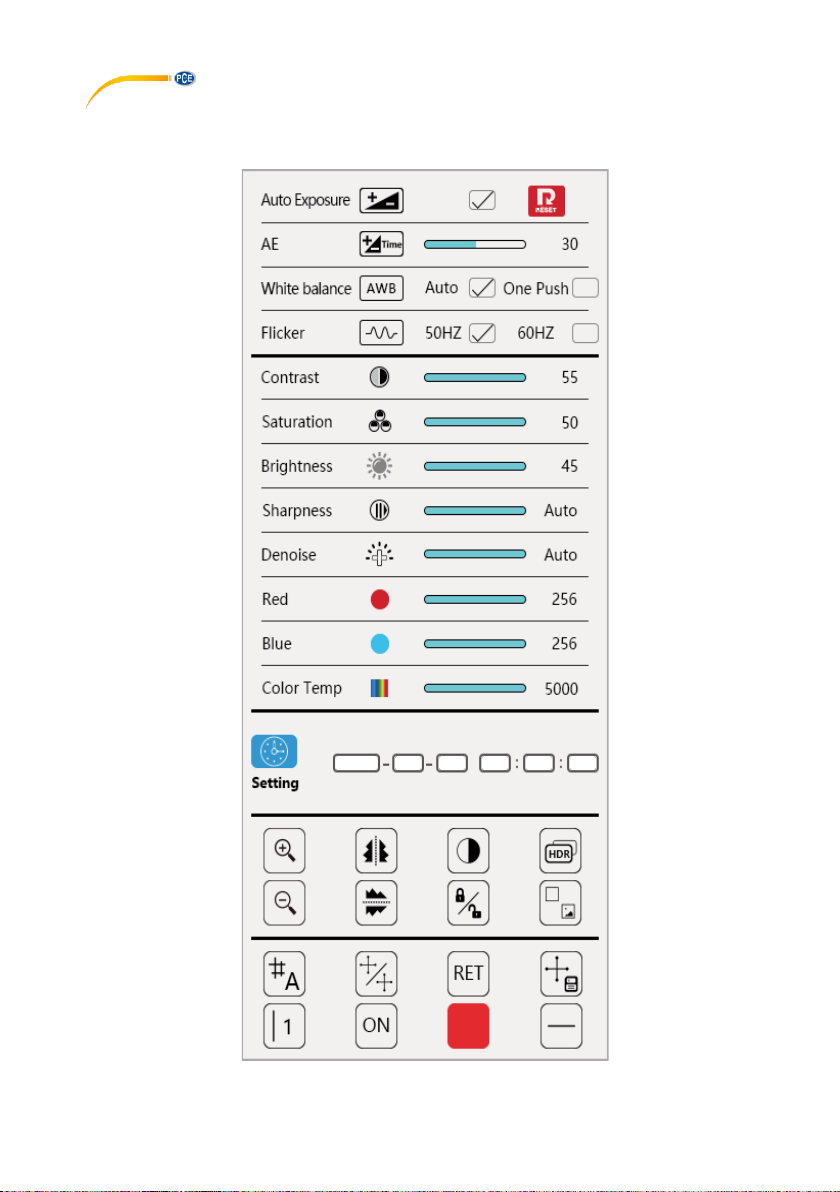
6 Description of user interface
The microscope has a user interface that opens as soon as the mouse touches the right-hand
edge and closes as soon as the mouse leaves this area.

© PCE Instruments
5
Automatic exposure time
Manual setting of exposure time
White balance
Automatic or by keystroke
Setting of image frequency (50 / 60
Hz)
Reset settings
Contrast setting
Setting the colour brightness
Setting the brightness
Setting the contrast of the image
edges
Setting of noise suppression
Setting of primary colour red
Setting of primary colour blue
Setting of colour temperature
Image zoom
Flipping image horizontally

© PCE Instruments
6
Activating black/white mode
Activating/deactivating HDR
Image zoom out
Flipping image vertically
Image hold
Comparison of two live samples
Measurement lines memory: Up to 8
groups of measurement lines can be
saved here.
Enable/disable all measurement lines
Reset measurement line settings
Save measurement line settings
made
Shows the selected measurement
line.
Possible selections: 8 vertical and
horizontal measurement lines, 1
centre point

© PCE Instruments
7
Enables/disables the measurement
line last selected
Changes the colour of the
measurement line last used
Changes the thickness of the
measurement line last used
Time indication and setting
7 Troubleshooting
Error
Cause
Solution
The field of view is dirty
Dirt is on the sample
Clean your sample.
Dirt is on the lenses
Clean the lenses.
Image unclear
Dirt is on the lenses
Clean the lenses.
Illumination does not work
when supply voltage is
connected
No voltage supply
Examine the mains
adaptor.
Illumination defective
Contact PCE Instruments.
Dark image
Brightness setting too low
Increase brightness
setting.
White balance inefficient
Set white balance
manually.
Angle between display and
microscope too wide
Change the angle.
No image displayed
No voltage supply
Examine the mains
adaptor and connection.
Display switch is in off
position
Change the display switch
position to on.

© PCE Instruments
8
8 Warranty
You can read our warranty terms in our General Business Terms which you can find here:
https://www.pce-instruments.com/english/terms.
9 Disposal
For the disposal of batteries in the EU, the 2006/66/EC directive of the European Parliament
applies. Due to the contained pollutants, batteries must not be disposed of as household waste.
They must be given to collection points designed for that purpose.
In order to comply with the EU directive 2012/19/EU we take our devices back. We either re-use
them or give them to a recycling company which disposes of the devices in line with law.
For countries outside the EU, batteries and devices should be disposed of in accordance with
your local waste regulations.
If you have any questions, please contact PCE Instruments.
Otros manuales para PCE-LCM 50
1
Tabla de contenidos
Otros manuales de Microscopio de PCE Instruments


Manuales populares de Microscopio de otras marcas


VWR
VWR VisiScope 384 Series Manual de usuario

Nikon
Nikon ECLIPSE E200 POL Manual de usuario

Leica
Leica DI C800 Manual

ThermoFisher Scientific
ThermoFisher Scientific Continuµm Manual de usuario

ThermoFisher Scientific
ThermoFisher Scientific Continuµm Manual de usuario

Olympus
Olympus SZ61 Manual de usuario