
Parklio Brain Manual de usuario

PARKLIO™ BRAIN
USER MANUAL

Statement of Conditions
In the interest of improving internal design, operational function, and/or reliability,
Parklio™ reserves the right to make changes to the products described in this doc-
ument without notice. Parklio does not assume any liability that mayoccur due to
the use or application of the product(s) or circuit layout(s) described herein.
Trademarks
Parklio™ is a trademark of Amplico d.o.o.
Other brand and product names are registered trademarks or trademarks of their
respective holders.
2

3
Thank you for the condence you have shown
us by purchasing our Parklio Brain.
Dear Customers,
We hope that all your expectations of this product will be fullled. Parklio™
Chain is manufactured using the latest technologies and has undergone rigorous
quality control procedures.
Please read this manual rst!
The User Guide will help you use your product quickly and safely.
•Read the user manual before installing and using your product.
•Always follow the safety instructions.
•Keep this user manual at hand for future reference.

4
TABLE OF CONTENTS
......
Table of Contents...................................................................................................4
Package Contents..................................................................................................5
Features....................................................................................................................6
Hardware Overview................................................................................................7
Technical Specication..........................................................................................8
Hardware Setup.......................................................................................................9
Before You Begin...........................................................................................................................9
Input/output list.............................................................................................................................9
Connecting steps..........................................................................................................................9
Dimensions...............................................................................................................10
Reset and Add Parklio Brain................................................................................11
Installing the application.....................................................................................12

5
1. Package Contents
The product package should contain the following items:
If any of the parts are incorrect, missing, or damaged, contact your Parklio™ deal-
er. Keep the carton, including the original packing materials, in case you need to
return the product for repair.
Table 1.1 - Package Contents
Parklio™ Brain 2.4 GHz Antenna
NOTE
• A 2mm or 3 mm at head screwdriver and a 8mm wrench is needed for installa-
tion

6
2. Features
Parklio™ Brain is a universal electronic module that will turn any existing products
into a smart one. Parklio™ Brain enables control of the existing parking solutions
with a smartphone. By integrating the module, it will be possible to benet from
all the advantages of smart Parklio™ solutions - control via free smartphone app,
key sharing options, real-time information, user-friendly management and possi-
bility of integration with any other systems. With this assistive technology solu-
tion, automatic and reliable access control is possible on all existing facilities with
Parklio™ Brain. With this smart electronic module, the user is never more than a
few seconds away from any piece of digital information. From parking product sta-
tus to occupancy information, it is all there in an instant. The brain makes products
smartphone-controlled, with a key sharing option. All the smart parking options
offered by Parklio™ can now be integrated with your existing parking products.
Parklio™ brain is a universal and unique electronic model so it can t all your out-
dated products. You will be able to control your existing parking products with
your smartphone and enjoy all the functionalities the system is providing. After
making phones and homes “smart”, it is time to make parking products smart with
Parklio™ Brain. Implementing a new hardware solution like a Parklio™ Brain is a
short and easy consuming process. Parklio™ Brain can be interfaced with a mo-
bile phone or with the Parklio™ Gateway to be controlled from Parklio™ CMS. In
this way, monitoring of your parking products has never been easier. The Parklio™
Brain is installed in the access control’s solution control panel and interfaces with
the existing control board. It is rated for operation in environments with tempera-
tures ranging from -20 °C to +60 °C and it allows smartphone-controlled on the
range of 50 m in open space with the provided antenna.

7
3. Hardware Overview
Figure 3.1 - Status and connection board
Figure 3.1 - Connection and status board
Power terminal Connectors for powering the Parklio Brain
Output terminals for providing open/close command to the device controlled
by Parklio Brain
SMA female connector for connecting the 2.4 GHz antenna provided with the Parklio
Brain
Input terminals for receiving info about the device controlled by Parklio Brain
Hold to reset the Parklio Brain to the default settings
RED light - Parklio Brain is powered on
GREEN light - activity of the Parklio Brain
Input terminals
Relay terminals
Antenna connector
Reset button
Power LED
Status LED
1
2
3
4
5
6
7

8
4. Technical Specication
Parameter
Input Voltage
Working temperature range
Ingress rating
LED
DC Current (Typ.)
Working humidity
Dimensions
Wireless Connectivity
Inrush current
Operating altitude
Weight
Over-the-Air upgrades
Antenna interface
Color
Max. supported connections
Battery backup
Standards
8 VDC ~ 32 VDC
e -20 °C - +60 °C
IP 44
1 x power LED, 1 x status LED
~20 mA normal operation, add 2 mA for each active pullup
maximum 100 mA
Up to 90 % RH
31.25 mm x 70 mm x 89.6 mm (H x W x D)
BLE
0.5 A
1000 m
100 g
Yes
External 2.4 GHz antenna with SMA connector
Light grey and black
max. 4 user may be connected to the device
CR1620, for clock only, non-user replaceable
RoHS compliant
DIN EN 60715 TH35,
DIN VDE 0470-1,
DIN 43880 unit 1,
REACH compliant,
VBG 4,
IEC 529
Value
Regulatory standards EN60950-1:2006 + A1:2010 + A11:2009 + A12:2011
EN 300 328
EN 300 440
EN 301 489 - 1
EN 301 489 - 3
EN 301 489 - 17
EN 55024
EN 55032
EN 61000-6-3
EN 61000-3-2
EN 61000-6-2
EN 61000-4-2
EN 61000-4-3
EN 61000-4-4
EN 61000-4-5
EN 61000-4-6
EN 61000-4-8
EN 61000-3-3
Table 4.1 - Technical Specications

9
5. Hardware Setup
To connect the Parklio brain to the desired control unit, use cables up to 1mm
5.1. Input/output list
2
5.2. Connecting steps
Before You Begin
V+
Step 1
Positive power supply input
Connect the V+ terminal on the Parklio Brain to the VDC (9-32VDC) terminal on the control
unit.
Connector for external antenna
Negative power supply input
Input/output terminal, can be congured through the mobile application
Input/output terminal, can be congured through the mobile application
Input/output terminal, can be congured through the mobile application
Connect the COM terminal on the Parklio Brain to the COM terminal on the control unit.
Input/output terminal, can be congured through the mobile application
Connect the provided antenna to the ANT connector on the Parklio Brain.
(Antenna needs to be previously mounted on the desired spot!)
COM
Step 2
ANT
Step 3
IO 0
IO 1
IO 2
IO 3
Table 5.1 - Input/output list
Table 5.2 - Connecting steps
10
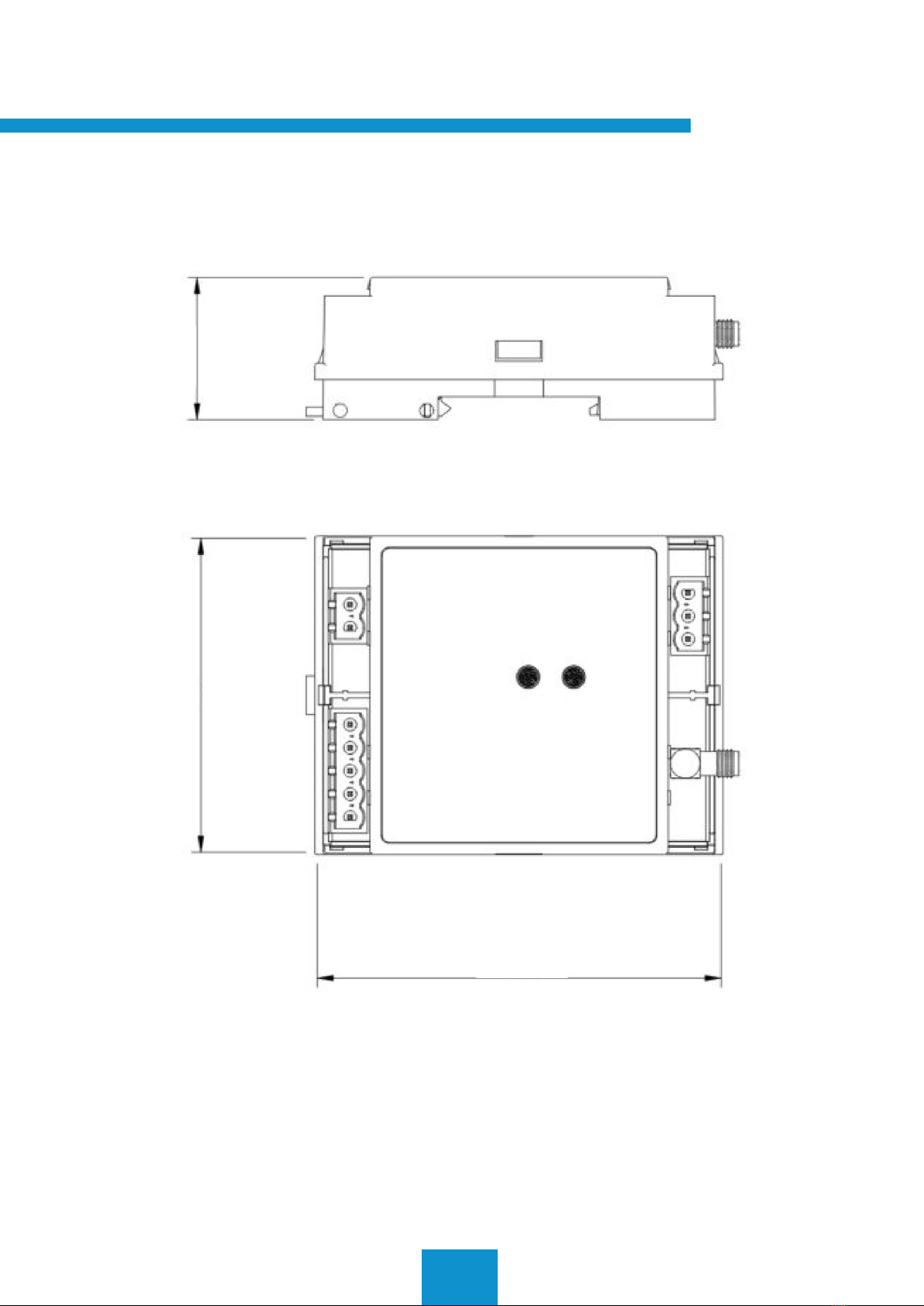
6. Dimensions
69 31.25
88.6
Otros manuales para Brain
1
Tabla de contenidos
Otros manuales de Sistema de control de Parklio


