Panasonic TH-50PH30E Manual de usuario

TH-50PH30E
Model No.
Operating Instructions
High Definition Plasma Display
For more detailed instructions, refer to the Operating
Instructions on the CD-ROM.
h
English
Contents
•Important Safety Notice ..................................2
•Safety Precautions .........................................3
•Accessories.....................................................6
•Connections....................................................7
•Power On / Off................................................9
•Selecting the input signal.............................. 11
•Basic Controls...............................................12
•On-Screen Menu Displays............................14
•Specifications................................................15
Please read these instructions before operating your set
and retain them for future reference.

2
Important Safety Notice
WARNING
1) To prevent damage which may result in fire or shock hazard, do not expose this appliance to dripping
or splashing.
Do not place containers with water (flower vase, cups, cosmetics, etc.) above the set. (including on
shelves above, etc.)
No naked flame sources, such as lighted candles, should be placed on / above the set.
2) To prevent electric shock, do not remove cover. No user serviceable parts inside. Refer servicing to qualified
service personnel.
3) Do not remove the earthing pin on the power plug. This apparatus is equipped with a three pin earthing-type
power plug. This plug will only fit an earthing-type power outlet. This is a safety feature. If you are unable to
insert the plug into the outlet, contact an electrician.
Do not defeat the purpose of the earthing plug.
4) To prevent electric shock, ensure the earthing pin on the AC cord power plug is securely connected.
CAUTION
This appliance is intended for use in environments which are relatively free of electromagnetic fields.
Using this appliance near sources of strong electromagnetic fields or where electrical noise may overlap with the
input signals could cause the picture and sound to wobble or cause interference such as noise to appear.
To avoid the possibility of harm to this appliance, keep it away from sources of strong electromagnetic fields.
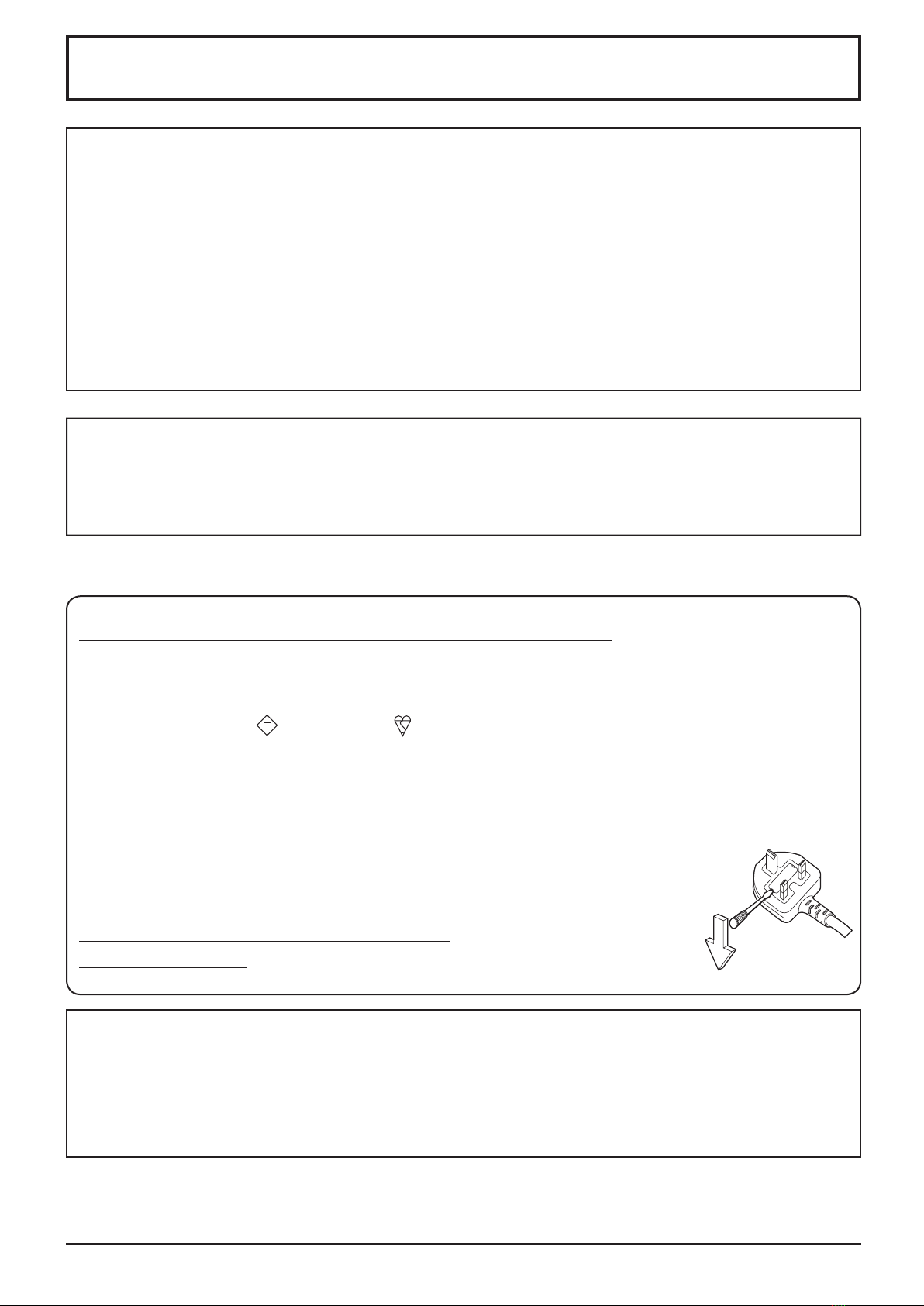
IMPORTANT: THE MOULDED PLUG
FOR YOUR SAFETY, PLEASE READ THE FOLLOWING TEXT CAREFULLY.
This display is supplied with a moulded three pin mains plug for your safety and convenience. A 10 amp fuse is
fitted in this plug. Shall the fuse need to be replaced, please ensure that the replacement fuse has a rating of 10
amps and that it is approved by ASTA or BSI to BS1362.
Check for the ASTA mark
ASA
or the BSI mark on the body of the fuse.
If the plug contains a removable fuse cover, you must ensure that it is refitted when the fuse is replaced.
If you lose the fuse cover the plug must not be used until a replacement cover is obtained.
A replacement fuse cover can be purchased from your local Panasonic dealer.
Do not cut off the mains plug.
Do not use any other type of mains lead except the one supplied with this display.
The supplied mains lead and moulded plug are designed to be used with this display to avoid
interference and for your safety.
If the socket outlet in your home is not suitable, get it changed by a qualified electrician.
If the plug or mains lead becomes damaged, purchase a replacement from an authorized dealer.
WARNING : — THIS DISPLAY MUST BE EARTHED.
How to replace the fuse.
Open the fuse compartment with a screwdriver and replace the fuse.
Trademark Credits
• VGA is a trademark of International Business Machines Corporation.
• Macintosh is a registered trademark of Apple Inc., USA.
• SVGA, XGA, SXGA and UXGA are registered trademarks of the Video Electronics Standard Association.
Even if no special notation has been made of company or product trademarks, these trademarks have been fully respected.
• HDMI, the HDMI Logo, and High-Definition Multimedia Interface are trademarks or registered trademarks of HDMI
Licensing LLC in the United States and other countries.
Note:
Do not allow a still picture to be displayed for an extended period, as this can cause a permanent image retention
to remain on the Plasma Display.
Examples of still pictures include logos, video games, computer images, teletext and images displayed in 4:3 mode.

3
Safety Precautions
Always be sure to ask a qualified technician to carry out set-up.
Small parts can present choking hazard if accidentally swallowed. Keep small parts away from young children. Discard
unneeded small parts and other objects, including packaging materials and plastic bags/sheets to prevent them from
being played with by young children, creating the potential risk of suffocation.
Do not place the Plasma Display on sloped or unstable surfaces, and ensure that the Plasma Display does
not hang over the edge of the base.
• The Plasma Display may fall off or tip over.
Do not place any objects on top of the Plasma Display.
• If water is spills onto the Plasma Display or foreign objects get inside it, a short-circuit may occur which could result
in fire or electric shock. If any foreign objects get inside the Plasma Display, please consult your local Panasonic
dealer.
Transport only in upright position!
• Transporting the unit with its display panel facing upright or downward may cause damage to the internal
circuitry.
Ventilation should not be impeded by covering the ventilation openings with items such as newspapers, table
cloths and curtains.
For sufficient ventilation;
If using the pedestal (optional accessory), leave a space of 10 cm or more at the top, left and right, and 7 cm
or more at the rear, and also keep the space between the bottom of the display and the floor surface.
If using some other setting-up method, follow the manual of it. (If there is no specific indication of installation
dimension in the installation manual, leave a space of 10 cm or more at the top, bottom, left and right, and 7 cm
or more at the rear.)
When installing the Plasma Display vertically;
Turn up the power switch for the upward direction when you install the Plasma Display vertically.
And set “Display orientation” to “Portrait” in Setup menu.
WARNING
Setup
This Plasma Display is for use only with the following optional accessories. Use with any other type of optional
accessories may cause instability which could result in the possibility of injury.
(All of the following accessories are manufactured by Panasonic Corporation.)
• Speakers ......................................................
TY-SP50P8W-K
• Pedestal ....................................................... TY-ST20-K
• Mobile stand................................................. TY-ST58PF20
• Wall-hanging bracket (vertical)..................... TY-WK42PV20
• Wall-hanging bracket (angled) ..................... TY-WK42PR20
• Ceiling-hanging bracket ............................... TY-CE42PS20
• Touch Panel .................................................
TY-TP50P10S

4
Safety Precautions
When using the Plasma Display
The Plasma Display is designed to operate on 220 - 240 V AC, 50/60 Hz.
Do not cover the ventilation holes.
• Doing so may cause the Plasma Display to overheat, which can cause fire or damage to the Plasma Display.
Do not stick any foreign objects into the Plasma Display.
• Do not insert any metal or flammable objects into the ventilations holes or drop them onto the Plasma Display, as
doing so can cause fire or electric shock.
Do not remove the cover or modify it in any way.
• High voltages which can cause severe electric shocks are present inside the Plasma Display. For any inspection,
adjustment and repair work, please contact your local Panasonic dealer.
Ensure that the mains plug is easily accessible.
An apparatus with CLASS I construction shall be connected to a mains socket outlet with a protective earthing connection.
Do not use any power supply cord other than that provided with this unit.
• Doing so may cause fire or electric shocks.
Securely insert the power supply plug as far as it will go.
• If the plug is not fully inserted, heat may be generated which could cause fire. If the plug is damaged or the wall
socket is loose, they shall not be used.
Do not handle the power supply plug with wet hands.
• Doing so may cause electric shocks.
Do not do anything that may damage the power cable. When disconnecting the power cable, pull on the plug body, not the cable.
• Do not damage the cable, make any modifications to it, place heavy objects on top of it, heat it, place it near any
hot objects, twist it, bend it excessively or pull it. To do so may cause fire and electric shock. If the power cable is
damaged, have it repaired at your local Panasonic dealer.
If the Plasma Display is not going to be used for any prolonged length of time, unplug the power supply plug
from the wall outlet.
To prevent the spread of fire, keep candles or other open flames away from this product at all times.
If problems occur during use
If a problem occurs (such as no picture or no sound), or if smoke or an abnormal odour starts to come out
from the Plasma Display, immediately unplug the power supply plug from the wall outlet.
• If you continue to use the Plasma Display in this condition, fire or electric shock could result. After checking that
the smoke has stopped, contact your local Panasonic dealer so that the necessary repairs can be made. Repairing
the Plasma Display yourself is extremely dangerous, and shall never be done.
If water or foreign objects get inside the Plasma Display, if the Plasma Display is dropped, or if the cabinet
becomes damages, disconnect the power supply plug immediately.
•
A short circuit may occur, which could cause fire. Contact your local Panasonic dealer for any repairs that need to be made.

5
Safety Precautions
CAUTION
When using the Plasma Display
Do not bring your hands, face or objects close to the ventilation holes of the Plasma Display.
• Heated air comes out from the ventilation holes at the top of Plasma Display will be hot. Do not bring your hands
or face, or objects which cannot withstand heat, close to this port, otherwise burns or deformation could result.
Be sure to disconnect all cables before moving the Plasma Display.
• If the Plasma Display is moved while some of the cables are still connected, the cables may become damaged,
and fire or electric shock could result.
Disconnect the power supply plug from the wall socket as a safety precaution before carrying out any
cleaning.
• Electric shocks can result if this is not done.
Clean the power cable regularly to prevent it becoming dusty.
• If dust built up on the power cord plug, the resultant humidity can damage the insulation, which could result in fire.
Pull the power cord plug out from the wall outlet and wipe the mains lead with a dry cloth.
Do not burn or breakup batteries.
• Batteries must not be exposed to excessive heat such as sunshine, fire or the like.
This Plasma Display radiates infrared rays, therefore it may affect other infrared communication equipment.
Install your infrared sensor in a place away from direct or reflected light from your Plasma Display.
Cleaning and maintenance
The front of the display panel has been specially treated. Wipe the panel surface gently using only a cleaning
cloth or a soft, lint-free cloth.
• If the surface is particularly dirty, wipe with a soft, lint-free cloth which has been soaked in pure water or water in
which neutral detergent has been diluted 100 times, and then wipe it evenly with a dry cloth of the same type until
the surface is dry.
• Do not scratch or hit the surface of the panel with fingernails or other hard objects, otherwise the surface may
become damaged. Furthermore, avoid contact with volatile substances such as insect sprays, solvents and thinner,
otherwise the quality of the surface may be adversely affected.
If the cabinet becomes dirty, wipe it with a soft, dry cloth.
• If the cabinet is particularly dirty, soak the cloth in water to which a small amount of neutral detergent has been
added and then wring the cloth dry. Use this cloth to wipe the cabinet, and then wipe it dry with a dry cloth.
• Do not allow any detergent to come into direct contact with the surface of the Plasma Display. If water droplets get
inside the unit, operating problems may result.
• Avoid contact with volatile substances such as insect sprays, solvents and thinner, otherwise the quality of the
cabinet surface may be adversely affected or the coating may peel off. Furthermore, do not leave it for long periods
in contact with articles made from rubber or PVC.

+
-
+
-
Accessories Supply
Accessories
Power supply cord
Batteries for the Remote
Control Transmitter
(R6 (UM3) Size × 2)
Remote Control
Transmitter
N2QAYB000535
Operating Instruction book
Check that you have the accessories and items shown
Remote Control Batteries
Requires two R6 batteries.
1. Pull and hold the hook, then open
the battery cover.
2. Insert batteries - note correct
polarity ( + and -).
3. Replace the cover.
Helpful Hint:
For frequent remote control users, replace old batteries with Alkaline
batteries for longer life.
Precaution on battery use
Incorrect installation can cause battery leakage and corrosion that will damage the remote control transmitter.
Disposal of batteries should be in an environment-friendly manner.
Observe the following precaution:
1. Batteries shall always be replaced as a pair. Always use new batteries when replacing the old set.
2. Do not combine a used battery with a new one.
3. Do not mix battery types (example: “Zinc Carbon” with “Alkaline”).
4. Do not attempt to charge, short-circuit, disassemble, heat or burn used batteries.
5.
Battery replacement is necessary when remote control acts sporadically or stops operating the Plasma Display set.
6. Do not burn or breakup batteries.
Batteries must not be exposed to excessive heat such as sunshine, fire or the like.
“R6 (UM3)” size
CD-ROM
(Operating
instructions)
6

1
2
Plug the AC cord into the display unit.
Plug the AC cord until it clicks.
Note:
Make sure that the AC cord is locked on
both the left and right sides.
Connections
Speaker
terminal (R)
Speaker
terminal (L)
When connecting the speakers, be sure to use only the optional accessory speakers.
Refer to the speaker’s Installation Manual for details on speaker installation.
AC cord connection (see page 9)
Speakers (Optional accessories)
AC cord fixing
Unplug the AC cord
Unplug the AC cord pressing the
two knobs.
Note:
When disconnecting the AC cord, be
absolutely sure to disconnect the AC
cord plug at the socket outlet first.
Cable fixing
There are 3 holes to fix the connection cables. As a clamper is not included with the
product, provide a clamper or band as necessary.
When using the Wall-hanging bracket (vertical)
Note:
When using the Wall-hanging bracket (vertical)(TY-WK42PV20), use the holes and to
secure the cables. If the cables are fixed on the hole , the cables may be caught by the
wall-hanging bracket.
AC cord connection and fixing, cable fixing
Red
Black
Red
Black
While pressing the lever,
insert the core wire.
Return the lever.
7
Speaker connection

8
Connections
Video equipment connection
AV IN (VIDEO):
Composite Video Input Terminal
COMPONENT/RGB IN:
Component/RGB Video Input Terminal
AV IN (HDMI): HDMI Input Terminal
DVI-D IN: DVI-D Input Terminal
Connect to video equipment such as VCR or DVD player.
PC IN:
PC Input Terminal
Connect to video terminal
of PC or equipment with
Y, P B(CB) and PR(CR)
output.
SERIAL:
Control the
Plasma Display
by connecting
to PC
Terminals are on the bottom side of the Plasma Display.

INPUT MENU ENTER/
+
/VOL
-
/
9
Power On / Off
Press the button on the remote control to turn the Plasma Display off.
Power Indicator: Red (standby)
Press the button on the remote control to turn the Plasma Display on.
Power Indicator: Green
Turn the power to the Plasma Display off by pressing the switch on the
unit, when the Plasma Display is on or in standby mode.
Note:
During operation of the power management function, the power indicator turns
orange in the power off state.
Connecting the plug to the Wall Outlet
Notes:
• Main plug types vary between countries. The power
plug shown at right may, therefore, not be the type
fitted to your set.
• When disconnecting the AC cord, be absolutely
sure to disconnect the AC cord plug at the socket
outlet first.
Press the Power switch on the Plasma Display to
turn the set on: Power-On.
Power Indicator: Green
Power Indicator
Remote Control Sensor
Connecting the AC cord plug to the Plasma Display.

Italiano
Español
ENGLISH (US)
English (UK)
Deutsch
Français
OSD Language
SetSelect
Display will be turned off
when there is no activity for 4 hours.
DisableEnable
No activity power off
Are you sure
you want to enable ’No activity power off’ ?
NoYes
No activity power off
Landscape
Portrait
Display orientation
1To enable No activity power off, select “Enable”.
2Set.
1“Select “Yes” or “No”.
2Set.
’No activity power off’ is enabled.
If selecting “Enable”, a
confirmation window appears.
10
If “No activity power off” in Setup menu is set
to “Enable”, a warning message is displayed
every time the power is turned ON.
If you do not need this display, the settings of
“Power On Message” in Options menu can
relieve you of it.
Power On / Off
When first switching on the unit
Following screen will be displayed when the unit is turned on for the first time.
Select the items with the remote control. Unit buttons are invalid.
OSD Language
No activity power off
Display orientation
No activity power off Precautions
1Select the language.
2Set.
1For vertical installation, select “Portrait”.
2Set.
Notes:
• Once the items are set, the screens won't be displayed when switching on the unit next time.
• After the setting, the items can be changed in the following menus.
OSD Language
No activity power off
Display orientation
Otros manuales para TH-50PH30E
2
Tabla de contenidos
Otros manuales de Pantalla de plasma de Panasonic


