
oticon EPOQ Manual de usuario

INSTRUCTIONS FOR USE
RITE Power

Thank you
Thank you for choosing our product as your means to better hearing.
To support your efforts, we have put great care and attention into making sure that your
new hearing instruments are of the highest quality and that they are easy to use and
maintain.
We recommend that you read this manual carefully to achieve the maximum benefit of
your new hearing instruments.
Congratulations on your decision to actively improve your hearing with today’s most
advanced hearing technology in the market.
Contents
Instrument view RITE Power with Power Dome 5
Instrument view RITE Power with Ear Mould 7
Turning your instruments ON and OFF 9
Left/Right ear marking 10
Putting on your instrument 11
Push-button 12
Programs (Optional) 14
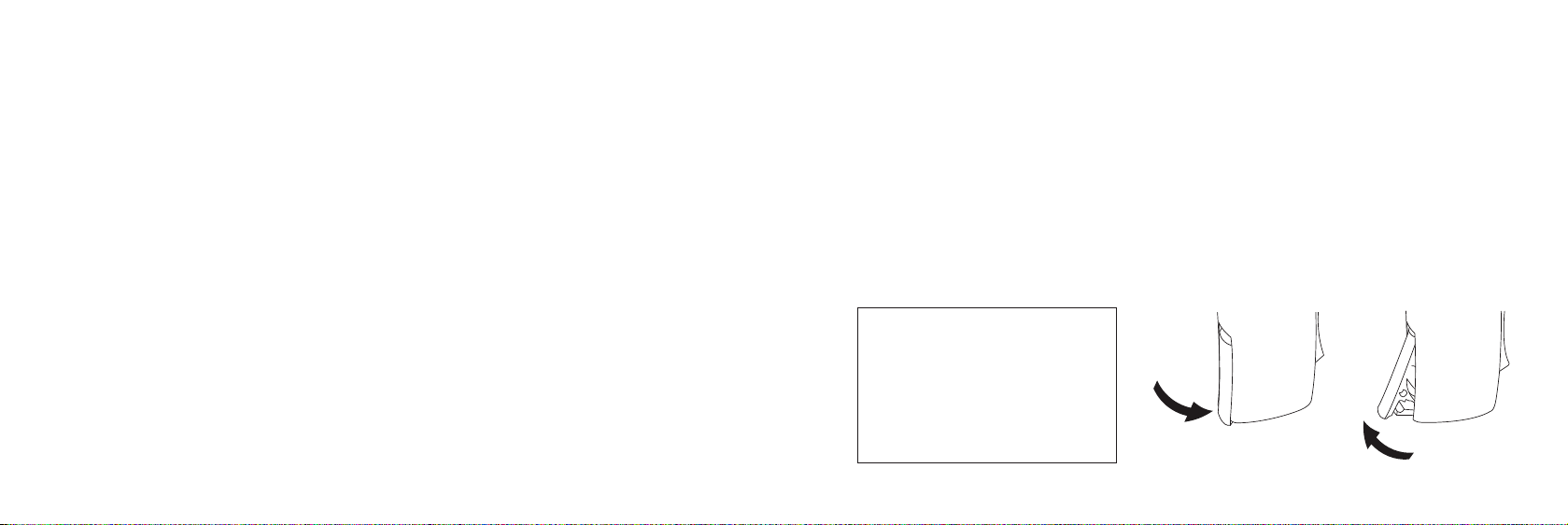
Volume Control 16
Standby (Optional) 17
Changing batteries 18
Tamper-resistant battery door (Optional) 20
Telecoil (Optional) 21
Auto Phone (Optional) 22
DAI (Direct Audio Input) 24
Daily care of your hearing instrument 26
Daily maintenance Power Mould 28
Daily maintenance with Power Domes 32

4 5
IMPORTANT NOTICE
Please familiarise yourself with the entire contents of this booklet before using your
hearing instruments. It contains instructions and important information about the use
and handling of your hearing instruments and batteries.
Instrument view
RITE Power with Power Dome
Your ear piece
Power Domes:
8mm 10mm 12mm Plus dome
Battery door
Push-button
Microphone
openings
Speaker
Sound outlet
Using your hearing instrument 36
Common problems and their solutions 42
Warnings Yellow Pages

7
Instrument view
RITE Power with Ear Mould
Sound outlet +
wax protection
system
Ventilations
openings
Battery door
Push-button
Microphone
openings
9
Turning your instruments ON and OFF
Turn ON your hearing instrument by closing the battery door completely with the battery
in place. When the battery door is closed the instrument will start up by playing a jingle.
This indicates that the battery is working and the instrument is operating.
Turn OFF your hearing instrument by opening the battery door slightly until a click is felt.
To preserve the battery, make sure your hearing instrument is switched off when you are
not wearing it.
IMPORTANT NOTICE
Open the battery compartment
fully to allow air to circulate
whenever you are not using your
hearing instrument, especially
at night!
ON OFF
Click Click

10 11
Left/Right ear marking
Hearing instruments are fitted to the uniqueness of each ear, which means if you have
two instruments then your left hearing instrument is programmed differently from your
right. That is why it is important to distinguish between the left hearing instrument and
the right.
In order to easily identify whether it is left ear or right ear instrument, colour markings
may be applied inside the battery door.
A blue dot marks the LEFT instrument.
A red dot marks the RIGHT instrument.
Putting on your instrument
Place the speaker, with the ear piece attached, into your
ear first (1) and then place the instrument behind your
ear (2).
If the power instrument has a Power Mould as ear piece,
make sure it is positioned in the ear so it perfectly fits
the ergonomics of the ear canal in a tight and comfort-
able way.
Make sure that the ear piece is placed so that the tube
follows the contour of the skin.
2
1

12 13
Push-button
Your hearing instrument has an ergonomic designed push-button for volume adjustment
and switching between different programs.
The push-button can be pressed and activated on either the upper part (UP) or the lower
part (DOWN).
UP
DOWN
The push-button on your hearing instrument can be programmed to one of 3 functionalities.
Left Right
Program shift:
Press shortly to change program.
Volume control:
Press shortly to adjust the volume.
Both volume control and Program shift:
Press shortly to adjust the volume and press long (about 2 seconds)
to shift program.
Binaural Interchange enabled (see “Using 2 instruments”).
To be filled out by your Hearing Care Professional!

14 15
Programs (Optional)
Your hearing instrument can have up to 4 different programs.
When switching between the different programs, your hearing instrument will beep.
The number of beeps will indicate which program you are using.
eOne beep, when you switch to programme 1
ee Two beeps, when you switch to programme 2
eee Three beeps, when you switch to programme 3
eeee Four beeps, when you switch to programme 4
Press the upper part to go forwards in the programme cycle e.g from P-P. Press the
lower part to go backwards in the programme cycle e.g from P-P.
Below you can see a description of the programs available in your hearing instrument.
Prg. 1:
Prg. 2:
Prg. 3:
Prg. 4:
Using 2 instruments
For ease of use, the push-button can be programmed to change to the equivalent
program in the other instrument also, by using the wireless communication between the
instruments. This is referred as binaural interchange.

16 17
Volume Control
The volume control allows you to adjust the volume in specific listening situations to the
level you feel comfortable with.
To increase volume, shortly press the upper part of the push-button.
To decrease volume, shortly press the lower part of the push-button.
When the hearing instrument is turned on, it starts up at a preferred volume level. When
adjusting the volume control to the preferred level, this is indicated by a beep.
Using 2 instruments
For ease of use, the push-button can be programmed to adjust the volume in the other
instrument equivalently, by using the wireless communication between the instruments.
This is referred as binaural interchange.
Standby (Optional)
Press the button for a minimum of 3 seconds to set the instrument in standby mode.
To reactivate the instrument, push the button shortly again.
Use the standby function if you need to silence the instrument
while you have the instrument on.
Note: pushing either side of the button will set the instrument
on standby.
WARNING
Do not use the standby function as a switch off as the hearing instruments still draws
current from the battery in this mode.
Push
3 sec

18 19
Changing batteries
Your hearing instrument battery size is 312.
A worn out battery should be removed immediately.
When the battery power is low, you will hear 2 beeps.
This pre-warning starts when the battery has only a few
hours of operation left. The pre-warning will be repeated
with moderate intervals to indicate it is time to change
the battery.
If the battery runs out the instrument turns off. When that
happens, 4 beeps are played to indicate that the instrument
is no longer operating.
It is not an indication of a malfunction.
To replace the battery, follow these instructions:
Open the battery door completely by pushing the raised edge in the bottom of the•
instrument. Remove the old battery.
Remove the sticky label from the + side of the new battery.•
Insert the new battery so that its + marking faces the + sign printed on the battery•
door. Close the battery door.
Any moisture on the battery surface should be wiped
off before use.
When you change battery, it will take a few seconds
before the battery works to full capacity.
To assist the handling of the batteries, the magnet
placed at the end of the tool can be used.
Tabla de contenidos
Otros manuales de Auriculares de oticon


