OPIN YL-211 Manual de usuario

USER MANUAL
Please read this manual carefully before using
This manual contains service guide, please safekeeping

Preface
Dear Customers,
Thank you for choosing "OPIN" mobility scooter, We all the staff at
your choice express our sincere welcome and heartfelt thanks. We will
take "innovation, safety, quality, service" as the purpose, allowing you
to "buy the rest assured that with the time. " We will become your
faithful partner and serve you with our honor .
This manual will introduce structure of scooter, accessories use,
function, announcements and maintenance to you. Please read this
manual carefully before using and understand the common use and
operation,to ensure your safety.
As effectively as possible protect your scooter and make it easy to use.
When you find that you couldn’t solve some problems and need to
replace parts, do please contact our local dealers freely.
Please read this manual carefully before using and obey the rules and
instructions.

Content
Safety points -- -- -- -- -- -- -- -- -- -- -- -- -- -- -- -- -- -- -- -- ------ P2
Product introduction -- -- -- -- -- -- -- -- -- -- -- -- -- -- -- -- -- -- -- -- P3
Adjustments ------------- -- -- -- -- -- -- -- -- -- -- -- -- -- -- -- -- -- -- P4
Dashboard -- -- -- -- -- -- -- -- -- -- -- -- -- -- -- -- -- -- -- -- -- -- -- -- P5
Gradient information -- -- -- -- -- -- -- -- -- -- -- -- -- -- -- -- -- -- -- -- P6
Turn tip -- -- -- -- -- -- -- -- -- -- -- -- -- -- -- -- -- -- -- -- -- -- -- -- -- P7
Electromagnetic brake -- -- -- -- -- -- -- -- -- -- -- -- -- -- -- -- -- -- -- P7
Battery -- -- -- -- -- -- -- -- -- -- -- -- -- -- -- -- -- -- -- -- -- -- -- -- -- P8
The charging step -- -- -- -- -- -- -- -- -- -- -- -- -- -- -- -- -- -- -- -- -- P9
Walking vehicle driving operation program -- -- -- -- -- -- -- -- -- -- P10
Road conditions and matters needing attention -- -- -- -- -- -- -- -- P10
Walking vehicle repair, maintenance and storage -- -- -- -- -- -- -- -P11
Technical parameters -- -- -- -- -- -- -- -- -- -- -- -- -- -- -- -- -- -- -- P12
Walking car common failures and troubleshooting methods -- -- -- P13
Warranty card -- -- -- -- -- -- -- -- -- -- -- -- -- -- -- -- -- -- -- -- -- -- P15
Warranty record -- -- -- -- -- -- -- -- -- -- -- -- -- -- -- -- -- -- -- -- --P16

Safety Points:
1. Without reading the instructions and did not understand before
walking vehicle performance, please do not hurry to use this product,
not to lend will not operate electric vehicles use.
2. To you and others safety, please you when driving car instead of
walking, be sure to comply with national and local road traffic laws and
regulations.
3. Please do not more than walking car do big bearing, four-wheel
single car can only take 1 person, otherwise may cause personal injury,
and the vehicles to obtain warranty service.
4. Please do not attempt to go beyond the rating of the walking vehicle
obstacle height, obstacle at low speed.
5. When uneven ground transportation, please be sure to slow down.
Default of not wade (when water flooded or circuit of the controller,
motor is likely to cause a short circuit and damage to electrical), under
the rain and snow weather, please you wear a raincoat, ensure that
water does not penetrate appliances!
6. Install the turn round of the vehicle, to a certain extent, increased
the walking vehicle safety performance, please do not remove or
replace at will, so as not to cause safety hazard!
7. Do not use other medical device connecting to walking on the car's
battery pack, lest cause other medical device failure, instead of walking
vehicle damage or personal injury.
8. Downhill and please slow down when turning on, do not back on the
ramp, on more than the provisions of the walking vehicle maximum
gradient.
9. Please use the accessory equipped with special charger to charge,
do not use other charger, in order to avoid damage to the battery or
cause other safety concerns.

Product introduction:
OP -18 is developed by OPIN company, it is designed with advanced
technology and high-quality material shaped. Multi-function design will
provide customers with safety and comfort. Its ease of use, flexibility
and convenience will make you love it, the product will be the most
advanced technology and modern style integration, we believe that our
design concept, intelligent operation mode will bring more convenience
to your daily life.
Safety is priority for our company. Please read the instructions
carefully before using and operate according to the instruction.
This manual is only applicable to Model YL-211.
If any problems when using this scooter, do please contact our local
dealer for help.
We are not responsible for any property loss or personal injury caused
by improper operation.


Adjustments:
A, Tiller Angle Adjustment
1. Tiller Angle can be adjusted according to the use of the driver to
achieve the most comfortable angle. The lowest position of tiller angle
is convenient for packaging, transportation and storage. Please don’t
use tiller angle when driving. (See figure A).
Figure A
2. How to adjust the tiller angle? At the bottom right hand side of the
scooter you will find the angle adjustment handwheel. To adjust the
angle, loosen the handwheel by turning anti-clockwise. Once the
desired angle is achieved tighten by rotating clockwise. Ensure the
tiller is fully secure before using this scooter.

B, The Seat Adjustment
The seat has a lockable swivel base to allow easier transfers.
Simply lift the lever circled and rotate the seat at the same time.
Releasing the lever will allow the seat to lock in position. The
seat locks in 45 degree intervals. Always ensure the seat is in a
locked position before mounting or dis-mounting the scooter. The
seat should always be locked facing forward whilst driving. ( See
figure B)
Figure B
1. The backrest can be folded, easy to remove and put into car boot.

2. Loosen the handrail that is fixed at the bottom of knob, twitch the
handrail inside and outside, fix the handle again, can realize the
adjustment of handrail width.
3. Seat eight direction parts (45 °) fixed rotate, rotate the seat
adjustment (arrow direction) outward pull handle, turn the seat 90 ° to
loosen the handle can be fixed.
Must not be allowed in the tiller and seat without a fixed drive!
The dashboard
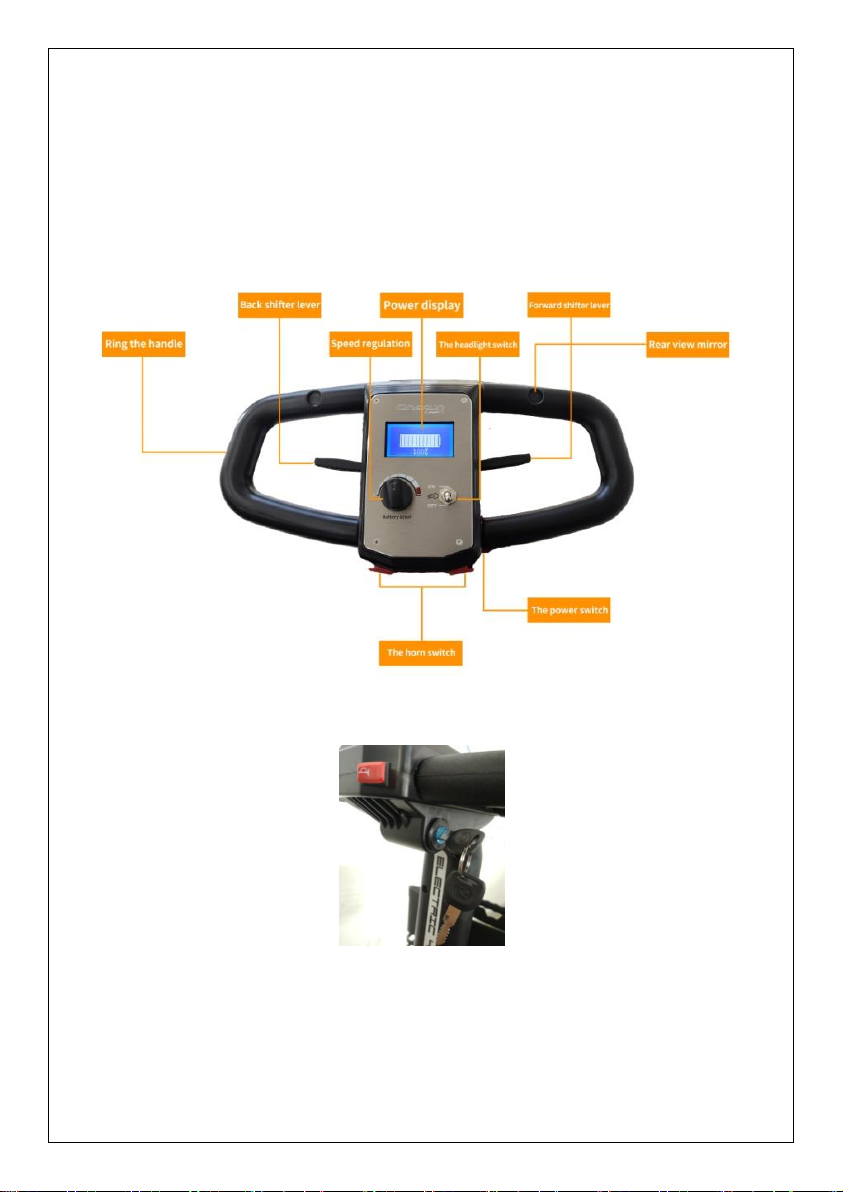
Introduction to dashboard each key-press functions such as (figure C)
Power switch: responsible for switched on and off the power;
Horn button: press the horn sounded, loosen the silent;
Battery gauge: the battery residual capacity, and nine, the remaining
three please recharge in time;

Speed knob: Clockwise to improve maximum speed and anti-clockwise
decrease.
Handle operation function: control the scooter forward and backward.
(see figure C)
figure C
Gradient information
More and more buildings are being built on different slopes, some of which
have even been turned over. Driving on the road requires you to be very
careful and have good handling skills.
Tabla de contenidos