
Ophit DDI Series Manual de usuario

DDI User’s Manual
DDI Installation Guide
DDI マニュアル
Benutzerhandbuch DDI
DDI 사용설명서
DDI.indd 1 2011-09-20 �� 2:23:27

2
3
DDI Installation Guide
●
Connection
●
Contact us (OPHIT USA)
Foreseeson Custom Displays, Inc.
2210E. Winston Road Anaheim, CA 92806
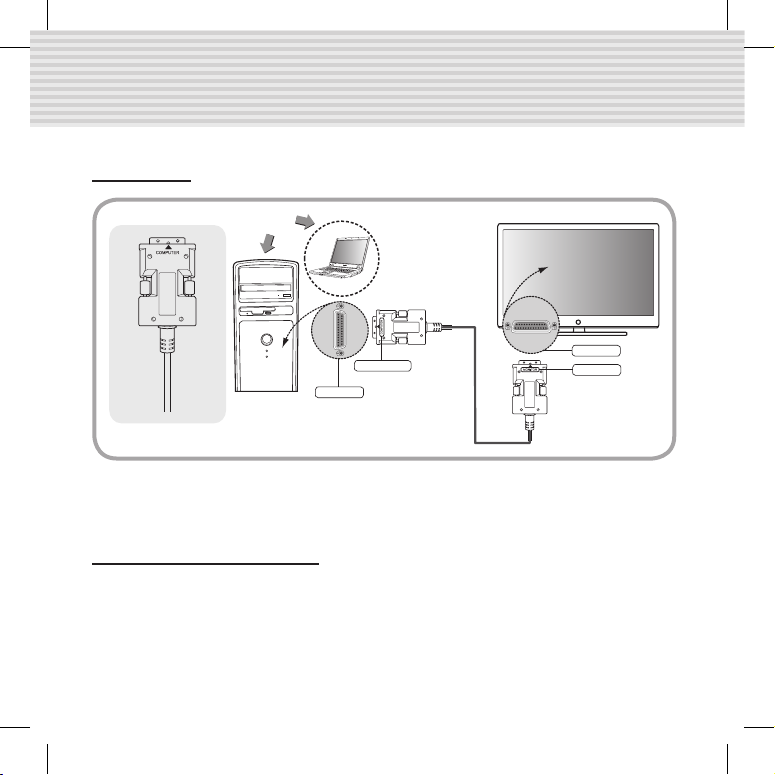
This product basically use internal power from PC (graphic card). However in some case of the
power from PC doesn’t supply, please use external DC power adapter(Option) for it.
or
DVI Port
MONITOR
DVI Port
COMPUTER
DDI.indd 2 2011-09-20 �� 2:23:30

2
3
DDI Installation Guide
●
FCC
CAUTION: Any changes or modication in construction of
this device which are not expressly approved by the party
responsible for compliance could void the user’s authority to
operate the equipment.
Screen is not displayed.
- Check if the PC power is on.
- Check if connection to the computer and the monitor are correct.
- Turn the PC power off and on again.
Noise is shown on the
screen.
-Check the DVI connection.
-Check the display resolution.
- If the malfunction is not xed by the above measures, please contact with the A/S center.
This device complies with part 15 of the FCC rules.
Operation is subject to the following two condition :(1)
This device may not cause harmful interface, and(2) this device must accept any interface
received, including interface that may cause undesired operation.
●
Troubleshooting
DDI.indd 3 2011-09-20 �� 2:23:31

4
5
DDI Installation Guide
●
Precautions for safety
Make sure to comply with precautions to prevent danger and damage on the property through
proper usage product.
If precautions are ignored, if may incur
decease or serious injury.
If precautions are ignored, if may incur
decease or serious injury.
●
Warnings
1. Do not plug in several power cords. It can cause overheating and a re.
2. Do not bend the power cord by force, or do not put heavy object on the power cord to prevent
breakdown. It can cause a re.
3. Do not touch the power plug with wet hands. You may be struck by electricity.
4. Insert the power plug rmly to avoid shaking. If not inserted rmly, It can cause a re.
5. Do not disassemble, repair of modify. It can cause a re and an injury by electrical shock due to
abnormal operation.
6. Do not insert a metallic material (hair pin or ironware) or combustible foreign object (match, paper and
so on) into the terminal hole, or drop the terminal. It may cause a re and an injury by electrical shock,
7. Do not put vase, owerpot, cup, cosmetics, medicines and container lled with water near the product.
It may cause a re and an injury by electrical shock, or injury by dropping.
8. Stay away from the direct sunlight and the heat source like the heater. It may cause a re.
9. Do not spray water on the product. It may cause a re and an injury by electrical shock. Scrub the
product surface softly with a dry towel.
10. Use the DC power adapter with correct specication. It may cause a re.
●
Cautions
1. Do not put the heavy object on top of the product. It may cause malfunction.
2. Put the product in the even and stable location. If the product
falls down or dropped, It may cause an injury and malfunction.
3. Stay away from the place with too high temperature (over 50°c)
and too low temperature (under 0˚c), or the high humidity.
It may cause a re and an injury by electrical shock.
4. Do not twist or pull by force the both ends of the optical
cable. It can cause malfunction
(Minimum bending diameter: 75mm).
Warning
Caution
75mm(3”)
DDI.indd 4 2011-09-20 �� 2:23:32

4
5
DDI Installation Guide
Warranty
● We, OPHIT hereby warrant the nal purchase of our product as follows.
● In the case of troubles on our products, please contact the shop purchased.
One year limited warranty
Our customers have right to be served with free of charge when there is trouble in this product
during 1(one) year from the day purchased.
Out of warranty services
When you request services (in the case of non manufacturing defects but the troubles by
misusage), may served with charge as follows.
● defects of products caused by accident, disaster
● damages of products caused by the customer’s carelesseness or mistaken application
● damages of products caused by the application of the parts or products not supplied or
sold by our company
● damages of products and related defects caused by not our staff or the men or group not
nominated by us for services.
The interchanged parts and products for maintenance services shall be replaced as new parts and
products operating normally, and the inter-changed parts and products shall be subjected to our
company.
Name of products
Date Purchased
Shop purchased
Day Month Year
Name of Model
Serial No.
DDI.indd 5 2011-09-20 �� 2:23:32

6
7
DDIマニュアル
この製品は通常、コンピューターの内部電力で駆動されるが一部特殊仕様のコンピューターは
電源供給のできない場合もあります。こうした場合、送信部側に外部のDC電源アダプター(オ
プション)を繋げてご使用ください。
●
接続
DVI ポート
モニター
DVI ポート
コンピュータ
または
DDI.indd 6 2011-09-20 �� 2:23:39

6
7
DDIマニュアル
●
FCC
CAUTION: Any changes or modication in construction of
this device which are not expressly approved by the party
responsible for compliance could void the user’s authority to
operate the equipment.
This device complies with part 15 of the FCC rules.
Operation is subject to the following two condition :(1)
This device may not cause harmful interface, and(2) this device must accept any interface
received, including interface that may cause undesired operation.
●
トラブルシューティング
画面が表示されない場合
- パソコンの電源を確認して下さい。
- コンピュータとモニタを分けて正確に接続されているかを確認
して下さい。
- パソコンの電源をOFFしてからもう一度ONしてください。
画面にノイズが生じる場合 - DVIコネクターの連結をご確認ください。
- 解像度を再確認してください。
-上記のような措置を取っても問題が続く場合は、A/Sセンタにお問い合わせください。
DDI.indd 7 2011-09-20 �� 2:23:39

8
9
DDIマニュアル
●
安全上の主意事項
製品を正しく使用して危険や財産上の被害を防ぐための内容であるので必ずお守りください。
●
警告
1.電源プラグを同時に複数個差し込んで使用しないでください。異常発熱や火災の原因になります。
2.電源コードを強引に曲げたり、または重いものに押されて破損されないように主意してください。
火炎の原因になります。
3.電源プラグは水気のない手でお取扱ください。感電の原因になります。
4.電源プラグが揺れないように確実に差し込んでください。接続が不完全な場合は火災の原因になります。
5.分解、修理、改造は絶対行わないでください。異常動作により火炎、感電傷害の危険があります。
6.端子の穴などに金属類(ヘアピンや鉄類など)や燃えやすい異物(マッチや紙など)を入れたり、落とさないで
ください。火炎や感電の原因になります。
7.製品の上に花瓶や植木鉢、コップ、化粧品、薬品、水などが入っている容器を置かないでください。
火災や感電、落下による負傷の原因になります。
8.直射光線の当たる場所や暖房器具などのように熱の出る場所を避けてください。火災の危険があります。
9.清掃時には製品の表面に直接水を振りまかないでください。火炎や感電の原因になります。
製品の表面は乾いた布で軽く拭いてください。
10.必ず定格のDCPoweradapterをご使用ください。火災の可能性があります。
●
注意
1.重いものを置かないでください。故障の原因になります。
2.平らで安定した場所に設置してください。製品が倒れたり、落ちた場合は、傷害や故障の原因になります。
3.温度の高い所(50以上)や低い所(0以下)、湿気の多い所には設
置しないでくたさい。火災や感電の原因になります。
4. 光ケーブルの両端を曲げたり、おったり、または力を入れて引っ張る
と故障の原因になるので、絶対行わないでください。
(最小の曲げ半径:75mm)。
指示事項の違反時に人が死亡した
り、重傷を負う可能性が予想される
内容です。
指示事項の違反時に人が負傷した
り、物的な損害の賠償が予想される
内容です。
警
告
注
意
75mm(3”)
DDI.indd 8 2011-09-20 �� 2:23:40

8
9
DDIマニュアル
製品の保証
● OPHITでは当社の製品の購入に対して以下のように保証いたします。
● 使用時に問題が発生した場合は製品の購入先にお問い合わせください。
購入日から1年以内に製品に不良が発生した場合は無償でサービスいたします。
保証例外事項
次のように(製造時の欠陥ではなく、使用時の誤りによる欠陥が発生した場合)サービスを要請す
れば、サービスを受けることも可能です。
● 事故,天災地変による製品の欠陥
● 顧客の不注意や誤った製品の使用による製品の欠陥
● 当社が提供したり、販売していない製品または部品の使用による製品の欠陥
● 顧客サービスのために当社が指定して職員や社員、サービスチームを通さないで発生した製品
の損傷及び関連欠陥
維持管理サービスのため交換する部品や製品は、正常に作動している新しい製品や部品を使い、
交換製品は当社の承認を得なければなりません。
製品名
購入日
購入先
年月日
モデル名
製品のー連番号
1年制限の保障
DDI.indd 9 2011-09-20 �� 2:23:40
10
11
Benutzerhandbuch DDI
●
Anschluss
●
Contact us (OPHIT EUROPE)
Foreseeson GmbH
Benzstr. 9, 61352 Bad Homburg, Germany
Tel : 49-6172-185310-10, Fax : 49-6172-185310-11, e-mail : jasonkwon@foreseeson.de
Dieses Gerät verwendet grundsätzlich die interne Energie vom PC (Grakkarte). Verwenden
Sie das externe Gleichstrom-Netzadapter, wenn die Energie vom PC in einigen Fällen nicht
ausreichend ist.
DVI-Port
MONITOR
DVI-Port
COMPUTER
oder
DDI.indd 10 2011-09-20 �� 2:23:40
Tabla de contenidos
Idiomas:
Otros manuales de Cables y conectores de Ophit


