
OneVue Sync Bluetooth Manual de usuario

OneVue™ Sync Bluetooth Analog Clock
Install Guide
Product Models B1004Z
Publication date February 19, 2020

Copyright ©2020 Primex. All rights reserved.
Printed in the USA.
Information in this document is subject to change without notice. The software described in this document is furnished under a
license agreement or nondisclosure agreement. The software may be used or copied only in accordance with the terms of those
agreements. No part of this publication may be reproduced, stored in a retrieval system, or transmitted in any form or by any means,
electronic, mechanical or otherwise, for any purpose, without the prior written permission of Primex.
OneVue is a trademark of Primex. All other trademarks are the property of their respective owners.
The Bluetooth® word mark and logos are registered trademarks owned by the Bluetooth SIG, Inc. and any use of such marks by
Primex, Inc. is under license.
Primex is the leading provider of solutions to automate and maintain facility compliance, increase efciencies, enhance safety and
reduce risk for enterprise organizations in the healthcare, education, manufacturing and government vertical markets. Primex delivers
solutions that utilize a facility’s existing network infrastructure to automate, monitor, document and report essential activities
performed by facility staff. Our solutions include synchronized time, automated critical notications and bell scheduling, and
environmental and event monitoring.
Corporate Headquarters
965 Wells Street
Lake Geneva, WI 53147
Phone: 1-262-729-4853

Table of Contents
Install and operation overview: Sync Bluetooth Analog Clock ................................................................... 4
About Sync Bluetooth Devices ................................................................................................... 4
Add a Clock Mode .................................................................................................................. 4
Post-install operation .............................................................................................................. 5
Install requirements: Sync Bluetooth Analog Clocks ............................................................................... 6
Location guidelines ................................................................................................................. 6
AC-powered analog clock install guidelines .................................................................................. 6
Battery use recommendations ................................................................................................... 6
Install Analog Clock: Wall mount ........................................................................................................ 7
Supplied components .............................................................................................................. 7
Mount clock to wall with clock-lock mount ................................................................................... 7
Install Analog Clock: 12.5" dual-sided .................................................................................................. 9
Install Analog Clock: 12.5" dual-sided electric powered ......................................................................... 11
Step 1: Assemble clocks to dual mount bracket .......................................................................... 11
Step 2: Mount bracket kit to wall or ceiling ................................................................................. 12
Analog clock: Remove from clock-lock mount ..................................................................................... 13
Dual-sided Analog Clock: Remove from dual mount bracket .................................................................. 14
Reassemble clocks to dual bracket .......................................................................................... 14
Analog Clock: battery maintenance .................................................................................................. 15
Battery use requirements ....................................................................................................... 15
Replace batteries for an analog clock ....................................................................................... 15
Specications Sync Bluetooth™ Analog Clock ..................................................................................... 16
Technical Support ......................................................................................................................... 17
Support through Primex Certied Sales and Service Partners ......................................................... 17
Primex Technical Support ...................................................................................................... 17
IMPORTANT SAFETY INSTRUCTIONS ............................................................................................... 18
REGULATORY APPROVALS ............................................................................................................. 19
RADIO STANDARDS SPECIFICATION (RSS) ........................................................................................ 21
EUROPEAN UNION DECLARATION OF CONFORMITY AND RESTRICTIONS ............................................... 22
TWO YEAR LIMITED WARRANTY ..................................................................................................... 23
Page 3

Install and operation overview: Sync Bluetooth Analog Clock
Sync Bluetooth clocks and repeaters are designed to provide ease of installation, requiring no end user conguration,
simply take-out-of the box and install. The only operation dependency is its connection to an available Sync Bluetooth
mesh network.
About Sync Bluetooth Devices
• Each device is equipped with a Bluetooth Low Energy (BLE) Wireless Technology radio component that allows it to
establish a wireless connection to a Sync Bluetooth mesh network.
• Each device is identied by a unique Device ID, allowing it to receive its unique settings managed in OneVue, and
authenticate and connect to the mesh network.
• A Bridge is the only system device that connects to an Ethernet or Wi-Fi network. Upon its network connection, it
connects to a NTP Server to receive UTC time and checks-in to OneVue. During each check-in, it sends device data
received from its last connection to the mesh network and downloads any pending setting updates. Pending setting
updates are then transmitted to devices during its next connection to the mesh network.
Add a Clock Mode
Upon rst-power up at its installation location, a clock and repeater enters Add a Clock mode as described below.
1. Once powered on at its installation location, the device continuously searches for an available Sync Bluetooth
mesh network.
It may take up to 15 minutes for a device to authenticate and connect to an available mesh network. We
recommend to continue installing additional devices, while other devices establish their connection to the mesh
network.
2. Once a device has authenticated with the mesh network, it establishes a communication path either to another
Sync Bluetooth device or directly to a Bridge available within the mesh network.
3. Once connected, the device receives the New Clock Time Zone and sets its time. For an analog clock, its hands
perform one full revolution past 12:00 and then sets its time.
• During its rst connection to the mesh network, its unique Device ID is added to the mesh network.
• If a Bridge is in 8-hour deployment mode, within 30 minutes of receiving a new Device ID, the Bridge connects to
your facility's network and sends the new Device ID to OneVue. The new device is added to your OneVue
account.
• If a Bridge is not in 8-hour deployment mode, the new device is added to your OneVue account within 24 hours to
7 days.
4. When the Bridge connects to OneVue, the new device default settings are downloaded to the Bridge.
5. Upon its next connection to the mesh network, the Bridge automatically sends updated device settings received for
each device based on their Device ID.
In summary, from the time a clock or repeater device is rst powered on at its install Location and connects to the
mesh network, it receives and sets its time within 15 minutes. If a Bridge is in 8-hour deployment mode, a new device is
Page 4

added to your OneVue account within 30 minutes, and when not in 8-hour deployment mode it may take up to 24 hours
to 7 days.
Battery-operated clock only: When a clock cannot establish a connection to a mesh network to receive time, its
estimated battery life is reduced to 90 days.
Post-install operation
Once a Bridge has connected to OneVue and the Bluetooth clocks and/or repeaters have authenticated and connected
to a Sync Bluetooth mesh network, the devices operate as described below.
1. Once a day, at a system dened time, a Bridge connects to your facility’s network to receive UTC time from a NTP
Server and check-in to OneVue to download device setting updates.
2. Once a day, at a system dened time, each Sync Bluetooth device automatically establishes a wireless
communication path to either another device to build the Sync Bluetooth mesh network.
• Clock and repeater statuses are forwarded to a Bridge either by its communication path to another clock,
repeater or directly to a Bridge.
• Clocks and repeaters receive setting updates and synchronizes received UTC time to its Time Zone offset and
DST rules.
3. Once the Sync Bluetooth mesh network has completed its daily build, a Bridge connects to your facility's network to
send all received device status data to OneVue.
Page 5

Install requirements: Sync Bluetooth Analog Clocks
Refer to the Important Safety Instructions before installing, operating or performing maintenance of clocks.
Location guidelines
When identifying the install location of a Bluetooth device, the following guidelines should be followed to ensure a
device as adequate Bluetooth wireless signal strength.
• 100 ft. (30 m) when in clear-line-of sight to another Sync Bluetooth device
• 50 ft. (15.2 m) when there is 1 internal wall between Sync Bluetooth devices
• 30 ft. (9.1 m) when there are 2 internal walls between Sync Bluetooth devices
You can also measure the Bluetooth signal strength at an install location to determine if the location has adequate
signal strength.
AC-powered analog clock install guidelines
A socket-outlet is required to be available within 18 inches (45.7 cm) from the clock installation location and should be
easily accessible. Refer to the table below for power specications.
Model Input Power Current Draw
AC-powered Single-sided 120V~, 47-63Hz 10mA@120V~
AC-powered clocks are supplied with a power cord with a two-prong plug. The two-prong plug may be removed for a
hardwired (pigtail) installation. Hardwired installation requires a 120V~ power line in a junction box installed by a
licensed electrician. Leave a minimum of 6 inches (15.2 cm) of cord inside the junction box.
Battery use recommendations
Battery life expectancy is based on common operating conditions and may vary due to installed site conditions and
settings. Sync Bluetooth battery-operated clocks and repeaters have up to a ve year battery life.
• Use only new high-quality name brand alkaline batteries
• Use batteries with expiration date ve or more years beyond the installation date
• Use batteries with the same type and date code
• Do not use heavy duty and zinc carbon batteries as they will not last as long as high-quality name brand alkaline
batteries
• Do not use rechargeable NiCad batteries, as their output voltage is too low to assure proper operation
• Do not use standard lithium batteries
• Battery level is monitored by OneVue. Batteries should be replaced promptly upon reaching low battery status to
maintain performance and reduce the risk of battery leakage due to excess discharge.
Page 6
Install Analog Clock: Wall mount
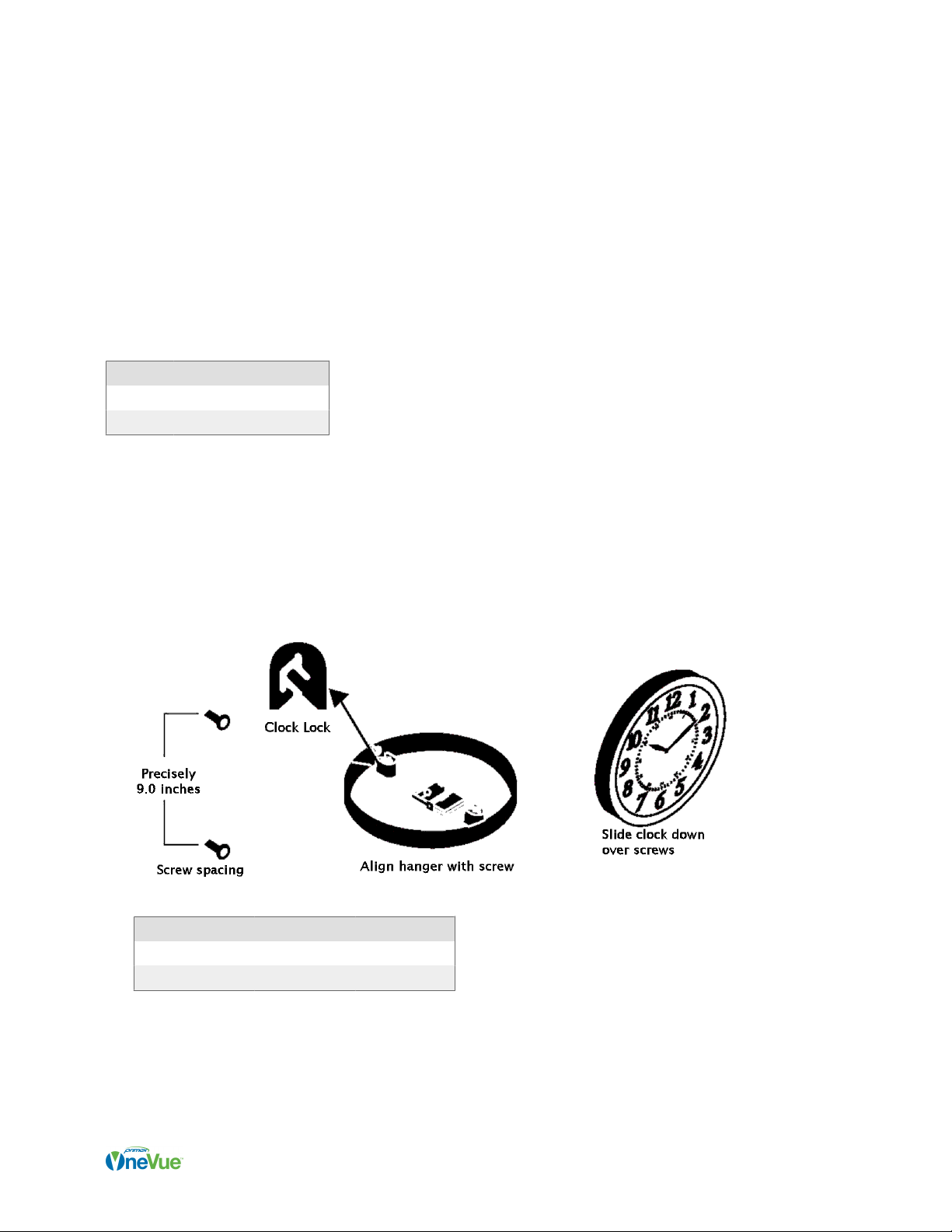
The backs of most analog clocks feature two specially designed clock-lock hangers spaced at precise distances, one
on the top and the other on the bottom. The clock-lock feature prevents accidental removal if the clock is bumped and
it may reduce theft by requiring a particular combination of moves to remove the clock.To avoid the clock-lock feature,
use nishing nails with no heads angled at 45 degrees into the wall in place of headed screws.
Supplied components
Quantity Component
2 Screw, #8 x 1 1/4” at head
2 Anchor
Mount clock to wall with clock-lock mount
1. Verify the installation requirements are met.
2. Drill holes for the screw anchors at the spacing listed in the following table. If two screws are being used to secure
the clock to the wall using the clock-lock mount, the distance between the screws is precisely the same as the hole
spacing specied below. You may download an analog clock hanger template for a full-scale template of the hole
spacing.
Model Hole Spacing Mounting Type
12.5" Round Model* 9 in. (22.86 cm) Clock Lock (2)
16" Round Model 9 in. (22.86 cm) Clock Lock (2)
3. Use a screwdriver to insert and tighten each screw, leaving the top of the screw head 3/8 in. (0.9 cm) out from the
wall.
4. Apply power to the clock.
5. Hold the clock with the face down and align the clock-lock hanger with the bottom screw.
6. Tilt the clock face to vertical and position the clock with the screw heads in the opening of the clock-lock hanger.
Page 7

7. Slide the clock down over the screw heads to latch it into place.
When a clock or repeater is powered-on, it enters Add a Clock Mode to initiate a connection to the Sync Bluetooth
mesh network.
Page 8
Install Analog Clock: 12.5" dual-sided
A dual-sided analog clock consists of two single analog clocks and a dual clock kit. Using the kit, you combine two
clocks to create a dual sided clock, which can be either ceiling or wall mounted.
Supplied components
Quantity Component
1 Dual mount bracket
1 Mounting plate
Screws and anchors supplied with each clock are included in the order packaging.
Step 1: Mount plate to wall or ceiling and assemble bracket
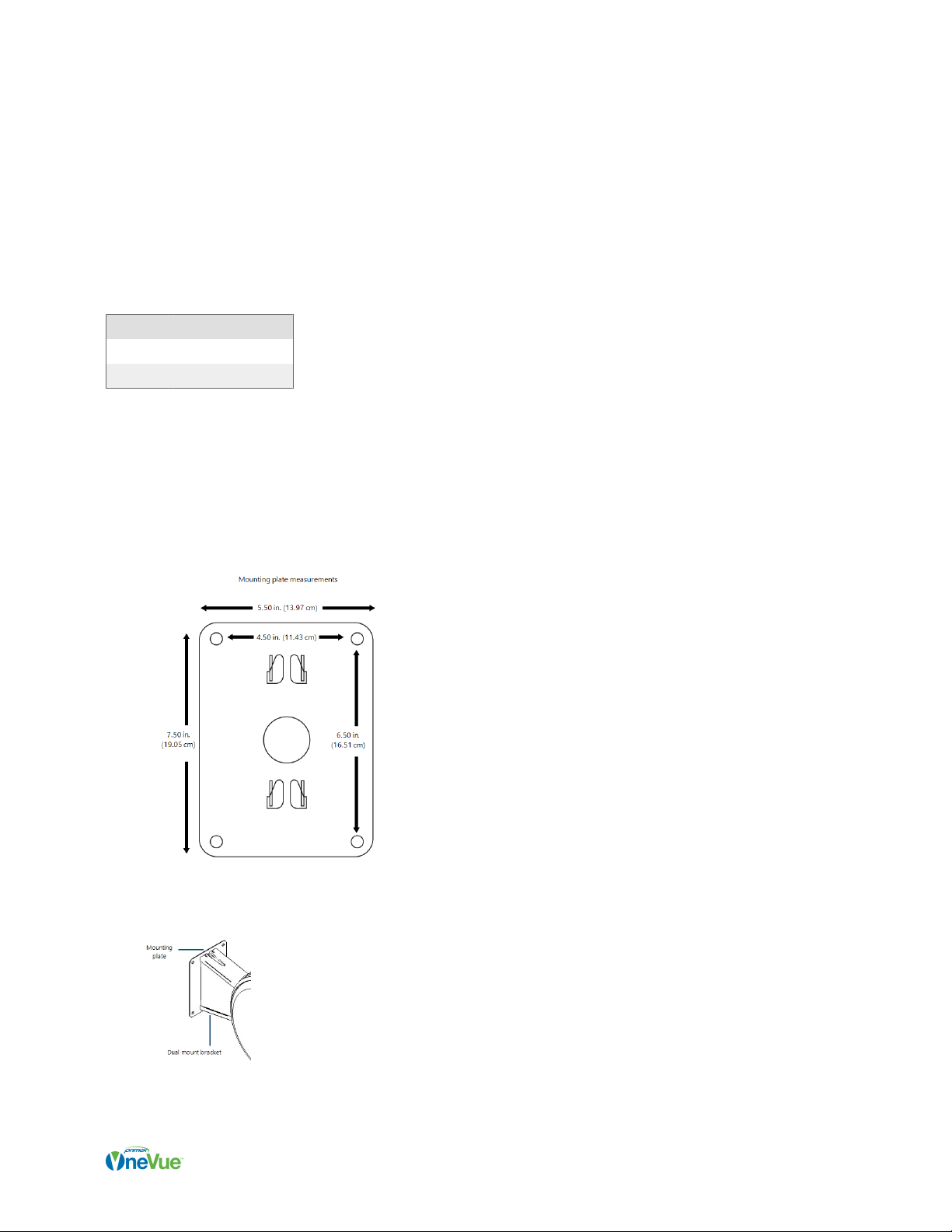
1. Measure and drill holes on the wall or ceiling to meet the spacing dimensions of the supplied mounting plate, as
shown in the gure below.
2. Attach the mounting plate to the wall/ceiling using the provided anchors and screws. The mounting plate holes are
to line up with the holes drilled in the wall/ceiling.
3. Slide the dual clock bracket over the four tabs on the mounting plate. A tap with a rubber mallet on the clock
bracket may be required to set the clock bracket assembly fully into place.
Page 9

4. Examine the mounting plate to ensure the bracket is fully engaged. The small hole in top side of the mounting plate
should be visible and fully exposed. To increase the security of the clock assembly, a common screw may be
inserted into the hole and screwed into the wall.
Step 2: Assemble clocks to bracket
Complete the steps below to assemble the clocks to the bracket.
1. Apply power to the clock.
2. Press and release the button located on the back of each clock to initiate its connection to a in-range Sync mesh
network to receive its time .
3. Place the clock in to the bracket housing with the 10/11 and 4/5 numerals over the metal posts.
4. Place your hands at the 10/11 and 4/5 positions and turn the clock clockwise to lock into place.
When a clock or repeater is powered-on, it enters Add a Clock Mode to initiate a connection to the Sync Bluetooth mesh
network.
Page 10
Este manual sirve para los siguientes modelos
1
Tabla de contenidos
Otros manuales de Reloj de OneVue

Manuales populares de Reloj de otras marcas

Silicon Laboratories
Silicon Laboratories SI5324 Manual de usuario

Heathkit
Heathkit GC-1005 Manual de usuario

Oregon Scientific
Oregon Scientific PRYSMA RMR221P Manual de usuario

Andrew O'Malley
Andrew O'Malley DOTKLOK Manual de usuario

ALGE-Timing
ALGE-Timing ASC3 Manual de usuario

Bodet
Bodet Profil 960 Manual de usuario


