
OK DIGITAL LF21-PL Manual de usuario

User Guide
Premium Digital Locker Lock
LF21-PL

LF21-PL
User Guide
2 / 14
Strong Points 3
Safety Instructions 4
Package included & Specifications 5
Part Names 6
Management Level & Functions 7
Public Mode 8
Private Mode 9
Use/Change Master Code 10
Page
Table of Contents
Use/Change User Code 11
Setting for Functions 12
Emergency Opening 13
Reset, Change Battery,
Emergency Power Supply
14

LF21-PL
User Guide
3 / 14
Strong Points
PW
Master & user password
1/0
Public mode, private mode
Durable diecasting front
Auto-locking, self-locking
Lock freezes 30 seconds after 5 times wrong entry
5
X
Strong warning alarm when forced opening
Intuitive pop-up in-use indicator (patented)
Pickproof deadlatch mechanism (patented)
Low battery alarm (”little star” melody)
USB-C emergency power port
Password type digital locker lock LF21-PL
Keypad backlight (except white front)
Imaginary number function
Five level volume control

User Guide
LF21-PL
User Guide
4 / 14
Do not disassemble or modify the product.
Do not wipe with flammable liquid such as
alcohol, benzene, thinner.
Do not give excessive impact to the keypad.
Be careful not to let water or liquid into
the product.
Keep away from flame or excessive heat.
Replace the battery if there is a leak.
Safety Instructions
Do not mix new and used battery.
Be sure to change the default master code and
user code. Take care of managing the code and
do not forget.

LF21-PL
User Guide
5 / 14
제품의 구성
Package included & Specification
12 3 4
5 6
Model No.
Power Source
Authentication
Color
Safety Approved
Material
Installable Door
Thickness
LF21-PL
AA 1.5V Battery 3 pcs
4 to 12 Digit Password (Master, User)
Front : Black, White Rear : Black
KC, CE, RoHS
Diecasting, PC, ABS
15 mm (M4 x 16mm bolts)
18 - 20 mm (M4 x 20mm bolts, included)
25 mm (M4 x 25mm bolts)
Product Specification
Q’tyDescription
Front
Rear
Bolt
Screw
Strike
1 pc
1 pc
2 pcs
2 pcs
1 pc
39.3 x 143.6 x 20mm
66 x 125 x 30mm
M4 for assemble front & rear
M4 x 20 for Strike (*3 pcs for left hand door)
35 x 65 x 15mm
Item
Battery cover
2
3
1
4
5
6

5 / 10 User Guide
LF21-PL
LF21-PL
User Guide
6 / 14
Keypad
Punching hole location
for emergency opening
by force
In-use indicator
Battery LED
Process Status LED
USB-C Emergency
Power Port
Handle
Part Names
(FRONT)
Battery
Opening
Button
Reset
Button
Deadlatch
(REAR)
Battery
Cover

LF21-PL
User Guide
7 / 14
Function Table
Master
Password
User
Password
Level Functions
4-12 digit manager’s code
Register user code for private mode
Unlock when forget user code
Precautions
Factory default setting : 5351
4-12 digit User Code
1. Unlock and the user code will be deleted right after
using master code.
2. Change factory default master code.
Factory default ser code in private mode : 1111
Management Levels
Imaginary number function
Imagionary number function
3. Please take care of using master code and change it
immidiately when exposed.
Private
Mode
Public
Mode
On/Off
Beep Sound
+
Public
On
Beep
Volume
(1-5 levels) Up : Down : 4th level
On/Off
Imaginary Off
BB
B-
Off : BB
On : B-
On : BB
Off : B-
(Press for 4 seconds
to change.)
Beep SoundFunction Key Number Factory
Default
LED
(Process)
3 times
4
3
3
3
3

LF21-PL
User Guide
8 / 14
Using Public Mode
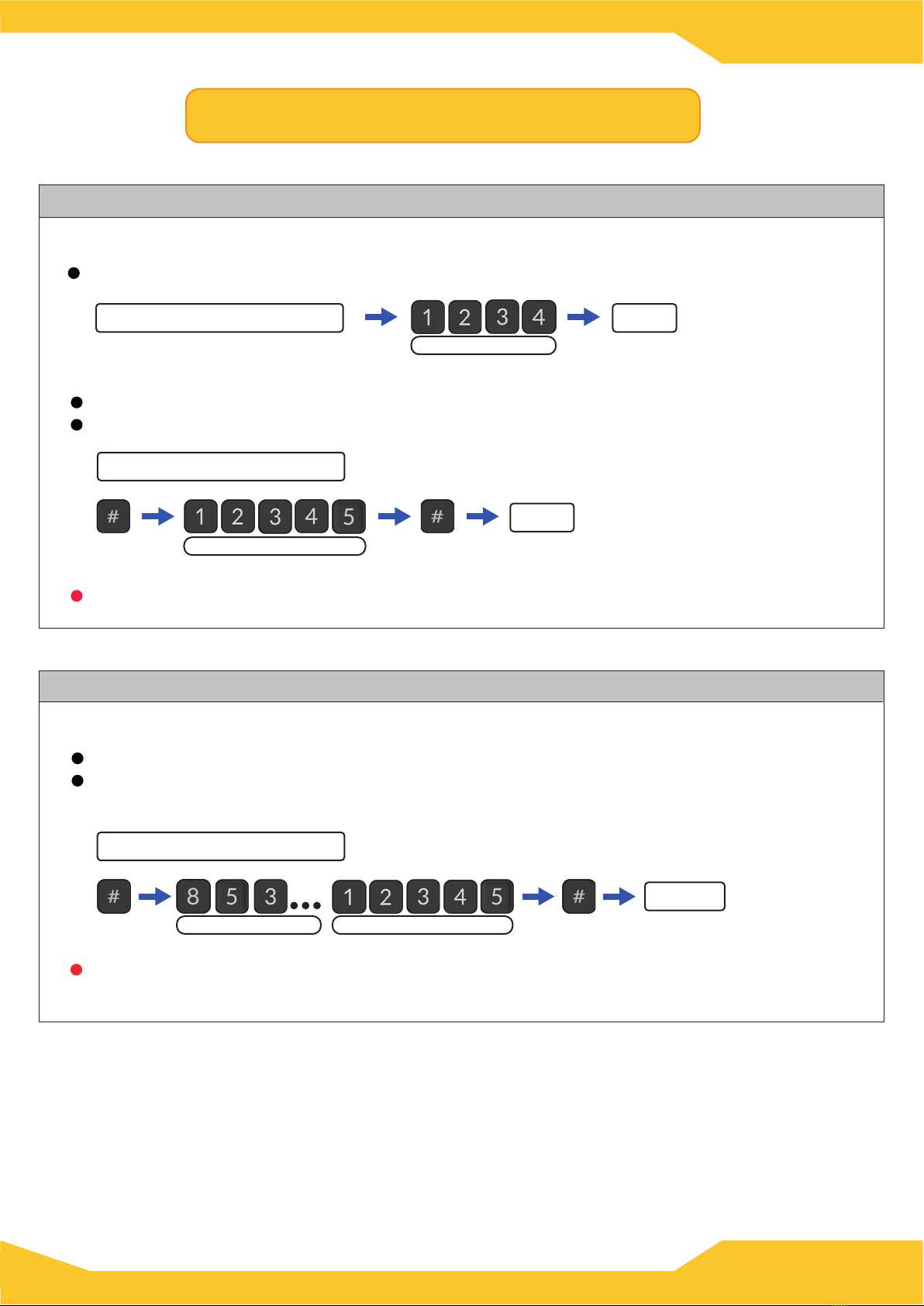
How to use User Code (public mode, imaginary function - off)
Public mode is useful when the user changed frequently, such as golf ranges.
(Use “4 digit only mode)
Locking with any 4 digit code and use same code for unlocking.
(Use 4-12 digit code)
Locking : Press “#” → enter 4 to 12 digit code → Press “#”
Unlocking : Same as locking.
In public mode, remain unlock and wait for next user. User code will be erased after use.
Lock
4 to 12 digit code
any 4 digit code same code
Lock
Unlock
Unlock
same code
How to use User Code (public mode, imaginary function - on)
If imaginery code is used, need to press “#” always after enter the user code.
Cannot use “4 digit only mode”.
Locking : Press “#” → enter 4-12 digit code → Press “#”
Lock
4 to 12 digit code
Unlocking : Press “#” → Imaginary code(any digit) → enter the registered code
→ Press “#”
Unlock
registered code
imaginary code
If the door is not opened after unlock with the code, it will be locked again after 5 seconds
and the user code won’t be erased.
LF21-PL
User Guide
9 / 14
How to use User Code (private mode, imaginary function - off)
Private mode is useful if the user is fixed such as membership locker.
Locked when close the door
Unlock
Locked when close the door
(Use 4-12 digit code )
Locking : It locks automatically when close the door.
Unlocking : Press “#” → enter 4-12 digit code → Press “#”
(Use “4 digit only mode”)
Will be locked when close the door. Use registered code to unlock.
registered user code
Unlock
registered code
How to use User Code (private mode, imaginary function - on)
If imaginery code is used, need to press “#” always after enter the user code.
Cannot use “4 digit only mode”.
Unlock
registered codeimaginary code
(Use 4-12 digit code)
Locking : Locked when close the door.
Unlocking : Press “#” → enter the imaginary code(any digit) → enter the registered code
→ Press “#”
Locked when close the door
Using Private Mode

LF21-PL
User Guide
10 / 14
master code
Alarm
Unlock
Master code cannot lock, possible to unlock if forgot the user code.
Factory default master code is “5351”. Please make sure to change it for security.
How to use Master Code (if the user code is registered)
(Unlock with master code if forgot the user code.)
Press “*” → enter registered master code → press “*” → Unlock with warning alarm
The user code is deleted as soon as the master code is used.
(If imaginary function is enabled)
Press “*” → enter any imaginary number → enter the registered master code
→ Press “*” → unlock with warning alarm
master code
Alarm Unlock
any digit imaginary number
Using Master Code
current master code
4 seconds
new master code
Need to close the door to change the master code.
How to change the master code
Press “*” for four seconds → enter current master code → press “*” → enter new master
code(4-12 digit) → press “*” (changed the master code)
Changed
Change Master Code
It will enter into user code registration mode if the user code is not registered.
Tabla de contenidos
Otros manuales de Cerrar de OK DIGITAL


