
Odyssey 7Q Manual de usuario

Updated December 19, 2014 | Firmware Release v4.10.100
4K RAW
2K Half RAW 120
QHD RAW
2K 12-BIT DPX
HD 12-BIT DPX
2K 10-BIT DPX
HD 10-BIT DPX
HD 422 DPX
HD Apple ProRes 422 (HQ)
2K Apple ProRes 422 (HQ)
CANON C500
Odyssey7Q
Odyssey7Q+
SETUP GUIDE
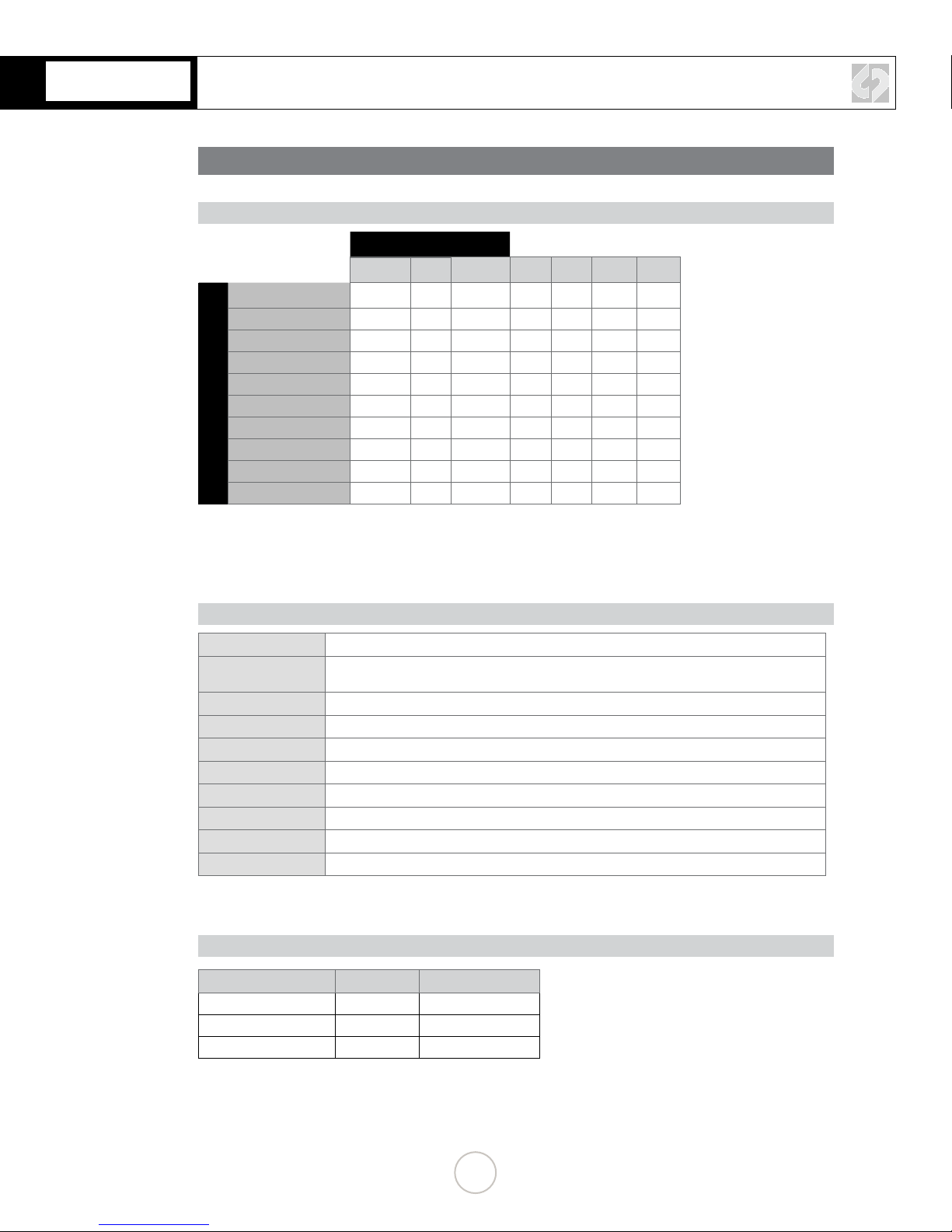
RECORDING CAPABILITIES
RECORDING TIMES
MAX RECORD TIME IN MINUTES (Two 512GB SSDs / 1TB Total)
FRAMES PER SECOND
23.98 25 29.97 50 60 100 120
REC MODE
4K RAW 62 60 50 30** 25**
4K Half RAW 60 50 30** 35**
QHD RAW 67 64 53 32** 26**
2K 12-BIT DPX 70* 67* 56*
HD 12-BIT DPX 74* 71* 59*
2K 10-BIT DPX 78 75 67
HD 10-BIT DPX 83 80 72
HD 422 DPX 43 36*
HD Apple ProRes 775 744 620 159 132
2K Apple ProRes*** 600 572 475
Note: The Odyssey does not currently support Scan and Reverse mode on the C500,
or Slow and Fast, except for the maximum rates in RAW and HRAW (100/120)
***2K Apple ProRes 4:2:2 23.98, 25, 29.97
**4K Half Raw x 1080 is not supported at this me.
*HD 120 fps is not supported at this me.
FORMAT DETAILS
4K RAW 4096x2160, 10-bit linear data, recorded as Uncompressed .RMF
4K Half RAW 4096x2160, 10-bit linear data, where every other line is sampled by the camera sensor, for faster
frame rate support, recorded as Uncompressed .RMF
QHD 3840x2160, 10-bit linear data, recorded as Uncompressed .RMF
2K 12-BIT DPX* 2048x1080, 12-bit log 4:4:4 RGB video, recorded as Uncompressed .DPX
HD 12-BIT DPX* 1920x1080, 12-bit log 4:4:4 RGB video, recorded as Uncompressed .DPX
2K 10-BIT DPX* 2048x1080, 10-bit log 4:4:4 RGB video, recorded as Uncompressed .DPX
HD 10-BIT DPX* 1920x1080, 10-bit log 4:4:4 RGB video, recorded as Uncompressed .DPX
HD 422 DPX 1920x1080, 10-bit log 4:2:2 video, recorded as Uncompressed .DPX
2K Apple ProRes 2048x1080, 10-bit log video, recorded as Apple ProRes 422 (HQ) compressed 2K video
HD Apple ProRes 1920x1080, 10-bit log video, recorded as Apple ProRes 422 (HQ) compressed HD video
* HD DPX les at 60p are “packed” on SSDs due to high data rate. Use free CD Data Unpacker ulity soware to
unpack les aer transfer.
TYPICAL DOWNLOAD TIME IN MINUTES
Media USB3.0 Thunderbolt
256G SSD 20 10
512G SSD 40 20
1TB SSD 80 40
Actual transfer rates are dependent on computer system and capture media.
USB 3.0 or Thunderbolt connecons are recommended by Convergent Design for ecient data rates.
1
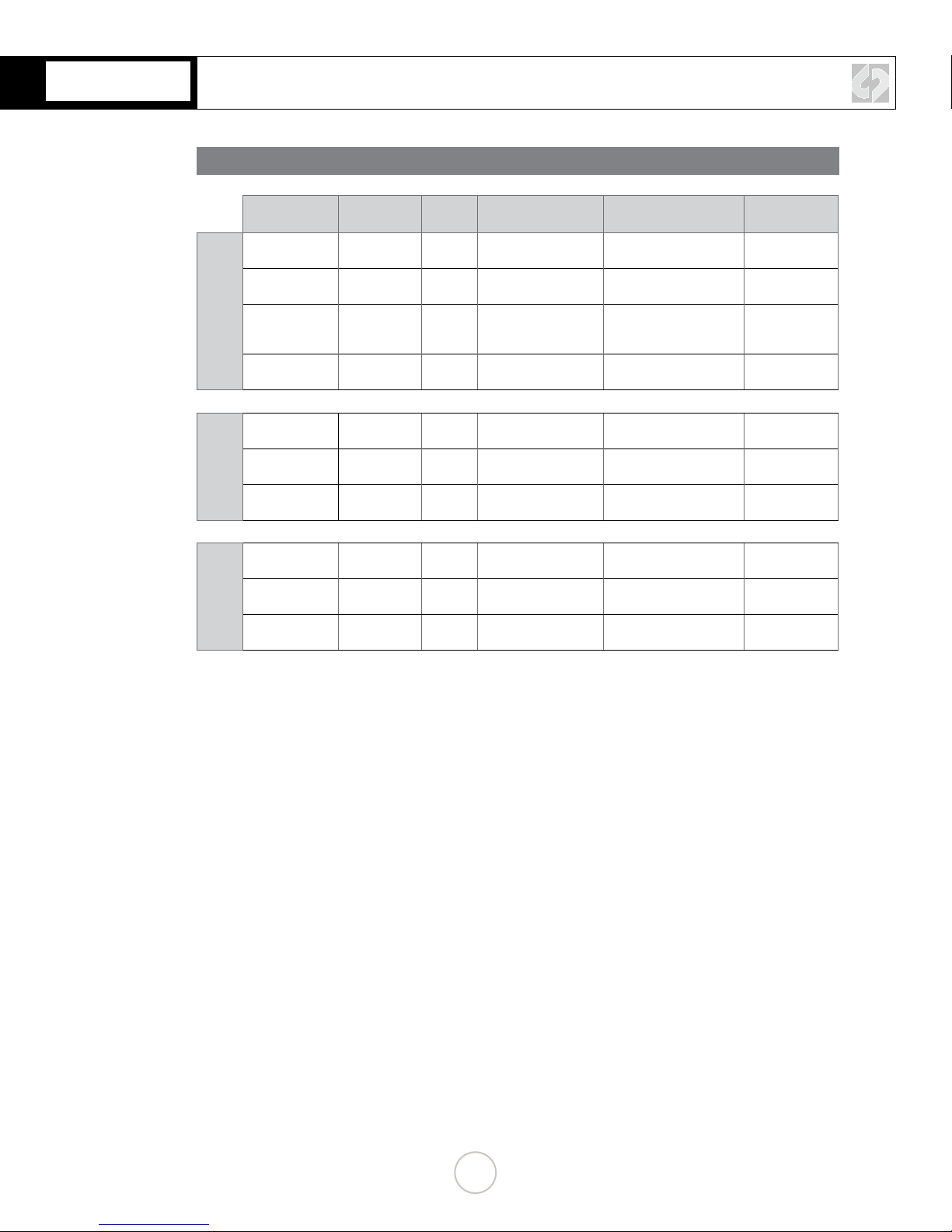
SUPPORT FOR CANON C500
FORMAT DETAILS
Canon C500
Mode Resoluon Bit-
Depth Frame Rates Supported in
Current Firmware
Two SSD's
Required
4K RAW
(OPTIONAL)
4K RAW 4096 x 2160 10-Bit 23.98p, 24p, 25p,
29.97p, 50p, 59.94p
Yes (RAW .RMF) 50p / 59.94p
4K (QHD) RAW 3840 x 2160 10-bit 23.98p, 24p, 25p,
29.97p, 50p, 59.94p
Yes (RAW .RMF) 50p / 59.94p
4K Half RAW 4096 x 2160 10-Bit 23.98p, 24p, 25p,
29.97p, 50p, 59.94p,
100p, 120p
Yes (RAW .RMF) 100p / 120p
4K RAW x 1080 4096 x 1080 10-Bit 62p up to 119.88p (by
2 frame steps)
No ---
2K/HD
DPX
2K RGB 4:4:4 2048 x 1080 10-Bit
12-Bit
23.98p, 24p, 25p,
29.97p, 50p, 59.94p
Yes (Uncompressed .DPX) 50p / 59.94p
HD RGB 4:4:4 1920 x 1080 10-Bit
12-Bit
23.98p, 24p, 25p,
29.97p, 50p, 59.94p
Yes (Uncompressed .DPX) 50p / 59.94p
HD YCC 4:2:2 1920 x 1080 10-Bit 62p up to 119.88p (by
2 frame steps)
No ---
2K/HD
.MOV
HD MXF 4:2:2 1920 x 1080 10-Bit 23.98p, 24p, 25p,
29.97p, 50p, 60p
Yes (Apple ProRes .MOV) No
HD YCbCr 4:2:2 1920 x 1080 10-Bit 50p, 59.94p, and 62p
up to 119.88p
No No
2K RGB 4:4:4 2048x1080 10-Bit 23.98p, 24p, 25p,
29.97p
Yes (Only 4:2:2 Monitor
Output must be used)
No
2

CONTINUED »
C500 CONFIGURATION
1. SET TIME & DATE
MENU » Other Functions » Set Clock » Date/Time
Set Time & Date so both the C500 and Odyssey match.
This is REQUIRED for using internal media as proxy.
2. NAME THE CLIP
MENU » 4K/2K/MXF » Clip Name » Title Prex (or NUMBER SETTING)
Name the clip so that C500 and Odyssey match.
3. ENABLE 3G-SDI OUTPUT & REC COMMAND
MENU » 4K/2K/MXF » 3G-SDI Output » ON
(BACK) » REC Command » ON
4K RAW (4096/3840x2160) RECORDING
3

4K RAW (4096/3840x2160) RECORDING
4. SET 4K RAW MODE
MENU » 4K/2K/MXF Setup » 4K (4096/3840) » Mode » RAW
5. SET SYSTEM FREQUENCY (HZ)
MENU » 4K/2K/MXF Setup » System Frequency » (Selection)
59.94p selected you will have the options 59.94,29.97,23.98
50p selected you will have the options 50p and 25p
24p this is the only option under frame rate
6. SET RESOLUTION
MENU » 4K/2K/MXF Setup » 4K (4096/3840) » Resolution » (4096x2160 or 3840x1080)
CONTINUED »
4
CONTINUED »
4K RAW (4096/3840x2160) RECORDING
7. SET FRAME RATE
MENU » 4K/2K/MXF Setup » 4K (4096/3840) » Frame Rate » (Selection)
You will have the options 59.94p,29.97p,23.98p
ODYSSEY CONFIGURATION
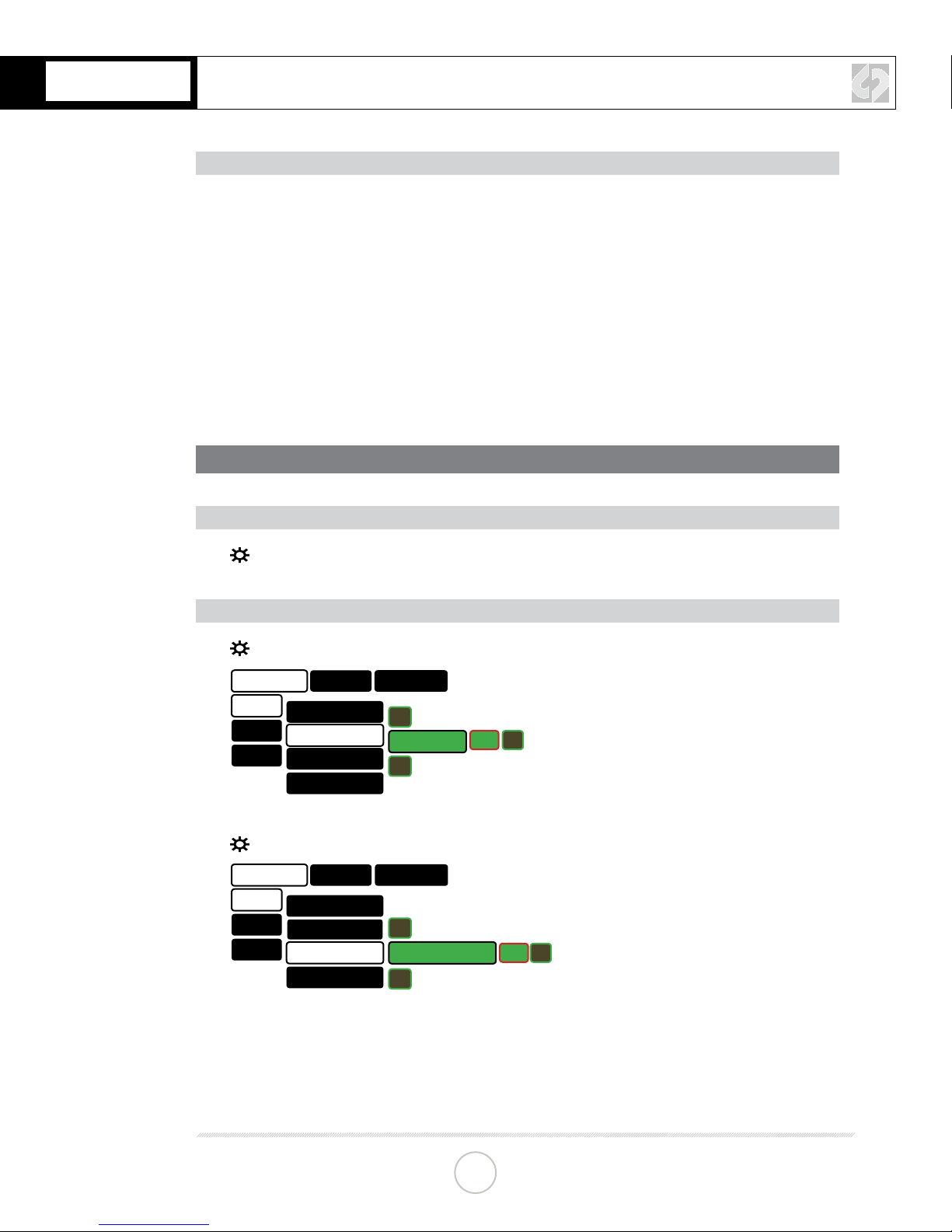
1. SET ODYSSEY TO C500 RAW MODE
☼
» SETUP » CAMERA » CANON » C500 RAW->RAW(.RMF)
2. SET DATE & TIME TO MATCH C500
☼
» ODYSSEY » SET » TIME
ODYSSEY
SET ACTIVATION
TIME 07:30:11
▲
▼
OK X
DATE
RESET
SSD’S
ABOUT
SETUP OUTPUTS
☼
» ODYSSEY » SET » DATE
ODYSSEY
SET ACTIVATION
TIME
2014 DEC 16
▲
▼
OK X
DATE
RESET
SSD’S
ABOUT
SETUP OUTPUTS
5
4K RAW (4096/3840x2160) RECORDING
3. SET CLIP NAME AND METADATA
TAP ON CLIP NAME IN TOOLBAR » TAP ON FIELD » (ENTER DATA)
4. MAKE C500 THE RECORD TRIGGER
☼
» SETUP » RECORD TRIGGER » CAMERA
5. SET TIMECODE SOURCE
☼
» SETUP » TIMECODE SOURCE » SDI/HDMI
6. FORMAT SSDs
☼
» ODYSSEY » SSD’S » FORMAT BOTH
(or FORMAT SSD1 if you do not have a second SSD drive installed.)
7. CONNECT TO CAMERA AND VERIFY STATUS INPUT
Connect C500 3G-SDI output to Odyssey SDIA input
NOTE
Use only 3G-SDI rated cables from C500 to Odyssey. Using a 1.5G SDI cable in not
recommended and may cause issues.
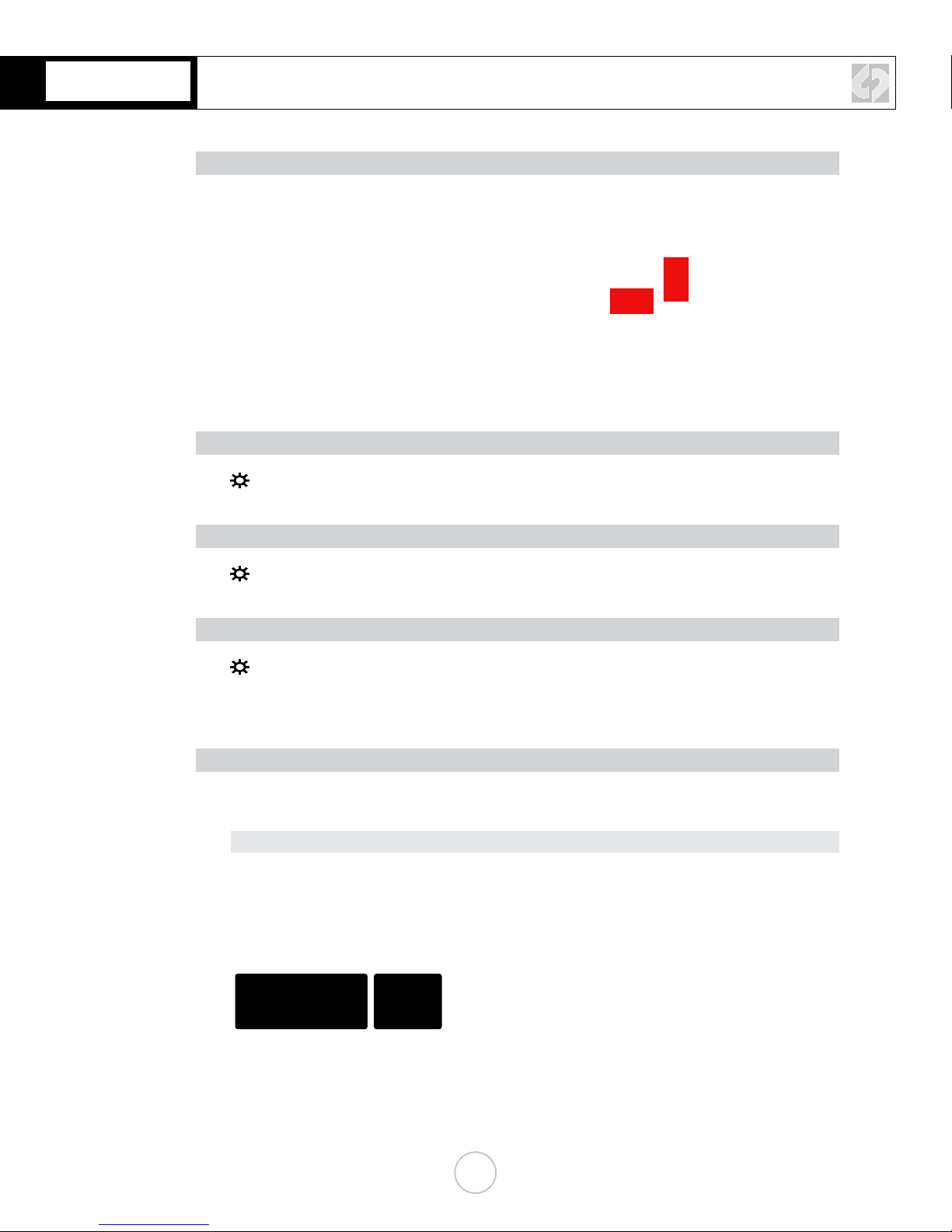
The status on your Odyssey will display your camera’s output.
Example:
4K 29.97 C500
RAW
6

CONTINUED »
C500 CONFIGURATION
1. SET TIME & DATE
MENU » Other Functions » Set Clock » Date/Time
Set Time & Date so both the C500 and Odyssey match.
This is REQUIRED for using internal media as proxy.
2. NAME THE CLIP
MENU » 4K/2K/MXF » Clip Name » Title Prex (or NUMBER SETTING)
Name the clip so that C500 and Odyssey match.
3. ENABLE 3G-SDI OUTPUT & REC COMMAND
MENU » 4K/2K/MXF » 3G-SDI Output » ON
(BACK) » REC Command » ON
4K HALF RAW (4096x2160 ONLY)
7

CONTINUED »
4K HALF RAW (4096x2160 ONLY)
4. SET 4K RAW MODE
MENU » 4K/2K/MXF Setup » 4K (4096/3840) » Mode » HRAW
*4K1K RAW not supported at this time.
5. SET SYSTEM FREQUENCY (HZ)
MENU » 4K/2K/MXF Setup » System Frequency » (Selection)
59.94p selected you will have the options 59.94,29.97,23.98
50p selected you will have the options 50p and 25p
24p this is the only option under frame rate
6. SET RESOLUTION
MENU » 4K/2K/MXF Setup » 4K (4096/3840) » Resolution » (4096x2160)
8

4K HALF RAW (4096x2160 ONLY)
CONTINUED »
7. SET UP SLOW AND FAST
MENU » 4K/2K/MXF Setup» Special Rec » Slow and Fast Motion
8. SET SLOW & FAST FRAME RATE
MENU » 4K/2K/MXF Setup» S&F Frame Rate » [102]
9
Otros manuales para 7Q
5
Tabla de contenidos
Otros manuales de Equipo de grabación de Odyssey


Manuales populares de Equipo de grabación de otras marcas


Strymon
Strymon NIGHTSKY Manual de usuario

Mitsubishi Electric
Mitsubishi Electric 16CH DIGITAL RECORDER DX-TL5000U Manual de usuario

Tews Technologies
Tews Technologies TPMC465 Manual de usuario

Honeywell
Honeywell Excel 50 Manual de usuario

SeaLevel
SeaLevel COMM+8.LPCI Manual de usuario

Arturia
Arturia AUDIOFUSE STUDIO Manual de usuario


