Nowley 21-2039 Manual de usuario

INSTRUCTION MANUAL
21-2039

2/21
Thank you for purchas ng a Nowley Smart.
We hope that th s manual w ll be useful for your
operat on.
Before us ng t for the f rst t me, you must fully charge t
and l nk t to your mob le phone, download ng the
correspond ng APP and nstall ng t.
In th s manual we w ll show you how to do t.
We w ll also nform you of ts funct ons, features,
frequently asked quest ons, and observat ons.

Index
1. Charge.........................................................................................................4
2. Gett ng started..............................................................................................5
2.1. Turn on and turn off...............................................................................5
2.2. D splay...................................................................................................5
2.3. Custom se the d al.................................................................................5
2.4. Nav gat on.............................................................................................6
3. Funct ons......................................................................................................7
4. System nformat on and sett ngs................................................................13
5. M n mum requ rements...............................................................................13
6. APP nstallat on..........................................................................................14
7. Pa r ng the smartwatch...............................................................................14
7.1. Enter personal nformat on..................................................................14
7.2. APP perm ss ons.................................................................................15
7.3. Pa r your Smartwatch..........................................................................15
8. Sett ng Da F t.............................................................................................16
8.1. Set up the custom sed mage..............................................................17
9. FAQ............................................................................................................19
10. Observat ons............................................................................................20
11. Features...................................................................................................21

1. Charge
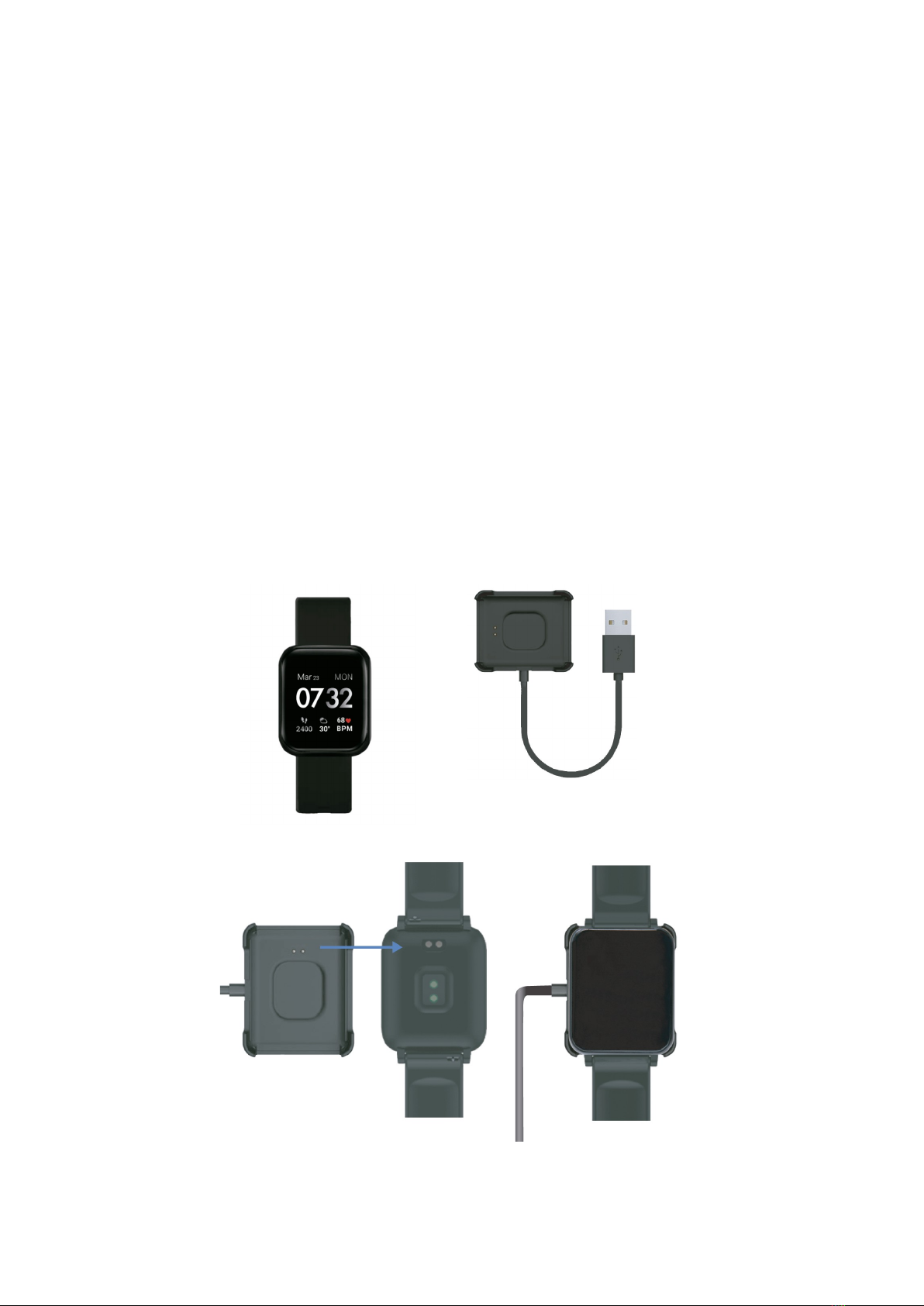
Before the f rst use, make sure t s fully charged.
In general, t can take about two hours to be fully charged. Use the charger
ncluded w th the dev ce and put t on the smartwatch by match ng ts t ps to
the charg ng contact po nts.
Then connect the USB (charger end) to a computer output or to a 5V-1A
power supply.
IMPORTANT: Do not connect it to a power suppl that exceeds 5V-1A (5
volts, 1 amp) because the circuit ma be damaged and the batter can
stop charging.
When the watch s charg ng, a charg ng symbol w ll appear on the screen.
If t does not charge, check that you have placed the charger correctly.
4/21

2. Getting started
2.1. Turn on and turn off
Press the screen for 3 seconds to turn on the smartwatch. The start-up logo
w ll appear followed by the n t al screen.
To act vate t from standby mode, cl ck t.
To turn t off, sw pe your f nger down to d splay the not f cat on panel. Touch
the sett ng con and scroll down to the "Power Off" con.
Press the “Power Off” con to conf rm and press the blue check to turn off
your dev ce.
2.2. Displa
A d splay that shows the t me, steps, weather and heart rate w ll appear by
default. It has 5 nterchangeable d als (the 5th one can be downloaded from
the APP). To change them, press on the n t al screen unt l t shows the
d fferent d als, and cl ck one.
The ava lable d als are the next:
2.3. Customise the dial
D al 5 can be replaced by an mage from the gallery or by an mage taken
w th the camera.
5/21
1 2 3 4 5

2.4. Navigation
Check the funct ons by mov ng your f nger, up and down, left and r ght.
The arrows nd cate n wh ch d rect on you should move the f nger so you can
access to the funct ons and the menu.
6/21
1 – Turn off Smartwatch
2 – Br ghtness
3 – Act vate / Deact vate v brat on
4 – Weather
5 – Sett ng
6 – BT / battery nd cator
Full menu
Qu ck access to
funct ons
Sw pe from r ght to left or
v ce versa to nav gate
through the ava lable
funct ons. Press w th your
f nger to enter one of the
funct ons.
Sw pe up and down to
cycle through the other
funct ons.
Messages
12
345
6

3. Functions
Sports: Touch the ma n screen, sl de to the r ght and cl ck on "Exerc se".
Sleep monitor: Th s feature automat cally detects your sleep qual ty and
mon tors your sleep progress based on your movements dur ng the n ght. On
the smartwatch, press on the ma n screen, sl de to the r ght and press
“sleep”:
7/21

Training: 7 types of sports: WALKING, RUNNING, BIKE, JUMPING ROPE,
BADMINTON, BASKETBALL, FOOTBALL.
Steps:
1. Cl ck on the screen.
2. Cl ck on "Exerc se".
3. Choose the sport mode.
4. Sw pe left to f n sh or cont nue.
Note: The distance travelled is regarding the length of the steps, based on an
estimation of the personal setting and the number of steps.
On the App:
Note: When the smartwatch is turned on, the App will start recording
information. The information will start from 0 every day at 00:00h. When you
connect the smartwatch with the mobile phone through the App, the
information will be saved for monitoring.
The App also has a G S and running function. The G S function provides
the distance travelled, the time, the average speed and the calories
consumed.
8/21

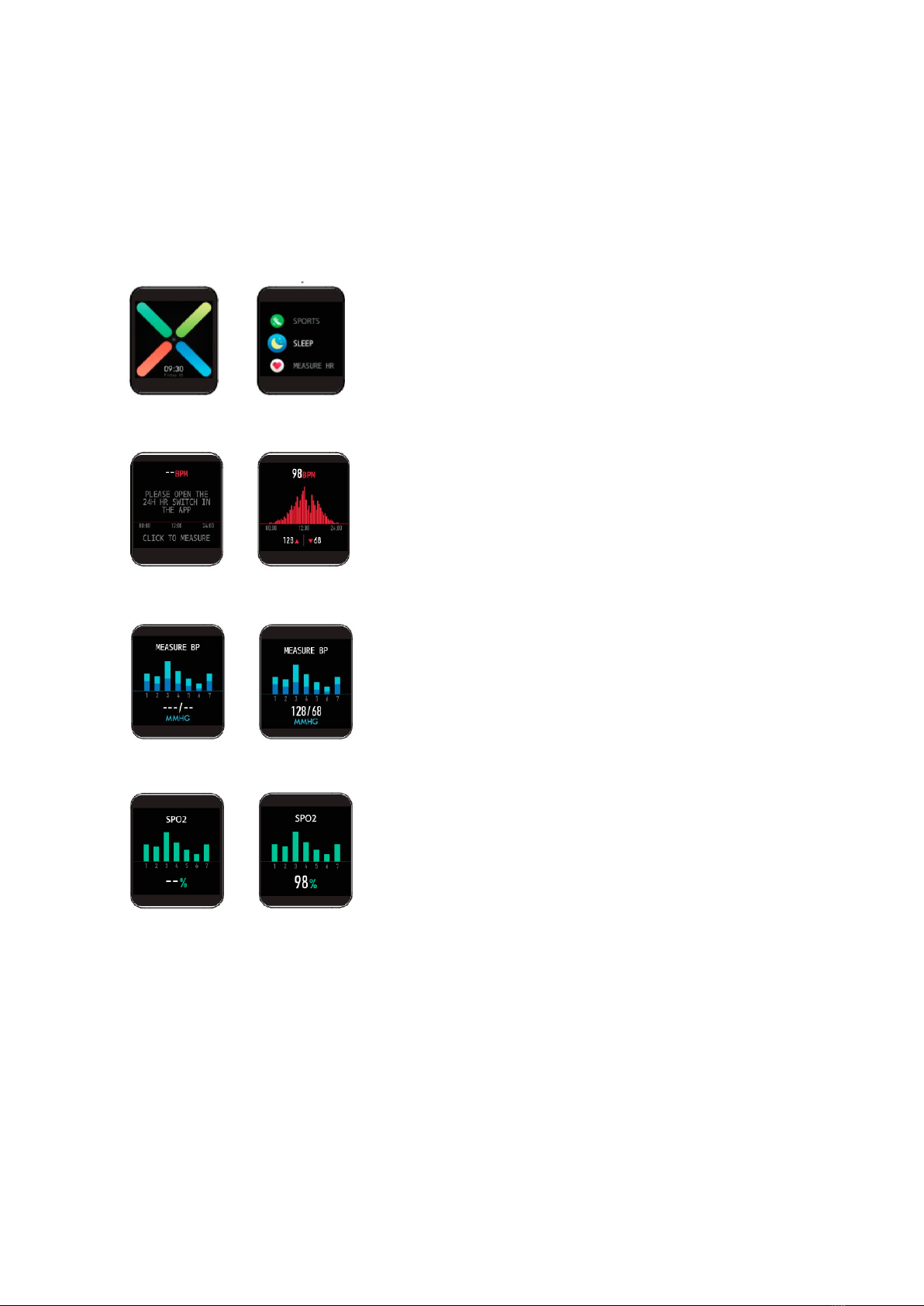
Measurements: The dev ce allows you to measure the heart rate by press ng
“Heart”, the blood pressure by press ng “Manometer” and the percentage of
oxygen n blood by press ng “spO2”. The nformat on w ll automat cally be
synchron sed w th the phone App.
On the smartwatch:
Touch the ma n screen, sw pe r ght, choose heart rate or other.
Heart rate
Blood pressure
Blood oxygen
9/21

On the App:
Weather: Touch the home screen, sl de to the r ght, choose weather, show
c ty’s weather. Press t and t w ll show the weather for the next 5 days.
Camera control: Touch the ma n screen, sl de to the r ght, choose “Shutter”
and then open the APP Da f t. Press the shutter mode and take the p cture.
Remote music control: Touch the home screen, sw pe r ght, select the
mus c con.
10/21
Tabla de contenidos
Otros manuales de Mirar de Nowley