
Novik Neo IMPACT TWO Manual de usuario

ENGLISH
PORTABLE PARTY AUDIO SYSTEM
USER MANUAL

www.novikneo.com
2
Important Safety Instructions
• Follow all the instructions and keep this manual for future references
• Do not use this device near water presence.
• Use a clean and dry cloth to clean it. Do not use chemical products.
• Do not block any ventilation openings. Install in accordance with the manufacturer instruc-
tions.
• Do not install near any heat sources such as radiators, heaters, stoves or other devices
(including ampliers) that produce heat and avoid putting it under direct sunlight.
• Keep the device away from any source that produces humming such as transformers or
engines.
• The product has a polarized or grounding- type plug as a security device. A plug of this kind
has two blades and a third grounding prong. The third prong is provided for your safety.
If the provided plug does not t into your outlet, consult an electrician to replace the old
outlet. Do not force the plug to t the outlet and do not try to change it.
• The outlet where the device is plugged must be near and easy to get to.
• Use only the accessories specied by the manufacturer.
• Use only with a cart, stand or table specied by the manufacturer or that has been sold
with the product. If a cart is used, be careful when moving the device or the table to avoid
damages.
• Do not force the switches, keys or buttons.
• Unplug this equipment during lightning storms or when it is not used for a long period of
time.
• Before moving the apparatus, unplug the power supply and all the connection cables.
• Refer all servicing to qualied service personnel. Servicing is required when the device has
been damaged in any way.
• Make sure the grid specications match those specied in the equipment
• Keep this manual in a safe place for future references.
www.novikneo.com
3
!
!
CAUTION
RISK OF ELECTRIC SHOCK
DO NOT OPEN
General Considerations
• Keep out of the reach of children.
• Be sure to place the box in a safe and stable.
• Do not overload the box, avoid damage to the structure and internal.
• Indoor use is recommended; if used outdoors, make sure that no moisture in the box.
• Do not place a ame (eg candles) near or on the box. - Fire Hazard
• Just plug into an outlet with a ground connection
• When not in use, unplug the unit from the mains.
• Unplug the power plug before checking or replacing the fuse.
• To hang the box, only use approved mounting hardware.
• During installation, make sure that nobody is standing under that area.
• Do not place liquids on the case and protect it from moisture; can signicantly shorten the
life of the equipment.
• Use appropriate means of transport in case you want to move the box. Watch your back.
• If the unit has not been used for a long period, can cause condensation inside the housing;
please allow the unit to reach room temperature before use.
• Never attempt to repair the unit yourself. Contains exclusive parts inside.
• Pull the cable so that no one falls on it or put anything on it.
• Set the minimum volume before starting
WARNING
To reduce the risk of re or electric shock, do not expose this device to rain or moisture.
Do not expose this equipment to dripping or splashing and ensure that no objects lled with
liquids are placed on the equipment.
• CAUTION: To reduce the risk of electric
shock, do not remove any cover. No user
serviceable parts inside. Refer servicing
to qualied service personnel.
The lightning bolt triangle is used to alert the user of the existence of dangerous
voltage that can cause an electric shock.
The exclamation mark inside a triangle is used to alert the user of the existence of
important operating or maintenance instructions.
CAUTION
To avoid an electric shock, do not use this polarized plug with an extension cord, receptacle or
other outlet unless the plug´s blades completely t into the outlet.

www.novikneo.com
4
Get ready to feel the Impact…to see the Impact.
The IMPACT ONE is the ultimate DJ system. With 29700W output power this system takes
your party to the next level. Led light eects bring amazing shine to your party.
Long life battery powered system, set your music when and where you like by the time
you want. Wireless streaming allows you to control everything from your smartphone.
You’re the DJ, let’s get the party started.
Features
• 2-ways portable powered system
• Operates on rechargeable battery
• USB/SD
• Bluetooth®
• MP3 Player
• Woofer 2x12”
• Tweeter 2x3”
• LED Display
• FM Radio
• Wireless Microphone
• 2 External Microphone Input (Echo Control)
• Line Input (3.5mm)
• 2-band EQ
• Remote Control
• Compact system for easy and comfortable
transportation with slide handle and wheels
What your party needs

www.novikneo.com
5
TECHNICAL SPECIFICATIONS
P.M.P.O. (Peak Musical Power Output) 29700W
RMS Power 1500W
Frequency response: 50Hz – 18KHz
S/N ratio <70dB
Sensibility 94dB
Woofer 2x12”
Tweeter 2x3”
Microphone inputs Unbalanced
Wireless Microphones VHF
Wireless Microphone Battery 3V (2xAA Batteries)
Remote Control Battery 3V (2xAAA Batteries)
Power supply AC 110V-240V - 60/50Hz
Power Consumption 100W
Speaker Battery 18V/4.5Ah
Dimensions (HxWxD) 16x14x42
Weight 57lb
Specications subject to change without notice

www.novikneo.com
6
1
REAR PANEL
2
3
4
5
6
7
1 - Inputs and Power Panel
2 - Battery housing
3 - Power Supply Input
Use only the cable provided by the manu-
facturer.
4 - Charging status LED
When the led is ashing, the internal battery
is charging. The battery is charged when the
led stops ashing. After charging the bat-
tery, disconnect the power cable.
5 - Auxiliary Audio Input
Connect audio devices such as cell phones,
ipods, turntables, DJ controllers, TV´s, DVD´s
6 - FM Radio Antenna Input
Connect the antenna provided by the
manufacturer. Place the cable in the
corresponding direction to improve
reception.
7 - Power Switch
Use this switch to turn on/o the system.
www.novikneo.com
7
- ECHO +- mic eq +- bass +- treble +
MIC
LEVEL
-
+
-
+
MUSIC
LEVEL
impact TWO
PORTABLE PARTY system
MODE LEDREC
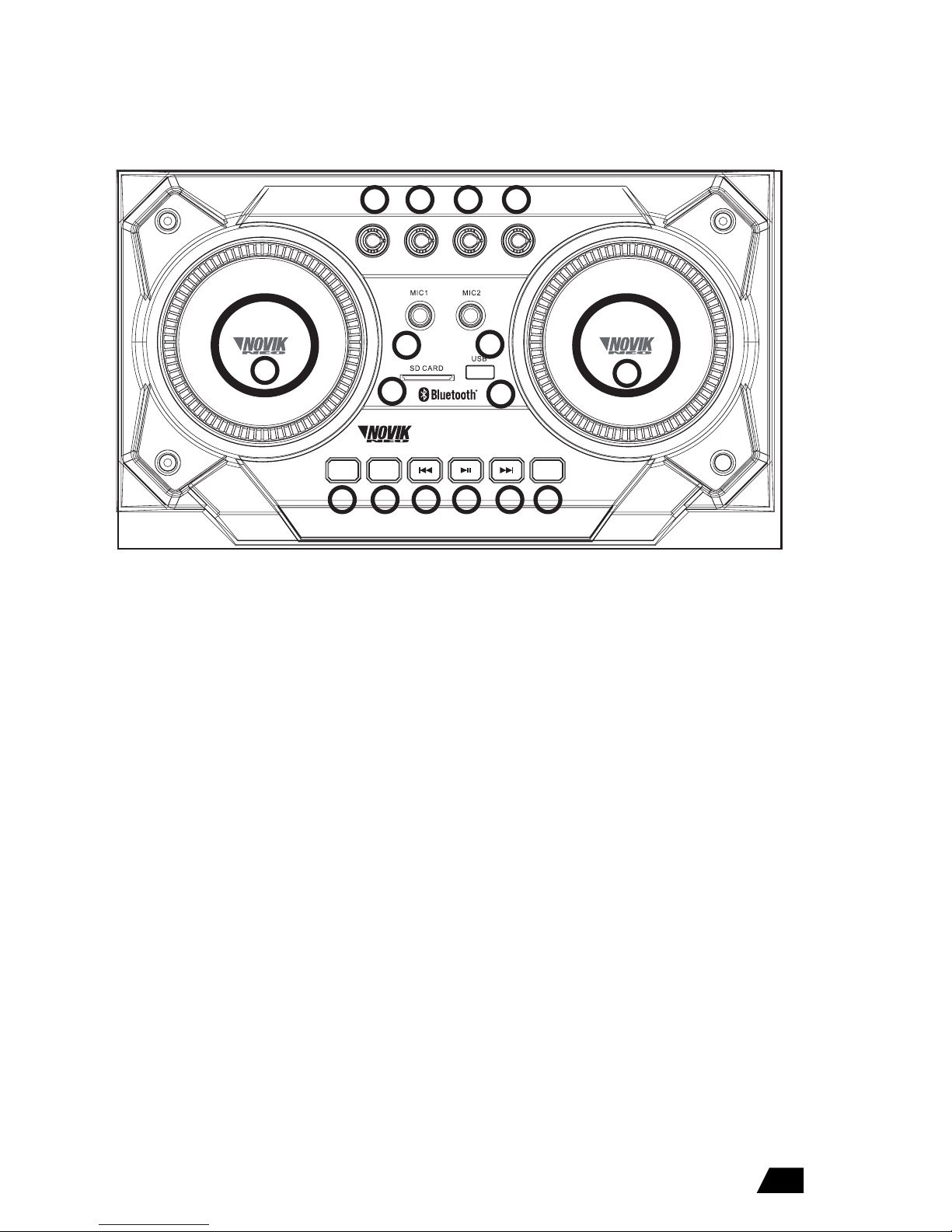
1- Microphones echo level control
Adjust the echo level of the microphone inputs.
2- Microphones tone control
Adjust the tone (high and low frequencies) of the
microphone inputs.
3- Bass level control
Adjust the low frequencies level between
-15dB/+15dB
4-Treble level control
Adjust the high frequencies level between
-15dB/+15dB
5- Microphone level
With this knob you can control the overall vol-
ume of the microphone inputs
6- Microphone 1 input
6.5mm plug input. Unbalanced.
7- Microphone 2 input
6.5mm plug input. Unbalanced.
8- Line/Fm/Aux level
With this knob you can control the overall vol-
ume of the music inputs
9- SD Card Input
Use this input to play your audio les on the
MP3 Player (supported formats MP3/WMA/WAV/
FLAC).
10- USB input
Use this input to play your audio les on the
MP3 Player (supported formats MP3/WMA/WAV/
FLAC).
TOP PANEL CONTROLS
11- MODE button
Press this button to choose Bluetooth®/USB/SD/
FM/AUX status for signal.
Attention: After you choose the Bluetooth® mode,
please note the code is BT-SPEAKER.
12- REC button
Connect an USB/SD device. Then choose the AUX
or FM mode. Press REC button for recording FM
signal or AUX signal and press again the button
to stop de record. An mp3 le is saved on the
ash drive.
13- Previous button
Press in playback mode USB Drive/SD/Bluetooth®
to return to the previous song, if you press and
hold the volume of the player will be decrease.
14- Play/Pause Button
Press to boot or pause playback of les on USB
ash drives/SD/Bluetooth®.
15- Forward Button
Press in playback mode USB Drive/SD/Bluetooth®
to advance to the next song, if you press and hold
the volume of the player will be increase.
16- LED button
Use this button to turn on/o the speaker lights.
Use this switch to turn on/o the system.
1
5
234
67
8
910
11 12 13 14 15 16

www.novikneo.com
8
FRONT DESCRIPTION
1
2
2
1
1- 2x3”High and mid-high frequency Tweeter
2- 2x12”Low and mid-low frequency Woofer

www.novikneo.com
9
REMOTE CONTROL FUNCTIONS
1- Power on/o
2- Mute
3- Repeat key (single repeat/repeat all)
4- Mode key (shift AUX/USB/SD mode)
5- 0-9 number keys
6- Sound mode key (several sound mode circulated)
7- Record key
8- Play/Pause
9- Volume –
10- Volume +
11- Previous song
12- Next song
1
3
5
5
8
10
12
11
9
76
4
2

www.novikneo.com
10
WIRELESS MICROPHONE FUNCTION INSTRUCTION
CHARGING STATEMENT
TROUBLESHOOTING
• Is the device connected to an appropriate alter current net
through the voltage wire provided by the manufacturer?
• Is the switch on?
• Are the wires correctly connected?
• Is the audio signal received in the loudspeaker?
• Is the level control correctly adjusted?
• Has the input signal the correct level to enter in
• Are the wires damaged?
• Move the wires and keep them far from noise sources.
• Move the monitors and the wires of any device that can
produce interferences (cell phones, transformers, etc.)
The device does not turn on
There is no sound
The sound is weak, distorted or noisy
1. Open battery cover, please notice the place of positive & negative pole when put in the batteries.
2. Turn on Microphone power switch to ON, if power indicator light not ash or constant on, please
check voltage of the power maybe not enough or battery contact wrong pole.
3. Adjust the knob on the speaker for the microphone, according your need to adjust the volume.
4. Adjust volume when use wireless microphone to sing.
5. When switch on wireless microphone, power indicator light will ash, indicates the power of the
battery is low, please replace new batteries as soon as possible.
Charging period should be 6-8hours, please pull o the adapter after full charged. It may caused
battery damaged after charge long-time (charging indicate light will keep ashing during charging,
ashing will be stopped after charging nished.)
Note: Please charge in-time if battery do not have enough power. Must be sure battery has power if
do not use the appliance for long time, otherwise will cause battery damaged.
Este manual sirve para los siguientes modelos
1
Tabla de contenidos
Idiomas:


