
NKE Pad Pilot Series Manual de usuario

Zi de Kerandré – Rue Gutenberg – 56700 – HENNEBONT
www.nke-marine-electronics.fr
Pad Pilot
Part number: 90-60-545 Pad Pilot White
90-60-546 Pad Pilot Carbon
USER MANUAL
&
INSTALLATION SHEET
V1.1

2 67_Pad_Pilot_UM_UK_11
1
Introduction.......................................................................................................... 3
2
Operation............................................................................................................. 3
2.1
Description of the control keys ...................................................................... 3
3
Settings of the Pad Pilot...................................................................................... 5
3.1
Set up an address for the Pad Pilot............................................................... 5
3.2
Key sound ..................................................................................................... 5
4
Use in a TOPLINE Bus........................................................................................ 6
4.1
Selection of a display..................................................................................... 6
4.2
Autopilot ON / OFF........................................................................................ 7
4.3
Course to steer.............................................................................................. 7
5
Installation........................................................................................................... 8
5.1
Pad Pilot packing list ..................................................................................... 8
5.2
Wiring the Pad Pilot....................................................................................... 8
5.3
Mounting the Padpilot.................................................................................... 9
6
Specifications of the PAD PILOT....................................................................... 10
7
Firmware evolution for the pad pilot................................................................... 11
3 67_Pad_Pilot_UM_UK_11
1 INTRODUCTION
The Pad Pilot controls displays and manages the autopilot.
2 OPERATION
The Pad Pilot is given a node address, like a display. When the Pad Pilot is
powered for the first time, the default address is 0 (factory setting). It will be
necessary to define a node address for the Pad Pilot to be recognised and to operate
on the Topline Bus.
(Refer to 3.1)
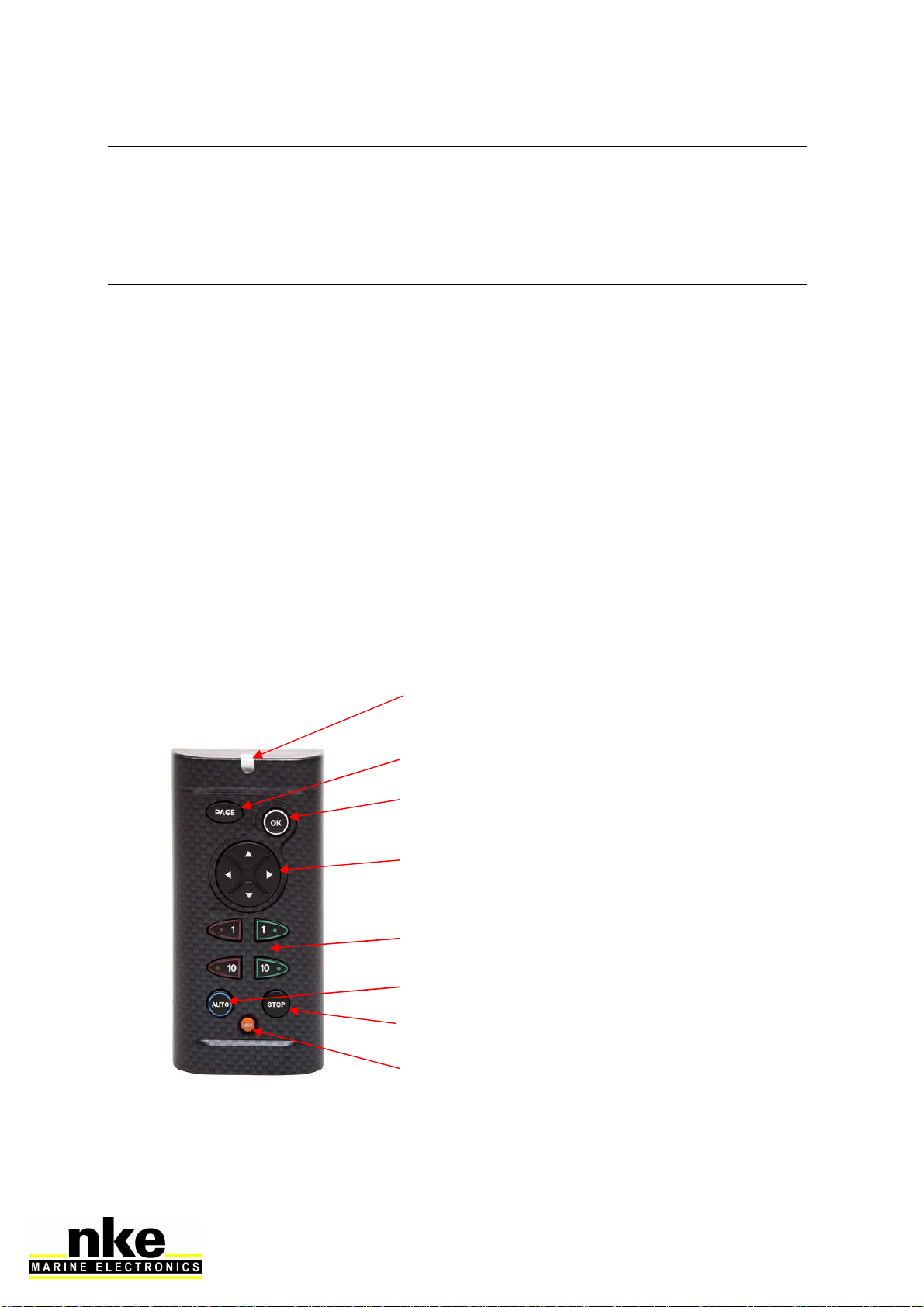
2.1 Description of the control keys
The Pad Pilot has 10 keys. They are used to control the display, to access the
menus and to manage the Autopilot.
STOP
OK
AUTO
PAGE
NAVIGATOR
COURSE TO STEER
MOB
RED LED

4 67_Pad_Pilot_UM_UK_11
•RED LED
Led indicating the current mode for the Pad Pilot (display selection mode, set-
up mode)
Flashes at each press.
.
•PAGE
Use this key to navigate in various displays of the Topline range. Press and
hold to access the display selection mode.
This key is also used to access the displays' menus, to scroll the pages and
for the "back/return" function.
•OK
This key is used to confirm a selection.
•NAVIGATOR
Use the left and right arrows to select the display. It is also used to navigate in
the menus and pages of the selected display.
•AUTO
This key is used to engage the autopilot.
•STOP
This key is used to disengage the autopilot.
•-1, +1, -10, +10
Pressing on one of these keys modifies the course to steer by step of 1° or
10°.
•MOB
Press and hold this key to trigger a Man Over Board function on the Topline
bus.

5 67_Pad_Pilot_UM_UK_11
3 SETTINGS OF THE PAD PILOT
3.1 Set up an address for the Pad Pilot
When the Pad Pilot is powered for the first time, the default address is 0, the LED
flashes once per second, waiting for the operational node address. Press to
allocate an address.
If the Pad Pilot already has an address, there are two possibilities:
•You wish to allocate a new address:
Press + simultaneously until you hear an audible signal (3
seconds) and the LED flashes once per second. You’ve accessed the setup
mode. To allocate a new address, press .
•You wish to set reset the default address (0):
To do this, press + simultaneously during 3 seconds, until you
hear an audible signal and the LED flashes once per second. The address 0 is
allocated to the Pad Pilot by pressing . This restores the setup as it
was when the device was powered for the first time.
3.2 Key sound
Every time you press on a key on Pad Pilot, this generates a sound. This sound can
be disabled by entering the setup mode with + during 3 seconds until
you hear a Beep and then press the right arrow of . Repeat the procedure to
activate the key sound.
6 67_Pad_Pilot_UM_UK_11
4 USE IN A TOPLINE BUS
4.1 Selection of a display
To select a display with the Pad Pilot, press until the second beep (5
seconds). You’ve accessed the selection mode. Then press on the left or right arrow
to toggle between displays. You may press several times until you find the desired
display.
This operation is required on the first use, as by default no display is
selected.
- Select the TL25 :
Press on until the second beep, then with and left and right arrows
you can select the TL25. Once the TL25 is selected, the upper line flashes. Press
to confirm this display is selected. Then you can modify the upper line using
up and down arrows of . To change line, use . Press and long hold
to access the sub-channel. Press to change the sub-channel. Press and hold
long to exit.
- Selecting Multigraphic:
Press until you hear a second beep and choose a display using the left and
right arrows of : Once Multigraphic has been selected, a remote control (version
2.3) or a yellow box (version 2.4) appears, then press to confirm. The keypad
works the same way as the one on the Multigraphic.
Refer to the manual of Multigraphic V2.4 or newer.
- Selecting Multidisplay:
Press until you hear a second beep and choose a display using the left and
right arrows of : Once the Multidisplay has been selected, a yellow box appears
and press to confirm.
Refer to the Multidisplay manual.

7 67_Pad_Pilot_UM_UK_11
4.2 Autopilot ON / OFF
- To engage the autopilot, press
- To disengage the autopilot, press
4.3 Course to steer
Pressing on any of the four keys alters the course to steer.
A long press on or (+10°) triggers an automatic tack.

8 67_Pad_Pilot_UM_UK_11
5 INSTALLATION
WARNING
Turn the power supply Off before doing any work on the TOPLINE Bus.
5.1 Pad Pilot packing list
- A Pad Pilot with a six metres cable.
- A protection cover.
- A Fixamo M14.
- A plastic M14 nut.
5.2 Wiring the Pad Pilot
Connect the bus cable to a Topline junction box as follow:
White wire on "+12 V white" or "+/white"
Shield on "GND" or "-/nu"
Black on "Data black" or "D/black"

9 67_Pad_Pilot_UM_UK_11
5.3 Mounting the Padpilot
There are several ways to mount the Pad Pilot:
A 18 mm diameter hole is required to allow the
cable running as well as the mounting kit.
If the supporting surface is between 1
and 3mm: Screw the plastic nut by hand.
If the supporting surface is between 3.1
and 40 mm: Screw by hand the Fixamo
to the unit and then the plastic nut.
Alternatively, you can use the two inserts
at the back of the Pad, and screw two
M3 screws.

10 67_Pad_Pilot_UM_UK_11
DRILLING TEMPLATE
6 SPECIFICATIONS OF THE PAD PILOT
Parameter Value
Dimensions
With protection cover (mm): 122 x 62 x 27
(Length x Width x Depth)
Without protection cover (mm): 115 x 58 x 23
(Length x Width x Depth)
Mounting kit - Hand-screw nut M14 (part Nr: 30-95-032)
- Fixamo M14 (part Nr: 30-95-031)
Weight 350g with 6m of cable (32g/m) and protection cover
Power supply 8V – 32V DC
Operational consumption
@ 12 V < 30mA
Topline bus power cable Ø5.5mm, 2 wires + ground, length 6m
Operational temperature -10°C / 50°C
Storage temperature -20°C / 60°C
Protection rate IP7 waterproof to water projections
Este manual sirve para los siguientes modelos
2
Tabla de contenidos


