
NextWave Digital TDR-2190 Manual de usuario

Standard Definition Set Top Box
TDR-2190
Operating Instructions
Please read these operating instructions before using the product.
tdr2190-manual.indd 1 10/03/2006 2:10:33 PM

2
Safety Instructions
Safety Tips.
Do not overload wall outlets, extension cords or integral convenience receptacles as this can result in a risk of
fire or electrical shock.
Never allow liquids, spray or other materials to come into contact with the inside of the STB.
Unplug the STB from the wall outlet before cleaning.
Use a soft cloth to clean the exterior of the STB.
Allow clear space around the STB for sufficient ventilation.
Do not use the STB where it is exposed to direct sunlight or near a heater.
Never stack other electronic equipment on top of the STB.
Do not place the STB outdoors. Keep out of direct sunlight.
Do not connect or modify cables when the STB is plugged in.
Do not cover the STB or place it on a unit that emits heat.
»
»
»
»
»
»
»
»
»
»
WARNING
RISK OF ELECTRIC SHOCK
DO NOT OPEN
TO REDUCE THE RISK OF ELECTRIC SHOCK, DO NOT REMOVE
COVER (OR BACK). NO USER SERVICEABLE PARTS INSIDE.
REFER SERVICING TO QUALIFIED SERVICE PERSONNEL.
This symbol indicates “dangerous
voltage” inside the product that presents a
risk of electric shock or personal injury.
This symbol indicates important
instructions accompanying product.
Never stack other electronic equipment on top of the STB. The STB requires sufficient
ventilation space to prevent overheating. Failure to provide adequate ventilation could
result in poor performance of the STB or void your warranty.
!
Please read the following
safety instructions carefully.
tdr2190-manual.indd 2 10/03/2006 2:12:01 PM

33
Table of Contents
Welcome... 4
Included within package................................................................... 4
Optional or Recommended Accessories (Not Included) ................ 4
Important Points 5
Rear Panel 6
Connection Options 7
Connecting the Antenna .................................................................. 7
Basic Set Up - Standard TV............................................................. 7
Basic Set Up - Standard TV - S-Video ............................................ 8
Standard TV & HiFi ......................................................................... 8
Front Panel 9
Front Panel ....................................................................................... 9
Remote Control 10
Navigating Menus 12
Using Remote Control to Navigate.................................................. 12
Using contextual help....................................................................... 12
Main Menu 13
Menu Structure................................................................................. 13
Installation Sub-menu ...................................................................... 14
Auto Search...................................................................................... 14
Fast Search ................................................................................ 14
Manual Search ................................................................................. 15
Scan Complete Menu ...................................................................... 15
Antenna Power................................................................................. 16
Initialise STB..................................................................................... 16
Edit Channels ................................................................................... 17
Favourite Group ............................................................................... 18
System Settings ............................................................................... 19
Video Settings .................................................................................. 19
Clock Settings................................................................................... 20
Language Settings ........................................................................... 21
Lock Settings .................................................................................... 22
System Information .......................................................................... 23
Program Guide ................................................................................. 23
Utility Sub-menu ............................................................................... 24
Calendar ........................................................................................... 24
On Screen Display (OSD) 25
iplate.................................................................................................. 25
Function Guide 26
Changing Channels ......................................................................... 26
Volume Control................................................................................. 26
Aspect Ratio ..................................................................................... 26
Sleep................................................................................................. 26
TV / Radio......................................................................................... 26
Audio Settings .................................................................................. 27
Teletext.............................................................................................. 28
Closed Captions (subtitles).............................................................. 28
Screen Zoom.................................................................................... 28
Troubleshooting................................................................................ 29
Specifications ................................................................................... 30
tdr2190-manual.indd 3 10/03/2006 2:12:01 PM

4
Congratulations, and thank you for purchasing a NextWave Digital TDR-2190
Standard Definition set top box.
Your NextWave TDR-2190 should include the following items. If you are missing any of the following items, please contact your retailer.
Electronic copies of the operating instructions and quick start guide are also available for download from the support section of
www.nextwave-digital.com.
Included within package
Depending on your particular audio/visual setup, certain third party products may need to be purchased such as:
Coaxial Digital interconnects, S-Video Flyleads, RF Flyleads.
Optional or Recommended Accessories (Not Included)
NextWave Digital reccommends SignalMAX Home Theatre Interconnects
www.signalmax.com.au
to the NextWave of Technology...
Standard Definition Set Top Box
TDR-2190
Operating Instructions
Please read these operating instructions before using the product.
RCU + 2x AAA
batteries
Operating
Instructions
RCA ~ RCA Flylead
tdr2190-manual.indd 4 10/03/2006 2:12:01 PM

55
Typographic conventions
Several symbols are used throughout these
operating instructions to identify actions, tasks
and important safety information.
Begin a task
This symbol indicates the beginning of a
specific task, and it is usually followed by a
step by step listing of the actions needed to
complete that task.
Information
This symbol indicates that a statement
contains explanatory or additional information
relevent to the particular task.
Caution
This symbol indicates that a statement
contains important information that has a
significant impact on the opreation of the
product.
Ignoring this type of symbol could result in
damage to the product or external equipment.
Step by Step
These symbols indicate a step by step
process required to complete a particular task
or use a specific function of the product. All
the steps of a single task are joined by a grey
bar, and other symbols such as and !
may appear within that bar.
Important Points
1
2
3
!
Disclaimer:
Menu structure and specifications can change
without prior notice.
While every care has been taken to
ensure the accuracy of these operating
instructions, neither NextWave Digital nor
any of its employees make any warranty,
expressed or implied, or assume any legal
liability or responsibility for the accuracy or
completeness of any information contained
within these operating instructions.
Please check
http://nextwave-digital.com/products.php
for the latest version of these operating
instructions.
!
tdr2190-manual.indd 5 10/03/2006 2:12:03 PM
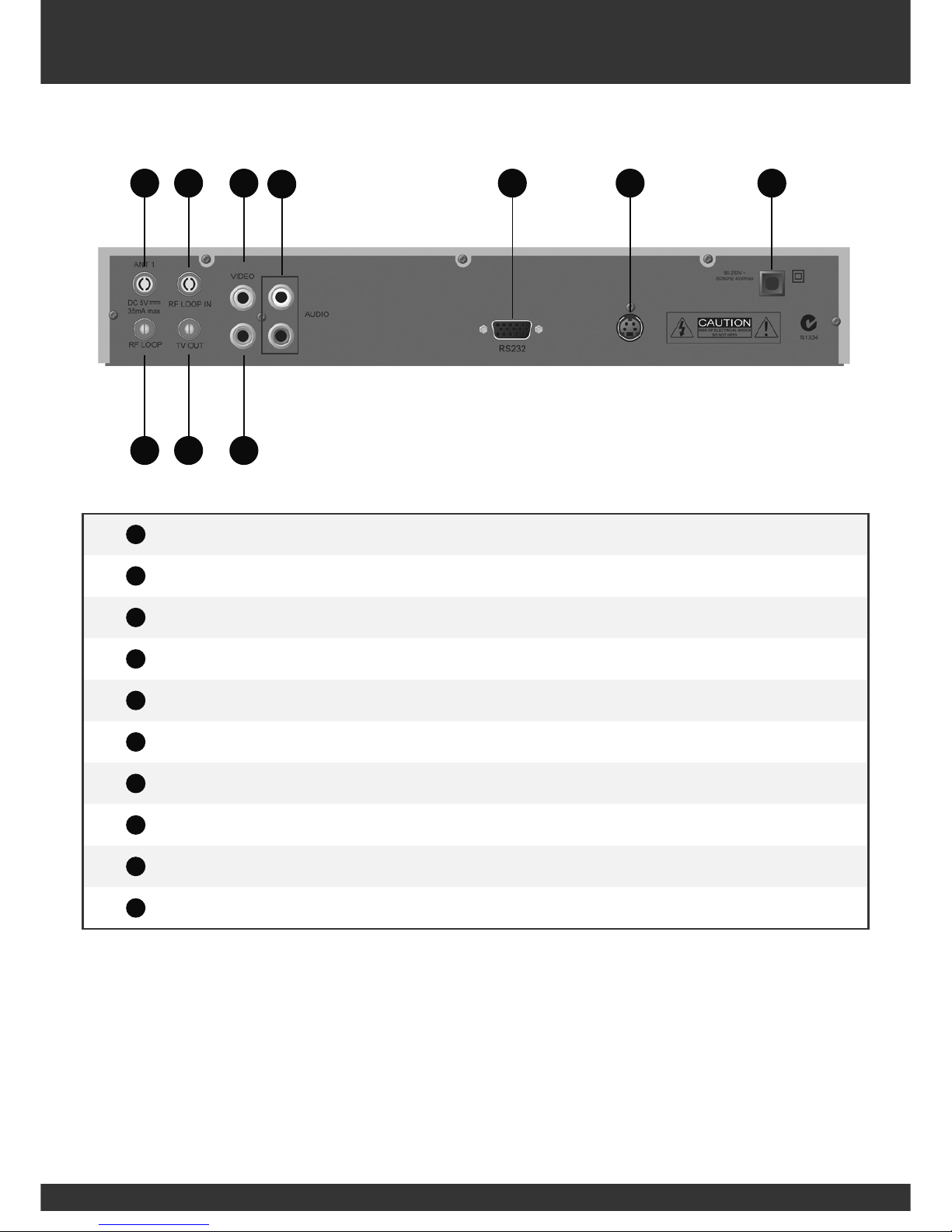
6
1
1ANT IN RF - Terrestrial (conventional) TV aerial input.
1
2RF LOOP RF - LOOP OUT to RF LOOP IN. (For continuation of analogue signal)
1
3RF LOOP IN Connect to RF LOOP.
1
4TV OUT RF output to RF socket on old style TV.
1
5VIDEO RCA Composite video (CVBS) output to TV.
1
6S/PDIF Coaxial - For 5.1 digital audio to AV processor.
1
7Audio L/R 2xRCA Stereo audio left & right to TV.
1
8RS232 Service port for software upgrades..
1
9SVIDEO S-Video output to TV.
1
10 Mains Main power lead to wall outlet.
Rear Panel
1
9
1
11
31
51
71
8
1
21
4
1
10
1
6
tdr2190-manual.indd 6 10/03/2006 2:12:04 PM

77
The following section details some common connection options that may assist. Please note that some of these connection options may
require third party interconnects or cables beyond what is supplied in the box. Talk to your retailer about the best options for connecting
your TDR-2190.
Connecting the Antenna
Connection Options
N1334
!
CAUTION
RISK OF ELECTRICAL SHOCK
DO NOT OPEN
RS232
90-250V ~
50/60Hz 40Wmax
VIDEO
RF LOOP IN
ANT 1
RF LOOP TV OUT
AUDIO
DC 5V
35mA max
TV OUT
ANT 1
Please Note: If you would like to receive either community television channels
or original analogue programming, you may use the RF LOOP OUT output
signal to connect your VCR or TV receiver to it. (This signal carries the same
signal that is received by the antenna and is not processed by the STB).
Basic Set Up - Standard TV
N1334
!
CAUTION
RISK OF ELECTRICAL SHOCK
DO NOT OPEN
RS232
90-250V ~
50/60Hz 40Wmax
VIDEO
RF LOOP IN
ANT 1
RF LOOP TV OUT
AUDIO
DC 5V
35mA max
Audio
Video
ANT 1
The TDR-2190 can power a 5VDC active antenna. By default this functionality is disabled
to prevent damaging standard passive antennas. To enable this feature, please refer to the
‘Antenna Power’ sub-menu on page 16.
!
Use supplied RCA ~ RCA cable.
tdr2190-manual.indd 7 10/03/2006 2:12:05 PM

8
Connection Options
Standard TV & HiFi
Connecting the Antenna
Connect the coaxial cable from the VHF/UHF Antenna to the RF IN ( 1
7)
socket on the rear panel of the STB.
N1334
!
CAUTION
RISK OF ELECTRICAL SHOCK
DO NOT OPEN
RS232
90-250V ~
50/60Hz 40Wmax
VIDEO
RF LOOP IN
ANT 1
RF LOOP TV OUT
AUDIO
DC 5V
35mA max
Audio S-Video
ANT 1
Digital Audio
POWER
(I&I 3
Use a S-Video cable purchased separately.
Basic Set Up - Standard TV - S-Video
N1334
!
CAUTION
RISK OF ELECTRICAL SHOCK
DO NOT OPEN
RS232
90-250V ~
50/60Hz 40Wmax
VIDEO
RF LOOP IN
ANT 1
RF LOOP TV OUT
AUDIO
DC 5V
35mA max
Audio S-Video
ANT 1
Use a S-Video cable purchased separately.
tdr2190-manual.indd 8 10/03/2006 2:12:10 PM

99
Front Panel
Front Panel
1
11 1
13
1
12
1
11 Standby Button Switch the STB between standby and power on mode.
1
12
Navigate the main menu
Volume Up/Down
Channel up/DOwn
OK
1
13 Menu Display the main menu.
tdr2190-manual.indd 9 10/03/2006 2:12:18 PM

10
Remote Control
1
31
1
27
1
28
1
24
1
29
1
25
1
30
1
26
1
23
1
21
1
19
1
17
1
16
1
13
1
10
1
8
1
9
1
11
1
12
1
15
1
18
1
22
1
14
1
20
tdr2190-manual.indd 10 10/03/2006 2:12:19 PM
Este manual sirve para los siguientes modelos
1
Tabla de contenidos


