2
CHANGING THE COOK CYCLE SETTINGS
1. T e front and rear zone cook settings can be set individually. To c ange t e settings of one of t ese
zones, make sure t e grill is on and t e eat zone is off. Press and old t e “Settings” button w ile
pressing t e appropriate zone button (front or rear) and release bot w en t e cook lig ts begin flas ing.
2. T e cook lig t will begin to flas and t e display will s ow t e current cook eat setting. T is is ow
muc eat is applied to t e rollers during t e cook cycle and can be set to any number from 0.00 to 1.00.
T e settings can be adjusted up or down using t e two zone buttons w ic ave up and down arrows on
t em. To advance to t e next setting, press t e “Settings” button.
3. T e next setting is t e cook time (in ours and minutes).
4. After t e cook settings are set, t e old lig ts begin to flas and t e grill s ows t e old eat setting.
5. T e last setting is t e old time (again in ours and minutes).
6. After setting t e old settings, press t e “Settings” button again to exit t e settings mode.
CLEANING
NOTE: Proper maintenance plays an important part in t e life span and functioning of t e roller grill
1. W en t e grill is off, press eac zone button (front and rear) to begin eating t e grill up.
2. Once t e grill is ot, t en t e rollers can be wiped down.
3. ALWAYS START AT THE END OF THE ROLLERS AND WIPE TOWARD THE CENTER. T is prevents
extra grease from entering t e sides of t e roller grill and into t e bearings.
♦GripsIt rollers: Use a wet, soft clot to wipe t e rollers clean. NOTE: never use any metal object on t e
GripsIt rollers at any time. Metal will cause serious damage to t e rollers.
♦Silverstone rollers: Use a scratc proof sponge made for non-stick coated products or a soft clot to
wipe t e rollers clean. If t e build up on t e rollers cannot be removed by just wiping wit a wet
sponge, wrap some ice cubes inside a soft towel and rub over t e rollers. NOTE: never use any metal
object on t e Silverstone rollers at any time. Metal will cause serious damage to t e rollers.
♦C rome rollers: Eac roller grill comes wit a two sided sponge. Use t e roug side of t e sponge to
remove all residue from t e rollers. If build up of residue cannot be removed from t e rollers by
wiping wit a course sponge you may use any type of kitc en abrasive to clean t e rollers.
4. After cleaning t e rollers, remove t e drip pan and clean wit mild soap and water.
SERVICE INSTRUCTIONS
IF ROLLERS WON’T TURN
1. C eck power source to be sure t e roller grill is plugged into t e proper voltage outlet and t at t e outlet
is in proper working order.
2. IMPORTANT: Disconnect t e roller grill from t e power source before disassembly.
3. Remove t e end covers.
4. If t e drive c ain is off t e idler sprocket, reinstall it.
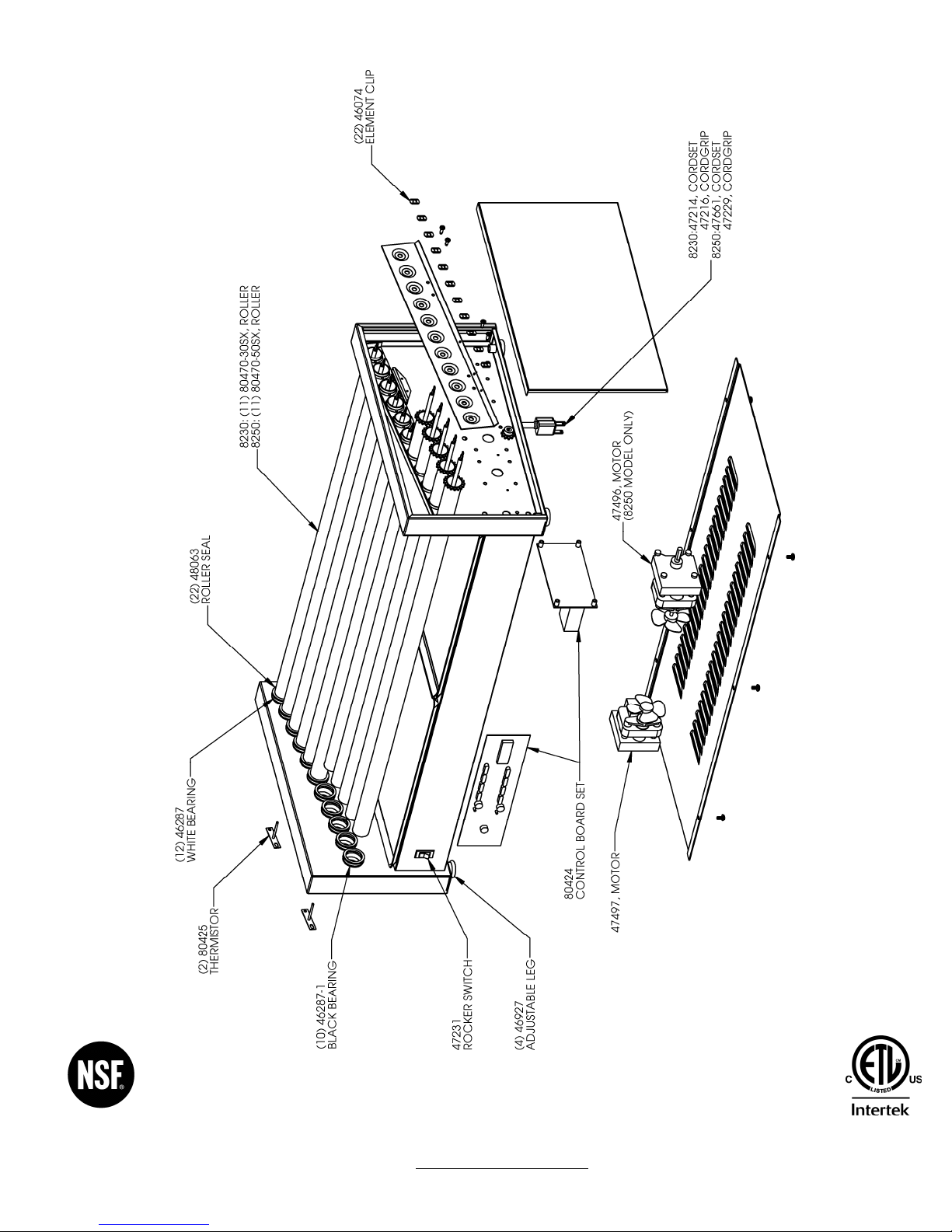
5. Remove t e drive c ain from t e sprocket on t e motor s aft and if t e rollers turn easily, t en replace
t e motor.
6. Remove t e c ain guard and inspect t e sprockets on t e end of eac roller. If t ey are loose, worn, or
out of alignment, t en replace t e roller.
7. If t e rollers are ard to turn by and (wit out t e c ain attac ed) remove and clean out any
accumulated foreign matter in t e bearings and on t e rollers.
8. IMPORTANT: Reassemble t e roller grill completely before reconnecting to t e power source.
IF ROLLER GRILL BLOWS A FUSE OR CIRCUIT BREAKER
1. C eck t e capacity of t e circuit being used to be sure it is not overloaded.
2. Unplug t e roller grill and c eck it’s wiring for s ort circuits.
IF ROLLERS WON’T HEAT
C eck t e power source to be sure t e roller grill is plugged into t e proper voltage outlet and t e receptacle
is working. If properly connected and still no eat call NEMCO customer service at 1-800-782-6761.
NOTE: WARRANTY DOES NOT COVER DAMAGE TO THE ROLLERS OR ROLLER
COATING. IT IS NEMCO'S SOLE DISCRETION TO DETERMINE IF A ROLLER OR
ROLLER COATING CLAIM IS WARRANTED
.