
Navien NaviLink Manual de usuario

ENG/FRE

If your NaviLink requires service, you have several options for
getting service, contact Technical Support at 1-800-519-8794 or on
the website: www.navien.com.
For warranty service, always contact Technical Support first.
TEL: 1-800-519-8794
FAX: 1-949-420-0430
Add: 20 Goodyear lrvine, CA 92618
This product can be used in the following countries: USA, CA

3
English
FCC STATEMENT
This equipment has been tested and found to comply with the limits
for a Class B digital device, pursuant to part 15 of the FCC Rules.
These limits are designed to provide reasonable protection against
harmful interference in a residential installation. This equipment
generates, uses and can radiate radio frequency energy and, if not
installed and used in accordance with the instructions, may cause
harmful interference to radio communications. However, there is no
guarantee that interference will not occur in a particular installation. If
this equipment does cause harmful interference to radio or television
reception, which can be determined by turning the equipment off and
on, the user is encouraged to try to correct the interference by one or
more of the following measures:
•
Reorient, or relocate, the receiving antenna.
•
Increase the distance between the equipment and receiver.
•
Connect the equipment into an outlet on a circuit different from that
to which the receiver is connected.
•
Consult the dealer or an experienced radio/TV technician for help.
This device complies with part 15 of the FCC Rules. Operation is subject
to the following two conditions:
(1) This device may not cause harmful interference.
(2) This device must accept any interference received, including
interference that may cause undesired operation.
Any changes or modifications in construction of this device which are
not expressly approved by the party responsible for compliance could
void the user’s authority to operate the equipment.
The manufacturer is not responsible for any radio or TV interference
caused by unauthorized modifications to this equipment. Such
modifications could void the user’s authority to operate the equipment.
FCC RF Radiation Exposure Statement
This equipment complies with FCC RF Radiation exposure limits set
forth for an uncontrolled environment. This device and its antenna
must not be co-located or operating in conjunction with any other
antenna or transmitter.
“To comply with FCC FR exposure compliance requirements, this grant
is applicable to only Mobile Configurations. The antennas used for this
transmitter must be installed to provide a separation distance of at
least 8 inches (20 cm) from all persons and must not be co-located of
operating in conjunction with any other antenna or transmitter.”
FCC IDENTIFIER: 2ADXS-WFM50-SFC201

4
Industry Canada Statement
Complies with the Canadian ICES-003 Class B specifications.
Cet appareil numérique de la classe B est conforme à la norme NMB-
003 du Canada.
This device complies with RSS 210 of Industry Canada. This Class B
device meets all the requirements of the Canadian interference-causing
equipment regulations.
Cet appareil numérique de la classe B respecte toutes les exigences du
Règlement sur le matériel brouilleur du Canada.
This radio transmitter (IC: 12641A-WFM50SFC201) has been approved
by Industry Canada to operate with the antenna types listed below with
the maximum permissible gain and required antenna impedance for
each antenna type indicated. Antenna types not included in this list,
having a gain greater than the maximum gain indicated for that type,
are strictly prohibited for use with this device.
Le présent émetteur radio (IC : 12641A-WFM50SFC201) a été approuvé
par Industrie Canada pour fonctionner avec les types d’antenne
énumérés ci-dessous et ayant un gain admissible maximal. Les types
d’antenne non inclus dans cette liste, et dont le gain est supérieur au
gain maximal indiqué, sont strictement interdits pour l’exploitation de
l’émetteur.
Canadian Compliance Statement
This device complies with industry Canada license-exempt RSS
standard(s). Operation is subject to the following two conditions:
(1) This device may not cause interference.
(2) This device must accept any interference, including interference that
may cause undesired operation of the device.
Cet appareil est conforme aux normes CNR exemptes de licence
d’Inustrie Canada. Le fonctionnement est soumis aux deus conditions
suivantes :
(1) cet appareil ne doit pa provoquer d’interferences et
(2) cet appareil doit accepter toute interference, y compris celles
susceptibles de provoquer un fonctionnement non souhaite de
l’appareil.
To reduce potential radio interference to other users, the antenna
type and its gain should be so chosen that the equivalent is tropically
radiated power (e.i.r.p) is not more than that permitted for successful
communications.

5
English
Safety information
• Do not clean the device with water or a damp cloth.
_
You can damage the device and expose yourself to the risk of an
electric shock.
CAUTION
• Use only Navien-approved accessories.
_
Using third-party accessories, such as power adapters, cables, or
antennas can damage the device or cause injury.
_
Navien is not responsible for damage or injuries caused by third-party
accessories, such as power adapters, cables, or antennas.
• When mounting the NaviLink on a wall, make sure that the wall is
strong enough to support the device.
_
The device could fall if the wall is not strong enough and this can
damage the device or cause injury.
• Use suitable tools and appropriate force to install the NaviLink.
_
Using unsuitable tools or excessive force during installation can cause
damage to the device.
• Do not expose the device to direct sunlight or high temperatures for
an extended period of time.
_
Prolonged exposure to sunlight or extreme temperature can cause
permanent damage to the device’s internal components.
• Avoid water and wet areas.
_
This may damage the device’s internal components.
• The operating temperature of the device is 32 °F–104 °F (0 ℃–40 ℃).
• Do not use loose or damaged cables.
_
This may result in a poor connection or cause the device to
malfunction.
• Use the antenna in the normal position.
_
Avoid contact with the antenna while the NaviLink is turned on.
Read and follow all safety instructions in this manual to avoid unsafe
operating conditions, property damage, personal injury, or death.
Safety messages used in this manual
WARNING
Indicates a potentially hazardous situation which, if not avoided, could
result in injury or death.
CAUTION
Indicates a potentially hazardous situation which, if not avoided, could
result in minor injury or property damage.
WARNING
• This device is designed for indoor use. Please install and use this
device indoors.
• Use only the supplied power adapter with your NaviLink. To
disconnect the device from the power supply, unplug the power
adapter.
• Do not disassemble or attempt to repair the device.
_
You can damage the device and expose yourself to the risk of an
electric shock.
_
Any attempt to disassemble or repair the device voids Navien’s
Limited Warranty. Navien is not responsible for damage or injuries
caused by voiding the Navien’s Limited Warranty.
• Do not store flammable materials near the device.
_
This may cause a fire or electric shock.
• Do not handle the device with wet hands.
_
This may result in an electric shock.

6
Connecting to a network ................................................... 19
Connecting to a network via a LAN cable ........................................19
Connecting to a Wi-Fi network and signing up................................ 19
Configuring a Wi-Fi network on smartphones .................................... 19
Starting the NaviLink App ..................................................20
Installing the App .............................................................................. 20
Registering for Membership – Product Owner ................................ 20
Registering for Membership – Installer/Servicer Member...............24
Registering for Membership – Additional Member ..........................26
Deregistering/Delegating the Permissions of a Product Owner
Member .............................................................................................29
Adding an Installer/Servicer NaviLink ..............................................30
Adding and Deleting NaviLink (Product Owner Accounts Only) .....32
Setting/Changing NaviLink Router ..................................................36
Troubleshooting ...............................................................39
Appendix ..........................................................................40
Specifications .................................................................................... 40
Contents
Overview ...........................................................................7
Supplied items ....................................................................................7
Part names ..........................................................................................7
Installing the NaviLink ........................................................9
Installing on a table ............................................................................9
Installing with a mounting plate ........................................................ 9
Connecting to boilers/water heaters ..................................11
Connecting to a single boiler/water heater ..................................... 11
Configuring the connection setting mode for NPE models ............ 13
Configuring the connection setting mode for NCB and NHB models
14
Configuring the connection setting mode for NFB (residential)
models ...............................................................................................15
Configuring the connection setting mode for NFB (commercial)
models ...............................................................................................16
Connecting to a cascade system ......................................................17

7
English
The NaviLink is an indoor converter for remotely controlling and
monitoring boilers or water heaters via a smartphone app. A boiler,
water heater, or a cascade system can be connected to a NaviLink.
• Hardware or software specifications of the NaviLink or the contents
of this manual may be changed without prior notice if the NaviLink’s
functions are upgraded.
• NaviLink functions can be limited by the operating environment.
Supplied items
Open the packaging and ensure that the following items are provided.
NaviLink Mounting plate Antenna Power adapter
NaviLink cable Screws and
anchors Foam pads User manual
Overview
Part names
2
5
3
4
1
67
No Description
1Power (PWR) LED
The blue light is turned on when the power is supplied.

8
No Description
4
SET/Reset button
• Resetting a network configuration: Press and hold the
button for more than 5 seconds.
• Resetting the NaviLink: Press and hold the SET/Reset and
AP mode button simultaneously for more than 5 seconds,
to reset the network settings and internal memory. All
LEDs will blink three times when the NaviLink is reset.
5
Communication channel ports (CH1/CH2/CH3)
A NaviLink cable is connected to each port for
communication with boilers water heaters.
* The NaviLink cable’s RS-485 connector should be
connected to a communication channel port.
RS-485 connector
5-pin connector
6LAN port
A LAN cable is connected to the LAN port.
7Power port
The DC 12 V power adapter is connected to the power port.
No Description
1
Wi-Fi (WiFi) LED
The green light is turned on when the NaviLink is connected
to a Wi-Fi network. When connecting to a Wi-Fi network, the
green light blinks.
CH1/CH2/CH3 LED
The green light blinks when a NaviLink cable is connected to
a communication channel port (CH1–CH3) and the NaviLink
and boilers/water heaters normally communicate. The LEDs
remain turned off if the NaviLink and boilers/water heaters
cannot communicate even when the NaviLink cable is
normally connected, or the NaviLink cable is not connected
abnormally.
2
Antenna port
An antenna for Wi-Fi network is connected to the antenna
port.
3
Access Point (AP) mode button
Press and hold for more than 3 seconds to start NaviLink AP
mode.
9
English
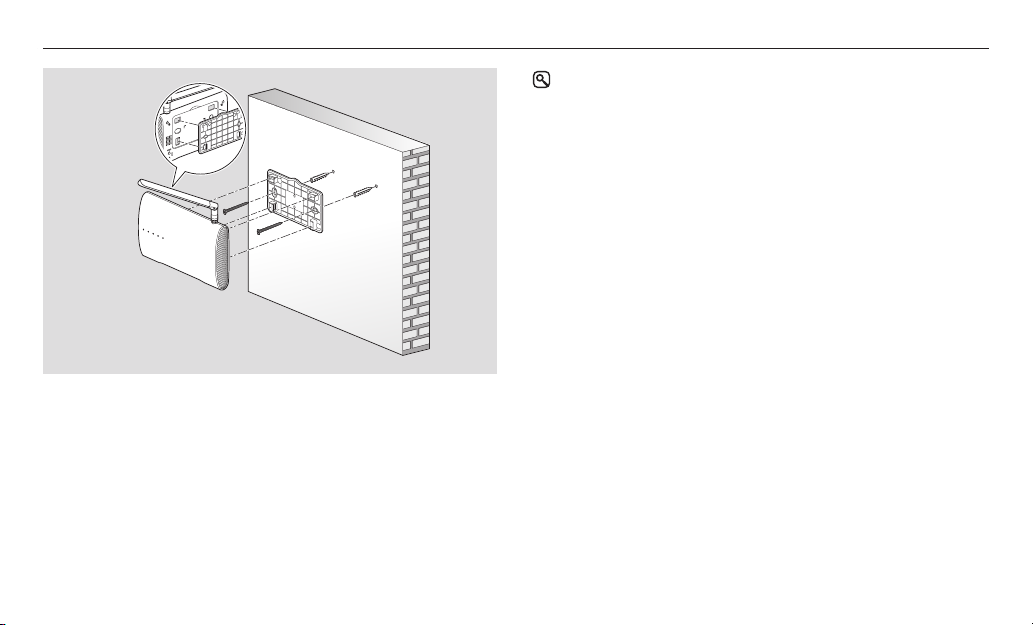
Installing with a mounting plate
The NaviLink can be installed on a wall using the supplied mounting
plate.
1
Drill holes which fit the keyholes of the mounting plate into the
selected wall, and then insert the plastic anchors into the holes.
• Ensure the plastic anchors are inserted to their full depth in the
holes.
2
Place the flat side of the mounting plate against the wall and then
line up the keyholes with the plastic anchors.
• Ensure the mounting plate is placed on the wall correctly.
3
Insert the screws through the keyholes of the mounting plate and
into the plastic anchors, and screw them in a clockwise direction to
fasten the mounting plate onto the wall.
4
Connect the antenna to the NaviLink.
5
Clip the NaviLink onto the mounting plate with the antenna
pointing up.
• You can hear a click when the NaviLink is securely attached to the
mounting plate.
You can place the NaviLink on stable, flat surface, such as a table, or
install the NaviLink on a wall using the supplied mounting plate.
This device is designed for indoor use only. Please install and use this
device indoors.
Arrange the power, LAN, and NaviLink cables after connecting each
cable to a corresponding port to ensure a tidy work environment.
Installing on a table
1
Affix the supplied foam pads to the back of the NaviLink.
2
Connect the antenna to the NaviLink.
3
Place the NaviLink on the table.
Installing the NaviLink
10
• When the NaviLink is connected to a Wi-Fi network, check the
following conditions to ensure the best network connection status.
_
To secure the best network signal quality and the maximum
communication range, install the NaviLink in an area where there
are no shadows and obstacles that can block the network signal.
_
Do not place the NaviLink close to metallic objects and do not
expose the NaviLink to direct sunlight.
_
Do not place the NaviLink near 802.11g or 20 MHz Wi-Fi
devices, computers or electronic devices using 2.4 GHz (e.g.
Bluetooth devices, wireless or mobile phones, fluorescent
lamps, microwaves, refrigerators, etc.), or industrial equipment
(e.g. transformers, large motors, etc.). This may damage the
NaviLink or other devices, or cause them to malfunction, due to
interference.
Otros manuales para NaviLink
1
Tabla de contenidos
Otros manuales de Mando a distancia de Navien


