Motorola MVMS Manual de usuario

MVMS Management Server
User Guide
Please read this instruction guide carefully before using the product and keep it for further reference.

MVMS Management Server User Manual
Notes
Please read this user manual carefully to ensure that you can use the device correctly and safely.
There may be several technically incorrect places or printing errors in this manual. The updates will be added into the new
version of this manual. The contents of this manual are subject to change without notice.
This device should be operated only from the type of power source indicated on the marking label. The voltage of the power
must be verified before using the same. Kindly remove the cables from the power source if the device is not to be used for a long
period of time.
Do not place this device near any heat sources such as radiators, heat registers, stoves or other devices that produce heat.
Do not place this device near water. Clean only with a dry cloth.
Do not block any ventilation openings and ensure proper ventilation around the machine.
Do not power off the device at normal recording condition.
This machine is for indoor use only. Do not expose the machine in rain or moist environment. In case any solid or liquid get
inside the machine’s case, please turn off the device immediately and get it checked by a qualified technician.
Do not try to repair the device by yourself without technical aid or approval.
When this product is in use, the relevant contents of Microsoft, Apple and Google will be involved in. The pictures and
screenshots in this manual are only used to explain the usage of our product. The ownerships of trademarks, logos and other
intellectual properties related to Microsoft, Apple and Google shall belong to the above-mentioned companies.
All examples and pictures used in the manual are from one of the models for reference purpose.
Disclaimer
With regard to the product with internet access, the use of product shall be wholly at your own risks. Our company shall be
irresponsible for abnormal operation, privacy leakage or other damages resulting from cyber attack, hacker attack, virus inspection, or
other internet security risks; however, our company will provide timely technical support if necessary.
Surveillance laws vary from country to country. Check all laws in your local region before using this product for surveillance
purposes. We shall not take the responsibility for any consequences resulting from illegal operations.
The storage period of the personal data depends on the capacity of the storage devices the users use and all data stored in the
device shall be handled by themselves. Our company shall not be responsible for the data loss.
Cyber Security Recommendations
Change passwords and use strong passwords. At least 8 characters or a combination of characters, numbers, and upper and lower
case letters should be used in your password.
Regularly change the passwords of your devices to ensure that only authorized users can access the system.
Change default ports (like HTTP, data port) to reduce the risk of outsiders being able to access.
It is recommended to set the firewall of your router. But note that some important ports cannot be closed (like 80, 6036).
Regulatory Information
FCC Marking
The products have be tested and found in compliance with the council FCC rules and regulations part 15 subpart B.
Operation of this product is subject the following two conditions: (1) this device may not cause harmful interface, and (2) this device
must accept any interference received, including interference that may cause undesired operation.
CE Marking
The products have been manufactured to comply with the following directives.
EMC Directive 2014/30/EU
RoHS Marking
The products have designed and manufactured in accordance with Directive EU RoHS Directive 2011/65/EU and its amendment
Directive EU 2015/863 on the restriction of the use of certain hazardous substances in electrical and electronic equipment.

MVMS Management Server User Manual
Contents
1 Introduction .......................................................................................................................................................................................1
1.1 Introduction ...................................................................................................................................................................................1
1.1.1 Summary ...........................................................................................................................................................................1
1.1.2 Features .............................................................................................................................................................................1
1.1.3 Interfaces and Indicators ...................................................................................................................................................1
1.2 Rear Panel Instructions ..................................................................................................................................................................2
2 Login...................................................................................................................................................................................................3
2.1 Login .............................................................................................................................................................................................3
2.2 Main Menu Interface Introduction .................................................................................................................................................3
3 Device Management...........................................................................................................................................................................6
3.1 Add Encoding Device ....................................................................................................................................................................6
3.1.1 Quickly Add ......................................................................................................................................................................6
3.1.2 Manually Add ....................................................................................................................................................................6
3.1.3 Initiatively Report .............................................................................................................................................................7
3.2 Modify or Delete Device ...............................................................................................................................................................8
3.3 Device Upgrade .............................................................................................................................................................................8
3.4 Device Setting ...............................................................................................................................................................................8
3.5 Area Setting ...................................................................................................................................................................................9
3.6 Channel Group Setting ..................................................................................................................................................................9
3.7 Add Media Transfer Server ...........................................................................................................................................................9
3.8 Add Storage Server...................................................................................................................................................................... 10
4 Live View..........................................................................................................................................................................................12
4.1 Live View .................................................................................................................................................................................... 12
4.1.1 View Mode Setting .......................................................................................................................................................... 13
4.1.2 Monitoring Point View .................................................................................................................................................... 13
4.1.3 Channel Group View ....................................................................................................................................................... 14
4.1.4 Plan View ........................................................................................................................................................................ 15
4.2 View Control ............................................................................................................................................................................... 16
4.3 Snapshot ...................................................................................................................................................................................... 17
4.4 Multi-Screen View ....................................................................................................................................................................... 17
4.5 Talkback ...................................................................................................................................................................................... 18
4.6 PTZ Control ................................................................................................................................................................................. 18
4.7 Audio Broadcast .......................................................................................................................................................................... 18
5 Record & Playback..........................................................................................................................................................................20
5.1 Record Configuration .................................................................................................................................................................. 20
5.1.1 Manual Recording ........................................................................................................................................................... 20
5.1.2 Schedule Recording ........................................................................................................................................................ 20
5.1.3 Alarm Linkage Recording ............................................................................................................................................... 21
5.2 Record Playback .......................................................................................................................................................................... 21
5.2.1 Instant Playback .............................................................................................................................................................. 23
5.2.2 Synchronous Playback .................................................................................................................................................... 24
5.2.3 Asynchronous Playback .................................................................................................................................................. 24
5.2.4 Playback by Time Slice ................................................................................................................................................... 24
5.2.5 Playback by Event ........................................................................................................................................................... 26
5.2.6 Playback by Tag .............................................................................................................................................................. 26
5.3 Backup ......................................................................................................................................................................................... 27
5.4 Search Picture .............................................................................................................................................................................. 27
6 Alarm Management.........................................................................................................................................................................29
6.1 Alarm Server Configuration ........................................................................................................................................................ 29
6.2 Alarm Configuration ................................................................................................................................................................... 29
6.3 SOP Settings ................................................................................................................................................................................ 30
6.4 Alarm View ................................................................................................................................................................................. 31
6.5 Alarm Log ................................................................................................................................................................................... 32

MVMS Management Server User Manual
7 E-Map...............................................................................................................................................................................................34
7.1 E-Map Settings ............................................................................................................................................................................ 34
7.1.1 Create E-Map .................................................................................................................................................................. 34
7.1.2 Add Hotspot .................................................................................................................................................................... 34
7.1.3 E-Map Monitoring .......................................................................................................................................................... 34
8 TV Wall.............................................................................................................................................................................................36
8.1 Add TV Wall Server .................................................................................................................................................................... 36
8.2 Add Decoder................................................................................................................................................................................ 36
8.2.1 Create and Connect Decoder ........................................................................................................................................... 36
8.3 TV Wall Management .................................................................................................................................................................. 37
8.3.1 TV Wall Settings ............................................................................................................................................................. 37
8.3.2 TV Wall View .................................................................................................................................................................. 41
8.3.3 Decoder Input .................................................................................................................................................................. 46
8.3.4 Playback .......................................................................................................................................................................... 47
8.3.5 Task Setting of TV Wall .................................................................................................................................................. 48
8.3.6 TV Wall System Configuration ....................................................................................................................................... 49
9 Account and Permission..................................................................................................................................................................51
9.1 Create Account ............................................................................................................................................................................ 51
9.2 User Permission Settings ............................................................................................................................................................. 51
10 Operation and Maintenance Management....................................................................................................................................53
10.1 Check and Export Log ................................................................................................................................................................. 53
10.2 Backup and Restore Configuration .............................................................................................................................................. 53
10.3 Viewing Online Status ................................................................................................................................................................. 53
10.4 Viewing Status Log ..................................................................................................................................................................... 54
11 Local Configuration.........................................................................................................................................................................55
11.1 Local Config ................................................................................................................................................................................ 55
11.2 Overload Settings ........................................................................................................................................................................ 55
11.3 Alarm View Settings .................................................................................................................................................................... 55
11.4 Network Configuration ................................................................................................................................................................ 56
11.5 Server Port Configuration ............................................................................................................................................................ 56
11.6 System Time Configuration ......................................................................................................................................................... 56
11.7 OSD Position Configuration ........................................................................................................................................................ 57
11.8 System Configuration .................................................................................................................................................................. 57
11.9 Audio Uploading ......................................................................................................................................................................... 57
12 Intelligent Management ..................................................................................................................................................................58
12.1 Face Surveillance......................................................................................................................................................................... 58
12.1.1 Object Library ................................................................................................................................................................. 58
12.1.2 Task Management ........................................................................................................................................................... 61
12.1.3 Real-Time View .............................................................................................................................................................. 62
12.1.4 Search.............................................................................................................................................................................. 64
12.1.5 Search Image by Image ................................................................................................................................................... 65
12.1.6 Configuration .................................................................................................................................................................. 66
12.2 Face Greeting .............................................................................................................................................................................. 68
12.3 Face Attendance .......................................................................................................................................................................... 70
12.4 Line Crossing Counting ............................................................................................................................................................... 72
12.4.1 Task Management ........................................................................................................................................................... 72
12.4.2 Real-time Statistics ......................................................................................................................................................... 72
12.4.3 Summary Statistics .......................................................................................................................................................... 73
12.4.4 Historical Statistics ......................................................................................................................................................... 73
12.5 Smart Site View ........................................................................................................................................................................... 74
12.6 Smart View .................................................................................................................................................................................. 75
13 Parking Lot Management ...............................................................................................................................................................76
13.1 System Settings ........................................................................................................................................................................... 76
13.2 Vehicle Management ................................................................................................................................................................... 77
13.3 Vehicle Monitoring ...................................................................................................................................................................... 78

MVMS Management Server User Manual
13.4 Search .......................................................................................................................................................................................... 78
13.5 Parking Overstaying .................................................................................................................................................................... 79
13.6 Backlist Vehicle ........................................................................................................................................................................... 79
14 Web Client........................................................................................................................................................................................81
14.1 Operating Environment of Web Client ........................................................................................................................................ 81
14.2 Start IE Client .............................................................................................................................................................................. 81
15 Troubleshooting ...............................................................................................................................................................................83
16 Specifications....................................................................................................................................................................................85

MVMS Management Server User Manual
1
1.1 Introduction
1.1.1 Summary
Based on the concept of ―All-in-One‖, the management server is a server specially designed for security surveillance application. Its
software is installed before delivery, combined the video stream replication and distribution. Due to its low cost, simple deployment,
flexible expansion, powerful performance, user-friendly interface design, good compatibility and high reliability, it can meet the
requirements of various large and medium sized video surveillance systems.
1.1.2 Features
High-performance X86 hardware platform, stable and reliable
Preset software before delivery; All-in-One simple deployment
Support the device access of our company and other famous manufacturers in the industry;
Support ONVIF protocol
Support device auto-report
Support adding devices through IP address, IP address segment, domain name and serial number
Automatically search devices and quickly adding devices
Support standard, widescreen and customized screen display modes
Support instant playback and alarm preview
Support corridor mode
Support fisheye mode
Support PTZ direction control and focus control; support setting and calling preset and cruise
Support listen, two-way talk and broadcast
Support record search, playback and downloading from device and control center
Support record search and playback by time, channel, event and tag
Support time-slice playback
Support record clip and backup; Support backup by time and event
Support video search, playback and downloading from SD card of the IPC
Support multi-level images and online E-map
Support TV wall management, including splicing, PIP, roaming and triggering video on TV wall
Support auto-switch plan and camera group on TV wall
Support various alarm types and alarm linkages
Support multi-level, multi-area and multi-user permission management
Support log management, including notices and alarms of device’s online and offline status
Support overload protection of the client
SDK/OCX available for client’s secondary development
Support DB31/T 889-2015 and DB33/T 629-2011 protocols
Support alarm host, access control system/ attendance system, dynamic environment surveillance system as well as one-button alarm
system access
Support Android/iOS mobile APP
1 Introduction

MVMS Management Server User Manual
2
Icon Description Icon Description
Power Key System disk running indicator; flashing light
indicators the disk works normally.
// Reset Power indicator
USB interface Network connection indicator. Green light
indicators the network connection is normal.
1.2 Rear Panel Instructions
No. Description No. Description
1 Mouse or keyboard port 9 Central bass(orange)
2 VGA port 10 Rear speaker(black)
3 DVI port 11 Optical SPIDF out port
4 HDMI port 12 Audio input(light blue)
5 LAN RJ-45 port(LAN1) 13 Front speaker(Lime)
6 USB3.0 ports(1~2) 14 Microphone(Pink)
7 LAN RJ-45 port(LAN2) 15 LAN RJ-45 port(LAN3)
8 USB3.0 ports(3~4) 16 LAN RJ-45 port(LAN4)
1 Mouse or keyboard port 9 Central bass(orange)
1.1.3 Interfaces and Indicators
The icons below are for reference only. Please refer to the interfaces and indicators of the real server.

MVMS Management Server User Manual
3
2 Login
2.1 Login
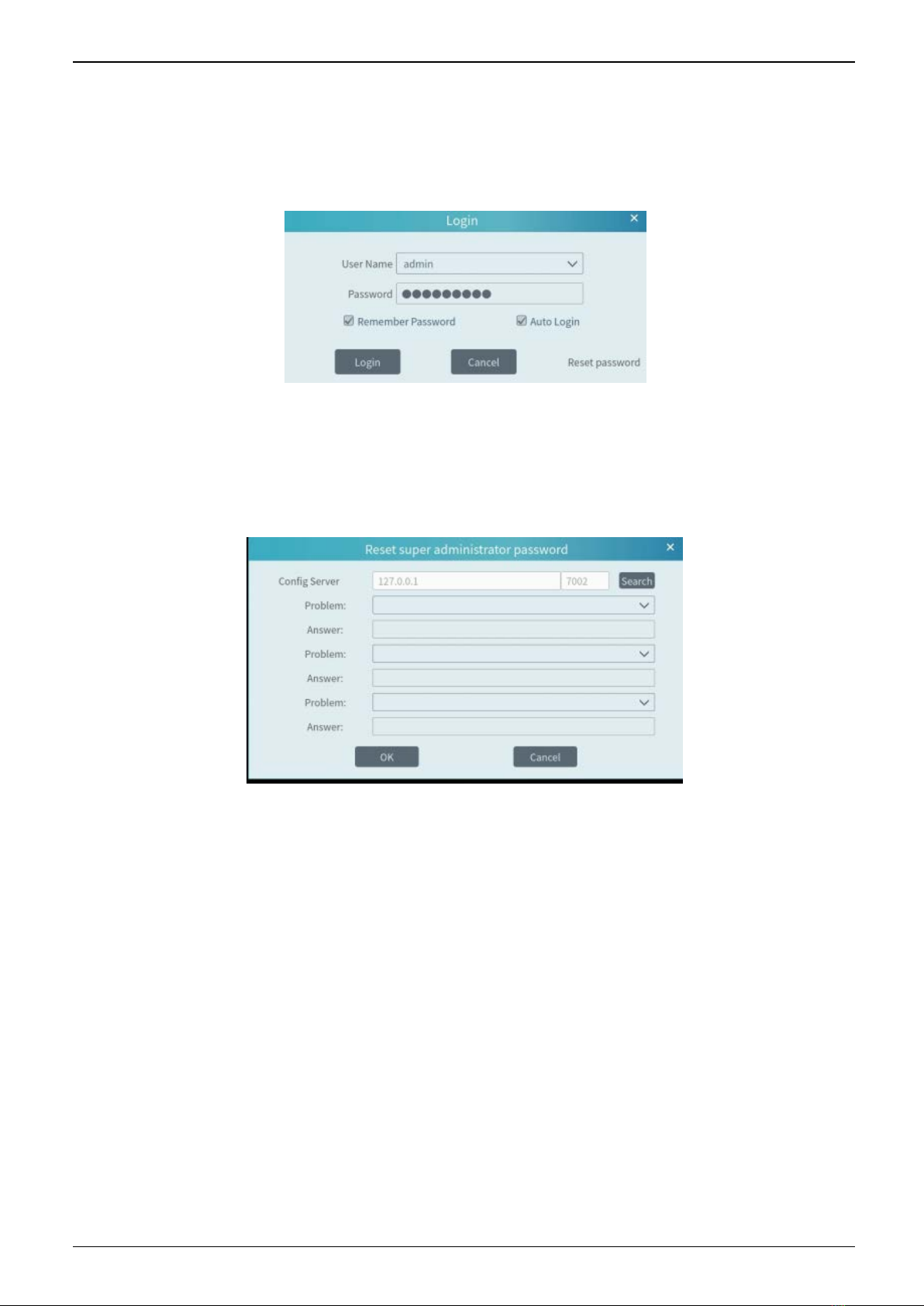
Double click the shortcut icon of ―Monitor Client‖ to run the software as shown below.
①Enter username and password (the default username is admin; the default password is 123456).
②Check ―Remember Password‖ or ―Auto Login‖ as needed.
③Click [Login].
If you forget the password, please click ―Reset password‖. Then a small window will appear. You can reset the password by answering the
pre-defined questions.
If this is the first time for you to log in, it is recommended to set the security questions/answers.

MVMS Management Server User Manual
4
There are five parts in the main menu interface. The descriptions of each part are as shown below.
Menu Bar
No. Description No. Description
1 Menu Bar 4 Status Bar
2 Tab Bar 5 Alarm Information Bar
3 Functional Areas
Tab Bar
Menu Description
View ―Live View‖, ―Edit live view‖, ―Change to home page‖, ―Change to smart view page‖, ―Change to smart
site page‖.
System Including ―Live View‖, ―Record Playback‖, ―E-Map‖, ―TV Wall Management‖, Resource Management‖,
―Account and Permission‖, ―Alarm Center‖ ―Operation and Maintenance Management‖, ―Face
Surveillance‖, ―Face Greeting‖, ―Line Crossing Counting‖, etc.
Help Including ―User Manual‖, ―Register license‖ and ―About MVMS‖
Functional area
Menu
Description
Live View
To view live images and to record, snapshot and talk, etc.
Record
Playback
To remotely play the local records or back up records.
E-Map
To manage and display maps, hot spots, etc.
TV Wall
Management
To set TV wall and decoding videos on TV Walls
Resource
Management
To add, modify or delete areas, devices or servers.
Account and
Permission
To add, modify or delete user account and set permissions for these accounts.
2.2 Main Menu Interface Introduction

MVMS Management Server User Manual
5
Alarm Center To set alarm linkage and schedule; To search alarm logs.
Face
Surveillance To recognize, compare or search face.
Face Greeting To welcome visitors based on face recognition technology
Face Attendance To help to manage staff attendance based on face recognition technology
Parking Lot
Management To manage vehicles in the parking lot
Line Crossing
Counting To monitor and analyze people/vehicle flow in real time
Operation and
Maintenance
Management To search, export and maintain logs.
Local
Configuration To set record path, snapshot path, system startup and maintenance, overload and alarm view.
Functional
Selection To select common functions displayed on the home page.
Other buttons:
Button Description
Click it to add the live view page.
When the tab pages exceed the applicable numbers, this icon will display. Click it to view the hidden
tabs.
Tabla de contenidos
Otros manuales de Servidor de Motorola