Mono V50 Manual de usuario

User Manual
Mono Bluetooth Headset
V50

目录
1.Product Overview............................................................................................. 3
2.Basic Operation ............................................................................................... 4
3.Bluetooth Pairing and Connection...................................................................... 5
4. Connection with Two devices ........................................................................... 6
5. LED Indicator ................................................................................................. 7
6. Charging ........................................................................................................ 8
7.TTS Tone ........................................................................................................ 9
8.Product Specification...................................................................................... 10
9. Attentions and Q & A .................................................................................... 11

1.Product Overview
Packing list:
A. V50 Bluetooth headset x 1
B. Type_C USB charge cable x 1
C. Manual x 1
+ +

2.Basic Operation
Button
Function
Operation Instruction
MFB
Power On
In off status, long press MFB for 3 seconds to power on. it will
automatically enter the pairing status with or without the pairing record
Power Off
In on status, long press MFB for 5 seconds to power off.
Enter Pairing Mode
After power on, the red and blue lights flashing alternately into the
Bluetooth pairing state (in the unconnected standby state can also be
paired); manually disconnect the phone Bluetooth, the headset into the
Bluetooth pairing state, the phone searches for the pairing name "V50"
click to connect.
Play / Pause
Double click the MFB to play/pause music
Redial A Call
When the phone is connected to standby or music, triple-click the "MFB"
to make the last dialed call.
Voice Wake up
When connected to standby or music, long press the "MFB" for 1-2
seconds and then release it to start the voice assistant.
Audio Switch
During a call, long press the MFB for 2 seconds to switch the audio
between the phone and the headset.
Three-way calling
function
Call coming during call, short press the MFB to answer the new call and
hang up the current call;
Call coming during the call, double press the MFB to answer the new call
and keep the current call;
Call coming during the call, long press volume button for 2 seconds to
reject the new call.
When you are on a three-party call, double press the MFB to switch audio
between the current call and the keep call.
Answer a call
Connected status,when a call coming, click "MFB" to answer the call
Hang up a call
When a call,click “MFB”to to hang up
Reject a call
When a call incoming, long press for 1 second to reject a call.
Volume +
Volume Up
Short press the "Volume Up" button (the loudest beep is "beep").
Next Song
Long press for 1 second.
Volume -
Volume Down
Short press the "Volume down" button
Previous Song
Long press for 1 second.
Microphone
Mute Button
Microphone Mute
During a call, Long press the volume down for 2 seconds to mute, and
long press the volume up to cancel the mute

3.Bluetooth Pairing and Connection
A. In off status, long press MFB for 3 seconds to enter pairing mode with LED Blue & Red flash
alternately.
B. Search and click to connect ”V50”on your phone Bluetooth lists, LED change to Blue slow
flash once after connected, now you can play music from phone to headphone.
C. You can press MFB / Volume+ / Volume- / Microphone Mute Button on the Bluetooth headset
to control the answer/hang up a call and play/pause of the music, next and previous song, volume
up and down, microphone mute.

4. Connection with Two devices
The cell phone connected with V50 is divided into two units, A and B.
Firstly, connect to A, Long press the MFB of V50 for 3 seconds to turn on the phone,
turn on the Bluetooth function of A and search for the device, search for "V50" and
click to connect, turn off the Bluetooth function of A after successful connection,
V50 re-enter the pairing state.
Then use B to pair and connect with V50, follow the method of A to pair, after
successful pairing, open the Bluetooth function of A and click V50 to connect.
(Some phones may have an auto connect function).
*Music only can be played from one phone under two connections, when you
want to play music from another phone, you need to pause or close the music
of the previous phone. The same operation during talking status.

5. LED Indicator
Mode
LED Indicator
Power on
Blue LED flash 2 times
Power off
Red LED flash 2 times
Pairing mode
Red & Blue LED flash alternately
Unconnected standby mode
Blue LED flash twice every 5 seconds
Connected standby mode
Blue LED flash once every 10 seconds
Playing Music
LED Blue flash once every 10 seconds
Talking
LED Blue flash once every 10 seconds
Delete pairing record
Blue and Red LED is on for 1 second at the same time
Low battery
Red LED flash
Charging
Solid Red LED
Full charged
Red LED turn off
Charge Base indicator
Charging base charge
Flashing red LED
Charging base full charge
Red LED always on
Charging base to charge the
headset
White LED always on
Charging base low battery alert
Flashing White LED

6. Charging
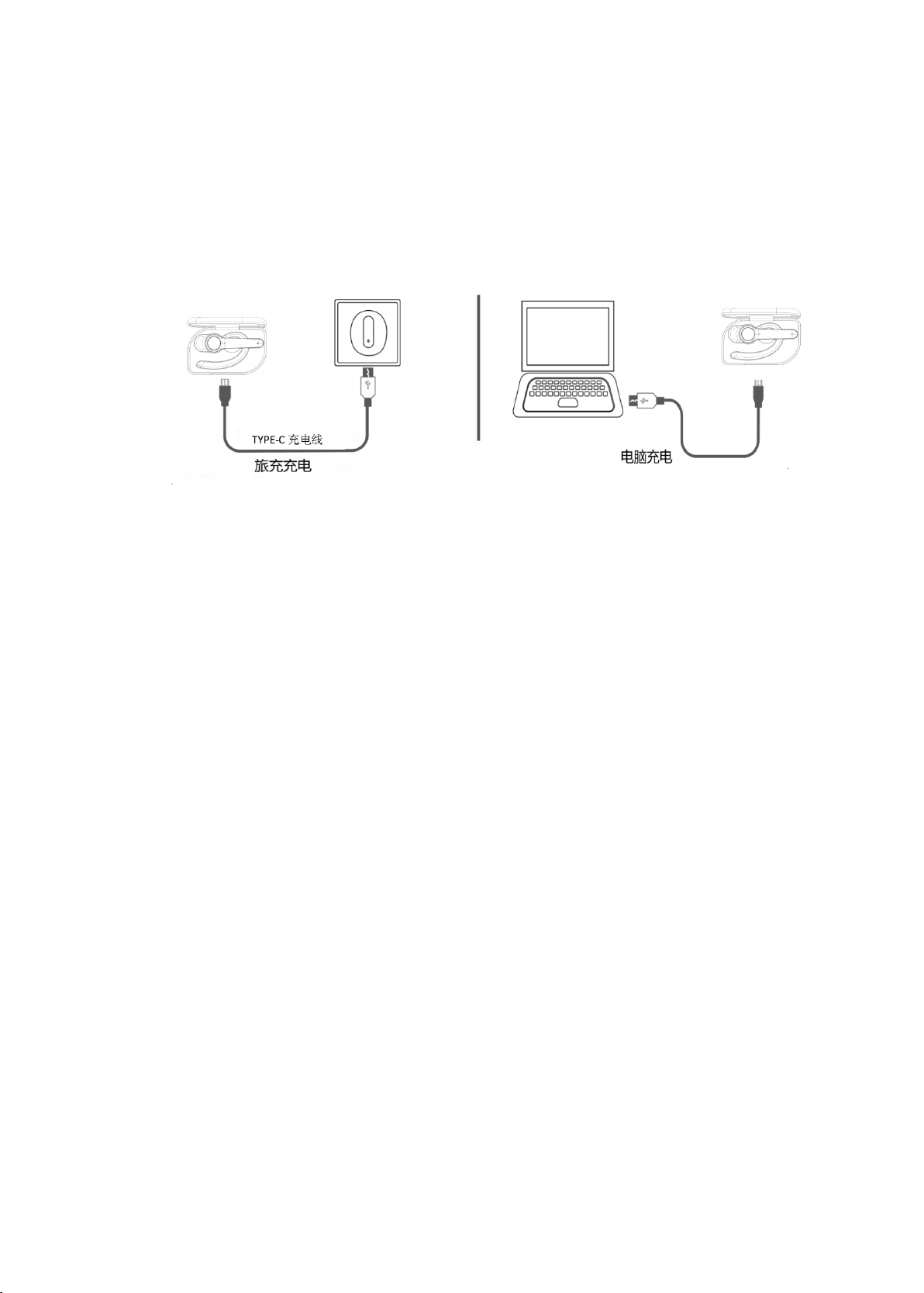
Please charge the V50 at once when the Red LED flash. Charging time is about 1.5 hours. Solid
Red LED turn off when full charged.
Charge Connections
Please connect to theV50 charging port through the Type-C end of Type-C charging cable, USB
end to the charger, can be used as car charger, travel charger, computer USB, etc.
Note:
Please charge the V50 at least one time every 2 months when don’t use it.
Charging when power on, it is normal that the charging indicator will be on at the
same time as the Bluetooth indicator;
Charging when using headset: When the V50 needs to be used for a long time, due to
the limited working time of the built-in battery, it is allowed to connect the charging
power supply (DC 5V ≥ 500mA, low battery or poor power quality may cause the
current sound); Operation: connect the charging power first and then turn on the V50
Please note: it is not recommended to use the headset frequently when charging,
otherwise it may affect the life of the battery.

7.TTS Tone
Power on
Power on
Enter paring mode
Pairing
Pair successfully
Paired
Connect successfully
Your headset is connected
Disconnect
Your headset is disconnected
Power off
Power off
Microphone mute on
mute on
Microphone mute off
mute off

8.Product Specification
Bluetooth Version
V5.0
Bluetooth Chipset
QCC3020
Frequency Range
10M
Bluetooth Protocols
HSP,HFP,AVRCP,A2DP
CODEC Code
SBC,AAC
Battery Type
Charging Case:600mAh/3.7V
Headset:60mAh/3.7V
Charging Time
Headset/Charging Case:1.5±0.5 H
Stand-by Time
About 20H
Working Time
Headphone : about 5 hours (70% volume)
Use with charging case: about 40 hours (70%
volume)
Headset Net Weight
138.8g
Headset Dimension
191.1*78.1*57.1mm
*Actual use time will differ from environment and music
Tabla de contenidos