
MGL Avionics Blaze INFO-2 Manual de usuario

G-force meter
UTC and local time display
Slip indicator
Battery Voltage, *Current and Charge display
OAT display
light Timer & light log
Stopwatch
Countdown Timer
Alarm
* Requires the MGL Avionics magnetic field or active current shunt (sold separately)
Blaze IN O-2
Information Display
Operating Manual – English 1.00

Blaze IN O-2 Operating Manual Page 2
Introduction
The I FO-2 is a 3 1/8” sunlight readable multifunction color display instrument. The I FO-2 has the following features:
G-force meter
The I FO-2 is capable of measuring g-forces exerted in an aircraft up to +-16g. The I FO-2 also has the facility to record
the maximum positive and negative g-forces encountered (typically during a flight) in permanent memory, with a
password protected reset facility. It also features two independent cycle counters to capture the amount of times a preset
force has been exceeded. The I FO-2 is able to measure g-forces even if the instrument is not mounted exactly on the
vertical axis of the aircraft.
UTC and Local Time display
The I FO-2 is capable of displaying both UTC (as known as Zulu time) and local time to facilitate ordinary ATC time
reporting. Time is maintained by an internal lithium battery which can be replaced by the user.
Slip indicator
The I FO-2 can display a slip indicator. The slip indicator can be disabled in the menu system.
Battery Voltage, *Current and Charge display
The I FO-2 can be used to monitor your aircraft’s battery power supply. The I FO-2 is very useful in determining your
battery’s health, charging status, as well as the current load consumption of your aircraft. The I FO-2 can be used in both
12V and 24V aircraft and can measure voltages up to 30V DC.
The I FO-2 uses the MGL Avionics magnetic field or active current shunt to measure the aircrafts current load. The
I FO-2 contains a programmable low/high voltage alarm to automatically detect bad batteries and alternator failures. The
maximum and minimum voltage reached is also recorded in permanent memory.
OAT display
OAT can be shown in either degrees Celsius or degrees Fahrenheit. The I FO-2 also contains a programmable low/high
OAT alarm. The maximum and minimum OAT reached is also recorded in permanent memory.
light Timer & light log
The I FO-2 provides a 50 entry flight log that stores the start time and duration of each of the last 50 flights. The flight
timer can either be started using a front push button or from a remote input.
Stopwatch, Countdown Timer & Alarm
Stopwatch and timers can be operated simultaneously to a programmable alarm, making the I FO-2 particularly suitable
for sport flying competitions.
1 eatures
•Large 2.6” high resolution 320x240, IPS (fully viewa le in all directions), sunlight reada le color LCD
display
• G-force range of +-16g
• Records the maximum positive and negative g-forces encountered (typically during a flight) in permanent
memory, with a password protected reset facility
• Two independent cycle counters capture the amount of times a preset force has been exceeded
• Able to measure G-forces even if the instrument is not mounted exactly on the vertical axis of the aircraft
• Capable of displaying both UTC (Zulu time) and local time
• Time is maintained by an internal lithium battery which can be replaced by the user
• Can measure voltages up to 30V (compatible with both 12V and 24V aircraft supplies)
• Contains a programmable low/high voltage alarm to automatically detect alternator failures and bad
batteries
• Uses the MGL Avionics magnetic field or active current shunt to measure the aircrafts current load.
• *Contains a charge status indicator
• OAT can be shown in degrees Celsius or degrees ahrenheit
• Contains a programmable low/high OAT alarm

Blaze IN O-2 Operating Manual Page 3
• Provides a 50 entry flight log that stores the start time and duration of each of the last 50 flights
• The flight timer can either be started using a front push button or from a remote input
• Stopwatch and timers can operate simultaneously to a programmable alarm
• Standard 3 1/8” aircraft enclosure (can be front or rear mounted)
• The LED backlight can automatically adjust to the ambient light, or it can be manually adjusted in the
menu system
• Rotary control plus 2 independent buttons for easy menu navigation and user input
• An external output activates when an alarm condition has been reached
• Wide input supply voltage range of 8 to 30V DC with built in voltage reversal and over voltage protection
for harsh electrical environments
• 1 year limited warranty
* Requires the MGL Avionics magnetic field or active current shunt (sold separately)
2 Layout
2 / Down Button:
Menu System: Softkey button
ormal Display: Mode dependent,
See section 3
Rotary Control (Up/Down) & Enter Button:
Press the rotary control during the normal display screens to access the menu system.
Rotate anti/clockwise for up/down menu scrolling. Rotate the rotary control during the
normal display mode to switch between the main display screens.
1 / Up Button:
Menu System: Softkey button
ormal Display: Mode dependent,
See section 3
3 1/8” enclosure.
Can be front or rear mounted
Ambient light sensor
Sunlight readable color graphic display:
The backlight can automatically adjust
to the ambient light or it can be manually
adjusted in the menu system
Blaze IN O-2 Operating Manual Page 4
3 Main Displays
The I FO-2 has various display screens depending on the mode selected. The local time, G-force, Slip (if enabled) and
OAT (if enabled) is shown on all of the main display screens.
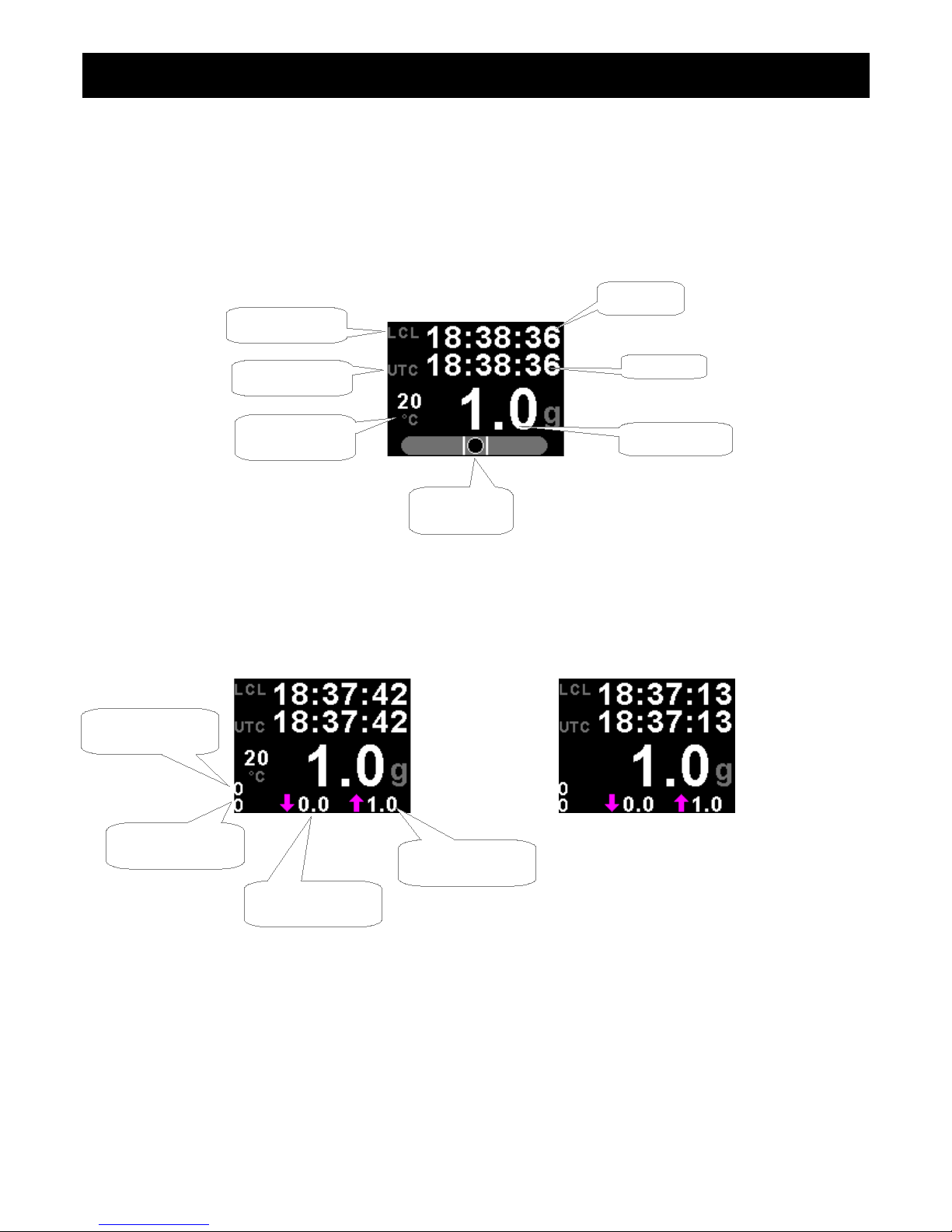
3.1 UTC Time Display
Slip Indicator disabled Slip Indicator & OAT disabled
Slip Indicator
(if enabled)
Local time
UTC time
OAT display
(if enabled)
Local time label
UTC label
G-force display
Maximum G-force
reached
Minimum G-force
reached
Positive G-force
cycle counter
egative G-force
cycle counter

Blaze IN O-2 Operating Manual Page 5
3.2 light Timer
Slip Indicator disabled Slip Indicator & OAT disabled
Press the F1 push button to start/stop the flight timer. This push button is only active if the flight timer is set to manual.
Slip Indicator & OAT disabled, light Timer set for remote start/stop
Local time
G-force display
Slip Indicator
(if enabled)
Local time label
Flight timer label Flight time
Press the F1 key to Start/Stop
the flight timer. The F1 key is
only active if the flight timer is set
to manual

Blaze IN O-2 Operating Manual Page 6
3.3 Stopwatch
The stopwatch can be started and stopped at any time and reset to zero.
Slip Indicator disabled Slip Indicator & OAT disabled
3.4 Countdown Timer
The countdown timer is loaded from a preset value. Once loaded, the timer can be started and counts down. It can be
stopped and restarted at any time.
Press the F2 key to enter the set timer screen. Use the rotary control to set the
countdown timer value. Press the F1 key to exit.
Local time
G-force display
Slip Indicator
(if enabled)
Press the F1 key to
Start/Stop the stopwatch
Stopwatch label
Local time label
Press the F2 key to reset
the stopwatch time to zero
Local time label
Timer label
Local time
Stopwatch time
Timer time
Slip Indicator
(if enabled)
Press the F1 key to
Start/Stop the countdown timer
Press the F2 key to
load the countdown timer
to a preset value
G-force display
OAT display
(if enabled)
Indicates timer is running
Indicates stopwatch is running

Blaze IN O-2 Operating Manual Page 7
Slip Indicator disabled Slip Indicator & OAT disabled
3.5 Alarm
Press the F2 key to enter the alarm setting screen as shown on the left. Use the rotary
control to set the alarm time. Press the F1 key to exit.
Slip Indicator disabled Slip Indicator & OAT disabled
Local time
Local time label
Alarm label
Alarm time
G-force display
Press the F2 key to
set the alarm time
Press the F1 key
to enable/disable the alarm
OAT display
(if enabled)
Indicates alarm is on

Blaze IN O-2 Operating Manual Page 8
3.6 Battery Voltage / Current display
Both the battery voltage and current can be displayed. If the current measurement is disabled then the battery voltage will
be shown with a bargraph.
Dual Mode (Both battery voltage and current shown)
Battery discharging
Battery charging
Battery Voltage only (Current measurement disabled)
Slip Indicator
(if enabled)
Local time
G-force display
Local time label
Charge/Discharge
icon
OAT display
(if enabled)
Current value
Battery voltage value
Slip Indicator
(if enabled)
OAT display
(if enabled)
Local time label
Local time
G-force display
Battery voltage value
Battery voltage bargraph

Blaze IN O-2 Operating Manual Page 9
3.7 OAT (Outside Air Temperature)
The OAT display is shown on all the main displays. The OAT display can be disabled in the menu system.
3.8 G-force
The G-force display is shown on all the main displays. The cycle counter and the maximum/minimum values are only
shown on certain displays.
3.9 Maximum/Minimum Values display
Press the F1 key to reset the maximum and minimum values. If the security option has been enabled, then the correct
security code will have to be entered before you will be able to reset the maximum and minimum values.
OAT display
OAT unit
umber of times the positive
limit has been exceeded
umber of times the negative
limit has been exceeded
G-force display
Maximum negative G-force
recorded during a flight
Maximum positive G-force
recorded during a flight

Blaze IN O-2 Operating Manual Page 10
4 Menu System
Press the rotary control button during the normal display mode to enter the menu system. Use the rotary control to
navigate through the menu system.
4.1 Exiting the menu system
Press the F1 button to exit the menu system when the “EXIT” soft key is shown. All changes made during navigation of
the menu system will be saved in non-volatile memory upon exiting. The instrument will not save any changes if you
remove power before exiting the menu system.
Tabla de contenidos
Otros manuales de Monitor de MGL Avionics


