
Matrix SATATYA NVR0801X Manual de usuario

SATATYA NVR
Quick Start

Matrix SATATYA PARAM NVR
Video Surveillance Solution
Quick Start
SECURITY SOLUTIONS

Documentation Disclaimer
Matrix Comsec reserves the right to change, at any time, without prior notice, the product design,
specifications, components, as engineering and manufacturing may warrant.
This is a general documentation for all models of the product. The product may not support some of the
features and facilities described in the documentation.
Information in this documentation may change from time to time. Matrix Comsec reserves the right to revise
information in this publication for any reason without prior notice. Matrix Comsec makes no warranties with
respect to this documentation and disclaims any implied warranties. While every precaution has been taken in
the preparation of this quick start, Matrix Comsec assumes no responsibility for errors or omissions. Neither
is any liability assumed for damages resulting from the use of the information contained herein.
Neither Matrix Comsec nor its affiliates shall be liable to the purchaser of this product or third parties for
damages, losses, costs or expenses incurred by the buyer or third parties as a result of: accident, misuse or
abuse of this product or unauthorized modifications, repairs or alterations to this product or failure to strictly
comply with Matrix Comsec's operating and maintenance instructions.
Warranty
For product registration and warranty related details visit us at:
http://www.matrixvideosurveillance.com
Copyright
All rights reserved. No part of this quick start may be copied or reproduced in any form or by any
means without the prior written consent of Matrix Comsec.
Safety Instructions
The product contains coin cell battery which is to be kept away from children. If swallowed, can
cause severe internal burns.
Certification
Version 7
Release date: August 11, 2021
Devices Compliance
NVR0801X/NVR1601X, NVR1602X/NVR3202X,
NVR3204X/NVR6404X, NVR6408X


Table of Contents i
Contents
Know Your SATATYA NVR ............................................................................ 1
Naming Convention ........................................................................................... 2
The Interfaces ................................................................................................... 3
NVRX Panel ...................................................................................................... 4
The User Interface ............................................................................................. 8
Installing SATATYA NVR ............................................................................. 10
What Your Package Contains ......................................................................... 10
Things You Will Need ...................................................................................... 11
Preparing for Installation ................................................................................. 11
Installing the Hard Disk ................................................................................... 15
Connecting Devices ........................................................................................ 23
Connecting Power Supply ............................................................................... 25
Accessing the SATATYA NVR .................................................................... 26
Accessing the Local View ................................................................................ 26
Accessing the Remote View ............................................................................ 27
Accessing the SATATYA Device Application .................................................. 29
Quick Setup .................................................................................................. 36
Configuring SATATYA NVR ........................................................................ 49
Formatting the Hard Disk ................................................................................ 49
Configuring Network Settings .......................................................................... 49

Matrix SATATYA NVR Quick Start 1
Know Your SATATYA NVR
Thank you for choosing the Matrix SATATYA NVRX Series.
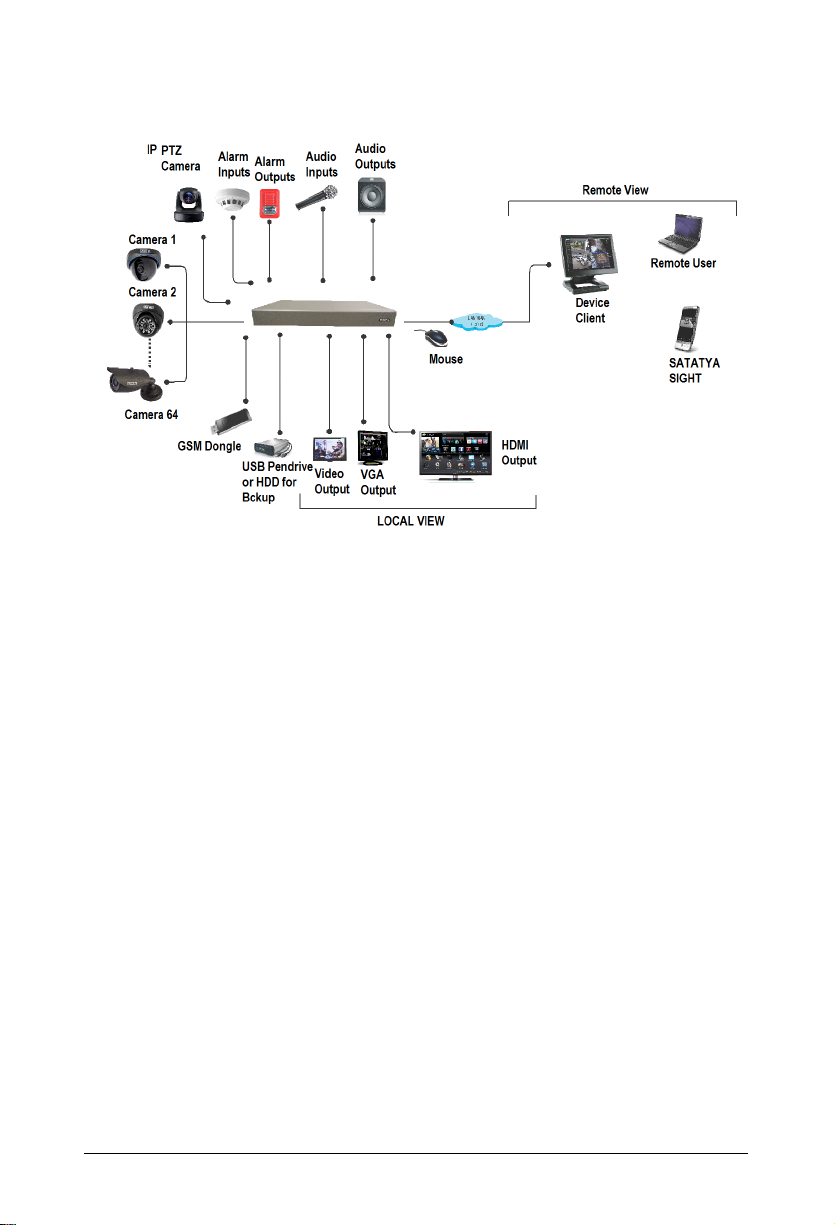
This Quick Start is meant to help you get familiar with SATATYA NVRX Series, install the device
and configure its basic parameters.
To view or download the documents related to this product, scan the QR Code printed on the
Product Label/Packaging Label.
You may also view or download the documents from https://www.matrixvideosurveillance.com/
product-manuals.html
For product registration and warranty related details, please visit https://
www.matrixcomsec.com/product-registration-form.html
Mentioned below are the variants of the product. The main difference is in the number of cameras
and hard disks supported.
NVR0801X: This NVR is having configuration of maximum 8 IP channels and 1 hard disk.
NVR1601X: This NVR is having configuration of maximum 16 IP channels and 1 hard disk.
NVR1602X: This NVR is having configuration of maximum 16 IP channels and 2 hard disk.
NVR3202X: This NVR is having configuration of maximum 32 IP channels and 2 hard disk.
NVR3204X: This NVR is having configuration of maximum 32 IP channels and 4 hard disk.
NVR6404X: This NVR is having configuration of maximum 64 IP channels and 4 hard disk.
NVR6408X: This NVR is having configuration of maximum 64 IP channels and 8 hard disk.

Matrix SATATYA NVR Quick Start 2
Naming Convention
Built on a high performance embedded microprocessor and video compression technology,
SATATYA NVR provides uninterrupted performance while recording, monitoring and playback,
best image quality with minimum storage space requirement. In addition to efficient local and
remote monitoring.
This Quick Start guide is meant to help you get familiar with SATATYA NVRX, install the device and
configure its basic parameters.
This is a common document for all the configurations of SATATYA NVRX series.
The terms NVRX, NVR, Satatya NVR, SATATYA NVR, Matrix SATATYA NVR and Network
video recorder are used interchangeably. The configurations for specific variant of NVRX
is mentioned explicitly.
Please read this document carefully before you begin the installation, and retain it for future
reference.
For complete product information and for detailed instructions on the installation and
configuration of SATATYA NVRX, you may refer the Matrix SATATYA System Manual.
SATATYA NVR 08 01 X
Product
Name
Hard Disks
01: 1 HDD
02: 2 HDD
04: 4 HDD
08: 8 HDD
IP Channels
08: 8CH
16: 16CH
32: 32CH
64: 64CH
Extreme
3 Matrix SATATYA NVR Quick Start
The Interfaces

Matrix SATATYA NVR Quick Start 4
NVRX Panel
NVR0801X/NVR1601X
NVR1602X/NVR3202X

5 Matrix SATATYA NVR Quick Start
NVR3204X/NVR6404X/NVR6408X
Ports and Connectors
Interface Description All Variants
USB 1
(Upper)
USB 2.0, used for Scheduled Backup.
To connect USB Mouse.
To connect Dongle.
Yes
Ratings: 5VDC - 500mA
USB 2
(Lower)
USB 2.0, used to connect USB Mouse.
To connect Dongle.
Yes
Ratings: 5VDC - 500mA
USB 3
USB 3.0, used for Manual Backup.
To connect USB Mouse.
To connect Dongle.
Yes
Ratings: 5VDC - 900mA
Alarm In
(Terminal Block Plug) To connect a sensor device to detect
alarm events.
Yes (2)
ALARM OUT
(Terminal Block Plug) To connect an alarm sounding relay
device such as a hooter or siren.
Yes (1)
HDMI 2.0 To connect a high definition digital
monitor or TV for Main view.
Yes (1)
Este manual sirve para los siguientes modelos
14
Tabla de contenidos
Otros manuales de DVR de Matrix


