MasterCraft Pro Star Manual de usuario


ProStar
Welcomeaboard!
Many years of ownership enjoyment
are ahead for boat owners who carefully
review and follow the guidance provided
in the Owners Manual that accompanied
delivery of your boat. In addition to the
detailed information provided in that publi-
cation, this supplemental guide offers some
model-specic information pertaining to
your ProStar boat.
Please take a few minutes to review all
the material supplied. The information has
been developed to ensure optimum enjoy-
ment and safe operation, as well as provid-
ing the proper maintenance for years of
boating enjoyment.
If you are unsure about any aspect of
your boat or its operation, please discuss
your concerns and questions with an autho-
rized MasterCraft dealer before operating
the boat.

MASTERCRAFT PROSTAR
ProStar
Length of Boat.............................20’
Width Amidship..........................96”
Boat Weight ................... 3,000 lbs.
Length of Boat w/Platform ..22’2”
Towing Length.......................25’10”
Towing Width..............................99”
Fuel Capacity................. 25 gallons
Maximum Capacity .........................
7 people or 1,341 lbs. (650 kg.)
.............Bow: 2 people or 300 lbs.
26 = Stern cleat (where equipped)
27 = Stern light receptacle (if equipped with
tower, the light will be in center aft
of tower)
28 = Aft seating (where equipped)
29 = Automatic re extinguisher (inside engine
compartment)
30 = Center drain plug (inside engine compart-
mentondeckoor)
31 = Ski pylon
32 = Amp (where equipped, beneath observer
seat)
33 = Hand-held re extinguishers (beneath
observer seat)
34 = Bow cleat (where equipped)
35 = MTS Ballast System (where equipped,
beneath observer seat)
36 = Navigation light
37 = Glovebox
38 = iPod interface (where equipped, inside
glovebox)
39 = Stereo CD Player (inside glove box,
where equipped)
40 = Sirius Satellite Radio (where equipped)
41 = Heater (where equipped)
42 = Bow seating (where equipped)
Storage space is located under:
Observer’s seat, bow seating, aft and wrap-
around seating, port and starboard sun pads.
1 = Bow hatch (where equipped)
2 = Drop-in walk-thru door
3 = Folding walk-thru seat
4 = Storage compartment
5 = Circuit breaker panel, including battery ON-
OFF switch (side panel, walk-thru)
6 = Adjustable mirror
7 = Bilge thru-hull outlet
8 = Navigation light
9 = Instrument panel (details follow)
10 = Bow cleat (where equipped)
11 = Steering wheel
12 = Shift-throttle control
13 = Fire suppression unit manual override
14 = In-oor storage compartment
15 = Engine compartment
16 = Aft seating (where equipped)
17 = Fuel tank ller
18 = Stern cleat (where equipped)
19 = Aft storage compartment
20 = Transom drain plug (center beneath swim
platform)
21 = Transom rail with tow eye (where equipped)
22 = Engine exhaust (two below swim platform)
23 = Swim platform
24 = Aft storage compartment
25 = Battery (beneath storage door)
Page 9-2 2014 MasterCraft Owners Manual • ProStar Supplement

MASTERCRAFT PROSTAR
1
2
34
5678910 11
12
13 14 15
16 17
18
19
20
21
22
23
24
25
26
27
28
29
35 34 33
32 30
31
36
37
38
2014 MasterCraft Owners Manual • ProStar Supplement Page 9-3
42
41
40 39

MASTERCRAFT PROSTAR
Page 9-4 2014 MasterCraft Owners Manual • ProStar Supplement
ProStar
VideoScreen
Operations
7”Screen
The ProStar 7” video touch screen is a
multi-functional tool that provides GPS
tracking, multi-media display, cruise con-
trol, rider proles, and enables equipment
operators to view a wide range of engine,
ballast, transmission parameters and ser-
vice codes.
CareandMaintenance
Only basic cleaning should be required
to maintain the 7” video touch screen at its
best. A soft cloth can be used for cleaning
the units. Typical window cleaner or rub-
bing alcohol can also be used to clean the
glass portion of the video screen display.
Do not use harsh or abrasive cleaners on
the unit.
Avoid contact between sharp or hard ob-
jects and the video touch screen because
this can result in scratches or other perma-
nent marks on the screen. Clean only with a
sof cloth, using window cleaner or rubbing
alcohol only. Never use harsh or abrasive
cleaners on the unit, as this may result in
damage to the unit that is not covered un-
der warranty.
BasicNavigation Features
All features are easily accessible through
the quick access keys, touch point com-
mands and menus.
QuickAccessKeys
The following controls are accessed via
the Quick Access Keys: Audio, Ballast/
Trim, Gauges, Video, Settings Menu, GPS,
User Proles, Cruise ON/OFF, Increase
Value and Decrease Value. They are called
Quick Access Keys because a new screen
can be called up quite fast by pressing the
key.
Touch Point Commands
After the desired screen is accessed, nav-
igation within the screen is controlled with
Touch Point Commands. These are execut-
ed by touching the screen in areas that are
outlined with a highlighted bezel.
In addition, there are areas where sliding
a nger up or down can adjust settings. For
example, on the Ballast and Tabs screen,
sliding the nger on the screen on the in-
side of the tank area adjusts the ballast set-
ting.

MASTERCRAFT PROSTAR
2014 MasterCraft Owners Manual • ProStar Supplement Page 9-5
There are also areas in which sliding a
nger from side to side will scroll through
a list.
When the slider bar on top of the screen
is visible, sliding the nger across it will
change screens.
NOTE: While the slide area may appear
to be curved, it is, in fact, a straight line.
Audio
The Audio screen can be ac-
cessed by pressing the Quick Ac-
cess Key. Press any Quick Access
Key to exit this screen.
The stereo display and functionality
is supported by JL Audio Media Master.
Please see the JL owner’s manual.
BallastandTrim
The Ballast and Trim screen can
be accessed by pressing the Quick
Access Key. Press any Quick Ac-
cess Key to exit this screen.
This screen displays the current state of
the ballasts and trim tabs. Refer to the in-
formation following for actions using the
Touch Commands on this screen.
Touch Commands
Function and Description
Touch to turn cruise control OFF or ON.
Touch to stop all activity on this screen.

name the new prole and the new prole
process is launched. (SeeProlesformore
information.)
Touch to ll all ballasts.
Touch to empty all ballasts.
Touch and slide your nger to the de-
sired Ballast Tank level, or touch the UP
DOWN Arrows to obtain the level.
Touch and slide your nger to the desired
Touch to turn AUTO LAUNCH/EXIT
ON or OFF. When Auto Launch is on, it
automatically controls the center tab. When
speed is above the Auto Launch speed the
center tab will be retracted to 0% or if a
prole is selected, it deploys the center tab
to the prole setting. If the speed is above
the Auto Launch speed and then deceler-
ated below the Auto Launch speed, the tab
deploys to 100.
Touch to save the settings to the current
rider prole.
NOTE: If no rider prole is selected,
does nothing.
Touch to save these settings to a new
rider prole. A keyboard is displayed to
Trim Tab position.
Gauges
The Gauges screen can be ac-
cessed by pressing the Quick Ac-
cess Key. Press any Quick Access
Key to exit this screen.
Gauge Screen Gage Display
• Speedometer (MPH)
• Water Depth (FT)
• Air Temperature (F°)
• Water Temperature (F°)
• Battery Voltage (Volts)
• Engine Run Time (Hours)
MASTERCRAFT PROSTAR
Page 9-6 2014 MasterCraft Owners Manual • ProStar Supplement

Touch Commands
Description
Touch to turn cruise control ON or
OFF.
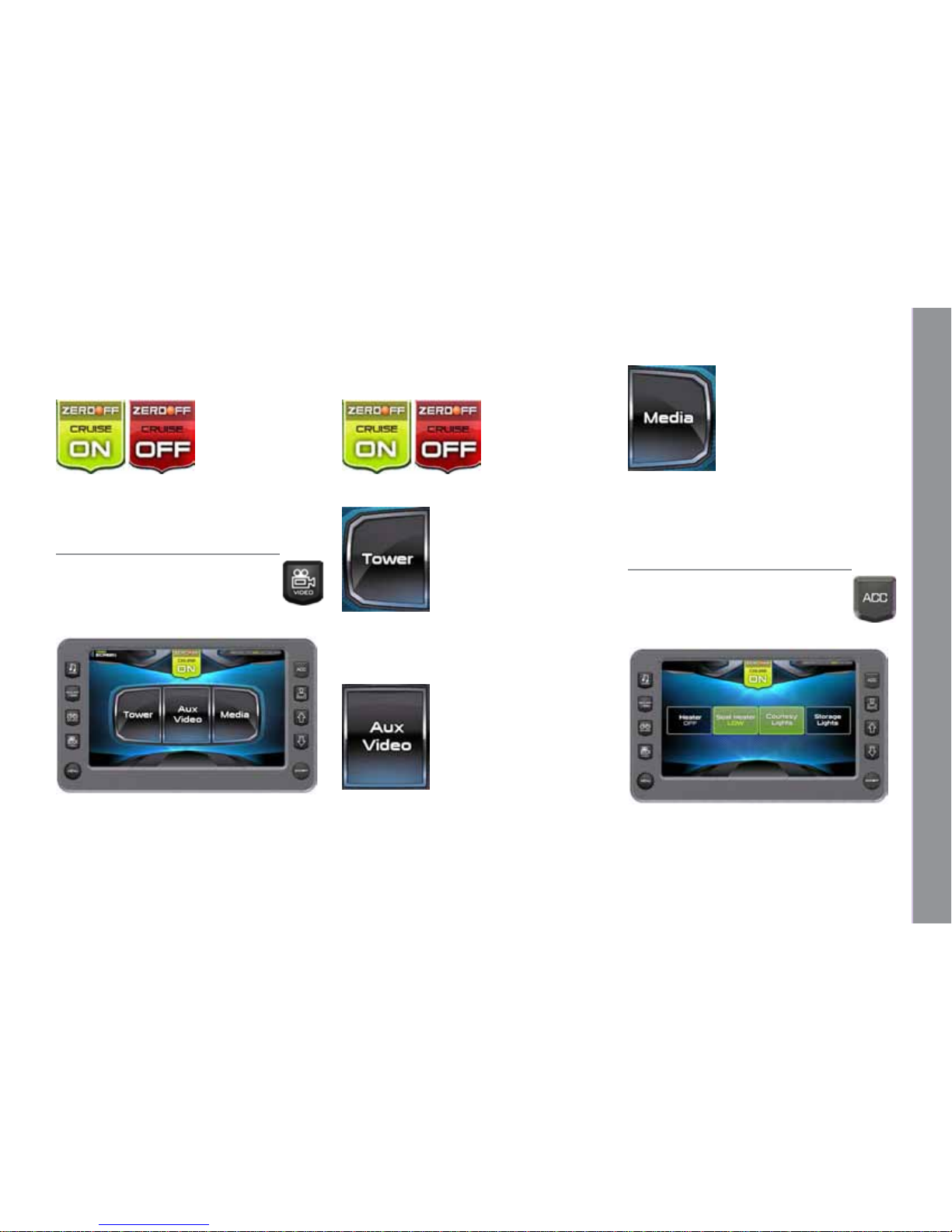
Video
The Video screen can be ac-
cessed by pressing the Quick Ac-
cess Key. Press any Quick Access
Key to exit this screen.
Touch Commands
Description
Touch to turn cruise control ON or OFF.
Touch to view the Tower video source.
Press the Video Quick Access Key to go
back.
Touch to view the Aux Video source.
Press the Video Quick Access Key to go
back.
Touch to view the Media video source.
Press the Video Quick Access Key to go
back.
HeaterandLights
The Heater and Lights screen can
be accessed by pressing the Quick
Access Key. Press any Quick Ac-
cess Key to exit this screen.
MASTERCRAFT PROSTAR
2014 MasterCraft Owners Manual • ProStar Supplement Page 9-7

Touch Commands
Description
Touch to turn cruise control ON or OFF.
Touch to turn ON or OFF.
Touch again to choose a High or Low
temperature setting.
Touch to turn ON or OFF.
Profiles
e Proles screen can be ac-
cessed by pressing the Quick Access
Key.
is feature displays rider/user
proles for cruise controls based on user
preferences for Set Speed, Ballast, and Tab
settings. Up to 16 rider/user proles can be
created and stored.
To scroll through the available Proles,
slide nger across
the information
slide bar or press
the Quick Access
Keys and to view the list.
Touch Commands
Description
Touch to turn cruise control ON or OFF.
Touch to delete the selected rider aer
conrmation warning.
Touch to activate the user displayed in
that event with all settings activated.
Touch to edit existing user or event
name.
MASTERCRAFT PROSTAR
Page 9-8 2014 MasterCraft Owners Manual • ProStar Supplement

Touch to add a new rider. See the process
in the next section.
A new rider prole can be setup using
the touch screen. To create a new prole,
press the [Prole] Quick Access Key:
Touch [ADD NEW] to create a new prole.
Type a name for the new prole using the
touch keypad and touch [DONE].
Touch [NEXT] to continue.
Touch the [UP] or the [DOWN] arrow
to Set the speed for this prole.
Touch [Change] to set 3 Event Type.
Touch [Next] to continue.
Set the tab by either sliding the nger
down the ridged area or by touching the
[UP] and [DOWN] arrows. Touch [NEXT]
to continue.
MASTERCRAFT PROSTAR
2014 MasterCraft Owners Manual • ProStar Supplement Page 9-9
Otros manuales para Pro Star
2
Tabla de contenidos
Manuales populares de Equipo de navegación de otras marcas

Dowco
Dowco V322 CC - 2019 Manual de usuario

Humphree
Humphree HCS-5 Manual de usuario

Vetus
Vetus BOW4512D Hoja de especificaciones

Dock Doctors
Dock Doctors SLIDING BOARDING STEP Manual de usuario

Mastervolt
Mastervolt Mass Combi 12/2000-100 Instrucciones de funcionamiento originales

Zattini Group
Zattini Group bamar BOXTRON E14S Guía del usuario