Marmitek Connect AE24 UHD 2.0 Manual de usuario

n
ect AE24 UH
D
20671/ 20170601 • Connect AE24 UHD 2.0™
ALL RIGHTS RESERVED MARMITEK ©
USER MANUAL 3
Connect AE24 UHD 2.0
™
GEBRAUCHSANLEITUNG 17
GUIDE UTILISATEUR 31
MODO DE EMPLEO 45
MANUALE D’ISTRUZIONI 59
GEBRUIKSAANWIJZING 73

© MARMITEK
2

Connect AE24 UHD 2.0™
3
ENGLISH
1 Table of contents
1Table of contents...................................................................... 3
2Safety instructions.................................................................... 4
3Your product ............................................................................ 5
3.1 Introduction .............................................................................. 5
3.2 Benefits.................................................................................... 6
3.3 HDMI properties....................................................................... 7
3.4 Package contents..................................................................... 8
4Getting started ......................................................................... 9
4.1 Installation tips ......................................................................... 9
4.2 Installation................................................................................ 9
5Use ........................................................................................ 11
5.1 Audio settings ........................................................................ 11
5.1.1 Audio Return Channel (ARC)..................................... 11
5.1.2 Audio format settings ................................................. 11
6Technical specifications ......................................................... 12
7Frequently asked questions (FAQs) ....................................... 13
8Notification ............................................................................. 15
8.1 Declaration of conformity........................................................ 15
8.2 Recycling ............................................................................... 15
8.3 Copyrights.............................................................................. 16

© MARMITEK
4
2 Safety instructions
xPlease read these instructions thoroughly before you use the
device and keep them for future reference.
xOnly for indoor use.
xDo not use the product in a damp environment or near water.
xDo not expose the product to extremely high or low
temperatures, strong light sources or direct sunlight.
xThis product is not a toy. Keep out of reach of children.
xDo not open the product: the device may contain live parts.
xConnect the adapter to the mains only after you have verified
that the line voltage corresponds to the value specified on
the type plates.
xNever connect a power adapter if it's damaged. In such
cases, please contact your supplier.
xRepairs or service should only be performed by qualified
personnel.
xDisconnect the AC/DC power adapter from the mains when
this device is not in use for prolonged time.
xImproper use, self-installed modifications or repairs will void
any and all warranties.
xMarmitek does not accept any product responsibility for
incorrect use of the product or use other than for which the
product is intended.
xMarmitek does not accept liability for any consequential
damage other than the legal product responsibility.

Connect AE24 UHD 2.0™
5
ENGLISH
3 Your product
3.1 Introduction
Congratulations on your purchase of the Marmitek Connect AE24
UHD 2.0™!
Connecting a TV to this type of audio equipment can often lead to
problems when:
xYour TV, monitor or projector does not have a separate
audio output;
xYou want to use your TV's ARC function, but the audio
amplifier is not equipped with it;
xYou want to connect various HDMI sources to a soundbar
that has too few connections;
xYour AV receiver does not support 4K UHD or 3D video
formats;
xYour TV only has a digital audio output (TOSlink or coaxial),
but you want to connect a stereo HiFi set.
The Connect AE24 UHD 2.0™ allows you to separate the sound
from the HDMI signal and connect it to your audio equipment
(home cinema set, AV receiver or soundbar). The
Connect AE24 UHD 2.0™ can be used as a versatile problem
solver when connecting your audio equipment.
All our products are designed and manufactured to the highest
quality requirements. Please read this manual first and follow the
instructions in order to fully enjoy the possibilities of this product.

© MARMITEK
6
3.2 Benefits
The Connect AE24 UHD 2.0™ is a versatile problem solver when
connecting your audio equipment to your TV, monitor or projector.
This may include:
xPlaying the audio from your Smart TV applications (Netflix,
YouTube) or built-in TV decoder on your home cinema set,
AV receiver or soundbar.
xConnecting HDMI sources without a dedicated audio output
(Chromecast, Nintendo, media players) to your audio
equipment anyway.
xListening to music (MP3, audio streams, radio channels)
without requiring the TV being turned on.
xAvoiding compatibility issues with your current AV receiver
because of its unique HDMI output without image
reproduction.
xStill being able to use your TV's Audio Return Channel (ARC)
function, even when your audio equipment is not suitable for
it.
xBeing a versatile problem solver when connecting your audio
equipment to your TV, monitor or projector.

Connect AE24 UHD 2.0™
7
ENGLISH
3.3 HDMI properties
xThe maximum throughput speed is 18 Gbit/s (gigabits per
second). This allows HDMI 2.0 to display Ultra HD 4K
images at 60 fps (frames per second).
xSuitable for the latest Ultra HD 4K60 resolution (3840 x 2160
/ 60Hz), High Dynamic Range (HDR), Deep Color and 4:4:4
chroma colours.
xSupports all 3D formats (suitable for use with your own 3D
equipment)
xDeep Color 36-bit (billions instead of millions of colours,
better reproduction of subtle differences in gradation and a
higher contrast ratio).
xARC (Audio Return Channel, synchronises your TV's audio
and video and sends it back to your AV amplifier, using the
digital audio output.
xSupports Dolby Atmos and DTS:X and all other common
audio formats.

© MARMITEK
8
3.4 Package contents
A. 1 x Connect AE24 UHD 2.0™ - HDMI audio extractor
B. 1 x Power adapter
C. 1 x User manual
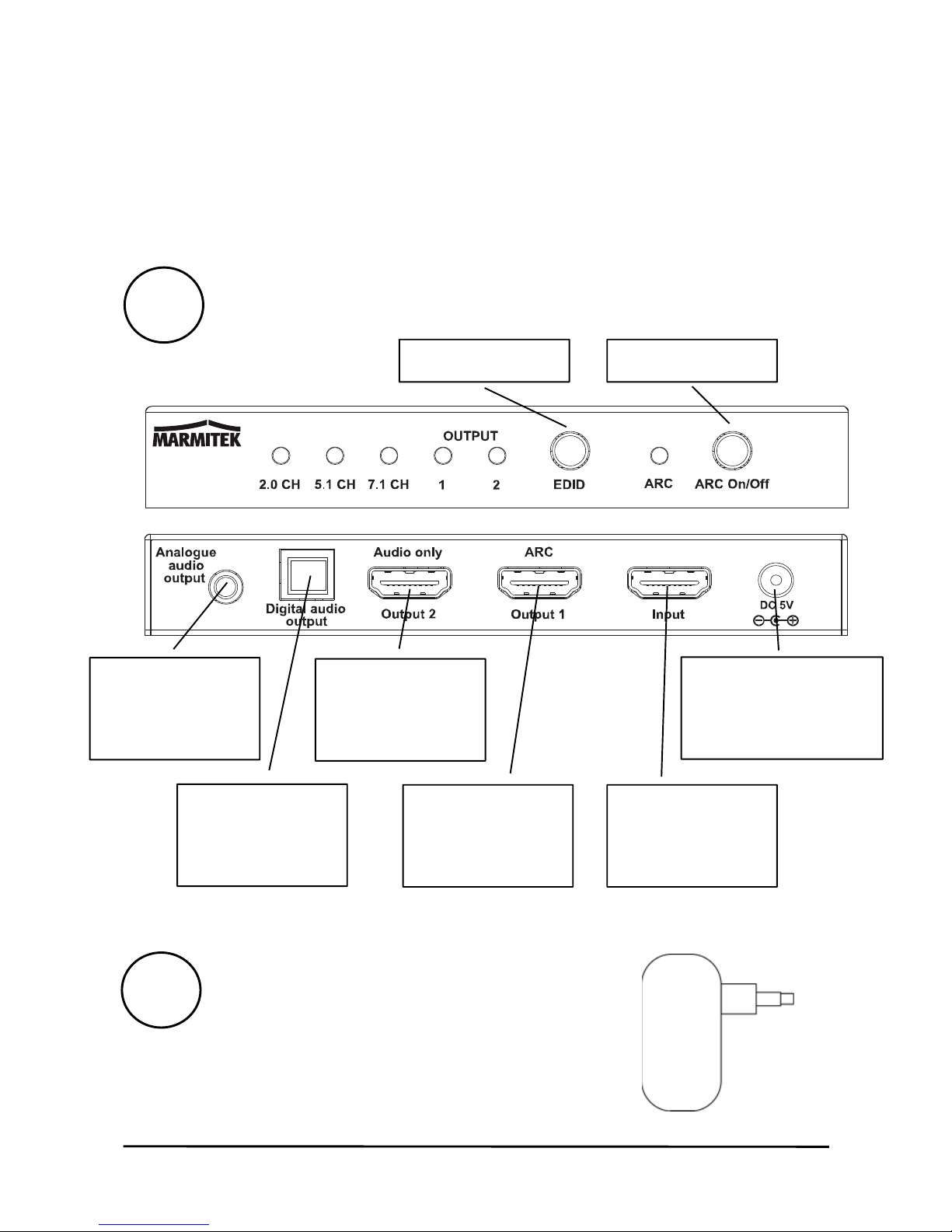
Power adapter
EDID button
Toslink
output
A
ARC button
H
DMI output
with ARC
Connector for
power cable
B
HDMI audio
only
output
Analog
ue
audio output
H
DMI output

Connect AE24 UHD 2.0™
9
ENGLISH
4 Getting started
4.1 Installation tips
xTurn off all devices (TV and HDMI sources) before
connecting them to the Connect AE24 UHD 2.0™. If a device
cannot be turned off, please remove the plug from the
socket.
xOnly use High Speed HDMI® certified cables for the best
picture and sound quality. Using too much force to connect
or disconnect the HDMI cables may damage them.
xPlease be careful when connecting your HDMI cables. These
damage easily.
4.2 Installation

© MARMITEK
10
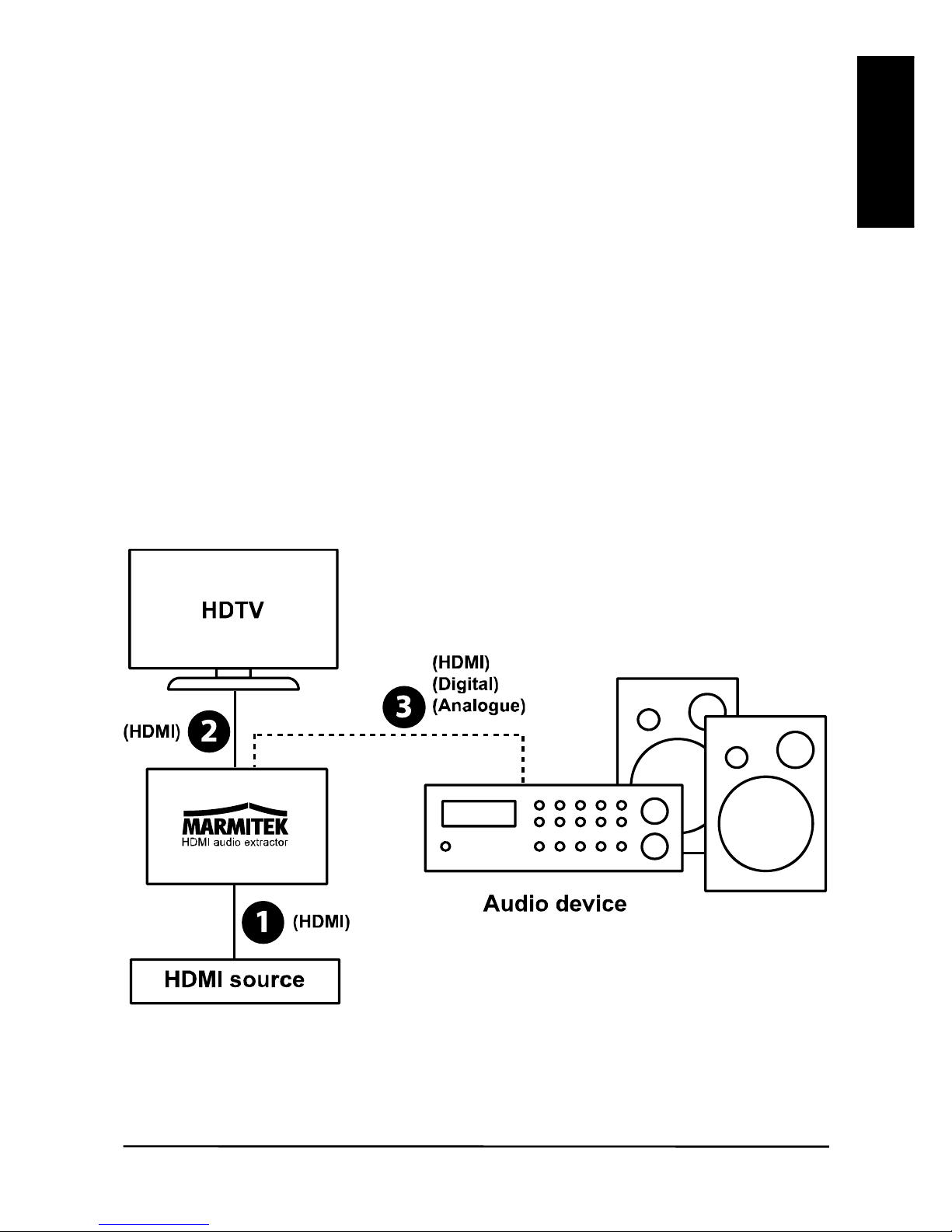
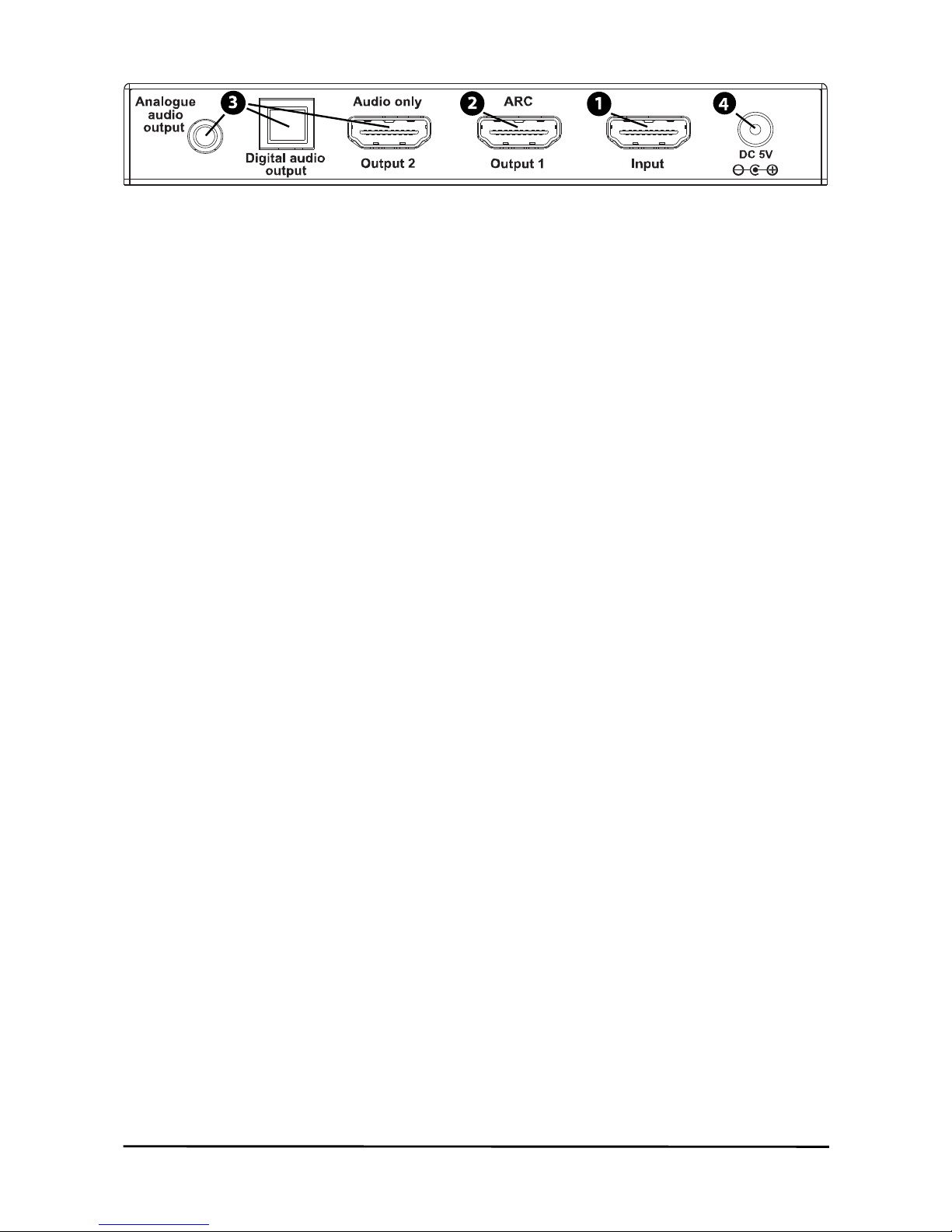
1. Use an HDMI cable to connect the HDMI source (digital TV
decoder, Chromecast, media player) to the "Input” (1).
2. Use an HDMI cable to connect the TV (monitor or projector)
to "Output 1” (2). If you want to use the ARC function (refer to
page 11), your TV needs to support this. Please refer to your
TV's user manual to check which HDMI port supports ARC.
3. Use the appropriate cable to connect your audio device
(home cinema set, AV receiver or soundbar) to the output (3)
marked "Audio only”, “Digital audio" or "Analogue audio".
xAudio only: use an HDMI cable. This output only
reproduces audio and supports Dolby Atmos, DTS:X
and all other common audio formats.
xDigital audio: use an optical (Toslink) or coaxial cable.
This audio output supports the DTS 5.1, Dolby
Digital/AC3 and PCM 2.0CH stereo formats.
xAnalogue audio: use a stereo jack cable; this output
supports the analogue stereo audio format.
4. Connect the power adapter to the "DC 5V" input (4) and
insert the plug into the socket.
Tabla de contenidos
Idiomas: