
Mark MW 900/1 Manual de usuario

MW 900
MWI 9
GUITAR WIRELESS TRANSMITTER
UHF
MWS 99
MW 900 MWS 99
MWI 9
User Manual / Manual de Uso
MW 900/1
MW 900/2
Rev 1.0

CHECK THE SURROUNDING TO SEE IF ANY SAME OR SIMILAR FREQUENCY IS WORKING
NOTES:
WARNING
1 User Manual/Manual de Uso MW 900/1 - /2
EN
MW 900/1 MW 900/2
UHF WIRELESS SYSTEM

Using UHF 460-990 MHz band to avert interference frequency.
Antenna diversity receiver, clear the dead spot in working distance.
Splendid LCD display, shows the RF level, AF level, channel and frequency
Automatic frequency scan feature searches for available frequencies.
PLL system. Preset 99 non-interfered channels.
The receiver support DC power supply or AA (1.5V *4) batteries.
SMT technology, guarantees stable function.
The transmitter equipped with lithium battery inside,
it can continuously use 9 hours.
The transmitter can also recharge from the receiver.
INTRODUCTION:
MAIN FEATURES:
2 avalaible models:
- MW 900/1 with receiver and instrument trransmitter MWI 9
- MW 900/2 with receiver and head microphone MWS 99
2 User Manual/Manual de Uso MW 900/1 - /2
EN
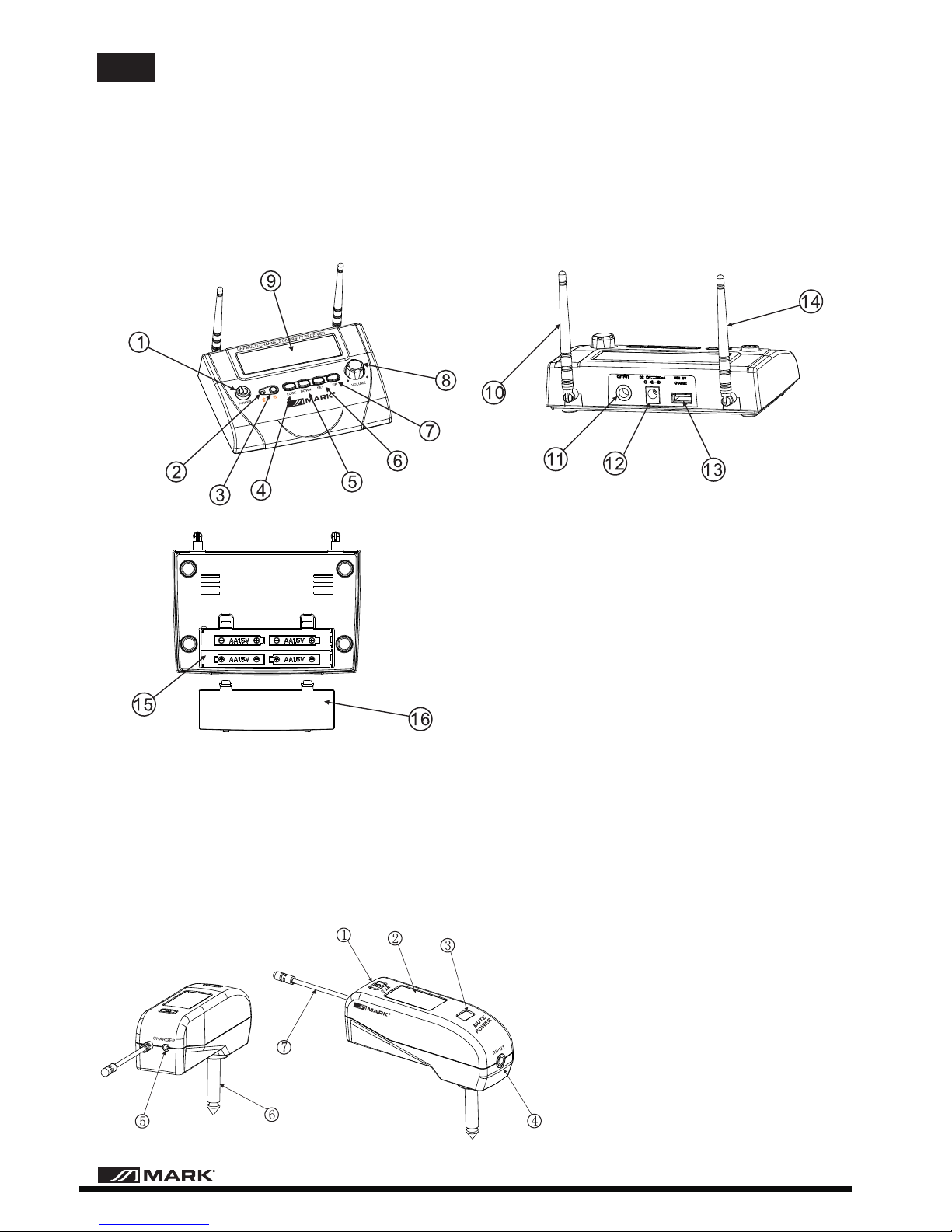
1. Power
2. IR SYNC Window
3. IR signal button
4. Lock button
5. Down set button
6. Menu button
7. Up set button
8. Volume konb
9. LCD window
10. Antenna B
11. Mix output Jacket
12.DC power input
13. USB charger
14. Antenna A
15. Battery Sink
16. Battery cover
CONTROL AND FUNCTION LIST
MW 900 (Receptor)
1.Power
2.LCD window
3.IR SYNC Window
4. Audio input
5. Charge hole
6. 6.3mm plug
7.Antenna
MWI 9 (Guitar transmitter)
MW 900
GUITAR WIRELESS TRANSMITTER
UHF
MWI 9
3 User Manual/Manual de Uso MW 900/1 - /2
EN

Locked
RECEIVER OPERATION:
1.Power the receiver
Connect the DC power to the rear DC input jack.
Open the battery compartment of the receiver,put four AA
batteries (note the polarity)
2. Turn ON the receiver
When Turn on the receiver, all buttons are locked, long press the”SET” button 3 seconds to
to unlock.
3.Pre-setted channels setting
Press the SET button to get into this mode. Press the Up or Down
buttons, the channels jumps forwards or backwards between ch1-ch16.
4. Free frequencies setting
Press the SET button to get into this mode. Press the Up or Down
buttons, the frequency jumps forwards or backwards 0.05MHz
4 User Manual/Manual de Uso MW 900/1 - /2
EN

Channel
Frequency
Battery Voltage
LCD Window
IR SYNC Inferaed download
The IR button is used to transfer the selected frequency info from the
for quick synchronization prior to use.
receiver to the transmitter
IR window
Begin programming by holding the wireless transmitter’s
about 6-12” from the receiver’s IR window. Press the receiver’s IR
Sync button once to begin the IR sync download of the selected
Sync button once
frequency to the transmitter.
TRANSMITTER OPERATION
LCD DISPLAY
MW 900
GUITAR WIRELESS TRANSMITTER
UHF
MWI 9
5 User Manual/Manual de Uso MW 900/1 - /2
EN

TECHNICAL SPECIFICATION
MW 900
MWI 9
6 User Manual/Manual de Uso MW 900/1 - /2
EN

2
3
4
5
1
6
7
8
9
1. POWER SWITCH - Slide in arrow direction to power transmitter On.
2. POWER & LOW BATTERY LED - Flashes once at power up,
continuous flashing indicates battery needs replacement.
3. BATTERY COMPARTMENT - Insert one AAA battery, observing the
correct polarity.
4. BATTERY - Single AAA alkaline o NiMH battery required for operation
5. BATTERY COMPARMENT COVER - To cover AAA battery, slide to open
6. INPUT MIC - Unidirectional pickup for vocals
7. FLEXIBLE HEADBAND - For mounting over the ears
8. ANTENNA - Permanently attacled flexible antenna
9. IR RECEPTOR SENSOR/WINDOW - Infrared LED sensor for linking
the TX to the RX during IR frequency download
MWS 99 Head Transmitter
Frequency range
RF Power Out
Harmonic & spurious emissions
Controls
LED Indicators
Input Impedance
Power consumption
Battery
Battery life
Antenna
Dimensions
Weight (w/batteries)
Housing
902 MHz - 928 MHz
25 mW nominal, 50 mW maximum
- 50 dB
Power ON/OFF
Power ON (Red-single flash), Low Battery (Red flashing)
5k ohm
DC 1.5V/90 mA
One AAA alkaline or NiMH
Up to 8 hours
1/4 wave permamently attached
153 x 178 x 64 mm (with mic)
56,6 g
ABS plastic
TECHNICAL SPECIFICATIONS
Powering the Transmitter
The transmitter requires one AAA battery. To install it, push the locking tabs on the battery cover and push
out to expose the battery compartment.
Insert one new battery according to the correct polarity as indicated on the transmitter body. Close the
battery cover, ensuring the cover is snapped shut. A new AAA battery generally provides up to 6-8 hours of
operation, but in order to ensure optimal performance it is recommended that the battery be replaced after
six hours of use or as indicated by the low battery indicator.
As the batteries weaken, the low battery indicator will flash to warn that the battery level is too low and
should be replaced as soon as possible. To preserve battery life, turn the transmitter off when not in use. To
tun the transmitter off, slide the power switch in the opposite direction of the arrow.
To turn the transmitter, slide the power switch in the direction of the arrow. The low battery indicator will flash
once. The unit is now on and rhe receiver`s RF signal LED will light up if the transmitter has bee frerquency
synchronized to the receiver´s selected frequency as per below. To turn it off, slide the power switch opposite
direction, and the receiver RF signal LED should be off
MWS 99
7 User Manual/Manual de Uso MW 900/1 - /2
EN

NOTAS
ATENCION
Este dispositivo es un producto electrónico inalámbrico, el cual puede generar y radiar energía a
frecuencias inalámbricas. Si no se usa de acuerdo a las instrucciones contenidas en este manual,
puede causar interferencias con otros productos inalámbricos, por favor, use el dispositivo de acuerdo
a las normas locales. El producto está disponible en varias frecuencias, por favor, elija la correcta que
cumpla con los requerimientos de legislación local.
De cualquier modo, esto no garantiza que puedan ocurrir interferencias en una instalación particular.
Si esto sucede, el usuario debe tratar de corregir la interferencia con una de las siguientes medidas:
- RECOLOCAR LA ANTENA RECEPTOR.
- CAMBIAR LA FRECUENCIA DE TRABAJO.
- COMPROBAR LOS ALREDEDORES PARA VER SI UNA FRECUENCIA IGUAL O CERCANA ESTA
OPERANDO.
- CONSULTAR CON SU DISTRIBUIDOR O TECNICO DE AUDIO EXPERTO.
- Evite colocar el receptor en un ángulo muerto para asegurar que la recepción se produce en buenas
condiciones.
- Por favor no lance, golpee o deje caer la unidad mientras está en funcionamiento para impedir daños.
- La unidad no es waterproof, debe evitar que se moje o ser expuesta a la lluvia o humedad.
- Mantenga la unidad apartada de la luz solar directa y lo más alejado posible de campos magnéticos.
- Por favor, inserte las pilas con la polaridad correcta, extrayéndolas de los dispositivos si va a usarlos
durante un periodo de tiempo prolongado.
- Desconecte el alimentador externo AC después de utilizar el receptor.
- Cuando cambie las pilas, apague antes el dispositivo.
- No hay elementos de control para el usuario en el interior, no abra la unidad o perderá la garantía
- Use un paño suave para limpiar el dispositivo. Para una limpieza más en profundidad use un
limpiadores neutros y en ningún caso líquidos volátiles como bencinas o disolventes.
8 User Manual/Manual de Uso MW 900/1 - /2
ES
MW 900/1 MW 900/2
SISTEMA INALAMBRICO UHF

Utiliza la banda UHF 460-990 MHZ para evitar interferencias
Receptor con antena diversity
Pantalla LCD que muestra el nivel RF, nivel AF, canal y frecuencia.
Escaneo de frecuencia automática que busca las ffrecuencias disponibles.
Sistema PLL. 99 canales predefinidos que no interfieren entre ellos.
El receptor puede ser alimentado con alimentador externo o pilas AA ( 4 x 1.5V).
Tecnología SMT que garantiza una función estable.
El emisor de instrumento está equipado con una batería de litio interna.
Uso continuado durante 9 horas.
El emisor de instrumento puede recargarse desde el receptor con el cable USB incorporado.
2 modelos disponibles:
- MW 900/1 con receptor y emisor de guitarra MWI 9
- MW 900/2 con receptor y micrófono de cabeza MWS 99
INTRODUCCION
CARACTERISTICAS
El uso tradicional de un instrumento musical electrónico es mediante un cable de audio conectado entre
el instrumentos y un mezclador de audio o un amplificador para transmitir la señal de audio, por esta
razón el área de movimiento del interprete es muy restringida. Para solucionar el problema, hemos
diseñado un nuevo modelo que transmite y recibe señal de audio a frecuencias inalámbricas para
transmitir la señal del instrumento. Dispone de varias frecuencias de trabajo con detección de ruido,
control, etc solucionando las restricciones de un instrumento musical en el escenario. El interprete
puede desplazarse por el escenario con toda libertad sin ningún cable conectado.
9 User Manual/Manual de Uso MW 900/1 - /2
ES
Este manual sirve para los siguientes modelos
1
Tabla de contenidos
Idiomas:
Otros manuales de Sistema de micrófono de Mark

Manuales populares de Sistema de micrófono de otras marcas


Sennheiser
Sennheiser Evolution Wireless Digital EW-DX EM 2 Manual de usuario

Alpha Technologies
Alpha Technologies RBMS Manual de usuario

SWIT Electronics Co.,LTD.
SWIT Electronics Co.,LTD. CW-S150 Manual de usuario

Shure
Shure UA844 Manual de usuario

Panasonic
Panasonic SHFX70 - DVD HOME THEATER WIRELESS SYSTEM Manual de usuario

Pyle
Pyle PDWM5000 Manual de usuario