Magnimage LED-F816-3D Manual de usuario

1
LED-F816-3D
Video Control Server
User Manual V1.0
△
!
Document Version:V1.0 Document Release Date:2023/10/20
Before using this LED video processor, please
read this instruction manual carefully and keep it
for future reference.
LED-F816-3D

2
Statement
Without the written permission of the company, no unit or individual may
copy, transcribe or translate part or all of the contents of this manual.This
manual shall not be distributed in any form or by any means
(electronic,mechanical, photocopying, recording or other possible means) for
commercial or commercial purposes.
The product specifications and information mentioned in this manual are
for reference only and are subject to update without notice. Unless otherwise
agreed, this manual is only used as a guide, and all statements, information,
etc. in this manual do not constitute any form of guarantee.
Revision History
Version
Revise Date
Revised Content
V1.0
2023-10-20
First release

3
Directory
Statement ......................................................................................................................................2
Introduction .............................................................................................................................. 3
Trademark Credit..................................................................................................................................................................... 4
About the software................................................................................................................................................................. 4
Product Features......................................................................................................................................................................5
Port Extension...........................................................................................................................................................................6
Safety Notice.............................................................................................................................................................................6
Features .........................................................................................................................................8
Overview ..................................................................................................................................................................................... 8
Technical Specifications...................................................................................................................................................... 12
Use Menu .................................................................................................................................... 12
How to use the buttons ......................................................................................................................................................14
MENU Area: .............................................................................................................................................................. 14
LAYER Area:...............................................................................................................................................................15
INPUT Area:.............................................................................................................................................................. 15
Introduction to Default State ............................................................................................................................................16
Main Menu Introduction .................................................................................................................................................... 17
Main Menu...................................................................................................................................................................18
LED SCREEN CFG ........................................................................................................................................................18
INPUT.............................................................................................................................................................................22
LAYERS...........................................................................................................................................................................26
PICTURE.........................................................................................................................................................................28
BACKUP......................................................................................................................................................................... 29
PRESETS.........................................................................................................................................................................32
MISC............................................................................................................................................................................... 35
LANGUAGE/语言.........................................................................................................................................................41
Warranty ..................................................................................................................................... 42
Machine Warranty Period...................................................................................................................................................42
Non Warranty......................................................................................................................................................................... 42

4
Introduction
Thank you for purchasing our company's LED all-in-one video controller.
Hope you can enjoy the excellent performance of this product. The design of
this LED all-in-one video controller complies with international and industry
standards, but improper operation may still cause personal injury and
property damage. In order to avoid the possible dangers caused by the
equipment, and to benefit from your equipment as much as possible, please
follow the relevant instructions in this manual when installing and operating
the product.
Trademark Credit
VESA is a trademark of the Video Electronics Standards Association.
HDMI, the HDMI logo and High-Definition Multimedia Interface are
trademarks or registered trademarks of HDMI Licensing LLC.
Even if the company or product trademark is not specifically stated, the
trademark has been fully recognized.
About the software
It is illegal to modify, decompile, disassemble, decrypt or reverse engineer
to the software installed on this product.

5
Product Features
Standard multiple input interfaces:HDMI2.0×1、DP1.2×1 、DVI×2、Audio
×1;Support for expansion:3G SDI×1、DVI×2 or HDMI2.0+DP1.2
Support HDMI loop out
Support zoom and image crop
Support quick light-up screen, no need computer software connection
Support single input port 4K×2K/60Hz(HDMI2.0) or 8K×1K/60Hz(DP1.2)
resolution
Support window size & position adjustment
Support four layers display, and full-screen roaming , and quick layer
layout templet
Support seamless switching between input signals and presets.
Support customized Input & Output resolution
Single network port standard load 0.98 million pixels,a single machine
can carry maximum width 16380 pixels and maximum height 7680 pixels
Support template save and load
Support connection with C-Link series receiving card
Support the read and load of configuration files from native U disks
Support monitoring output function
Support free wiring function
Support for single machine input backup
Support single machine network port backup and multi machine
network port backup
Support receiving card serial number calibration, switch on the
intelligent serial number to visually check the position of the box
Support the debug network port comes with its own ring out, which
eliminates the need for routers to form a local area network, make it
convenient for multi machine cascading debug
Support single machine multi input splicing and multi machine splicing
Support RS232 central control

6
Support external independent audio input and output
Support scrolling caption
Support time task function, timed brightness
Support for fiber optic backup
Support button lock
Support 120Hz continuous 3D and around 60Hz/up and down 3D display
Support 10bit/12bit high color and deep video input
Port Extension
LED-F816-3Dis basic model number,we can extend Input Source on the
basis of basic model. Extension model are as follows:
Safety Notice
The input voltage range of the power supply of this product is 100~240V,
50/60Hz, please use the correct power supply.
When you want to connect or unplug any signal cable or control cable,
please make sure that all power cables have been unplugged beforehand.
When you want to add hardware devices to this product or remove
hardware devices from this product, please make sure that all signal
cables and power cables have been unplugged in advance.
Before performing any hardware operations, power off the LED video
processor and discharge static electricity from your body by touching a
grounded surface.
Please use it in a clean, dry and ventilated environment, and do not use
Available Expansion Modules
Product Model
Input
module
Expand 2 external DVI input module
LED-F816D-3D
Expand 1 external HDMI2.0 and 1 external DP1.2
input module
LED-F816H-3D
Expand 1 external 3G SDI input module
LED-F816S-3D
Expand 2 external DVI and 1 external 3G SDI input
module
LED-F816DS-3D

7
this product in a high temperature, humid environment.
This product is an electronic product, please keep it away from fire, water
and flammable and explosive dangerous goods.
There are high-voltage components in this product, please do not open
the case or repair the device by yourself.
If you find any abnormality such as smoke or odor, please Function off the
power switch immediately and contact the dealer.

8
Features
Overview
The video control server is a video controller created by Magnimage,
which integrates video processing, splicing, switching and LED screen sending
card functions. This series integrates various professional input interfaces,
supports up to 4K × 2K/60Hz or 8K×1K/60Hz, LED-F816-3D single machine
can load 10.40 million pixels, with bandwidth expansion enabled, a single
machine can load up to 15.68 million pixels, and support 16 Gigabit Ethernet
ports for output. can be used with the company's support to connect
Magnimage C-Link series receiving cards.
The load capacity of all-in-one video controller is twice of the ordinary
all-in-one video controller, and supports EDID management and customize
output resolution, single controller output max width can be 16380 pixel, up
to 120HZ refresh rate. Greatly improved the utilization of output bandwidth.
The output image can be scaled point by point according to the actual size of
the LED display.
Complete video input interface, including: DVI×2, DP1.2×1 (support 8K ×
1K/60Hz), HDMI2.0 × 1 (support 4K × 2K/60Hz), AUDIO×1 , HDMI loop-out
(only supports HDMI2.0 loop-out) × 1 , and can also extend 12G SDI×1 ,DVI
×2 or HDMI2.0×1 and DP1.2×1input source at the same time. And it supports
network, square port USB and RS232 serial port control, which is convenient
for interconnection and control with a variety of video equipment.

9
Front Panel
INPUT2
INPUT1
LAYER 4
LAYER 3
LAYER 2
LAYER 1
Rotary knob
Button Description
DVI2
DVI1
Layer4
Layer3
Layer2
Layer1
Return button, return to the previous menu
select menu items and adjust parameters
INPUT7
INPUT6
INPUT5
INPUT4
INPUT3
Extend input port
Extend input port
Extend input port
DP1
HDMI1

10
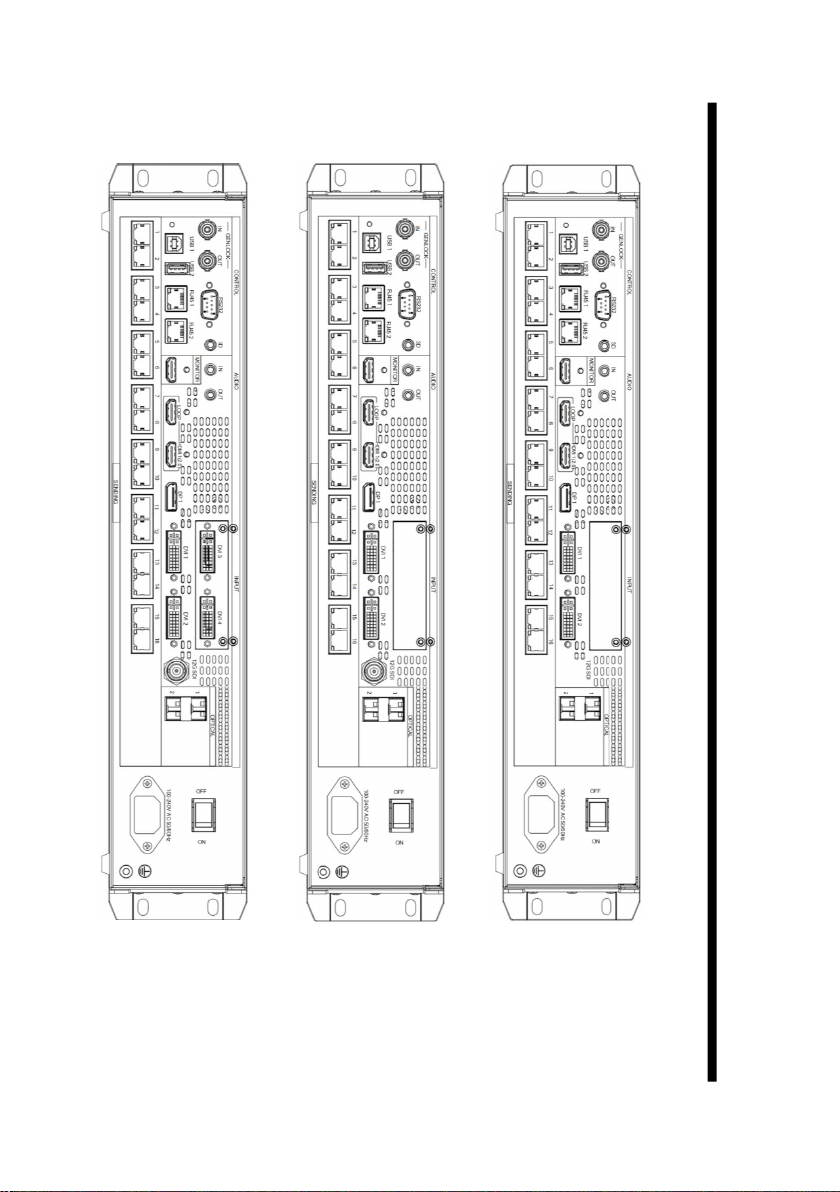
Back Panel
LED-F816-3D
LED-F816DS-3D
LED-F816S-3D
Tabla de contenidos
Otros manuales de Servidor de Magnimage