MAGINON ipc-1 Manual de usuario


1
Dear Customer,
Congratulations on purchasing this high quality MAGINON® product.
You have chosen a modern security camera with excellent technical features and
accessories which are all especially easy to use. Please read all instructions carefully and
attentively. Pay special attention to all safety instructions.
The device comes with a three year warranty. In the event of a fault in the camera
you will need the enclosed warranty card and your proof of purchase.
Keep these safely together with these user instructions
and be sure to pass the user instructions on to any new user or owner.
1. Contents of box
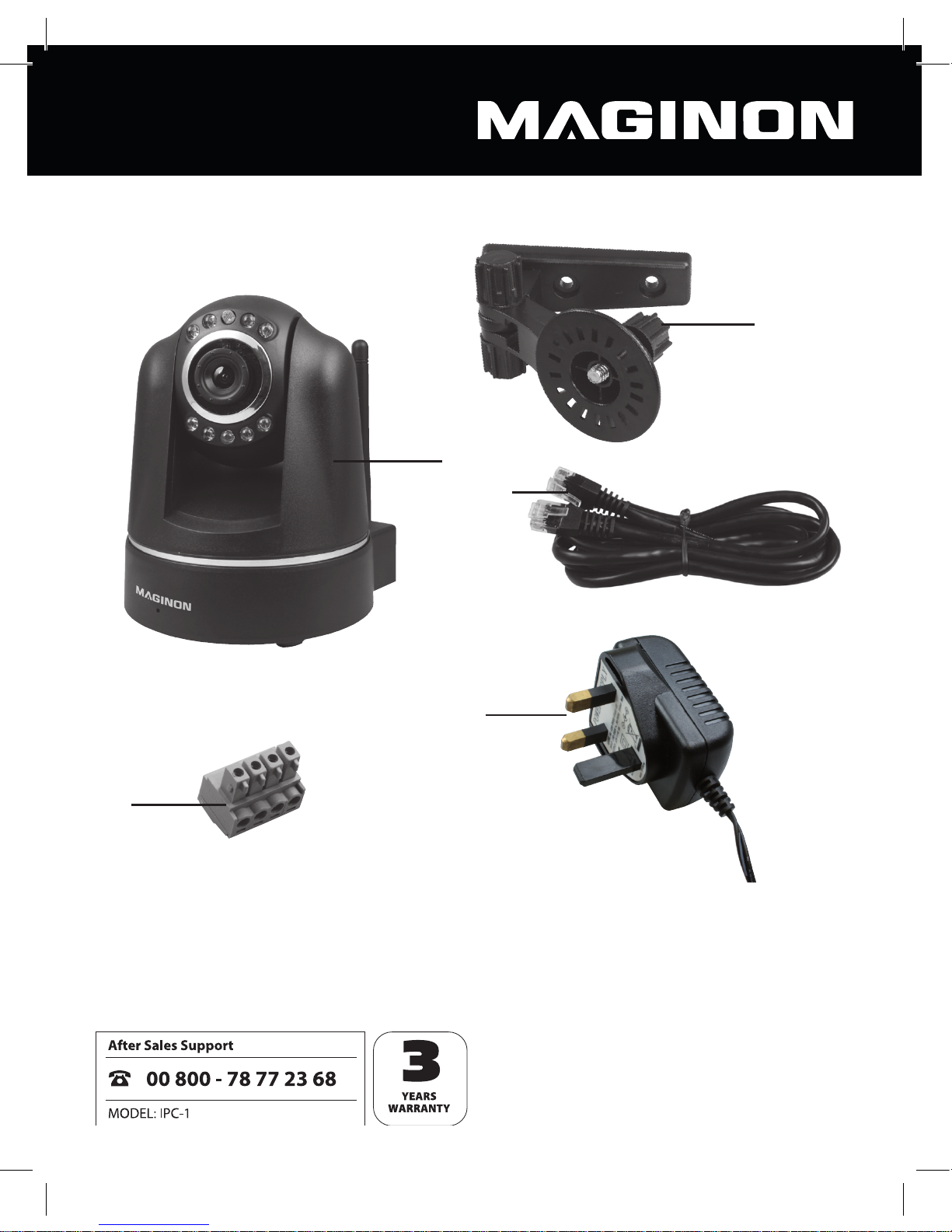
Unpack the camera carefully and check that all the following items are present and correct:
1. MAGINON® IP Security Camera IPC-1
2. AC adaptor
3. Mounting bracket (with assembly kit)
4. Network cable
5. Alarm connector
6. Software CD
7. Instruction Manual
8. Warranty documents
Note:
• Caution! Keep plastic bags and plastic lm away from babies and small children to
avoid risk of suffocation.

2
2. Table of contents
Introduction 1
1. Contents of box 1
2. Table of contents 2
3. Hazard, safety and general warnings 4
4. Preparations 7
4.1. Description of parts 7
4.2. Views of the camera 8
4.3. Installing the security camera 9
5. Installing the security camera 11
5.1. System requirements 11
5.2. Installing the hardware 11
5.3. Installing the software 12
5.4. Setting up the security camera 13
5.5. Installing under Mac OS X 15
5.6. Internet access 18
User data on delivery of IP Security Camera
User name: admin
Password: no Password presetted
New Password: _______________________
Note:
• Please make sure to apply a password to the “admin“ user account, on rst use
of the camera.

3
6. Settings 20
6.1. Equipment status 20
6.2. Camera name 21
6.3. Date and time 22
6.4. User accounts 23
6.5. Network settings 24
6.6. Wireless settings 26
6.7. UPNP settings 28
6.8. DDNS settings 29
6.9. Email settings 31
6.10. FTP settings 33
6.11. Alarm settings 35
6.12. Head settings 37
6.13. Resetting 38
6.14. Rebooting 38
7. Using the security camera 39
7.1. Accessing the camera 39
7.2. Controlling the camera 40
7.3. Using the camera via mobile devices 43
7.4. “Maginon IPC Viewer“ App Instructions 45
8. Conformity 50
9. Disposal 51
10. Warranty and Service 51
11. Technical Specication 52
12. Glossary 53

4
3. Hazard, safety and general warnings
Improper use or treatment of the camera and accessories poses a risk to you and others, and
the camera may be damaged or destroyed. Therefore please read and observe strictly the
following hazard, safety and general warnings.
Intended use
This security camera is intended to be used for monitoring indoor areas only. You are
responsible for ensuring that the personal rights of third parties are not violated
through the use of the security camera.
The security camera is designed for private use and is not suitable for business or
commercial use.
Hazards for children and persons with limited ability to operate
electronic equipment
The camera, accessories and packaging are not toys for children to play with and
should therefore be kept away from children. There could be a risk of electrocution,
poisoning and suffocation.
The camera and accessories may not be used by children or persons with a limited
ability of operating equipment. The camera may not be used by persons (including
children) with limited physical, sensory or mental capacities or limited experience and/or
knowledge. The camera, the receiver and mains adapter may only be used by persons that
are physically or mentally able to operate the equipment safely, unless they are supervised
by a person responsible for their safety or have been instructed by this person as to how
to use the equipment. Children should be supervised to ensure that they are not playing
with the equipment.

5
Hazard of electrocution in case of wet and humid conditions
The camera and any supplied components may not be exposed to dripping or spray
water. Containers filled with liquid, such as vases or glasses may also not be placed on or
close to the camera Danger of fire and electrocution.
Do not use the camera and its components close to water and protect against moisture
and humidity. Danger of fire and electrocution.
Do not use the camera and its components in areas exposed to high humidity, steam,
smoke or dust. Danger of fire and electrocution.
Electrical hazard
Switch off camera or receiver if a foreign body or liquid has entered the camera or
receiver. Wait until completely dry, there is danger of fire and electrocution.
Switch off if camera or receiver has been dropped or if housing is damaged, there is
danger of fire and electrocution.
The camera and its components may not be dismantled, modified or repaired, there is
danger of fire and electrocution.
Use only the power supply provided or a power supply with the same specifications.
Connect the power supply only to a power source which complies with the information on
the equipment label.
Do not use power supply or output cable if damaged. Replace with same type of power
supply.
Check that all used mains sockets are always accessible so that the power supply can be
quickly interrupted when necessary. The device is disconnected from the mains by pulling
out the plug from the mains socket.
Ensure adequate ventilation and do not cover the power adapter in order to avoid
overheating.
The USB power supply may not be used during a thunder storm, there is danger of
electrocution.

6
Damage from heat – re hazard
Do not leave camera and receiver in places that are susceptible to considerable
increases in temperature (e.g. in a vehicle). The housing and internal parts may be
damaged, which in turn could cause a fire.
Do not wrap up camera and receiver or place on textiles. This could produce a build up
of heat in the camera that could cause deformation of the housing and may represent a
fire hazard.
Injuries and material damage
When setting up or mounting the security camera, be sure to leave at least a 10 cm gap to
all sides in order to ensure adequate ventilation. Take special care to ensure that no
ventilation openings are covered by newspapers, tablecloths or curtains.
Never place open sources of fire onto or beside the camera
Damage to the electronics, lens or accessory caused by external factors, such as impacts,
falls or others are not covered by the warranty and are thus chargeable.
Legal Notices
This IP security camera is exclusively intended for indoor surveillance use. It is your
responsibility to ensure that the use of the IP security camera does not violate the
personal rights of third parties.
The video surveillance of public indoor areas (e.g. underground garage) requires a permit
and the premises must be labeled accordingly. In case of uncertainty, please contact the
respective local authority.

7
4. Preparations
4.1. Description of parts
1. MAGINON IP Security Camera IPC-1
2. Mounting bracket
3. Network cable
4. AC adaptor
5. Connector for alarm device
6. Assembly kit (not shown)
7. Software CD (not shown)
8. Instruction manual (not shown)
9. Warranty documents (not shown)
1.
4.
3.
2.
5.

8
4.2. Views of the camera
1. Lens
2. Infrared LED
3. Sensor
4. WiFi antenna
5. Network socket (LAN)
6. Alarm socket (in/out)
7. Power supply socket (5V DC)
8. Reset button
1.
5.
4.
3.
2.
6.
7.
8.
90°
270°
Tabla de contenidos
Otros manuales de Cámara IP de MAGINON