Mach Speed Technologies NF4-A9A Manual de usuario

NF4-A9A / NF4 Ultra-A9A
i
FCC Information and Copyright
This equipment has been tested and found to comply with the limits of a Class
B digital device, pursuant to Part 15 of the FCC Rules. These limits are designed
to provide reasonable protection against harmful interference in a residential
installation. This equipment generates, uses and can radiate radio frequency
energy and, if not installed and used in accordance with the instructions, may
cause harmful interference to radio communications. There is no guarantee
that interference will not occur in a particular installation.
The vendor makes no representations or warranties with respect to the
contents here and specially disclaims any implied warranties of merchantability
or fitness for any purpose. Further the vendor reserves the right to revise this
publication and to make changes to the contents here without obligation to
notify any party beforehand.
Duplication of this publication, in part or in whole, is not allowed without first
obtaining the vendor’s approval in writing.
The content of this user’s manual is subject to be changed without notice and
we will not be responsible for any mistakes found in this user’s manual. All the
brand and product names are trademarks of their respective companies.

Table of Contents
ii
Chapter 1: Introduction.....................................................1
1.1 Motherboard Features.......................................................1
1.2 Package Checklist.............................................................4
1.3 Layout & Components.......................................................5
Chapter 2: Hardware Installation.....................................6
2.1 Central Processing Unit (CPU) .........................................6
2.2 Fan Headers .....................................................................8
2.3 Memory Modules Installation ............................................9
2.4 Connectors & Slots .........................................................11
Chapter 3: Headers & Jumpers Setup...........................13
3.1 How to setup Jumpers ....................................................13
3.2 Detail Settings.................................................................13
Chapter 4: Useful Help....................................................21
4.1 Award BIOS Beep Code .................................................21
4.2 Extra Information.............................................................21
4.3 Troubleshooting...............................................................23
Chapter 5: WarpSpeeder™.............................................24
5.1 Introduction......................................................................24
5.2 System Requirement.......................................................24
5.3 Installation.......................................................................25
5.4 [WarpSpeeder™] includes 1 tray icon and 5 panels.......26

NF4-A9A / NF4 Ultra-A9A
1
CHAPTER 1: INTRODUCTION
1.1 MOTHERBOARD FEATURES
A. Hardware
CPU
Supports Socket 939.
SupportsAMDAthlon 64 / Athlon 64 FX /Sempron processors.
Supports Dual Core CPU.
Supports Maximum Front Side Bus up to 2G HT.
AMD 64 architecture enables simultaneous 32 and 64 bit computing.
Supports HyperTransport andAMD Cool’n’Quiet Technologies.
Chipset
NVIDIA nForce4 (NF4-A9 A)/ nForce4 Ultra (NF4 Ultra-A9A):
-Supports NVIDIA Firewall.
-Supports 10 USB 2.0 ports.
-Supports NVIDIAnTune Utility.
-Supports 1 PCI-Express x16 interface graphics slot.
-Supports 4 SATA ports, each channel up to 1.5Gb/s (NF4-A9A) /
3.0Gb/s (NF4 Ultra-A9A).
-Supports 4 IDE disk drives with PIO Mode 5, Bride Mode and Ultra
DMA33/66/100/133 Bus Master Mode.
-Compliant with AC’97 version2.3 specification.
-Compliant with PCI-Express Version 1.a specification.
Dimensions
ATX Form Factor: 20.8cm (W) x 29.35cm (L)
Operating Systems
Supports Windows 2000 and Windows XP.
Note: Do not support Windows 98SE and Windows ME.
Main Memory
Supports Dual Channel DDR.
Supports DDR266/333/400.
Maximum memory size is 4GB.
DIMM Socket
Location DDR Module Total Memory Size
DIMM1 128MB/256MB/512MB/1GB *1
DIMM2 128MB/256MB/512MB/1GB *1
DIMM3 128MB/256MB/512MB/1GB *1
DIMM4 128MB/256MB/512MB/1GB *1
Max is 4 GB.

NF4-A9A / NF4 Ultra-A9A
2
On-board IDE
2 on-board connectors support 4 IDE disk drives.
Supports PIO mode 0~4.
Supports Ultra DMA 33/66/100/133 bus master mode.
Serial ATA
4 on-board Serial ATA connectors support 4 serial ATA (SATA) ports.
nForce4 Ultra supports SATA2.0 specification, with data transfer rates
up to 3Gb/s.
nForce4 supports SATA 1.0 specification, with data transfer rates up to
1.5Gb/s.
Slots
Four 32bit PCI bus master slots.
Two PCI-Express x1 slots:
-PCI Express 1.0a compliant.
-Bandwidth 250MB/s per direction.
One PCI-Express x16 slot.
-PCI Express 1.0a compliant.
-Maximum theoretical realized bandwidth of 4GB/s simultaneously
per direction, for an aggregate of 8GB/s totally.
Super I/O
Chip: ITE IT8712F.
Low Pin Count Interface.
Provides the most commonly used legacy Super I/O functionality.
Environment Control initiatives,
-H/W Monitor
-Fan Speed Controller
-ITE's "Smart Guardian" function
On-board AC’97 Audio Sound Codec
Chip: ALC655:
-Compliant with AC’97 version2.3 specification.
-Supports 6 channels audio output.
10/100 LAN PHY
PHY: RTL8201CL.
Half/Full duplex capability.
SupportsACPI, PCI power management.

NF4-A9A / NF4 Ultra-A9A
3
Security
NVIDIA Firewall technology
-Native firewall solution
Advanced features
-Remote access, configuration, monitoring
-Command line interface (CLI)
-WMI scripts.
Internal On-board Connectors and Headers
1 audio-out header supports audio-out facilities.
1 front panel header supports front panel facilities.
1 CD-in connector supports CD-ROM audio-in function.
1 SPDIF-out connector supports digital audio-out function.
1 floppy connector supports 2 FDD devices with 360K, 720K, 1.2M,
1.44M and 2.88Mbytes.
2 IDE connectors support 4 IDE disk drives.
3 USB headers support 6 USB 2.0 ports at front panel.
4 Serial ATA connectors support 4 SATA devices.
Rear (Back Panel) Side Connectors
1 PS/2 Mouse Port.
1 PS/2 Keyboard Port.
1 Printer Port.
1 Serial Port. (JCOM2 is optional.)
1 RJ-45 LAN jack.
4 USB 2.0 Ports.
3 audio ports support 6 channels audio-out facilities.
PS/2
Mouse
PS/2
Keyboard
JCOM1 JCOM2
(optional)
Printer Port
COM1 COM2
(optional)
JUSB1
USB *2
LAN
Connector
USB*2
Line-in/Rear
Line-out
MIC-in/
Center/
Left

NF4-A9A / NF4 Ultra-A9A
4
B. BIOS & Software
BIOS
Award legal BIOS.
Supports APM1.2.
Supports ACPI.
Supports USB Function.
Bundled Software
Supports 9th Touch™, WINFLASHER™ and FLASHER™.
1.2 PACKAGE CHECKLIST
FDD Cable X 1
HDD Cable X 1
User’s Manual X 1
Serial ATA Cable X 1
Fully Setup Driver CD X 1
Rear I/O Panel for ATX Case X 1
USB 2.0 Cable X1 (optional)
S/PDIF Cable X 1 (optional)
Serial ATA Power Switch Cable X 1 (optional)

NF4-A9A / NF4 Ultra-A9A
5
1.3 LAYOUT &COMPONENTS
JKBMS1
JUSBLAN1
JCOM1
JCOM2
(optional)
JPRNT1
JUSB1
JAUDIO2
JAUDIO1
JKBMSV1
JUSBV1
JATXPWR2
JATXPWR1
PEX16
PEX1_1
PEX1_2
PCI1
PCI3
PCI2
PCI4
JSPDIF_OUT
JCDIN1
BIOS
DIMM1
DIMM2
JSATA1
JSATA2
JSATA3
JSATA4
JUSB3 JUSB4JUSB2
IDE2
IDE1
FDD1
JCFAN1
JSFAN1
BAT1
JNBFAN1
JCMOS1
JUSBV2 JCI1
JPANEL1
Codec
Super I/O
DIMM3
DIMM4
Socket 939
LAN
nForce4
or
nForce4 Ultra
Note: ■represents the 1st pin.

NF4-A9A / NF4 Ultra-A9A
6
CHAPTER 2: HARDWARE INSTALLATION
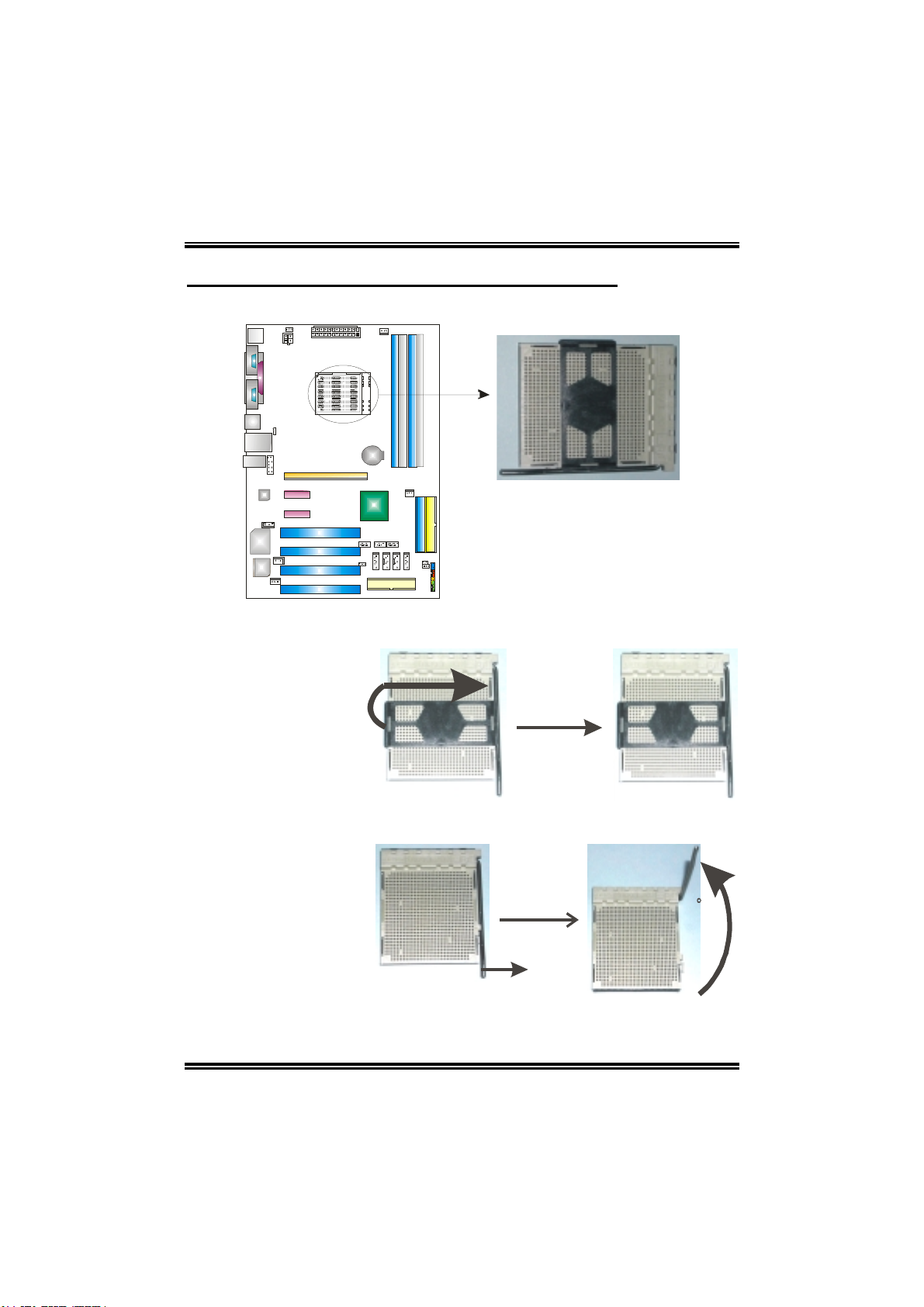
2.1 CENTRAL PROCESSING UNIT (CPU)
Step 1: Remove the socket protection cap.
Step 2: Pull the lever toward direction Afrom the socket and then raise the lever up
to a 90-degree angle.
A
90

NF4-A9A / NF4 Ultra-A9A
7
Step 3: Look for the white triangle on socket, and the gold triangle on CPU should
point forwards this white triangle. The CPU will fit only in the correct
orientation.
Step 4: Hold the CPU down firmly, and then close the lever toward direct B to
complete the installation.
B
Step 5: Put the CPU Fan on the CPU and buckle it. Connect the CPU FAN power
cable to the JCFAN1. This completes the installation.

NF4-A9A / NF4 Ultra-A9A
8
2.2 FAN HEADERS
CPU FAN Power Header: JCFAN1
System Fan Power Header: JSFAN1
Northbridge Fan Power Header: JNBFAN1 Pin Assignment
1 Ground
2 +12V
JCFAN1
JSFAN1
JNBFAN1
13
13 13
3 FAN RPM rate sense
(Only for JCFAN1 and
JSFAN1.)
Note:
The JCFAN1 and JSFAN1 reserve system cooling fan with Smart Fan Control utility. It
supports 3 pin head connector. When connecting with wires onto connectors, please note
that the red wire is the positive and should be connected to pin#2, and the black wire is
Ground and should be connected to GND.
Este manual sirve para los siguientes modelos
1
Tabla de contenidos
Otros manuales de Placa madre de Mach Speed Technologies
Manuales populares de Placa madre de otras marcas

Telit Wireless Solutions
Telit Wireless Solutions SL869-3DR Manual de usuario

Gigabyte
Gigabyte GA-9IVDT Manual de usuario

Texas Instruments
Texas Instruments ADS8372EVM Manual de usuario

Commell
Commell MS-C73 Manual de usuario

IBT Technologies
IBT Technologies MB860 Manual de usuario

Nvidia
Nvidia TEGRA DG-04927-001_V01 Manual de usuario