
Macally IceCam2 Manual de usuario

IceCam2 User’s Guide
USB2.0 Video Camera with Microphone for Mac & PC

P.2
Table Contents
Introduction P3»
Package Contents P3»
System Requirements P3»
About Macally Products and Services P4»
Hardware Basic P6»
Installation P7»
Using IceCam2 under MacOS X 10.4.11 and 10.5.x P7
iChat P7
Skype P13
Using IceCam2 under Windows XP(SP2) and Vista P16
Windows Live Messenger P17
Skype P21
Yahoo! Messenger P26
Frequently Asked Questions P30»

P.3
Introduction
Package Contents
System Requirements
Thank you for purchasing the Macally IceCam2. IceCam2 is a Portable USB2.0 web
camera with built-in microphone. Its works with iChat, Skype, Window Live Messen-
ger etc. and to keep you in touch with family, friends and business contacts.
Before you begin using the Macally IceCam2, be sure to read this manual in its
entirety.
IceCam2•
User’s Guide•
Mac OS X 10.4.11 and 10.5.X•
Windows XP(Service Pack2) and Windows Vista•
Desktop or Notebook computers with a• USB2.0 port available

P.4
About Macally Products and Service
More information about Macally products and services are available through the
following sources:
The Macally Home Page URL on the World Wide Web :
http://www.macally.com or
Macally Technical Support
In USA, please call (909)230-6778 or
In other areas, E-mail us at techsupport@macally.com
We are confident that Macally IceCam2 will greatly increase your productivity and
simplify the usage of your devices. Please register this product at www.macally.com/
register.html. It will help you obtaining latest drivers, updates, technical support and
new Macally product release information.
Copyright 2008 by Macally Peripherals
This manual is furnished under license and may be used or copied only in accordance with the terms of such license.
Except as permitted by such license, no part of this publication may be reproduced, stored in a retrieval system, or
transmitted, in any form or any means, electronic, mechanical, recording, or otherwise, including translation to another
language or format, without the prior written permission of Macally Peripherals.
The content of this manual is furnished for informational use only, is subject to change without notice, and should not be
construed as a commitment by Macally Peripherals. Macally Peripherals assumes no responsibility or liability for any
errors or inaccuracies that may appear in this book.
Macally is a trademark of the Mace Group, Inc. All other product names, trademarks and registered trademarks in this

P.5
document are the property of their respective holder.
FCC Information
This device complies with part 15 of the FCC Rules. Operation is subject to the following two conditions: (1) this device
may not cause harmful interference and (2) this device must accept any interference received, including interference
that may cause undesired operation.
Warranty
Macally Peripherals warrants that this product will be free from defects in title, materials and manufacturing workman-
ship for 1 years warranty from the date of the purchase. If the product is found to be defective then, as your sole
remedy and as the manufacturer’s only obligation, Macally will repair or replace the product. This warranty is exclusive
and is limited to IceCam2. This warranty shall not apply to products that have been subjected to abuse, misuse, abnor-
mal electrical or environmental conditions, or any condition other than what can be considered normal use.
Warranty Disclaimers
Macally Peripherals makes no other warranties, express, implied or otherwise, regarding the IceCam2, and specifically
disclaims any warranty for merchantability or fitness for a particular purpose. The exclusion of implied warranties is
not permitted in some states and the exclusions specified herein may not apply to you. This warranty provides you with
specific
legal rights. There may be other rights that you have which vary form state to state.
Limitation of Liability
The liability of Macally Peripherals arising from this warranty and sale shall be limited to a refund of the purchase price. In no event shall Macally Peripherals be liable for
costs of procurement of substitute products or services, or for any lost profits, or for any consequential, incidental, direct or indirect damages, however caused and on any
theory of liability, arising from this warranty and sale. These limitations shall apply notwithstanding any failure of essential purpose of any limited remedy.

P.6
Hardware Basic
Focusing Adjust ring
Status LED(Green when in use)
Microphone
Lens
(640x480 Resolution)
Clip
Connect to computer USB2.0 Port
360° Pan
135° Tilt
Open Clip : For thicker flat panel monitor.
Extension: For Notebook or
thin flat panel monitor
Closed Clip: It can sit flat on top of a computer or desk.

P.7
Using IceCam2 under MacOS X 10.4.11 and 10.5.x
IceCam2 is a UVC device, it uses and installs necessary drivers from OS automati-
cally. All you need to do is to plug IceCam2 into a USB 2.0 port in the computer, and
clip it securely on the top of flat panel monitor or the location you prefer. When this
manual is written in March 2008, IceCam2 is tested and fully supports Apple iChat
and Skype. We recommend you to download the latest video conferences software
update available to your OS. As the software develops, the User Interface might
change as well. Below installation guides are for reference only.
iChat
1. Connect your Mac to Internet. Click iChat icon on the Dock or from Applications
to launch iChat. iChat Buddy List window will show on the desktop. Login to iChat.
Installation

P.8

P.9
2. Under iChat menu, select Preferences…
P.10
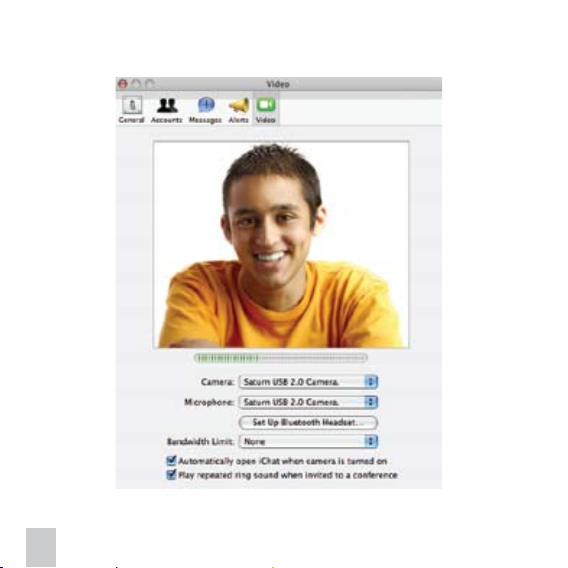
3. Click on Audio/Video or Video icon. To use IceCam2 please select “USB 2.0
Camera” under Camera and Microphone options.
Tabla de contenidos
Otros manuales de Cámara web de Macally


