LXE MX5A3856 Manual de usuario

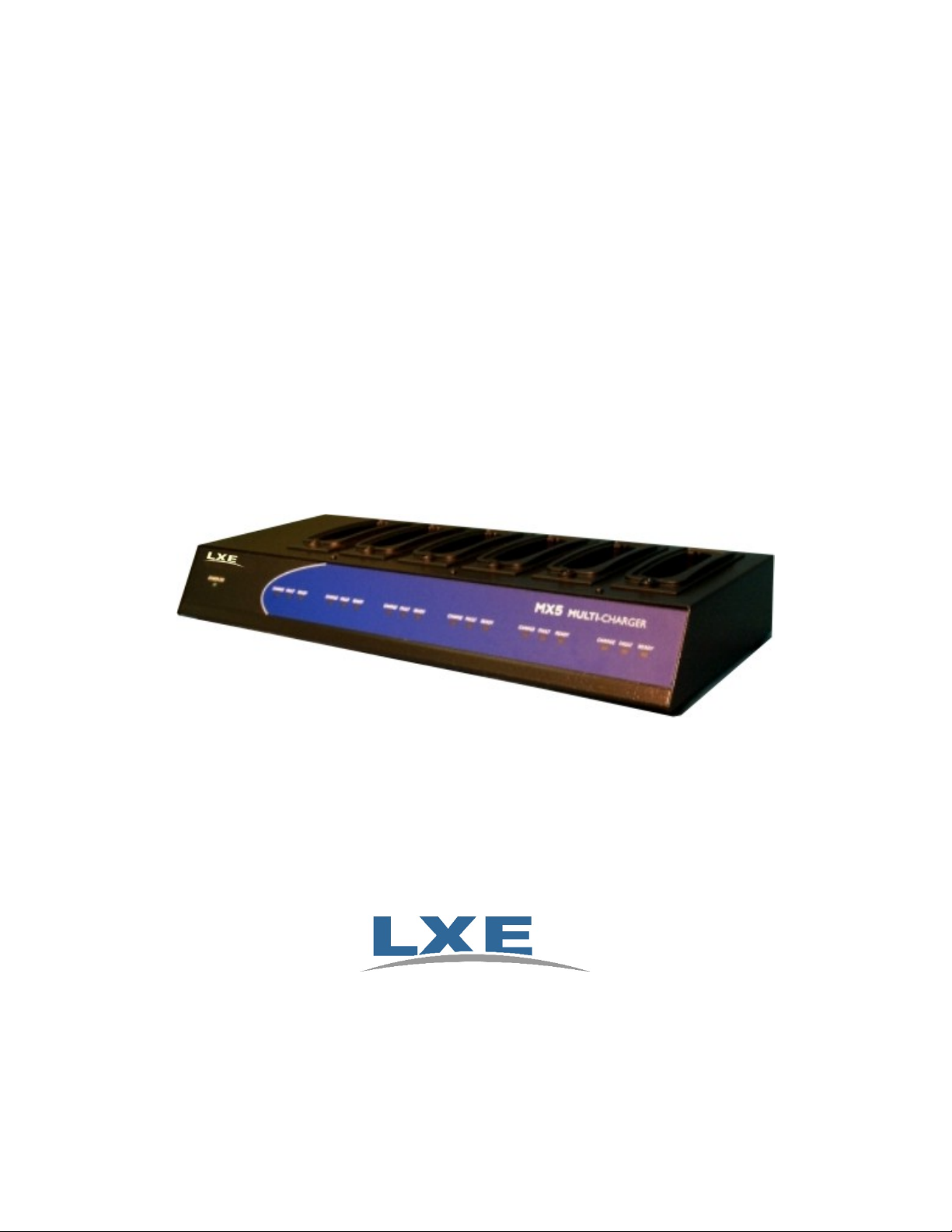
MX5 Multi-Charger User’s Guide
Models MX5A385CHGR6US and MX5A385CHGR6WW
For Use with LXE MX5A379BATT Lithium Ion Battery Packs
Copyright © November 2006 by LXE, Inc.
All Rights Reserved
E-EQ-MX5CHGROG-D

Notice
LXE Inc. reserves the right to make improvements or changes in the products described in this manual at any time without
notice. While reasonable efforts have been made in the preparation of this document to assure its accuracy, LXE assumes no
liability resulting from any errors or omissions in this document, or from the use of the information contained herein. Further,
LXE Incorporated, reserves the right to revise this publication and to make changes to it from time to time without any obligation
to notify any person or organization of such revision or changes.
Copyright Notice:
This manual is copyrighted. All rights are reserved. This document may not, in whole or in part, be copied, photocopied,
reproduced, translated or reduced to any electronic medium or machine-readable form without prior consent, in writing, from
LXE Inc. Further, LXE Incorporated, reserves the right to revise this publication and to make changes to it from time to time
without any obligation to notify any person or organization of such revision or changes.
Copyright © 2006 by LXE Inc. , An EMS Technologies Company
125 Technology Parkway, Norcross, GA 30092, U.S.A. (770) 447-4224
LXE® is a registered trademark of LXE Inc. All other brand or product names are trademarks or registered trademarks of their
respective companies or organizations. When manual is in PDF format: "Acrobat ® Reader® Copyright © 1987-2006 Adobe
Systems Incorporated. All rights reserved. Adobe, the Adobe logo, Acrobat, and the Acrobat logo are trademarks of Adobe
Systems Incorporated." applies.
FCC Information:
This device complies with FCC Rules, part 15. Operation is subject to the following conditions:
1. This device may not cause harmful interference
and
2. This device must accept any interference that may be received, including interference that may cause undesired
operation.
Warning!
This equipment has been tested and found to comply with the limits for a Class A digital device, pursuant to
part 15 of the FCC rules. These limits are designed to provide reasonable protection against harmful
interference when the equipment is operated in a commercial environment. This equipment generates, uses,
and can radiate radio frequency energy and, if not installed and used in accordance with the instruction
manual, may cause harmful interference to radio communications. Operation of this equipment in a residential
area is likely to cause harmful interference in which case the user will be required to correct the interference
at his own expense.
Changes or modifications to this device not expressly approved by LXE Inc., could void the user’s authority to operate this
equipment.
EMC Directive Requirements:
This is a Class A product. In a domestic environment this product may cause radio interference in which case the user may be
required to take adequate measures.
Industry Canada:
This Class A digital apparatus meets all requirements of the Canadian Interference Causing Equipment Regulations. Operation is
subject to the following two conditions: (1) this device may not cause harmful interference, and (2) this device must accept any
interference received, including interference that may cause undesired operation.
Cet appareil numérique de la classe A respecte toutes les exigences du Règlement sur le matériel brouiller du Canada.
Le present appareil numérique n’emet pas de bruits radioélectriques dépassant les limites applicables aux appareils numeriques
de le Classe A préscrites dans le Reglement sur le brouillage radioélectrique édits par le ministere des Communications du
Canada.

IMPORTANT SAFETY WARNINGS US
SAVE THESE INSTRUCTIONS
This document contains important safety and operating instructions for the LXE MX5 Multi-Charger. Please read
all instructions and cautionary markings on the charger/analyzer itself before putting the unit into service.
Safety Alert Symbols
This symbol is used to call your attention to instructions concerning your personal safety. Watch
for this symbol – it will alert you to important safety precautions that must be observed to avoid
death, personal injury or property damage. Follow the instructions after the warning symbol and be
alert to the possibility of personal injury or death.
These signal words provide users with information about the seriousness of the hazard involved:
DANGER WARNING CAUTION
Indicates imminent hazards
which, if not avoided, WILL
result in severe personal injury
or death.
Indicates potential hazards
which, if not avoided, COULD
result in severe personal injury
or death.
Indicates hazards or unsafe practices
which, if not avoided, COULD result in
minor or moderate personal injury or
property damage.
Safety Instructions
Setting up the MX5 Multi-Charger
Locate or orient the AC cord so that it will not be stepped on, tripped over or subjected to damage or stress.
Analyze or charge only LXE part no. MX5A379BATT Rechargeable Lithium Ion Battery Pack in this
charger/analyzer. Other batteries or battery packs may burst causing injury or property damage.
Operating the MX5 Multi-Charger
Only users who have read and understand all operating instructions are qualified to operate the MX5 Multi-Charger.
Failure to read, understand and follow safety instructions may result in injury or death.
Keep the rear of the charger/analyzer free of obstacles and do not block the rear ventilation slots. The
charger/analyzer generates internal heat during charging.
Keep the charger/analyzer away from any heat source. Excessive internal heating can ruin the charger/analyzer.
Use care when inserting battery. Do not "slam" or slide the battery into the pocket, this could damage the
charger/analyzer.
Keep dirt and foreign objects out of the battery pocket. Do not short circuit any of the contacts in the battery
pocket, this could result in injury or property damage.
Do not operate the charger/analyzer if it has been dropped or damaged in any way. Return the charger/analyzer to
LXE.
Storing the MX5 Multi-Charger
Disconnect charger/analyzer by pulling the plug; not the cord.
Maintaining the MX5 Multi-Charger
Service should be performed by trained persons only. Return the charger/analyzer to LXE.
Caring for Batteries
Do not dispose of batteries into a fire. Burning will generate hazardous vapors and may cause the battery to
explode. Failure to observe this warning may result in injury from inhalation of vapors or burns from flying debris.
Do not immerse batteries in water or any other liquid. If batteries are immersed, contact LXE.
Do not disassemble or perform modifications to the battery. There are no user serviceable components in the
battery.
Do not place battery into pocket or toolbox with conductive objects (coins, keys, tools, etc.).

A battery placed on damp ground or grass could be electrically shorted. Lay the battery on its side when not in use.
Do not store batteries above 140°F (60°C) for extended periods.
Failure to observe these warnings could result in injury or damage to the battery from rapid discharge of energy or
overheating of the battery.
Electrical Shock Hazards
The following precautions should be observed to avoid the risk of electrical shock hazards associated with charging
batteries:
The MX5 Multi-Charger has been designed for indoor use only. Do not operate outdoors or in extremely high
humidity environments. Do not expose charger/analyzer to rain, snow or wet conditions.
Unplug the charger/analyzer from power source before cleaning. Use only mild detergent with a slightly damp
cloth to clean the outside of the charger/analyzer. Do not use solvents or flammable cleaners. Allow the case to dry
fully before using again.
Use of attachments or accessories not recommended by LXE could result in fire, electric shock or injury.
This appliance must be properly grounded. If it should malfunction or break down, grounding provides a path of
least resistance for electric current to reduce the risk of electric shock. This appliance is equipped with a cord
having an equipment grounding conductor and ground outlet that is properly installed and grounded in accordance
with all local codes and ordinances. Do not operate the charger/analyzer with a damaged AC cord or plug. LXE
does not recommend the use of any extension cord with the MX5 Multi-Charger.
The MX5 Multi-Charger has been designed for use on a nominal 100 or 120 volt or nominal 220 or 240 volt circuit
and has a grounding attachment plug. The plug is an IEC configuration that is appropriate for your country and
regulations. Make sure that the appliance is connected to an outlet having a configuration similar to the plug. No
adapter should be used with this appliance. Improper connection of the equipment-grounding conductor can result
in a risk of electric shock.
Check with a qualified electrician or service person if you are in doubt as to whether the outlet is properly
grounded. Do not modify the plug provided with the appliance. If it will not fit in the outlet, have a proper outlet
installed by a qualified electrician.
Do not disassemble the MX5 Multi-Charger. It contains no user serviceable parts.

E-EQ-MX5CHGROG-D MX5 Multi-Charger User’s Guide
Table of Contents
INTRODUCTION 1
Purpose of this Manual ............................................................................................ 1
Quick Start................................................................................................................. 1
Intended Use ............................................................................................................. 1
Controls and Connectors......................................................................................... 2
MX5 Multi-Charger..................................................................................................................2
MX5 Rechargeable Lithium Ion Battery Pack .........................................................................2
Specifications............................................................................................................ 3
Electrical Specifications ...........................................................................................................3
Operating Temperature Ranges................................................................................................3
Dimensions ...............................................................................................................................3
INSTALLATION AND OPERATION 4
Introduction............................................................................................................... 4
Setup.......................................................................................................................... 4
Placing the Battery Pack into the Charger.............................................................. 5
Interpreting the LEDs ............................................................................................... 6
Normal Operations.................................................................................................... 6
Maintenance .............................................................................................................. 7
Storage ......................................................................................................................................7
Service ......................................................................................................................................7
Getting Help............................................................................................................... 7
Accessories ...............................................................................................................................7
Troubleshooting........................................................................................................ 8
Revision Notices ....................................................................................................... 9
IMPORTANT SAFETY WARNINGS -TRANSLATIONS 10

ii Table of Contents
MX5 Multi-Charger User’s Guide E-EQ-MX5CHGROG-D
Illustrations
Figure 1 MX5 Multi-Charger.............................................................................................................................2
Figure 2 Lithium Ion Battery Pack ....................................................................................................................2
Figure 3 Charging Pocket ..................................................................................................................................4
Figure 4 Battery Pack Insertion .........................................................................................................................5

E-EQ-MX5CHGROG-D MX5 Multi-Charger User’s Guide
Introduction
Purpose of this Manual
This user’s guide is intended to familiarize the user with the safety and operating instructions
necessary to use the MX5 Multi-Charger (Model MX5A385CHGR6US / MX5A385CHGR6WW)
to charge LXE Rechargeable Lithium Ion Battery Packs.
This manual should be readily available to all users and maintenance personnel using this charger.
Quick Start
This manual provides the following instructions for operating the MX5 Multi-Charger.
•Setting Up the Charger
•Inserting the Battery Pack
•Interpreting the LEDs
Intended Use
The LXE MX5 Multi-Charger (MX5A385CHGR6US / MX5A385CHGR6WW) is designed to
simultaneously charge six LXE Rechargeable Lithium Ion Battery Packs in less than four hours,
depending upon battery pack temperature and conditions.
Note: Store the charger in a cool, dry place.
Important: This symbol is placed on the product to remind users to dispose of Waste Electrical
and Electronic Equipment (WEEE) appropriately, per Directive 2002-96-EC. In most areas, this
product can be recycled, reclaimed and re-used when properly discarded. Do not discard labeled
units with trash. For information about proper disposal, contact LXE through your local sales
representative, or visit www lxe com.

2 Controls and Connectors
MX5 Multi-Charger User’s Guide E-EQ-MX5CHGROG-D
Controls and Connectors
MX5 Multi-Charger
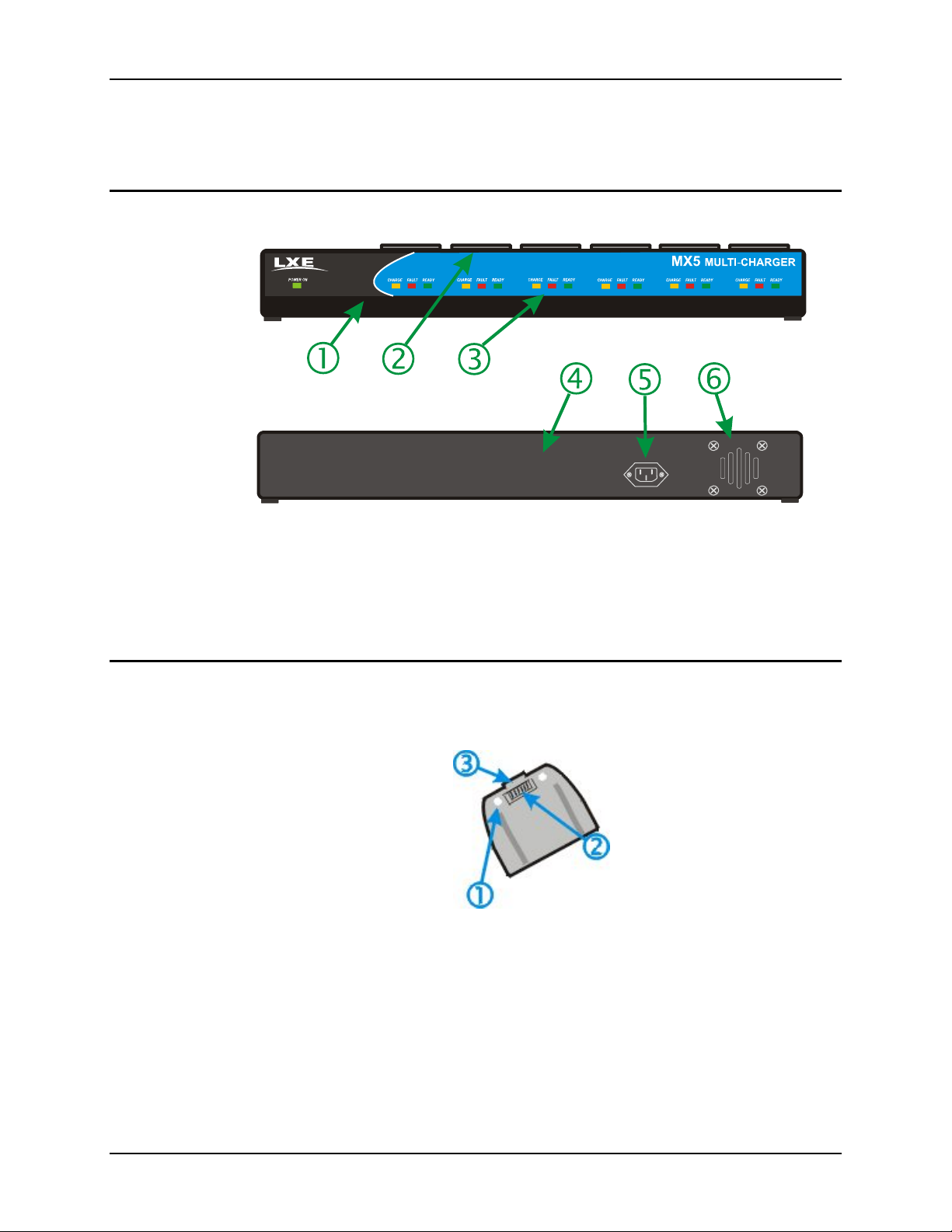
Figure 1 MX5 Multi-Charger
1 Front 4 Back
2 Battery Charging Pocket 5 Power Connection
3 LED Indicators 6 Ventilation Slots
MX5 Rechargeable Lithium Ion Battery Pack
Battery Pack Model Number -- MX5A379BATT
Figure 2 Lithium Ion Battery Pack
1. Retaining Screws
2. Contacts, Battery Charger
3. Retaining Clip

Specifications 3
E-EQ-MX5CHGROG-D MX5 Multi-Charger User’s Guide
Specifications
Electrical Specifications
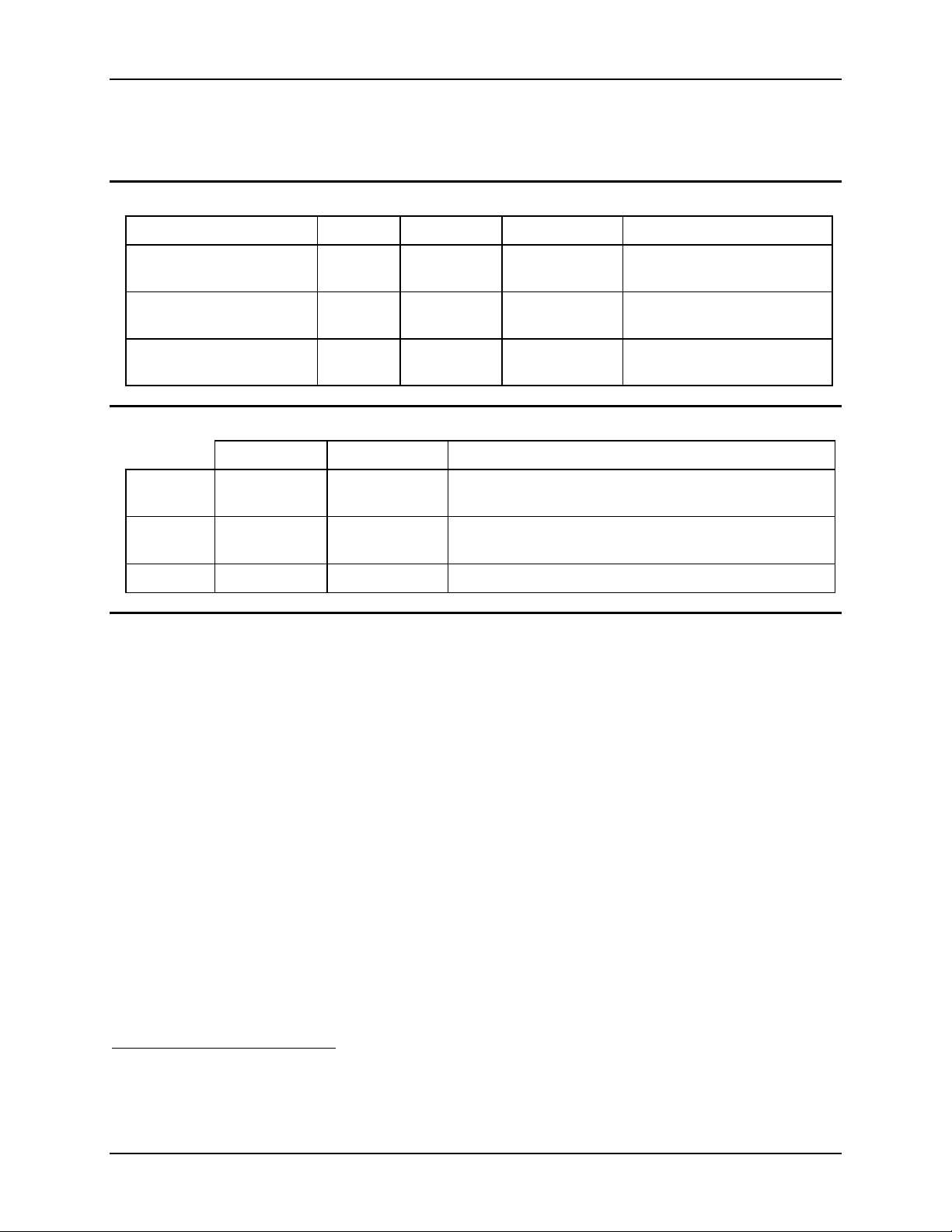
Parameter Min Typical. Max. Comment
Power Supply Input
Voltage (VAC-IN)
88VAC 110VAC 132VAC Auto-switching
Power Supply Input
Voltage(VAC-IN)
176VAC 220VAC 264VAC Auto-switching
Power Supply Input
Frequency (freq)
47Hz 63Hz
Operating Temperature Ranges
Minimum Maximum Comment
Operating 0°C (32°F) +60°C (140°F) Battery packs will only be charged when their temperature
is between 0°C (32°F) and 45°C (113°F).
Charging 0°C (32°F) +45°C (113°F) Battery packs will not charge if their temperature is outside
this range. 1
Storage -20°C (-4°F) +70°C (158°F) Unit is off.
Dimensions
Weight 11.6 pounds
Plug Type IEC; 3-prong
1If the MX5 has a dead main battery and is as cold as the extended operating temperature’s
lowest value, the unit must be warmed to above –20°C (-4°F) before installing a new main
battery pack and pressing the On button.

4 Introduction
MX5 Multi-Charger User’s Guide E-EQ-MX5CHGROG-D
Installation and Operation
Introduction
The life and capacity of a Lithium Ion battery can vary significantly depending on the discharge
current and the environment in which it is used. As with all batteries, expect to see a reduction in
the total number of operations a fully charged battery pack can deliver as it ages. Charging times
may increase but will not exceed four hours. Battery packs do not need to be fully discharged
between charge cycles.
Setup
•Ensure that the location you choose for the battery charger is well ventilated.
•Place the charger on a horizontal, hard surface.
•Plug the power cord into a properly grounded outlet.
•On initial power-up, all LEDs light up for a few seconds (yellow, red, green).
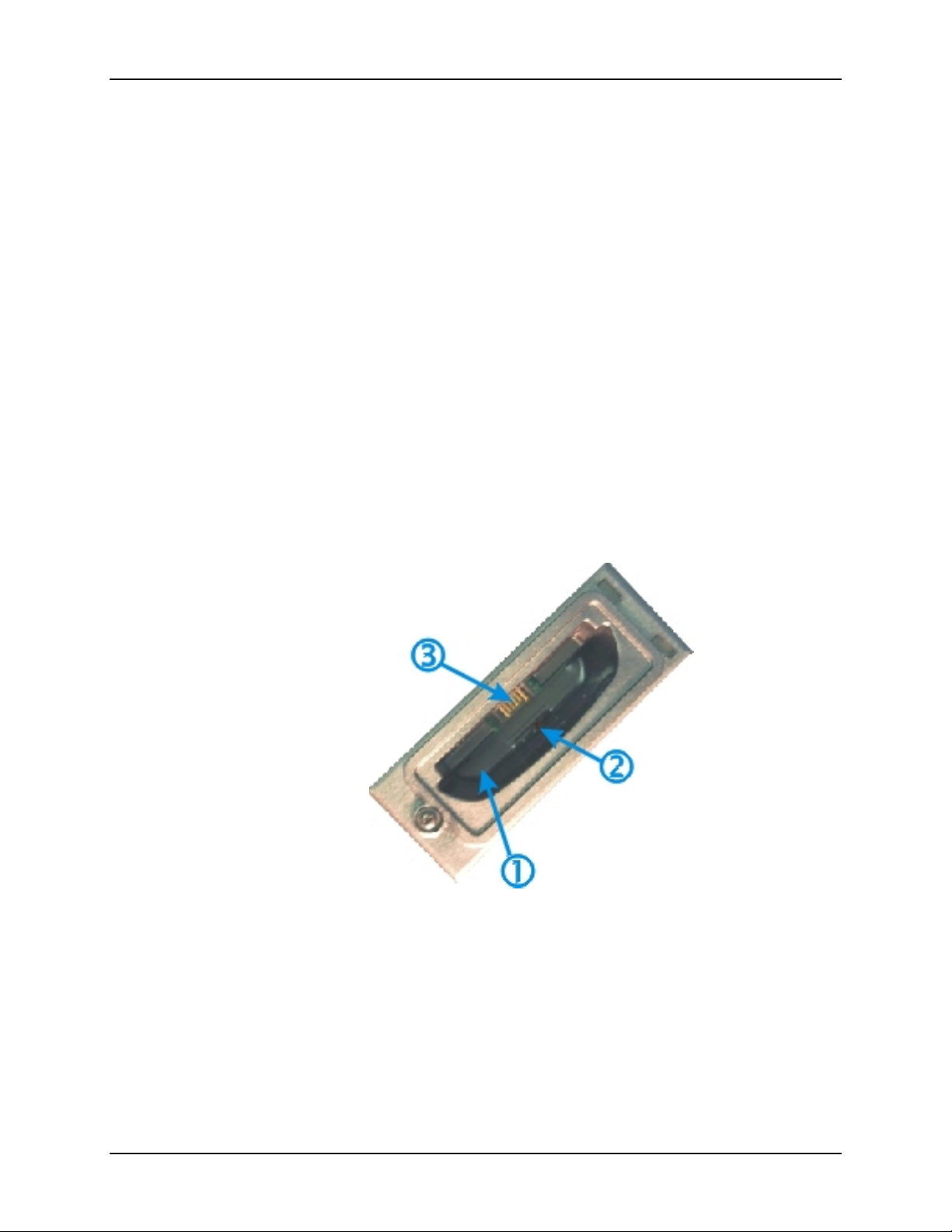
Figure 3 Charging Pocket
1. Battery Charging Pocket
2. Retaining Pins
3. Battery Charger Contacts
Este manual sirve para los siguientes modelos
3
Tabla de contenidos
Otros manuales de Cargador de baterías de LXE

LXE
LXE MX3A378 Manual de usuario

LXE
LXE HX1A376 Manual de usuario

LXE
LXE 9000A3775 Manual de usuario

LXE
LXE MX7A3855 Manual de usuario

LXE
LXE MX7 Manual de usuario

LXE
LXE HX1A376CHGR Manual de usuario

LXE
LXE HX2A3106 Manual de usuario

LXE
LXE MX8A3854 Manual de usuario

LXE
LXE 9000A377CHGR5US Manual de usuario

LXE
LXE MX1ISA378 Manual de usuario