
LuCell LU-3000 Manual de usuario

LU-3000 User Manual
Jewellery Box of My life

2│LuCell (LU-3000)
1. Safety Precautions
Safety precautions are to prevent any unexpected risk or damage.
Please read before use.
•Be careful opening and closing door. Fingers or objects may get stuck.
• Keep away from children.
• Do not hit edge of safe to avoid injury.
• Do not slam door to avoid injury or damage.
• Safe is heavy. Be careful when moving or installing safe to avoid injury.
• Firmly fix safe to ground when installing.
• When moving safe, inquire a professional if needed.
• Improper handling of safe can cause damage to floor or table.
• Avoid breaking glass to prevent injury. Do not apply force.
• Avoid placing fragile objects, such as ceramic or glass, on safe.
• Product may malfunction if any foreign metal substances or moisture enter keypad.
• Do not scratch keypad with any sharp material.
• Do not apply excessive force to keypad.
• Avoid exposure to any chemicals (gasoline, benzene, solvent, acetone, thinner, etc.)
• Remove batteries when safe is not used for a long time.
• Avoid direct fire or heat to the safe and keypad (touch screen).
• Any wrong operation may cause injury or damage to safe.
• Safe can be broken into using cutting or welding tools. Our company is not liable
for any stolen items.

User Manual │3
Safety precautions are to prevent any unexpected risk or damage.
Please read before use.
❖ Overview
LCD
<Outside>
<Touch panel><Display>
<
Inside
>
Smart cam
(camera)
Keypad
Password change button
Adapter/Internet
<Touch panel>
Front Back
Card/key holder
USB memory
File holder
Alarm
Battery mode
Mute
Door status
Keypad
lock out
Error
occurrence
Battery
status
alarm
occurrence
Lock/
unlock
fingerprint
recognition
START button
Fingerprint
recognizer
Battery case

4│LuCell (LU-3000)
Notice
- This safe uses DC 12V adapter as main power supply.
(Specification or adapter design is subject to change without prior notice).
Incorrect adapter may cause problems to system.
(Not covered by company warranty).
1. Check back of safe for adapter insert location.
2. Connect DC12V adapter jack to power plug.
3. Connect adapter power cord to outlet.
Connection is confirmed when screen starts self-test, plays sounds, and
displays “good.”
2. Connecting Adapter
<Back>

User Manual │5
※ Notice
- Battery is auxiliary power supply. Use adapter.
※
Replace battery immediately when:
• screen displays Lo-bAt with low voltage icon ( )
•numbers on touch button or LCD are blurry or repeatedly turn on and off..
•screen fails to turn on after you press START button.
•LCD malfunctions.
•system turns off immediately after entering password.
•safe door fails to open when “OPEn” message appears after password is entered.
1. Battery compartment slightly pops out when gently pushed.
2. Pull battery compartment and insert new batteries. Use 1.5V alkaline batteries
(AA x 4).
3. Connection is confirmed when screen starts self-test, plays sounds, and displays
“good.”
4. Slide battery cover back until a click is heard.
3. Inserting Batteries

6│LuCell (LU-3000)
※ Notice
- Press START button twice for security mode to hide password.
- Press START button to cancel password entry.
- Safe will not open if door is not opened within 3-4 seconds after green
light turns ON.
- "Err-03" indicates incorrect password.
- 5 consecutive incorrect passwords will sound alarm for 3 minutes. Press
START button and enter correct password to stop alarm.
1. Press START button. “------“ will be displayed on screen.
2. Input password and press START button.
Input factory password "1,2,3,4,5,6.”
3. Pull safe door to open.
- Display will show ‘OPEn’ once door is open.
4. Close door. Safe will automatically lock with “CLOSE” displayed on LCD.
- Confirm proper closure by checking lock icon( ) on LCD.
1 2
4. Opening/Closing Door

User Manual │7
Enter current password and open door.
1 2
※ Notice
- Confirm new password works before closing door.
1. Press Password change button located inside door.
“-CodE-“ and “-----“ will be displayed.
2. Enter new password and press START button.
Password can be set with 4-20 digits.
“AgAin” then “------” will be displayed.
3. Enter new password again and press START button.
4. New password is set.
“USEr_1“ is displayed on LCD and OK flickers.
5. Changing Password

8│LuCell (LU-3000)
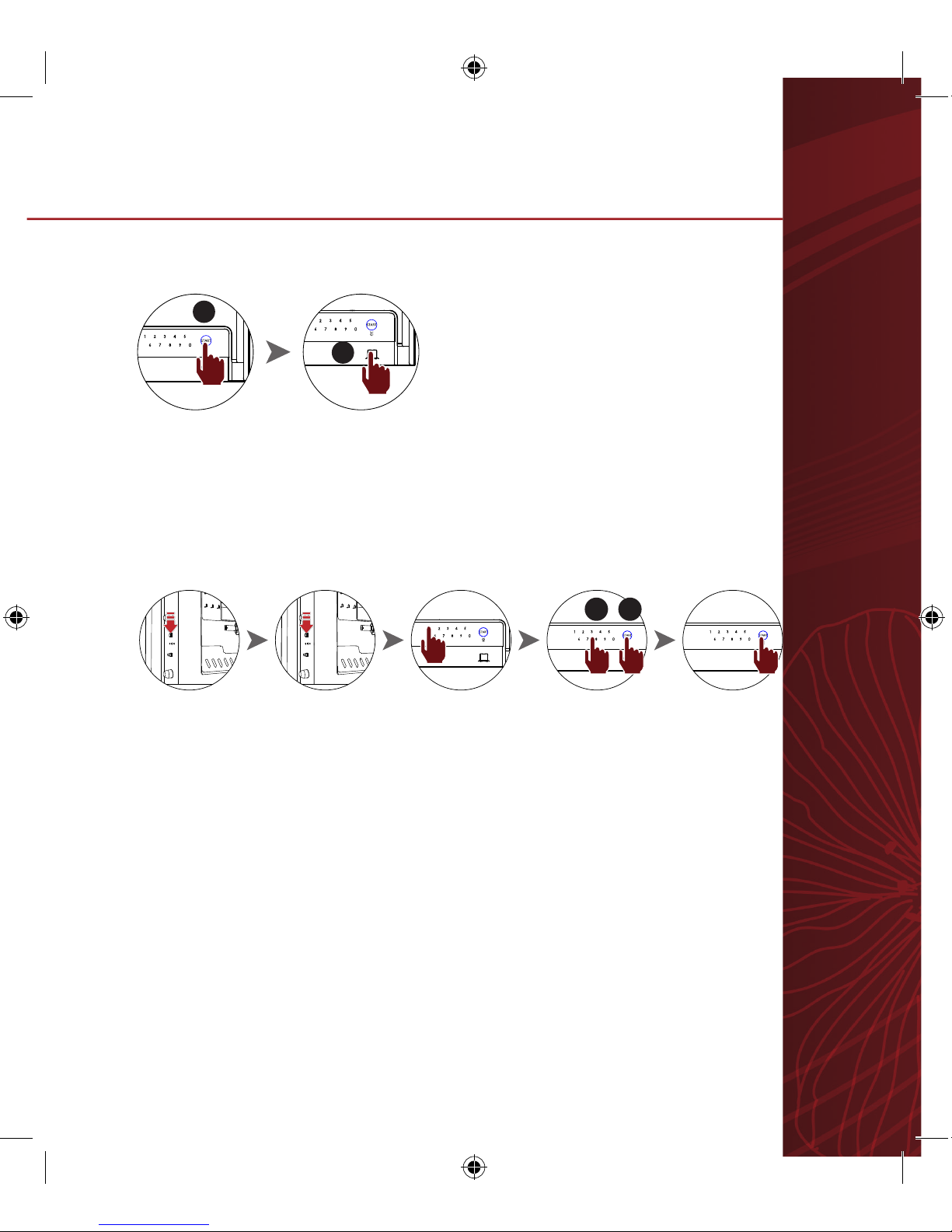
Registering fingerprint
Enter current password and open door.
※ Maximum registration of 10 fingerprints possible. “Id-specific number”
※ signifies number of registered fingerprints.
※ When fingerprint is correctly registered, Id and specific number will be
displayed.
1. Press password change button inside door for 3 seconds until LCD displays “SEt.”
2. Press password change button again for a short time.
- “FingEr” will be displayed on LCD along with voice sound of “Fingerprint set up.”
3. Press 0 and place finger on fingerprint recognizer until “Id-specific number”
appears.
4. Press start button to finish.
5. Press 0 and repeat steps to add more fingerprints"
1 2 3 3 4
6. Registering and Deleting Fingerprint
User Manual │9
Opening Door with Fingerprints
Deleting Fingerprint
1
2
※ To delete all fingerprints at once, press password change button once for a
short time instead of fingerprint Id number.
1. Press START button and place registered finger on fingerprint recognizer.
2. Pull safe door to open.
- Display will show ‘OPEn’ once door is open.
1. Press password change button inside door for 3 seconds until LCD displays“SEt.”
2. Press password change button again for a short time.
“FingEr” will be displayed on LCD along with voice sound of “Fingerprint set up.”
3. Press 1 and select fingerprint number to be deleted and press START button.
‘dEL_number’ will be displayed on LCD
4. Press START button to finish.
1 2 3 3 4
1 2

10 │LuCell (LU-3000)
1. Inserting batteries for alarm
2. Replace battery when:
3. Turning on alarm
1) Press red button to turn on.
- Green and red LED lights will turn on and then off.
2) Check if green LED turns on.
- If green LED flickers, adapter power is not
connected to safe. This will shorten alarm battery life.
We suggest to connect AC adapter.
3). Close door.
Alarm will work in 10 seconds.
Power
button
12
3
Alarm is located inside door.
1) Open door and lift alarm to remove.
- Be careful not to disconnect cable.
2) Remove battery cover on back of alarm.
3) Insert batteries according to +/-. Use 1.5V AA battery x 4.
4) Slide battery cover back and insert alarm.
- Lo-bAt appears on LCD with alarm icon and voice sounds “Replace the battery
in alarm.”
- red LED continues to stay lit or flickers on alarm.
7. Using Alarm
Tabla de contenidos


