
Logiblocs Spy Kit Manual de usuario

INVENTOR’S
MANUAL


INDEX
Contents 4
Introduction 5
Understanding Logiblocs 6
Let's Get Started 7-9
Recording and Playing Back 10-11
1. Recording 10
2. Playing Back 10
3. Overwriting Recordings 11
4. Making Your Messages Louder 11
5. Sending Secret Messages 11
Playing With Shadows 12
1. Logiguard 12
2. Shadow Surprises 12
Let's Get Connected! 13-15
1. Door Alarm 13
2. Drawer Guard 14
3. Security Mat 15
More Use Of Light 16
1. Light Breaker Alarm 16
Lie Detector 17
Creating Coded Messages 18-20
1. A Simple Code 18
2. The Vigenère Square 19
Let`s Get Detecting 21
1. Hunt The Spy 21
2. Check For Metal! 21
3. Water Detector 21
What the Logiblocs Do 22-24
Battery Installation 25
Safety Advice and Useful Tips 26
3

CONTENTS
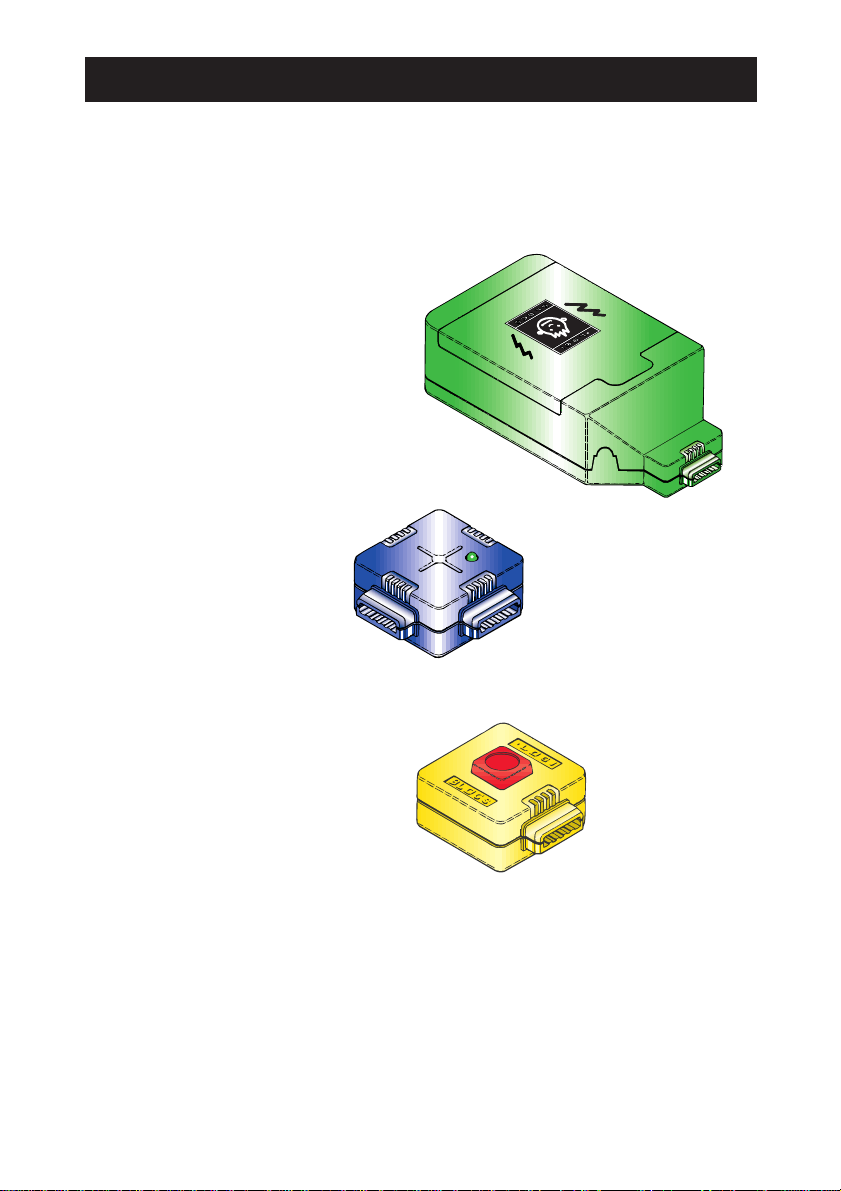
Please check that you have all the parts in the Spy Kit as follows:
BATTERY BOX
CROSS
IN
NOT
BUTTON
LIGHT SWITCH
MICROPHONE
RECORDER
AMPLIFIER
SPEAKER
JACK PLUG
PRESSURE MAT CARDS (x 2) & STICKERS
4

SPY KIT
INTRODUCTION
Welcome to the hi-tech world of Logiblocs!
These instructions will tell you all you need to make your Spy Kit record
and play-back messages. Find out how to make a Lie Detector, play-back
messages automatically and surprise your friends. You will also find out
how to send secret messages using the blocks as a messenger.
You may have other Logibloc kits and, if so, you will be able to combine the
Logiblocs in this kit with your other kits to increase their power and flexibility.
If you join the Logiclub you will be able to get loads more ideas of things to
make and do with your Logiblocs. You may try to win a prize by entering
your own ideas in the regular competitions.
SAFETY
Logiblocs are absolutely safe if used correctly. Please read the section
on safety at the end of this booklet. Do not use the Logiblocs until you
understand the safety advice. Please keep these instructions for
future reference.
Never ever touch or try to push any wires into a mains electrical socket or
plug. This would be very dangerous. Do not let the Logiblocs get wet
and never put any parts or wires into your mouth.
LOOKING AFTER YOUR LOGIBLOCS
It’s a good idea to keep your Logiblocs in the box. There is plenty of
space underneath the plastic holder to store your models and any
Logibloc Extrablocs you may have.
Remember that Logiblocs are very special and need to be looked
after well. Keep them clean and try not to step on them!
THE LOGIBLOC GUARANTEE
If by any chance anything is missing or not working properly, please write to us
at the address on the back of this booklet and we will sort things out as soon as
possible. This does not affect your right to return this product to where you bought
it from under the retailer’s usual terms and conditions.
5

UNDERSTANDING LOGIBLOCS
Logiblocs make computer technology simple!
Logiblocs is the electronic discovery system that helps you understand about
the world of technology around you as you create your own inventions.
From traffic lights to super computers, everything in today's high-tech world
runs by the same principles that Logiblocs demonstrate. Inside each
Logibloc is a printed circuit board and every block is colour-coded for the
function it performs. By plugging together Logiblocs in different
combinations you can create circuits and virtually write your own simple
program to build each new invention.
Each block has its own job to do, described by its colour:
Logi Yellow
Input: These blocks trigger the system at the press of a button and in all
sorts of other ways.
Logi Blue
Throughput: These blocks take messages from place to place.
Logi Orange
Logic: These brain blocks do the thinking and make sure that everything
happens in the right place and at the right time.
Logi Red
Output: These chatterboxes turn things on and off and communicate with
the outside world through light and sound.
Logi Green
Power: These energy suppliers give life to Logibloc inventions.
All Logiblocs work with each other so with a few Extrablocs you can build on to
your inventions to make them even more powerful using your Logimagination.
6
LET’S GET STARTED
The first thing to do is to get to know the Logiblocs and make sure
that they are working OK.
You will need four 1.5V AA size batteries.
Step 1
Open the BATTERY BOX and put
the batteries in. See the section on
battery installation near the end of
this booklet.
Step 2
Plug in the BATTERY BOX
to the CROSS
Step 3
Plug in the BUTTON.
When you press it the light on
the CROSS should come on.
If this doesn’t happen,
check that the batteries
are put in correctly.
If you still have trouble,
maybe your batteries are flat!
BATTERY
PACK
CROSS
BUTTON
7

Slide the slider switch on the
RECORDER to Record ●
If you press the BUTTON the red light
will come on. This tells you that the
RECORDER is recording.
Say “Hi!” into the MICROPHONE
while you are pressing the BUTTON.
Now slide the switch to Play ➤
and press the BUTTON again.
If the Logiblocs say “Hi!”
then everything is OK.
Step 4
Now add on the four sound blocks.
MICROPHONE
RECORDER
AMPLIFIER
SPEAKER
8

Step 5
Add on the NOT and press the BUTTON
to check that its red light goes on and off.
This block always does the opposite
to what it is told!
Step 6
Replace the BUTTON with the
LIGHT SWITCH. Pass your hand
slowly over the LIGHT SWITCH
and see what happens.
Step 7
Replace the LIGHT SWITCH
with the IN and plug in the
Jack Plug leaving
the wires loose.
Hold the wires, one in
each hand and touch
the metal ends of
the wires together.
Again the Logiblocs
will say “Hi!”
LIGHT
SWITCH
JACK PLUG
IN
9
You have successfully completed the test procedure. Well done!
Now it is time to get the Logiblocs to work and have some fun!
NOT

❷PLAYING BACK
Now slide the slider switch to Play ➤.
This makes sure that you do not
record over your message by mistake.
Hold the blocks so that the SPEAKER block
is close to your ear and press the BUTTON.
Your message will playback to the end
through the SPEAKER. There is no need
to keep the BUTTON pressed.
RECORDING ANDPLAYING BACK
As you have seen, using the RECORDER block we can record and playback
messages and sounds. The next section gives you some practice at fixing
the system up to record and playback.
❶RECORDING
The simplest way to switch the
RECORDER block on and off is by
using the BUTTON block.
Put the blocks together as shown.
Slide the slider switch to Record ●.
Decide what you want to say and then press
and hold the BUTTON and speak clearly
into the MICROPHONE.
Release the BUTTON when you
have finished. During recording the
red light will be on.
If your message is a long one
then you will only be able to record
the first 10 seconds. The light
will go off when you have
reached the end of the recording
time. To start again, just release
and press the BUTTON again.
10
RECORD PLAYBACK
Tabla de contenidos
Otros manuales de Juguete de Logiblocs


