
LNR Mountain Topper MTR-5B Manual de usuario

The MTR-5B
Five band Mountain topper
KD1JV Designs
revised 12-12-1
(shown with optional enclosure sold by LnR Precision, production kits use white backlight display)
Features:
Switch selected 40/30/20/17/15 meter bands
(no band modules to lose or change out)
Wide operating oltage range, 6 to 12 olts
15 ma Rx current at 12V supply
Efficient transmitter. Low current with 4W output
LCD display
Push button or Optional rotary tuning
24 hour clock built in, with battery back up
Three 63 character programmable message memories
Message beacon mode with adjustable pause time
Small size: can fit into a 4” x 3” x 3/4” box
MTR-5B Page -1-
Five Band Mountain Topper - KD1JV Designs Manufactured by LNR Precision, Inc. www.LNRprecision.com Manual Revision 12-12-15
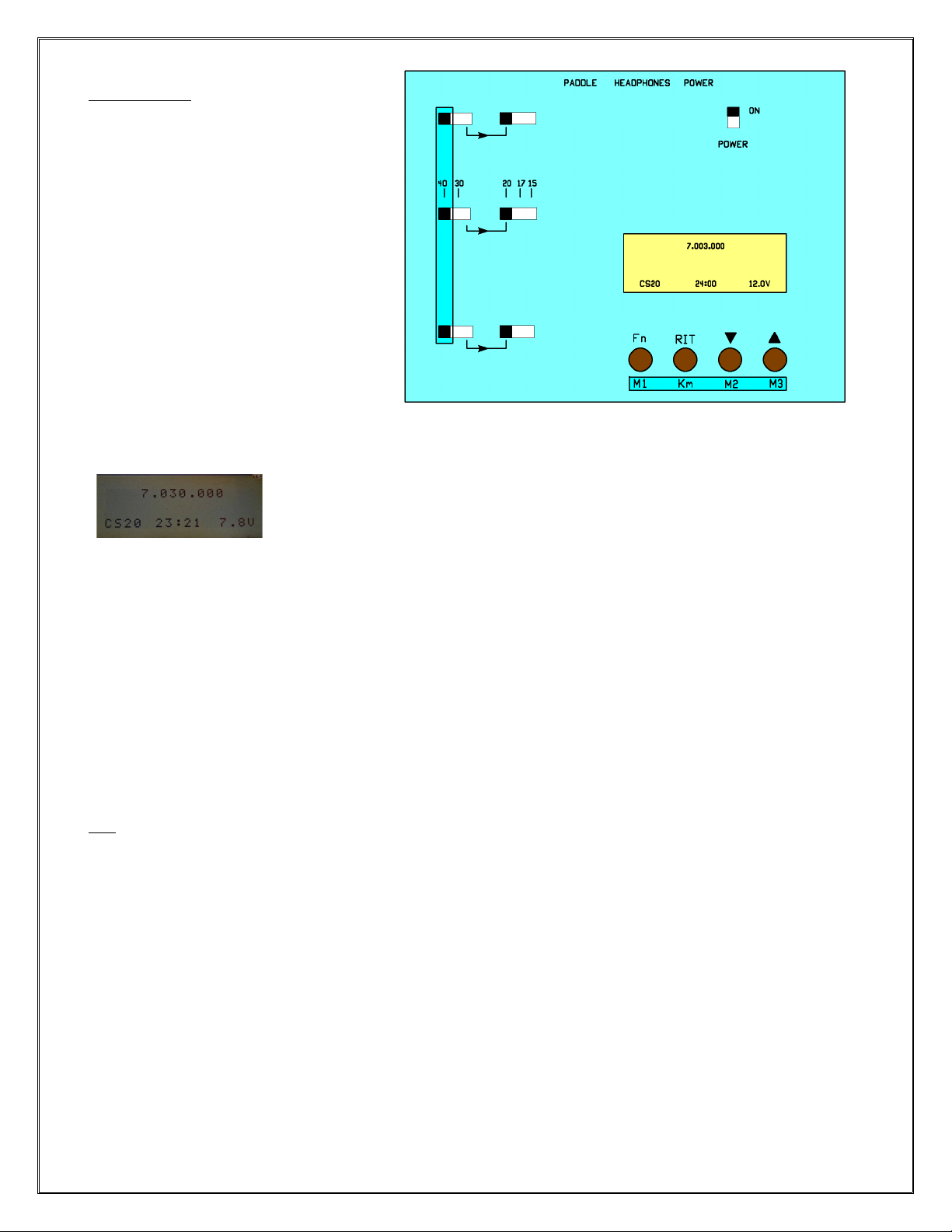
Operating Instructions:
Band Selection:
Bands are selected with 2 sets of three-
position slide switches. The three switches
must be in the same position for the rig to
work properly.
The band switches on the left select the 40
and 30 meter bands. When set to the right-
most position, the second set of band
switches are enabled: 20m, 17m and 1 meter
bands.
The switches on top row state which band to
operate.
When a band is changed, a Morse number
corresponding to that band is annunciated by
a side tone: 4 for 40m, 3 for 30m, 2 for 20m,
7 for 17m and for 1 m. The last used
frequency for any band is restored when the
band is selected.
Display:
A four line, 16 character LCD is used to display radio information.
Line 1: Normal – Operating frequency.
Alternate – Decoded Morse when using a paddle - either transmitting or entering a message.
Line 2: RIT delta frequency
Line 3: Menu selections
Line 4: Normal – Keyer Speed, 24 hour timer, battery voltage.
Alternate – switch functions
Frequency Tuning:
The UP arrow (Tune Up) and DOWN arrow (Tune Down) switches change the operating frequency in 0 Hz steps.
●Holding the switch closed for longer than 1 second begins a fast-tune mode where the frequency changes in
100 Hz steps.
●If the opposite tuning switch is held closed while in fast-tune mode, the step rate will increase to 30
steps/second for real fast tuning.
The frequency can also be rotary tuned by adding an optional rotary encoder. In this case, the tuning rate is
fixed at 0 Hz steps, furthermore, the tune up and down switches are still enabled.
RIT:
●Enter RIT: HOLD RIT closed for 1 second or longer.
●Exit RIT: HOLD RIT closed for 1 second or longer.
Display: Line 2, [RIT 0.000+]
The plus (+) or minus (-) difference (delta) between the transmit frequency and the current receive frequency is
shown below the primary frequency readout. The delta frequency is limited to +/- 1. 0 kHz.
RIT toggle:
RIT can be toggled on and off to check the transmit frequency for activity.
●TAP <Fn> switch to toggle RIT.
Display: Line 2, [RIT R=T] Frequency tuning is locked out when R=T, however, radio can transmit and use
message memories.
MTR-5B Page -2-

Fn (Menu) Functions:
- Morse frequency annunciation (optional)
- Change Keyer speed
- Direct Frequency entry
- keyer Memory entry
- Tune
- Set time
- Config - Turn on/off options and store configuration
Morse Frequency Annunciation
This function can be turned ON or OFF in the CONFIG menu. Default is OFF.
●Tap the <Fn> switch.
●The current frequency is sounded by the side tone at the current keyer speed.
●Format: 000.0 kHz “T” is used for zeros, “R” indicates decimal point.
hange Keyer speed: [ADJ K SPEED]
●HOLD the <Fn> switch for 1 second until the message [ADJ K SPEED] is displayed on Line 3
●Speed is shown on Line 4 [ Sxx] where xx is current CW speed.
●Use UP/DOWN arrow switches, DOT/DASH paddle or rotary encoder to change speed in 1 WPM steps. Range 9 to
3 WPM.
●Tap the <Fn> switch to exit
Straight key Mode:
Straight key mode can be enabled in two ways:
1) A mono phone plug in the paddle jack on power-up will turn on straight key mode.
2) TAP the RIT switch while in <Adjust Code Speed> mode. Tapping will toggle straight key mode ON and OFF.
Straight key mode cannot be turned OFF if a mono plug is in the paddle jack.
●When Straight key mode is active, the code speed display will change from [ Sxx] to [SKxx].
●The code speed can be changed using the <UP/DOWN> arrow switches or rotary encoder.
●DFE, Message Memory entry and Tune modes are not available when Straight Key mode is active.
●Straight key mode is reset on power-up, unless a mono plug is in the paddle jack.
Direct Frequency Entry: [DFE]
DFE mode allows the user to directly enter a new frequency via the paddle.
Display:
Line 1: current frequency…
Line 2: ---.-
Line 3: DFE
Line 4: EXIT RE LD {Switch function labels}
●Enter four Morse digits 0 to 9
●Short cut: TAP <LD> to reset current frequency to the bottom of the band or to load remaining decades as
zero “0”
●TAP <LD> (DOWN Arrow) load the new frequency
●TAP <RE> (RIT) re-set entry to zero and start again
●TAP <EXIT> (Fn) exit with no change
MTR-5B Page -3-
This feature is not available on the WARC bands.

Message entry [ENTER MSG]
Line 1 – blanks. Will display decoded Morse characters as entered.
Line 2 – blank
Line 3 – ENTER MSG
Line 4 – EXIT CK RE BS (Switch function labels)
Message count may use up to 63 characters (including word spaces) and there can be three unique posts. Word
spaces are automatically inserted after a word-space pause of ‘7 dot’ lengths. A “Back Space” switch can be used
to correct errors or eliminate word spaces. Note: you cannot delete the first character entered. The menu display
will scroll when the message exceeds 16 characters.
Switch functions:
●<EXIT> (Fn) TAP to EXIT any time before storing a message.
●<K> (RIT) TAP to check (review) the message and hear how it sounds prior to actually storing the
message.
●<RE> (UP Arrow) TAP to Re-enter (rest) the message entry mode. The only way to clear the first
character.
●<BS> (Down Arrow) TAP to Back Space one location.
Once the Message has been reviewed and after tapping the <CK> switch, Line 4 will change to:
[M1 RE M2 M3]
●TAP M1, M2 or M3 to store the message in that memory location.
○Once tapped, line 4 will change to [STORING]. A Morse "R" will sound when done and message entry mode
will return for another message, if desired.
○When done TAP <EXIT> to escape to normal operation.
●TAP <RE> to escape back to message entry mode without storing.
TUNE [TUNE]
Tune mode allows the user to toggle the transmitter ON and OFF to adjust an antenna tuner with both hands. If the
operator uses one hand adjusting antenna tuner, sending a string of dots may be faster.
NOTE: If the DC power supply exceeds 10 volts, the output power is reduced by turning the supply to the PA ON and
OFF at about a 1:3 ratio. This ensures no damage to the PA if excessive SWR is encountered while adjusting the
antenna tuner for lowest SWR. Since this PWM of the PA supply voltage has no feedback, the output power switches
low and gradually builds until it stabilizes at about one-third its steady-state output.
●Tap <DOT> paddle to toggle ON
●TAP <DASH> paddle to toggle OFF
●TAP <Fn> switch to exit back to normal operation
SET TIME: [SET TIME]
A 24 hour clock can be enabled and displayed on the bottom line of the LCD. The DFE function is used to enter the
time via the paddle. The time is not displayed until the set time function is used. The “display time” flag is
reset on power up if battery back-up is not used.
Display:
Line 1: operating frequency
Line 2: ---.-
Line 3: SET TIME
Line 4: EXIT RE LD
MTR-5B Page -4-

●Enter the current time + 1 minute (24 hour format) using the paddle: hours, then minutes. Leading zero
must be entered if the time is before 10:00am.
●Tap <LD> (DOWN Arrow) to load the time and exit.
●Tap <RE> to clear and re-enter the time
●Tap <EXIT> to escape with no action taken.
onfiguration: [ ONFIG]
onfiguration allows the user to turn ON or OFF the Morse frequency annunciation. The display of Morse while
transmitting and storing of the current frequency for all the bands, plus the current keyer speed to be used as
the power-on, frequency and code speed is annunciated.
●TAP <EXIT> (Fn) to escape
●TAP <ST> (RIT) to store
●TAP <DM> DOWN arrow) to toggle Display of Morse characters ON and OFF. The side tone will annunciate “ON”
or “OFF” to indicate the selected state.
●TAP <MA> (UP arrow) to toggle the Morse audio annunciation ON and OFF. The side tone will annunciate “ON”
or “OFF to indicate the selected state.
Sending a previously stored message:
●TAP <RIT>
●Then TAP <Fn> (message 1), <DWN Arrow> (message 2) or <UP Arrow> (message 3) within one-half second of
tapping <RIT>
If a message has not been stored in a selected location, no message will be sent.
Pause, terminate and Beacon Mode:
Once a message has begun, it may be paused, terminated or set to repeat (beacon mode).
●HOLD <DASH> to pause a message. The message will pause at the first word space after the paddle is
closed.
●HOLD <DOT> to terminate the message. The message will terminate at the first word space after the paddle
is closed and normal operation restored when the paddle is released.
Beacon (repeat) mode:
After a message is in progress, the message may be set to repeat by HOLDING the respective switch for that memory
location closed until a word space is detected. For example, if Message 1 was started, hold the <Fn> switch
closed, if Message 2, <Down arrow> and if Message 3, <Up arrow>.
Line 3 will read: [BEACON 3] Where {3} is the repeat delay in seconds.
●During a word space, the delay can be set up to 9 seconds using the up and down arrow switches or rotary
encoder.
The message may be paused or terminated using the DOT or Dash method. The message must first be terminated
before transmitting will begin again.
Battery Backup:
A 12 mm, 3V lithium coil cell is used to power the processor when power is removed from the transceiver. When the
processor detects the input voltage below 4. V, the processor is in sleep mode, but the 32.768 kHz clock and
timer remains active to keep the RTC running. In this mode, current from the coin cell is a mere 10 uA. All the
current operating settings are retained in RAM thus the rig returns to the same state on power up as it was when
power was turned off. If the rig is to be stored for a long period of time, it would be a good idea to disconnect
the battery by slipping a small piece of paper between the top contact and battery.
MTR-5B Page -5-
To access the battery: Turn off power. Remove the two side panel screws and the knurled nuts
securing the "paddle" and "phones" jacks. Carefully separate the "bottom" of the case to expose the
battery holder.

Assembly:
●The work area should be reasonably clean and uncluttered. Good lighting is a must.
●Empty the packets containing the parts into a small bowl for this will ensure the parts will not be lost.
Some builders like to assembly over a cookie sheet as the lip around the edge helps to keep parts from
going far. The metal sheet also provides some measure of static control, especially if the sheet is
grounded. A white sheet under the work area could help in finding stray parts which might wander away.
●Very thin (0.01 ”) solder is supplied for soldering the surface mount parts where very little solder is
needed for each connection. Ideally, a convex fillet at the end of chip resistors and capacitors is
desired. Try not to finish with a solder ball at the end of the part.
●Do not use liquid solder flux. It simply creates a mess and is difficult to clean off the board and from
under parts. If not completely removed from the board, it can cause problems.
●Before placing a part onto the board, lightly tin one pad for where the part will be placed. Assembly
time may be increased by first tinning one pad at all the locations for which a particular part will be
placed. There is no need for a low wattage soldering iron. It is best to have a hot tip which will get
the job done quickly. A small tip on the iron perhaps 1/32” to 1/16” chisel or round point is best.
●Most of the surface mount parts come in part carriers. To remove the part(s), hold the carrier close
to the work surface and carefully peel back the clear plastic covering. This can be done with the tip
of a sharp hobby knife such as an #11 Xacto blade or pointy tipped tweezers. Once the clear plastic
strip is removed, lay out the part onto your work surface.
●If tweezers are used, be careful not to grab onto the part too tightly. Surface mount parts have a
way of flying out from between the tips of the tweezers--never to be seen again. Be careful!
●An alternative to using tweezers for small parts is to use a tooth pick or ‘chop stick’ with the end
rubbed onto a little bees wax. The bees wax makes the end tacky enough for the part will adhere to
it. For smaller ICs, clutch the part length wise with the tweezers.
●Tack one end of a part in its place by applying heat to the end of the part over the tinned circuit
board pad, while applying little pressure to be sure it lays flat on the PC board. Be sure to heat
both the pad and the end of the part. Generally, additional solder is not needed for this connection.
Secondly, solder the other end of the part. If both ends are not soldered at this time, there is a
blameless chance the builder will forget to return and solder all the parts which require it.
●It is nearly impossible not to make solder shorts between pins on the DDS and processor chip due to
the close pin spacing. Remove any shorts with solder wick.
Using solder paste:
Using solder paste is the ideal way to build the board. Small amounts of solder paste in an application syringe
can be purchased for about five dollars from ‘Cash Olson’ on the internet. Also needed is a warming plate to
preheat the board to about 2 0 degrees F and a low power heat gun. An “Embossing” heat gun is commonly used
(found at craft stores). A soft air flow is required as to not to blow parts off the board. A typical hot air gun
is too high-powered with air and heat.
For chip, caps and resistors, a very small dab of solder paste is placed on the pads and then the part
placed onto the pads. The SMT parts will slide around very easily, so one must be careful not to nudge them from
their correct location. For ICs, placing the IC down first and then engaging a bead of paste along the leads
appears to be a better method than placing the paste on the pads first followed by the IC.
The LCD display should be hand soldered, along with all the through-hole parts. Begin with the side of the board
with the most parts first, which in this case, is the bottom for the MTR.
Once all the parts have been placed, place the board on the warming plate and heat to about 2 0 degrees
F. Slowly heat the top of the board with a hot air gun. When the solder paste reaches its melting point, the
solder will liquefy and the parts snap into alignment on the pad. Here is where the solder paste turns color from
a dull gray to shinny brown. Be aware of “tomb stoning,” which is when an SMT chip capacitor or resistor will
stand on one end making no connection. Once all the solder has reflowed, remove power from the heating plate and
let MTR cool down slowly.
A “YouTube” video showing how to solder SMT parts, both by hand and using solder paste is:
http://youtu.be/Ah5HEjDTHUo. The builder may want to view other suggested videos on SMT soldering which are done
a bit more professionally. Work slowly and be patient!
MTR-5B Page -6-

onstruction:
Reference photos of assembled board
MTR-5B Page -7-

MTR-5B Page -8-

Parts list:
QTY Resistors QTY Capacitors
1 10 1 ohms % 080 3.3 pfd GRN/GRN 0V C0G 2% 080
3 271 271 ohms % 080 9 22 pfd RED/RED 0V C0G % 080
3 471 470 ohms % 080 1 33 pfd ORG/ORG 0V C0G % 080
4 222 2.2 K % 080 2 47 pfd YEL/VOL 0V C0G % 080
2 362 3.6 K % 080 1 68 pfd BLU/GRY 0V C0G % 080
3 103 10 K % 080 8 100 pfd (101) BRN/BLK/BRN 0V C0G % 080
9 223 22 K % 080 4 1000 pfd (102) BRN/BLK/RED 0V X7R 10% 080
104 100 K % 080 22 0.01 ufd (103) BRN/BLK/ORG 0V X7R 10% 080
1 474 470 K % 080
10 0.1 ufd (104) BRN/BLK/YEL 0V X7R 10% 080
1 2761 2.76 K 1% 080 10 1.0 ufd (10 ) BRN/BLK/GRN 0V X7R 20% 080
1 1372 13.7 K 1% 080 3 10.0 ufd (106) BRN/BLK/BLU 0V X7R 20% 080
1 2002 20 K 1% 080 1 33 ufd (336) Alum electrolytic
1 10 3 10 K 1% 080 1 100 ufd (107) Alum electrolytic
1 1133 113 K 1% 080
1 2763 276 K 1% 080 4 100 pfd (101) Brown 100V C0G 10% 1206
2 1 0 pfd (1 1) Yellow 100V C0G 10% 1206
1 101 Resettable fuse 1206 4 220 pfd (221) RED 100V C0G 10% 1206
Semiconductors 3 330 pfd (331) Orange 100V C0G 10% 1206
2 SA612AD01112 MIXER/OSC SO-8 1 60 pfd ( 61) Green 100V C0G 10% 1206
1 LM386MX-1/NOPB AUDIO AMP SO-8 1 680 pfd (681) Blue 100V C0G 10% 1206
1 LM4808M AUDIO AMP/DUAL SO-8 11 30 pfd green Trimmer caps
1 MSP430G2433IPW28 16 BIT, 8K PROCESSOR TSSOP-28
1 AD9834BRUZ 24 BIT DDS TSSOP-24 4 3.3 uhy RFC 080 (Green)
1 74AC02M96 QUAD OR GATE SO-14 4 10 uhy RFC 080 (Brown)
1 SN74LVC1G31 7DBV SPDT ANALOG SWITCH SOT-23-6 2 8.2 uhy RFC 080 (Gray)
1 TPS 60200 (GRN) SWITCHING BUCK REG SOT-23- 4 4.7 uhy RFC 080 (Yellow)
1 TC1014-3.3VCT713 (ORG) 3.3V LDO SOT-23- 1 10 uhy power Inductor (100)
1 ASVMB-60.000MHZ 60.000 MHZ CLOCK 10 ppm 10 T30-2 red toroid
1 BAV99 (YELLOW) DUAL SILICON DIODE SOT-23
2 BAT 4 (Blue) DUAL SHOTKEY DIODE SOT-23 1 FT37-43 Ferrite core
4 BZT 2C V1-F .1 V 00 mw ZENER DIODE 1 32.768 kHz Cylinder watch crystal
1 DZ247000L (PG) 47 V, 2W ZENER DIODE 4.91 2 MHZ HU-49/US crystal, matched
3 BS170 N-CHANNEL MOSFET TO-92
2 NDT29 P-CHANNEL MOSFET SOT-223 4 Push button Tack switch
2 2N7002 (RED) N-CHANNEL MOSFET SOT-23 6 DP3T slide switch
1 NHD-
C12832A1ZFSW-
FBW-3V3
NEWHAVEN 128X24 LCD GRAPHICS
DISPLAY, WHITE BACKLIGHT
1 DPDT slide switch
2 3. mm phone jack 1 12mm button cell holder
1 1.7mm power jack Panel mount 1 122 3V lithium Button battery
1 1.7mm power plug 4mm dia x 10mm length
1 1 mil solder
1 9 feet #28 Magnet wire
MTR-5B Page -9-

Using the parts placement guides:
The parts placement guides on the following pages are color coded to show the location of the various types of
parts. Parts to be installed are highlighted in various colors to help identify their locations. The guides are
scaled so that the writing on them is easy to see on a computer monitor and come out crisper after the conversion
to pdf. Unfortunately, if you print all these pages out, it will use up a bunch of your ink jet ink.
Some parts do not have values marked on them or are very hard to read. Capacitors are not marked so these have
been color coded with a marker on the part carrier using the resistor color code to indicate their value in pfd.
SOT-23 parts have numbers printed on them, but are very hard to read. Therefore, these parts are also color
coded, but with a color sticker, as they come in plastic carriers. The color on the carrier matches the color
shown on the placement guide diagram.
Resistors have their value printed on them, though it might take a magnifying glass to read the numbers.
Therefore, individual values are not color coded.
Due to the tight spacing of
parts, not all of them have
their designation number
printed next to them on the
board. These two diagrams show
the part number designation
for each part location.
MTR-5B Page -10-
Tabla de contenidos
Otros manuales de Transceptor de LNR


