
Lingo TTV-5 Manual de usuario

1
OPERATIONAL NOTES
Thank you for purchasing our Translator. To insure trouble-free operation of your Translator,
we recommend the following:
1. Do not expose device to water, sand or dust.
2. Do not expose the device to heavy pressure or bending, The LCD may break.
3. Never use colored paint thinners or other chemical cleaning agents.
4. Never carry out repairs yourself. Save this manual for further reference.
FEATURES
1. Your TRANSLATOR translates 20 languages; on the average, each language contains
20,000 words and 2,300 phrases.
2. HUMAN VOICE, instant speaks in 20 languages.
3. Operational menu with 20 languages, you can select any of the 20 available
languages as the source language.
4. The New Oxford American Dictionary.
5. The built-in DATABANK stores and retrieves names, telephone numbers and memos.
6. 12 digit CALCULATOR can do memory and percent calculations as well as standard
arithmetic operations.
7. LOCAL TIME CLOCK specifies your local date and time. ALARM rings when you preset
your alarm time. Alternative American or English date format, 12-hour or
24-hour format and summer daylight saving time.

2
8. WORLD TIME shows the date and time of any one of 360 major cities in the world.
9. CURRENCY CONVERSION functions as a currency converter for 8 denominations of
your choice.
10. METRIC CONVERSION converts automatically 8 different types of measurement.
11. FM Radio.
12. GAMES.
13. LIGHT/DARK DISPLAY allows you to choose any of 16 levels of light display or dark
display.
14. PERSONAL PASSWORD allows you to lock your databank memory.
15. 119x120 dot graphic display.
16. AUTOMATIC POWER OFF conserves battery power allows you to choose by turning off
the translator from 1 to 15 minutes.

3
BATTERY FITTING
The translator is powered by 2xAAA batteries. When the battery power is low, display shows
< >. If this happens, replace the batteries immediately. The actual service life
depends on the batteries you use. We recommend:
= Replace the 2 batteries every three months.
= Be sure that the positive and negative poles of each battery are facing in the proper
direction.
= Never mix batteries of different types.
= Never mix old batteries and new ones.
= Never leave dead batteries in the battery compartment.
Replacing the batteries
= Turn off the machine. Don’t press any buttons
during the battery replacement.
= Slide off the battery door according the
direction of the arrow indicated. Take out
the old batteries and change them.
= Make sure that the batteries make good
contact with the metal plates.
= Cover the battery door.
RESET
4

5
NAME OF KEYS

6
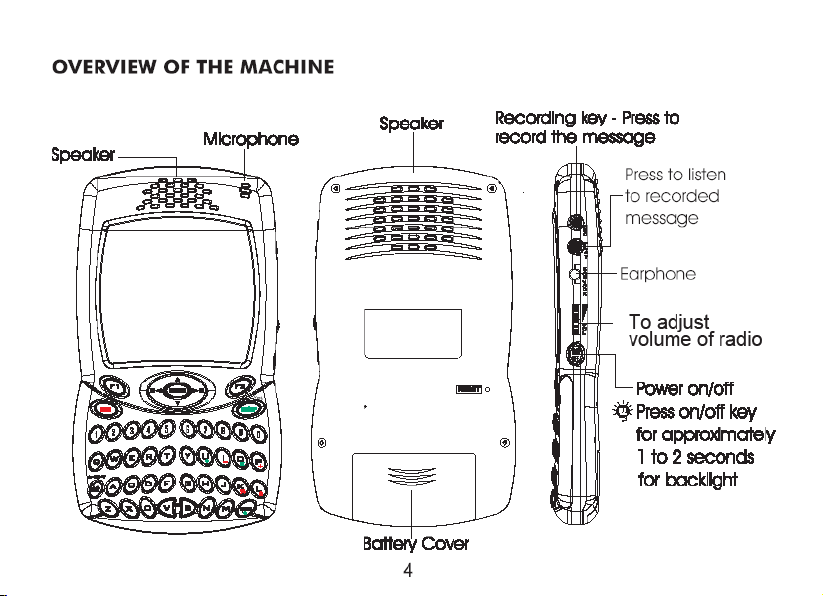
1. ON/OFF : a) Switch on & off. The translator will automatically switch off if
you do not press any keys for 1 to 15 minutes .
(please set up the time from 1 to 15 minutes in Set Up Mode)
: b) Backlight. To get backlight, press and hold the On/Off button for
approximately 1 to 2 seconds.
2. REC : REC - Recording key. Press to record a message of about 16
seconds. You can make an instant memory,or record your voice
learning.
3. PLAY : PLAY - Press to listen to the recorded message.
4. MENU : Main Menu, press this to enter function.
5. F1 : Function key 1, use this key to activate the functions according to
the ‘function bar’.
6. F2 : Function key 2, same as Function 1 key to activate the functions
7. ESC : Press this key to return to last screen.
8. ENTER : a) Press this key to have translation in translator mode.
b) Press this key to store data into memory in databank.
c) Press this key to confirm the setting in set up mode.
d) Press ENTER to adjust the volume
9. SHIFT : a) Shift to get capital letters apart from main letter.
b) Shift key to scroll Page Up/Down key.
c) Shift key to Backspace andto delete.
10. SPACE : Provide an interval.
11. LANGUAGE : a) Press these keys to access other language translations
KEYS b) Press these keys to access the calculator mode.

7
a
bcd
e
f
12. : a) BS - BACKSPACE. To clear the last input.
b) In editing mode, as a LEFT KEY. To move the cursor leftward.
c) UP KEY. To move the cursor upward.
d) RIGHT KEY. To move the cursor right.
e) In editing mode, as a Delete key. To delete the letter.
f) DOWN KEY. To move the cursor down. Press [shift] key, then
press it to work as page down key.

8
FUNCTION KEYS
The translator uses the function keys operating the system same as a cell phone.
There are 2-function key areas beneath the display of the translator which are black high-
lighted. The following are the explanations for the function keys:

9
Standard
Display area Status bar
with symbols
ENGSPA
car
coche
DISPLAY SYMBOL
Function Bar
Indicates that it is in Capital
Alphabet
Indicates that it is in Shift
status.
Indicates that it is in LOCK
position and needs password.
Indicates that it is set
up with ALARM
Indicates that keyboard tone
is on.
Indicates that the battery
power level is low.
Indicates that you can make
a selection with PAGE
UP or PAGE DOWN key to
scroll further
Indicates that you can make
a selection with the Left
or Right key to see further
Indicates that you can make
a selection with the Up
or Down key to see further
Shift
Caps

10
.
.
.
.
.
OPERATION
Before starting, please read this instruction manual carefully and be sure follow the correct
operating procedures. Keep this instruction manual for future reference.
SWITCH ON YOUR TRANSLATOR - To switch the Translator on, press <ON/OFF>. The
device always starts in the mode that was active when it was last switched off. For
example, if you were in calculator mode during the last use, you will be in calculator
mode again when you switch the device back on.
The translator automatically switches off if no key is pressed for a certain period. You can
select this time period from 1 minute to 15 minutes. Go to <SET UP> mode, number 5,
(off time), from this mode, you can select to set your machine to automatically switch off
in 1 minute to 15 minutes.
SET UP :
SETUP to adjust the basic settings of the Translator. Various options are available in the
setup menu.
Tabla de contenidos
Otros manuales de Lector de libros electrónicos de Lingo


