LG GP9 Hoja de especificaciones

GAMING SPEAKER
www.lg.com
Copyright © 2021 LG Electronics Inc.
All Rights Reserved.
SIMPLE MANUAL
GP9
2106_Rev01
MFL71805515

Download Manual
<Android> <iOS>
Download App

a
OPTICAL
OUT
b c
d

ENGLISH
Connecting and Using
the Speaker
a
Charge the speaker before using
it by opening the rear cover and
connecting the speaker to the
charging adapter.
b
Connect the speaker to the PC
via a USB cable
A
Connect the speaker to the PC via
a USB C-type cable.
B
Press the Power button on the
speaker to turn it on.
C
Press the Function button on
the speaker repeatedly until the
Function LED turns white.
If you are using a voice chat
through integrated microphone or
headset, press the Microphone
button.
c
Connect the speaker to the Game
Console via an optical cable
A
Connect the speaker to the Game
Console via an optical cable.
B
Press the Power button on the
speaker to turn it on.
C
Press the Function button on
the speaker repeatedly until the
Function LED turns red.
d
Connect the speaker to a
smartphone via Bluetooth
A
Press the Power button on the
speaker to turn it on.
B
Press the Function button on
the speaker repeatedly until the
Function LED ashes blue.
C
Press the Settings button
on the smartphone and select
Bluetooth . Turn on the
Bluetooth function.
(Off > On )

D
Find "LG-GP9 (XX)" on the
device list on the smartphone
and connect to it. Once the
smartphone is connected via
Bluetooth, the Function LED turns
blue.
E
On the smartphone, play a music
of your choice.
e
Connecting the LG XBOOM App
A
Find LG XBOOM app on the Play
Store or App Store and install it
on your smartphone.
B
Run the LG XBOOM app and use
more features (EQ, Voice Chat,
Setting etc.)
Press and hold the Headset button
for 2 seconds or use the App to turn the
front lighting on or off.
For using a headset or earphones
connect it to the terminal.
yDesign and specications are subject to
change without notice.
yFor more information, download the online
owner’s manual. http://www.lg.com

ENGLISH
Specication
Power Supply:
y19 V
0
2.1 A (AC Adapter)
yBuilt-in rechargeable battery
Power consumption
yRefer to the main label.
AC adapter
yModel : ADS-45SN-19-2 19040G
yManufacturer : SHENZHEN HONOR
ELECTRONIC CO.,LTD
yInput : 100 - 240 V ~ 50/60 Hz
yOutput : 19 V
0
2.1 A
Dimensions (W x H x D):
Approx. 376 mm x 86 mm x 108 mm
(14.80 inch x 3.39 inch x 4.25 inch)
Operating Temperature: 5 °C to 35 °C
(41 °F to 95 °F)
Operating Humidity: 5 % to 60 %
Attaching the ferrite core (optional)
Wind the headset's wire once around the
ferrite core.
Safety Information
CAUTION: TO REDUCE THE RISK OF ELECTRIC
SHOCK DO NOT REMOVE COVER (OR BACK)
NO USER-SERVICEABLE PARTS INSIDE
REFER SERVICING TO QUALIFIED SERVICE
PERSONNEL.
This lightning ash with
arrowhead symbol within an
equilateral triangle is intended to
alert the user to the presence of
uninsulated dangerous voltage within the
product’s enclosure that may be of sufcient
magnitude to constitute a risk of electric shock
to persons.
The exclamation point within an
equilateral triangle is intended to
alert the user to the presence of
important operating and
maintenance (servicing) instructions in the
literature accompanying the product.

WARNING:
yTO PREVENT FIRE OR ELECTRIC SHOCK
HAZARD, DO NOT EXPOSE THIS PRODUCT
TO RAIN OR MOISTURE.
yDo not install this equipment in a conned
space such as a book case or similar unit.
yThis unit contains magnets which can
be harmful to some kind of object (Ex :
Magnetic card, Pacemaker etc..).
CAUTION:
yDo not block any ventilation openings. Install
in accordance with the manufacturer’s
instructions. Slots and openings in the
cabinet are provided for ventilation and to
ensure reliable operation of the product
and to protect it from over heating. The
openings should never be blocked by placing
the product on a bed, sofa, rug or other
similar surface. This product shall not be
placed in a built-in installation such as a
bookcase or rack unless proper ventilation is
provided or the manufacturer’s instruction
has been adhered to.
yThe apparatus should not be exposed to
water (dripping or splashing) and no objects
lled with liquids, such as vases, should be
placed on the apparatus.
yNo naked ame sources, such as lighted
candles, should be placed on the apparatus.
yTo avoid re or electric shock, do not open
the unit. contact to qualied personnel only.
yDo not leave the unit in a place near the
heating appliances or subject to direct
sunlight, moisture, or mechanical shock.
yThe Power Plug is the disconnecting device.
In case of an emergency, the Power Plug
must remain readily accessible.
yTo clean the unit, use a soft, dry cloth. If the
surfaces are extremely dirty, use a soft cloth
lightly moistened with a mild detergent
solution. Do not use strong solvents such as
alcohol, benzine, or thinner, as these might
damage the surface of the unit.
yDo not use volatile liquids such as
insecticide spray near the unit. Wiping with
strong pressure may damage the surface.
Do not leave rubber or plastic products
in contact with the unit for a long period
of time.
yDo not place the unit over the vehicle’s air
bag. When the air bag deploys, it may result
in injury. Before using in the car, x the unit.
yDo not use the handsfree function during
driving a car.

yDo not leave the unit on an unstable place
such as high shelves. it may fall down
because of the vibration of the sound.
yDo not use high voltage products around
this product. (ex. Electrical swatter) This
product may malfunction due to electrical
shock.
CAUTION when using this product in
environments of low humidity.
yIt may cause static electricity in
environments of low humidity.
yIt is recommended to use this product after
touching any metal object which conducts
electricity.
NOTICE: For safety marking information
including product identication and supply
ratings, please refer to the main label on the
bottom or the other surface of the product.
CAUTION: Only use the AC adapter
supplied with this device. Do not use a
power supply from another device or
another manufacturer. Using any other
power cable or power supply may cause
damage to the device and void your
warranty.
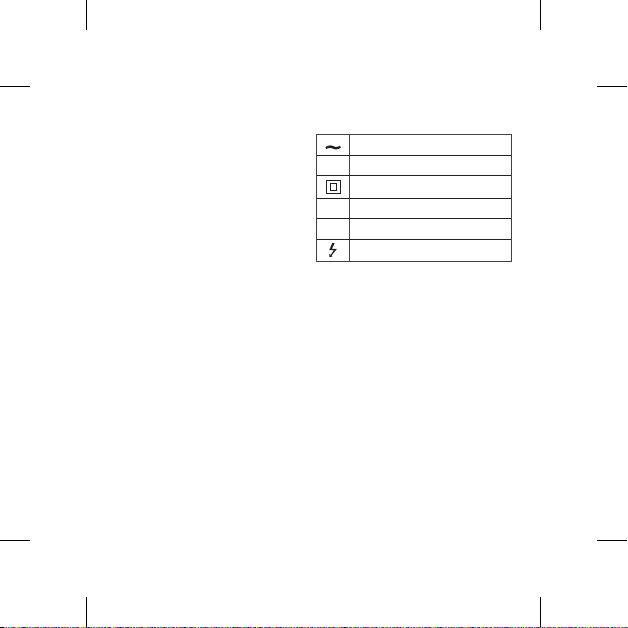
Symbols
Refers to alternating current (AC).
0Refers to direct current (DC).
Refers to class II equipment.
1Refers to stand-by.
!Refers to “ON” (power).
Refers to dangerous voltage.
For models using a built-in battery
Do not store or transport at pressures lower
than 11.6 kPa (0.116 Bar) and at above
15,000 m (9.32 miles) altitude.
yreplacement of a battery with an incorrect
type that can defeat a safeguard (for example,
in the case of some lithium battery types);
ydisposal of a battery into re or a hot oven, or
mechanically crushing or cutting of a battery,
that can result in an explosion;
yleaving a battery in an extremely high
temperature surrounding environment that
can result in an explosion or the leakage of
ammable liquid or gas; and
ya battery subjected to extremely low air
pressure that may result in an explosion or
the leakage of ammable liquid or gas.

For models using a battery
This device is equipped with a portable battery
or accumulator.
CAUTION: Risk of re or explosion if the
battery is replaced by an incorrect type.
How to Safely remove the batteries or
the battery pack from the equipment: To
Remove the old batteries or battery pack,
follow the assembly steps in reverse order. To
prevent contamination of the environment
and bring on possible threat to human and/or
animal health, the old batteries or the battery
pack must be put in an appropriate container
at designated collection points. Do not dispose
of batteries or battery pack together with
other waste. It is recommended that you use
local, free reimbursement systems batteries
or battery packs, (may not be available in your
area). The batteries or the battery pack should
not be exposed to excessive heat such as
sunshine, re or the like.
FCC Compliance Statement
This equipment has been tested and found
to comply with the limits for a Class B digital
device, pursuant to Part 15 of the FCC
Rules. These limits are designed to provide
reasonable protection against harmful
interference in a residential installation.
This equipment generates, uses, and can
radiate radio frequency energy and, if not
installed and used in accordance with the
instructions, may cause harmful interference
to radio communications. However, there is
no guarantee that interference will not occur
in a particular installation. If this equipment
does cause harmful interference to radio or
television reception, which can be determined
by turning the equipment off and on, the user
is encouraged to try to correct the interference
by one or more of the following measures:
yReorient or relocate the receiving antenna.
yIncrease the separation between the
equipment and the receiver.
yConnect the equipment to an outlet on
a circuit different from that to which the
receiver is connected.
yConsult the dealer or an experienced radio/
TV technician for help.
This device complies with part 15 of the FCC
Rules. Operation is subject to the following
two conditions: (1) this device may not cause
harmful interference and (2) this device must
accept any interference received, including
interference that may cause undesired

operation. Any changes or modications in
construction of this device which are not
expressly approved by the party responsible
for compliance could void the user’s authority
to operate the equipment.
FCC RF Radiation Exposure Statement:
This equipment complies with FCC
radiation exposure limits set forth for an
uncontrolled environment. This transmitter
must not be co-located or operating in
conjunction with any other antenna or
transmitter.
This equipment should be installed and
operated with minimum distance 20 cm
(7.8 inches) between the antenna and
your body. Users must follow the specic
operating instructions for satisfying RF
exposure compliance.
Supplier’s Declaration of Conformity
Trade Name LG
Responsible
Party LG Electronics USA, Inc.
Address 111 Sylvan Avenue, North
Building Englewood Cliffs,
New Jersey 07632
Email [email protected]om
IMPORTANT SAFETY INSTRUCTIONS
1. Read these instructions.
2. Keep these instructions.
3. Heed all warnings.
4. Follow all instructions.
5. Do not use this apparatus near water.
6. Clean only with dry cloth.
7. Do not block any ventilation openings.
Install in accordance with the
manufacturer’s instructions.
8. Do not install near any heat sources
such as radiators, heat registers, stoves,
or other apparatus (including ampliers)
that produce heat.
9. Do not defeat the safety purpose of
the polarized or grounding-type plug.
A polarized plug has two blades with
one wider than the other. A grounding
type plug has two blades and a third
grounding prong. The wide blade or the
third prong are provided for your safety.
If the provided plug does not t into
your outlet, consult an electrician for
replacement of the obsolete outlet.
10. Protect the power cord from being
walked on or pinched particularly at
plugs, convenience receptacles, and
Otros manuales para GP9
5
Tabla de contenidos
Otros manuales de Oradores de LG

LG
LG HLX56S Hoja de especificaciones

LG
LG SPK8-S Hoja de especificaciones

LG
LG FH6A Hoja de especificaciones

LG
LG PK7 Hoja de especificaciones

LG
LG XBOOM Go Manual de usuario

LG
LG PK3 Hoja de especificaciones

LG
LG SK4D Hoja de especificaciones

LG
LG NP6630 Manual de usuario

LG
LG PK5 Hoja de especificaciones

LG
LG XG5QBK Manual de usuario

LG
LG PN5 Hoja de especificaciones

LG
LG ThinQ WK7 Hoja de especificaciones

LG
LG PK7W Manual de usuario

LG
LG OM5542A Manual de usuario

LG
LG DXG5QBK Hoja de especificaciones

LG
LG SH5 Hoja de especificaciones

LG
LG LAS550H Hoja de especificaciones

LG
LG SH3B Hoja de especificaciones

LG
LG Music Flow P5 NA6550W Manual de usuario

LG
LG NP5550W Manual de usuario