
LG Isai LGL22 Guía de instalación

Forinquiries,call:
Fromfixed-linephones:
Forgeneralinformationandcharges
(tollfree)
0077-7-111
Pressing"zero"willconnectyoutoanoperator,
aftercalling"157"onyouraucellphone.
Fromaucellphones:
157
withoutareacode
Fromfixed-linephones:
Forlossortheftandoperationinformation
(tollfree)
0077-7-113
0120-977-033(exceptOkinawa)
0120-977-699(Okinawa)
Incaseabovenumbersarenotavailable,calltoll-free:
Fromaucellphones:
113
withoutareacode
CellphoneandPHSoperatorscollect
andrecycleunusedtelephones,
batteriesandbatterychargersatstores
bearingthelogoregardlessofbrand
andmanufacturertoprotectthe
environmentandreusevaluable
resources.
Securecellphonesupportcenter
Businesshours9:00−21:00(7daysaweek)
Forloss,theft,damage(tollfree)
Fromfixed-linephones/aucellphones,
0120-925-919
CustomerServiceCenter
Soldby:KDDICORPORATION,
OKINAWACELLULARTELEPHONECOMPANY
Manufacturedby:LGElectronicsInc.
Importedby:LGElectronicsJapanInc.
November2013,1stEdition
MFL67984201
BasicManual
LGL22
ii
Preface
Thank you for buying the "LGL22" (simply called "product"
from here on).
Before using the product, be sure to read the "Basic Manual"
(this manual) or "Full Instruction Manual" (in Japanese only)
to ensure correct use. After you have nished reading this
manual, be sure to store it in a safe place so that you can
retrieve it whenever needed. If you lose the "Basic Manual"
(this manual), contact an au shop or Customer Service
Center.
About Operating Instructions
Handles only basic operations for main features. For
detailed descriptions of various functions, refer to the
"Basic Manual" application that can be used on your
product or "Full Instruction Manual" (in Japanese only) on au
website:
http://www.au.kddi.com/support/mobile/guide/manual/
• All company names and product names in this manual are
either trade marks or registered trade marks.
You can use the "Basic Manual" application on product to
check detailed operational procedures. Certain functions
can be directly activated from the application screens on
which their operations are described.
a
uuu
• When using the application for the rst time, you must
download and install it following the onscreen instructions.
You can download "Basic Manual" (this manual), "Setting
Guide" and "Full Instruction Manual" (in Japanese only) from
au website.
http://www.au.kddi.com/support/mobile/guide/manual/
1
Safety Precautions
Before you start using product, be sure to read the "Safety
Precautions" to ensure correct use.
Before thinking of it as a malfunction, check for possible
remedies in the following au Customer Support site of au
website.
http://www.au.kddi.com/support/mobile/trouble/repair
When Using This Product
• Communication is not possible even inside the service area
in places where the signal does not reach (e.g. tunnels and
basements). Also, communication is sometimes not possible
in poor reception areas. Communication is sometimes
interrupted if you move into a poor reception areas during
communications.
• Since product uses radio waves, the possibility of
communication intercepts by third parties cannot be
eliminated. (Though LTE/CDMA/GSM/UMTS system has
highly secure condential communication features.)
• product is compatible with the international roaming service.
Each network service described in this manual varies
depending on the area and service content.
• Since product is a radio station under the Radio Law, you
may be asked to temporarily submit product for inspection in
accordance with the Radio Law.
• When the IMEI information of the cell phone is automatically
sent to KDDI CORPORATION for maintenance and monitoring
operational status of your cell phone.
• Take care not to inconvenience people around you when you
use the product in a public place.
• If you are using the product overseas, please check the
relevant laws and regulations of the country/region that you
visit.
• When the product is used by a child, guardians should
thoroughly read the "Basic Manual" (this manual) and teach
the child how to use it.
2
• Do not use a cell phone while driving a car or riding a
motorbike or bicycle. Failure to do so might cause a trac
accident. Use of a cell phone while driving a car or motorbike
is prohibited by law. Use of a cell phone while riding a bicycle
may be punishable by some regulations.
• Do not use product while you are aboard an airplane. Use
of electric devices transmitting radio waves in airplane is
prohibited by law. Some airline companies, however, allow their
passengers to use cell phones. For details, contact the airline
company you use.
• Do not talk on the phone loudly.
• Ask for permission of other people before taking pictures of
them with this cell phone.
• product is the same as PC, depending on the application you
install, the operation of product may get unstable, or your
location information and other personal information registered
in product may get revealed and abused via Internet. Make
sure to conrm the source and the operation conditions of the
application you use.
• In crowded trains or other crowded places, there may be
people with a cardiac pacemaker nearby. Turn o the cell
phone.
• When a medical institution has laid down designated areas
where use of the product is prohibited or is not allowed
to be brought in, abide by the instructions of that medical
institution.
List of Packaged Items
Before you start using the product, make sure that you
have all the following packaged with the product.
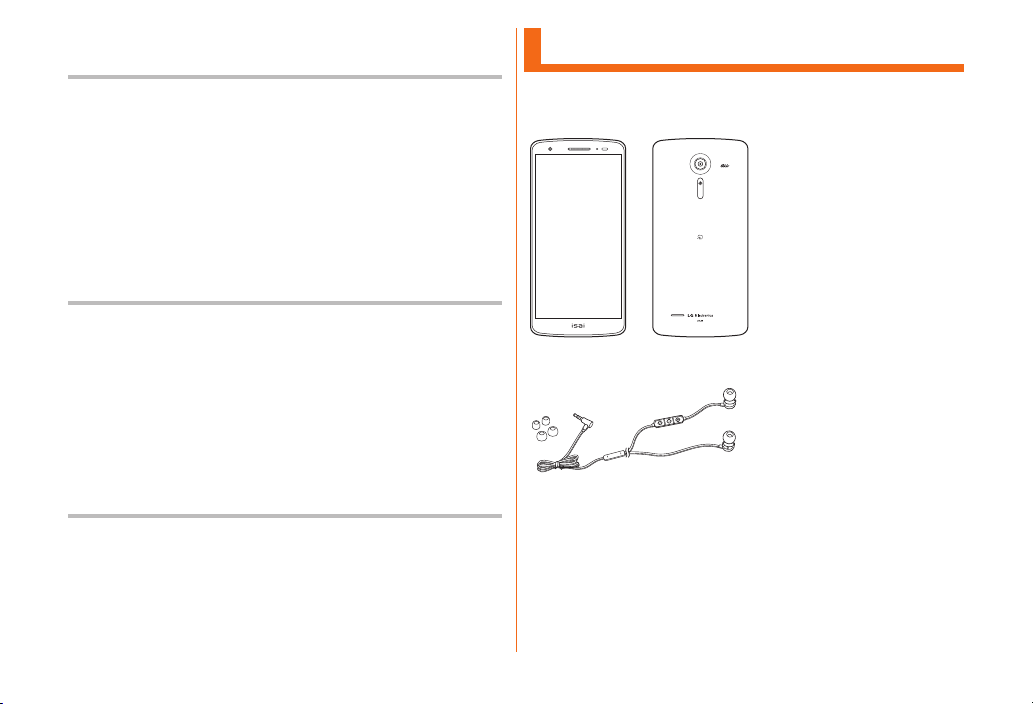
Main unit (including back cover)
Stereo earphone with Microphone (Ear pads: Size S, M, L)
(sample)
設定ガイド (Setting Guide) (in Japanese only)
取扱説明書 (Basic Manual) (in Japanese only)
保証書 (Warranty) (in Japanese only)
3
The following items are not included in the package.
microUSB cable
AC adapter
microSD memory card
Smart phone Cradle
* Stereo earphone with Microphone (sample) is not waterproof
or dust preventive.
* When watching TV (1Seg), make sure to connect Stereo
earphone with Microphone (sample) to product. Stereo
earphone with Microphone (sample) functions as a TV
antenna.
memo
• Purchase a specied charger (sold separately).
• Illustrations of cell phones in this manual are only for
reference. They may look dierent from the actual product.
• This product is built-in battery.
Using au Disaster Countermeasure
Application
a
uuu
au disaster countermeasure menu is displayed.
災害用伝言板 (Disaster Message Board) is a service that
enables you to register your safety information from
disaster areas via LTE NET when large-scale disaster such
as an earthquake with intensity of over 6 lower occurs.
Registered safety information can be conrmed from au
phones, other company's phones, and PCs.
For details, refer to "災害用伝言板サービス (Disaster Message
Board service)" on au website.
a
u
Follow the onscreen instructions to register and conrm.
4
memo
• An e-mail address (@ezweb.ne.jp) is required to register
safety information. Set up e-mail address beforehand. For
details on settings of an e-mail address, refer to "Setting
Guide".
• While wireless LAN (Wi-Fi®) is connected, deleting or
changing the settings of safety information e-mail is not
available.
• The Company makes no guarantee about the quality of
this service. Note that in using the service, the Company is
not liable regardless of the cause, for problems related to
registering safety information due to access concentration
or facility failure, damage due to corruption or loss of
safety information, or damage caused by registered safety
information.
The Emergency Rapid Mail is a service that distributes
Earthquake Early Warning and tsunami warnings provided by
Japan Meteorological Agency, or Disaster and Evacuation
Information provided by national/local governments to all au
cell phones in specied areas simultaneously.
The "受信設定 (receiving setting)" for Emergency Rapid Mail
(Earthquake Early Warning or Disaster and Evacuation
Information) is set to "受信する (receive)" at the time of
purchase. The "受信設定 (receiving setting)" for tsunami
warnings can be set on the "災害・避難情報 (Disaster and
Evacuation Information)".
When you receive Earthquake Early Warning, ensure your
safety and take proper action according to the situation
around you.
When you receive tsunami warnings, leave sea coast
immediately and evacuate to safe places such as hills and
substantial tall buildings.
5
a
u
Inbox is displayed.
Select a mail to view detailed information.
Delete a received mail.
: Set if receive Earthquake
Early Warning.
: Set if
receive Disaster and Evacuation
Information and tsunami warnings.
: Set incoming mail
volume.
: Set if enable
vibrator when receiving a mail.
: Set if notify by manner
mode (sets Sound prole to "Vibrate
only" or "Silent") while manner mode
is on.
: Conrm ringtone/vibrator
for Earthquake Early Warning.
: Conrm
ringtone/vibrator for Disaster and
Evacuation Information and tsunami
warnings.
memo
• Reception of Emergency Rapid Mail is notied by a special
warning tone. The warning tone cannot be changed.
• Earthquake Early Warning is sent to areas where strong
quakes (over 4 degrees) are expected when earthquakes
whose maximum intensity is predicted of 5 lower or more
degrees.
• Immediately after an earthquake occurs, quakes (P waves
and initial tremors) near the epicenter are detected and
position, scale, and expected strength are automatically
calculated and notication is sent as soon as possible
within a few seconds to tens of seconds before the
strong quakes (S waves and major tremors) caused by the
earthquake start.
• Earthquake Early Warning may not arrive before strong
tremors in areas near the epicenter.
• Tsunami warning noties major tsunami warnings and
tsunami warning provided by Japan Meteorological Agency
to area including the target sea coasts.
• Disaster and Evacuation Information is a service that
distributes bulletins concerning residents safety including
evacuation advisories, evacuation orders and other
warnings issued by the national and local governments.
• This service is available only in Japan (it cannot be used
overseas).
• No information fee or communication charge is required for
receiving Emergency Rapid Mail.
• KDDI is not liable for damages suered by customers
resulting from the service's information, lack or delay in the
information caused by transmission or system breakdowns,
or other events that does not belong to the responsibility
of KDDI.

6
• Refer to the Japan Meteorological Agency web page for
details about distribution of Earthquake Early Warning.
http://www.jma.go.jp/
• You cannot receive any Emergency Rapid Mail if the
product is turned o or during a call.
• Data communication, such as receiving or sending an
SMS/e-mail and using browser, you might not be able to
receive Emergency Rapid Mail.
• You might not receive any Emergency Rapid Mail in
places where the signal does not reach (e.g. tunnels and
basements) or where the signal reception is poor even
inside the service area.
• Once the Emergency Rapid Mail fails in receiving, the same
mail cannot be received again later on.
• Since Emergency Rapid Mail uses a dierent delivery
system, the reception time of Emergency Rapid Mail
may not coincide with the same emergency warnings
broadcasted through TV, radio or other medium.
• Information from someplace other than your current
location may be received.
"災害用音声お届けサービス (Disaster Voice Messaging
Service)" is the service that enables you to record your voice
via your smartphone and to deliver the message to persons
to whom you want to send when a large-scale disaster.
a
u
Tap "声をお届け (Sending voices)", and operate "①お届け先
を選択 * (select a sending destination)" → " ②お届けしたい声
を録音 (record voices to send)" in this order.
* Sending destination can be selected from Contacts.
Delivery of voice messages are notied by the pop-up window
or SMS. Receive (download) and play back the voice message.
• If the receivers are using a smartphone or an au cell phone on
which an au Disaster Countermeasure application supporting
Disaster Voice Messaging Service is not active, they are
notied with an SMS.
• If you are notied with SMS, the information is not saved in
the au 災害対策 (au Disaster Countermeasure) application.
7
memo
• To use the service on Wi-Fi®, initial setting is required on
the LTE/3G network.
• Voice messages can be recorded for up to 30 seconds.
• Voice messages can be exchanged among au cell phones
as well as with NTT DOCOMO and Softbank cell phones.
• Voice may not be heard when the media sound volume is
set to low or when the manner mode (Sound prole set to
"Vibrate only" or "Silent") is set.
• When a main unit (memory) has no free space, voice
messages may not be saved or played back.
• Some cell phones cannot receive voice messages. For
details, refer to the au website.
Take the following steps to view the history of disaster
information/evacuation information dispatched by
municipalities, the disaster information portal site, disaster
relief donation site, etc.
a
u
b

8
Contents
Preface ……………………………………………………………………… ii
About Operating Instructions ………………………………………… ii
Safety Precautions ………………………………………………………… 1
When Using This Product ……………………………………………… 1
List of Packaged Items ………………………………………………… 2
Using au Disaster Countermeasure Application ………………… 3
Regarding Notations Used in This Manual ………………………… 9
Exemptions ……………………………………………………………… 10
Safety Precautions (Observe Strictly) …………………………… 11
Handling Precautions ………………………………………………… 23
Notes on Waterproof Properties …………………………………… 30
Bluetooth®/Wireless LAN (Wi-Fi®) Function ……………………… 35
Notes on Packet Communication Charge ……………………… 37
Applications ……………………………………………………………… 38
Names and Functions of Parts ……………………………………… 39
Attaching/Removing Back Cover …………………………………… 40
Using
au Nano IC Card (LTE) ……………………………………………… 41
Attaching/Removing
au Nano IC Card (LTE) ……………………… 42
Charging …………………………………………………………………… 44
Turning the Power On/O …………………………………………… 46
Initial Settings …………………………………………………………… 47
Using the Touch Panel ………………………………………………… 48
Using the Home Screen ……………………………………………… 49
Checking product state ……………………………………………… 53
LED Notication ………………………………………………………… 56
Capturing a Screenshot ……………………………………………… 56
Using QMemo Function ……………………………………………… 57
Entering Text ……………………………………………………………… 58
Making Calls ……………………………………………………………… 60
Receiving Calls …………………………………………………………… 62
Checking Your Phone Number ……………………………………… 63
Using a microSD Memory Card ……………………………………… 64
Viewing the Setting Menu …………………………………………… 66
Introduction of Related Accessories ……………………………… 69
Troubleshooting ………………………………………………………… 70
Using Stereo Earphone with Microphone (Sample) …………… 71
Updating Software ……………………………………………………… 71
After-sales Service ……………………………………………………… 72
Main Specications …………………………………………………… 75
Specic Absorption Rate (SAR) of Cell Phones ……………… 77
FCC Notice ………………………………………………………………… 78
FCC RF Exposure Information ……………………………………… 79
Body-worn Operation …………………………………………………… 79
Certicate and Standard ……………………………………………… 80
Export Administration Regulations ………………………………… 80
Intellectual Property Right …………………………………………… 81
Tabla de contenidos
Otros manuales de Teléfono móvil de LG


LG
LG LG-P880G Manual de usuario

LG
LG X220dsh Manual de usuario

LG
LG LM-K510EMW Manual de usuario
LG
LG MS870 Manual de usuario

LG
LG LG-T375 Manual de usuario

LG
LG UN430 Grey Manual de usuario

LG
LG A7150 Manual de servicio

LG
LG Sprint LG-LS997 Manual de usuario

LG
LG LG-P500 Manual de usuario

LG
LG LG-C199 Manual de usuario


Manuales populares de Teléfono móvil de otras marcas


Blackbe;rry
Blackbe;rry Q10 Manual de usuario

Blackbe;rry
Blackbe;rry Bold 9900 Manual de usuario

Blackbe;rry
Blackbe;rry STORM 9500 - VERSION 5.0 Manual de usuario

ISAFE MOBILE
ISAFE MOBILE IS655.2 Manual de usuario

Blackbe;rry
Blackbe;rry CURVE 8300 - SMARTPHONE Manual de usuario

Blackbe;rry
Blackbe;rry 8707 - VERSION 4.1 Manual de usuario