
Letsfit TP2 Manual de usuario

TP2
Sleep Sound Machine
User Manual
Thank you for purchasing our product. This manual addresses
the safety guidelines, warranty and operating instructions. Please
review this manual thoroughly before operating your device.

Contents
Package Contents................................................... 1
At a Glance .............................................................. 2
Powering On / Off.................................................... 3
Setting and Using the Machine.............................. 4
Choose Your Sound................................................................4
Volume Control .......................................................................5
Set Auto-Off Timer ..................................................................5
Set Clock.................................................................................5
Set Alarms...............................................................................6
Set Night Light.........................................................................7
Set Colorful Ambient Light ......................................................8
Set Child Lock .........................................................................8
Restoring Factory Defaults.................................... 9
Specifications ......................................................... 9
SAFETY AND WARRANTY.................................... 10

● Sleep Sound Machine × 1
Package Contents
- 1 -
● Power Adapter × 1 ● User Manual × 1
⑭
- 2 -
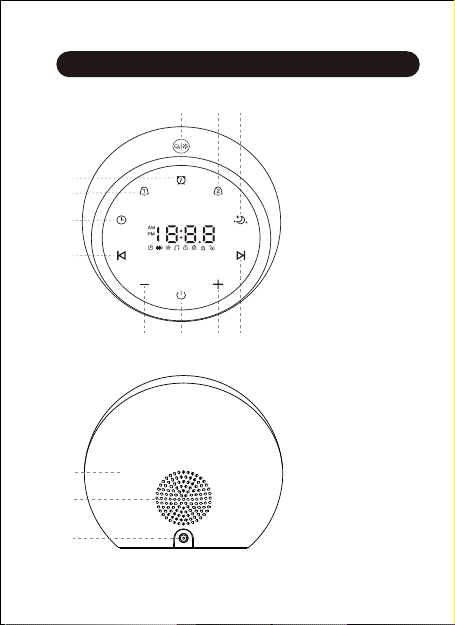
At a Glance
① Power Switch
② Decrease Volume
③ Previous Track
④ Timer
⑤ Alarm 1
⑥ Clock Setting
⑦ Night Light / Snooze
Touch Button
⑧ Alarm 2
⑨ Ambient Light
⑩ Next Track
⑪ Increase Volume
⑫ Lighting Area
⑬ Speaker
⑭ Power Jack
⑬
⑫
⑪
⑧⑦ ⑨
⑤
⑥
③
④
① ⑩②

Powering On / Off
1) Connect the machine to a power source using the
power adapter provided.
Note:
The power switch will not affect the use of night light /
ambient light and alarms.
2) Tap the " " button
to turn on / off the
machine.
- 3 -

Note:
When you choose a sound, the corresponding icon will be
displayed on the touch screen.
Setting and Using the Machine
- 4 -
● Fan sound
Choose Your Sound
Tap the " " or " " button to choose the sound you wish
to listen to. The machine provides 20 soothing sounds:
● White noise sound
1) White Noise
2) Pink Noise
3) Smoothed Pink Noise
4) Brown Noise
5) Baby White Noise
6) Box Fan Noise
7) Desk Fan Noise
8) Laundry
9) Clothes Dryer
10) Hair Dryer
● Natural sound & lullaby
11) Flame
12) Train Voice
13) Nothing But Crickets
14) Forest
15) Spring Water
16) Thunder Rain
17) Sea Waves
18) Twinkle Twinkle Little Star
19) Brahms' Lullaby
20) Rock-A-Bye Baby Crystal Box

Volume Control
Tap or hold the "+" / "-" button to increase / decrease the
volume.
Set Auto-Off Timer
When the music is playing or the light is on, tap the " "
button to set the timer for 15/30/60/90/120mins or turn it off.
You can also tap and hold the " " button to turn off the
timer directly.
Note:
Turn off the timer if you wish to listen to the sounds or use
the light continuously.
- 5 -
Note:
If there is no operation for 10 seconds in setting mode, the
machine will automatically save the current parameters and
exit the setting mode.
Set Clock
● Clock time setting:
1) Tap and hold the " " button to enter the setting mode
and the hour will begin flashing.
2) Tap or hold the "+" / "-" button to change the hour value,
paying attention to the AM and PM indicators. Short tap
the " " button to confirm and enter the minute setting
and the minute will begin flashing.
3) Tap or hold the "+" / "-" button to change the minute
value. Short tap the " " button to complete setting.
● Clock brightness setting:
Short tap the " " button to adjust the brightness (6 levels).
- 6 -
1) Digital clock
2) Alarm bell
3) Bird morning
4) Melodic
5) Manor
6) Twilight
7) Vivifying
8) Brisk
8 types of ringtones:
Set Alarms
You can set two alarms on the machine.
● Alarm time & ringtone setting:
1) Tap and hold the " " or " " button to enter the setting
mode and the hour will begin flashing.
2) Tap or hold the "+" / "-" button to change the hour value,
paying attention to the AM and PM indicators. Short tap
the " " or " " button to confirm and enter the minute
setting and the minute will begin flashing.
3) Tap or hold the "+" / "-" button to change the minute
value. Short tap the " " or " " button to confirm and
enter the ringtone setting.
4) Tap the "+" / "-" button to choose a ringtone (8 ringtones
available). Short tap the " " or " " button to complete
setting. When the alarm is set successfully, the
corresponding icon will be displayed on the touch screen.
2
1
● Turn on / off the alarm:
Short tap the " " or " " button. When Alarm 1 or Alarm 2 is
turned on, the corresponding icon will be displayed on the
screen.

- 7 -
● Snooze mode:
When the alarm sounds, you can tap the " " button on
top of the machine to postpone the alarm. And the " " / " "
icon will flash. The alarm will sound again after 9 minutes.
You can postpone an alarm five times.
Notes:
● Alarm 1 is defined as a wake-up alarm. When it sounds,
the light will stay warm yellow at the same time. When
the alarm is off, the light will go out.
● Alarm 2 is defined as a sleeping alarm. When it sounds,
the light will stay blue at the same time. When the alarm
is off, the light will go out.
● If there is no operation for 10 seconds in the setting
mode, the current parameters will be automatically
saved, and the setting mode will be exited.
Set Night Light
1) Tap the " " button on top of the machine to turn on /
off the night light.
2) When the night light is on, tap and hold the " " button
to adjust the brightness.

Set Colorful Ambient Light
1) Tap the " " button to choose an ambient light
(6 colors: red, yellow, blue, pink, aqua, and purple, and
color-changing mode).
2) Tap and hold the " " button to adjust the brightness.
3) Tap the " " button on top of the machine to turn off
the ambient light.
- 8 -
Set Child Lock
● Tap and hold the " " button and "+" button at the same
time for 2 seconds until you hear a prompt sound to
activate the child lock. During this time, you cannot perform
any operations on this machine. The " " icon will display
on the screen.
● Tap and hold the " " button and the "-" button at the same
time for 2 seconds to unlock. The " " icon will display on
the screen.
Tabla de contenidos
Otros manuales de Máquina de reducción de ruido de Letsfit

Manuales populares de Máquina de reducción de ruido de otras marcas


Pro-Ject Audio Systems
Pro-Ject Audio Systems Vinyl NRS Box S3 Manual de usuario

Rocktron
Rocktron HUSH Ultra Manual de usuario

dbx
dbx 180 Manual de usuario

Diley Dreams
Diley Dreams Milky Manual de usuario

AudioQuest
AudioQuest Niagara 7000EU Manual de usuario

AudioQuest
AudioQuest Niagara 7000 Manual de usuario


