LENCO LED-3213 Manual de usuario

Operating Instruction
Please read these instructions before operating
your set and retain them for future reference.
LED COLOR TV
EUCY00-E
LED-3213
WWW.LENCO.COM

PRECAUTION
1. Read these instructions.
2. Keep these instructions.
3. Heed all warnings.
4. Follow all instructions.
5. This apparatus with CLASS construction .
6. Do not use this apparatus near water, the apparatus shall not be exposed
to dripping or splashing and that no objects lled with liquids, such as
vases, shall be placed on the apparatus.
7. Clean only with dry cloth.
8. Do not install this apparatus in windtight places such as the wall-unit. Do
not block any ventilation openings.
9. Do not install near any heat sources such as radiators, heat registers,
stoves, or other apparatus (including ampliers) that produce heat.
10. Do not defeat the safety purpose of the polarized or grounding-type plug.
A polarized plug has two blades with one wider than the other. A grounding
type plug has two blades and a third grounding prong. The wide blade or
the third prong are provided for your safety. If the provided plug does not
t into your outlet, consult an electrician for replacement of the obsolete
outlet.
11. Protect the power cord from being walked on or pinched particularly at
plugs, convenience receptacles, and the point where they exit from the
apparatus.
12. Only use attachments/accessories specied by the manufacturer.
13. Use only with the cart, stand, tripod, bracket, or table specied by the
manufacturer, or sold with the apparatus. When a cart is used, use caution
when moving the cart/apparatus combination to avoid injury from tip-over.
14. Unplug this apparatus during lightning storms or when unused for long
periods of time.
15. Refer all servicing to qualied service personnel. Servicing is required
when the apparatus has been damaged in any way, such as power-supply
cord or plug is damaged, liquid has been spilled or objects have fallen into
the apparatus, the apparatus has been exposed to rain or moisture, does
not operate normally, or has been dropped.

Attention:
Motionless picture might cause permanent destruction to the display.
Be sure not to display motionless picture on the LE D TV for more than•
2 hours, because it would cause picture remnants to appear, which is
called "screen burns". To avoid such picture remnants, please decrease
the "contrast" and "brightness" of the display when displaying motionless
picture.
While watching TV program in 4:3 size mode for a long time, there would•
be traces on the edge of the screen's left, right and center parts because
of different transmition of the light on the screen.Similar impact on the
screen will occur when playing DVD or connecting games control. Products
destroyed by these reasons can't be guaranteed for maintenance.
It might cause picture remnants to display electronic games and motionless•
picture of PC more than a period of time.To avoid such effect, please
decrease the "contrast" and "brightness" when displaying motionless
picture.
CAUTION
Where the MAINS plug or an appliance coupler is used as the disconnect device,
the disconnect device shall remain readily operable.
CAUTION
These servicing instructions are for use by qualied service personnel only. To
reduce the risk of electric shock, do not perform any servicing other than that
contained in the operating instructions unless you are qualied to do so.
CAUTION
Danger of explosion if battery is incorrectly replaced.
Replace only with the same or equivalent type.
Batteries shall not be exposed to excessive heat such as sunshine, re or the
like.
Used batteries should not be thrown into the garbage can, please leave them
at an appropriate depot.

IMPORTANT INFORMATION
If a television is not positioned in a sufciently stable location, it can be potentially
hazardous due to falling. Many injuries, particularly to children, can be avoided
by taking simple precautions such as:
● Using cabinets or stands recommended by the manufacturer of the
television.
● Only using furniture that can safely support the television.
● Ensuring the television is not overhanging the edge of the supporting
furniture.
● Not placing the television on tall furniture (for example, cupboards or
bookcases) without anchoring both the furniture and the television to a
suitable support.
● Not standing the televisions on cloth or other materials placed between
the television and supporting furniture.
● Educating children about the dangers of climbing on furniture to reach
the television or its controls.
The each USB terminal should be loaded with 0.5 A under normal operation;
Do not attach candle to accessible opening area, to avoid flammable foreign
material from entering the TV
●
●
Minimum distances around the apparatus for sufficient ventilation;
The ventilation should not be impeded by covering the ventilation openings
with items,such as newspapers,table-cloths,curtains,etc.;
No naked flame sources,such as lighted candles,should be placed on the
apparatus;
Attention should be drawn to the environmental aspects of battery disposal;
The use of apparatus in tropical and/or moderate climates.
●
●
●
●
●
Put the TV in the environment of moderate temperature,not to lay aside the
Air Conditioner outlet or stove to avoid damage.
Use both hands when carrying TV, make TV suffer stable outside force.
●
●

Place the TV on a firm and flat surface,leaving a space of at lease 10cm around
the set and 30cm from the top of the set to the wall or cabinet.Ensure the TV is
positioned close to the wall to avoid it falling when pushed.
To avoid the TV overturning,when installed,it must with screw through
screw hole on the base for fixing TV on the desk
Screw hole
Top view
●
●
●When you turning the TV set,do not hold the top side of the TV set ,you
should hold the bottom side .
●When you lifting the TV set,do not use one hand to handle it,you
shoud lift the TV set bytwo hands.

1
CONTENTS
1. Connection and Preparation of TV.............................................
1.1 Accessories ......................................................................... 2
1.2 Installation of Stand............................................................. 2
1.4 Keys and Interfaces............................................................. 3
1.5 Remote Control....................................................................
1.6 Installation of Batteries......................................................... 5
2. Basic Operation.......................................................................... 5
2.1 Power ON/OFF..................................................................... 5
2.2 Setting of Standby Mode......................................................
2.3 Selection of Input Mode........................................................
3. Select input source ....................................................................
..........................................................................
................................................................
.......................................................................
........................................................................
7. Technical Speciication................................................................
8. Supported Signal Modes............................................................ 25
9. Simple Troubleshooting ............................................................. 26
.....................................................................
1.3 Installation of Wall Mount Kit(Optional)................................
LE D COLOR TV
5.1 Picture menu
4. First time setup
5. Main Menu Operation
5.2 Sound menu
5.3 Channel menu
5.4 Lock system menu...............................................................
5.5 Setup menu..........................................................................
6. USB Operation ..........................................................................
6.1 Photo...................................................................................
6.2 Music...................................................................................
6.3 Movie...................................................................................
6.4 Text......................................................................................
2
22
22
23
23
2
4
5
5
6
7
8
8
10
12
16
17
22
24
Service and support ................................................................... 27
10.
WEE........................................................................................... 28
11.
CE.............................................................................................. 28
12.

LE D COLOR TV

3
The design and specication takes actual
products as the standard
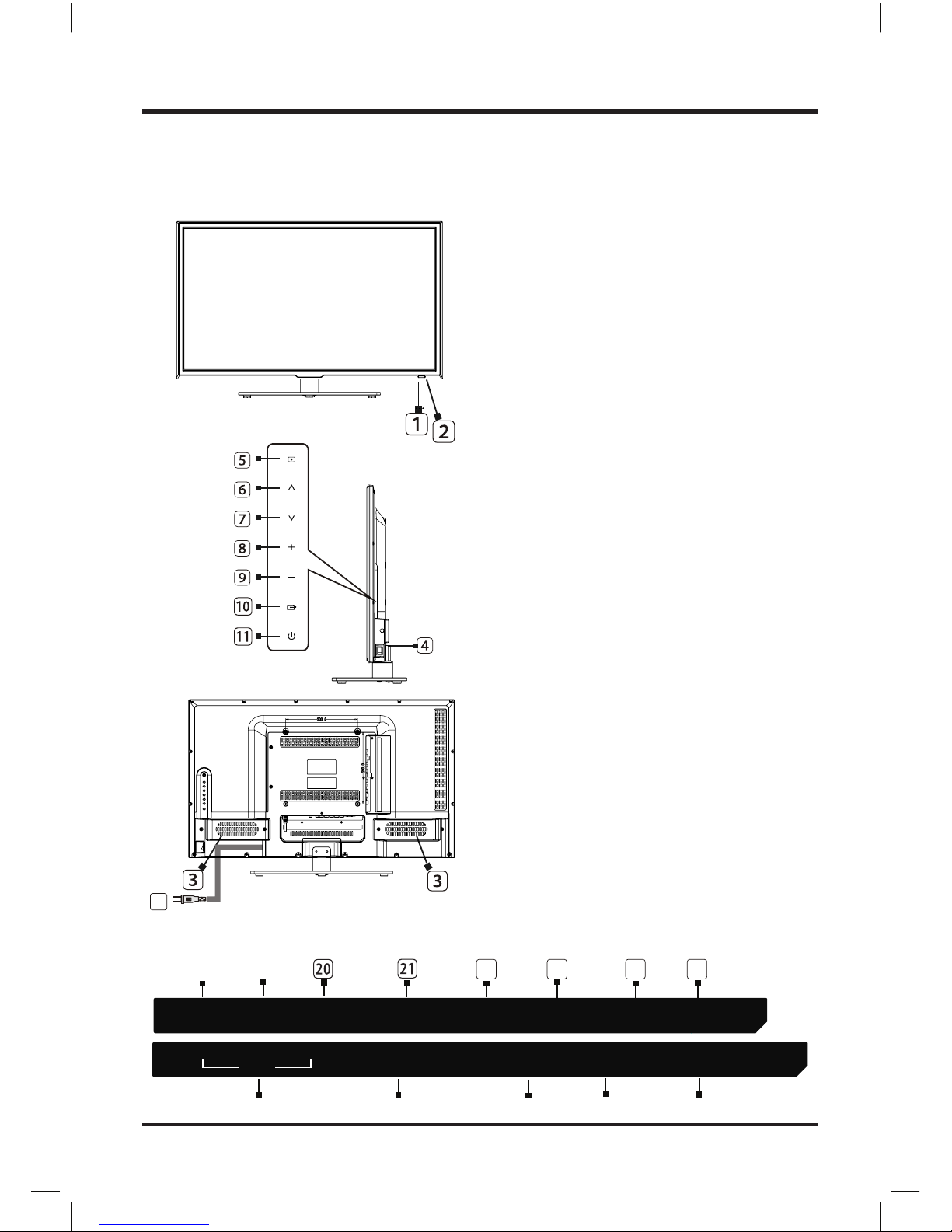
1.4 Keys and Interfaces
LE D COLOR TV
23
22
VIDEO RL
AV I N RF IN
PC(VGA)
PC AUDIO
EARPHONE HDMI3 USB
HDMI1 HDMI2 COAXIAL
SCART
YPbPr IN CI
24 25
1. Remote sensor window
2. Power indicator
3. Speaker
4. Power switch
5. Menu key
6. Program “
+
” key
7. Program “ ” key
8. Volume “
+
” key
9. Volume “
-
” key
10. Source key
11. Standby key
12. Power plug input
13. AV input
20 .HDMI1
19.EARPHONE output
17.RF input
21.HDMI2
15.PC AUDIO input
24.USB
25.Coaxial
14.Scart input
16.PC(VGA) input
22.HDMI3
-
18.YPbPr IN
23.CI card
12

4
1.5 Remote Control 1. STANDBY( ): Standby turn on and off.
2. SOURCE: Select the signal source.
3. 0~9: Continue to press the keys to select
a channel.
4. DISPLAY: Display the information of
current video and audio.
5. RECALL: Return to previous channel.
20.TIMESHIFT:DTV mode time shift.
23. RECORD:DTV mode record data USB disk.
22. FAV.LIST: Favorite channel list
10.
VOL+: Increase the volume.
11. CH∧
: Select the channel forward.
12. MUTE: Mute sound.
13.
VOL-: Decrease the volume.
14. CH∨
: Select the channel backward.
15. MENU: Enter or exit menu.
16. EXIT:Exit current function.
17. , ,
,
key: The menu item selection.
18.
ENTER: Conrm or enter.
9. S.MODE: Select the sound mode.
MEDIA mode: Press one time to pause,
press again to playback.
21. ASPECT:Select picture size.
8. P.MODE: Select the picture mode.
24. SUBTITLE:DTV mode select subtitle mode.
7. TV/RADIO:Select the TV or Radio mode.
25. AUDIO: Select TV audio mode.
30. RED: Access the red item or page.
31. BLUE: Access the blue item or page.
32. GREEN: Access the green item or page.
33. YELLOW: Access the yellow item or page.
FREEZE P.MODE
TIMESHIFT
AUDIO
SUBTITLE RECORD
FAV.LIST
SUBPAGE
INDEX
HOLD
REVEAL
EXIT
EXIT
MEDIA mode: Fast Backward
MEDIA mode: Next
MEDIA mode: Fast Forward
MEDIA mode: Previous.
26. INDEX: Display the index page.
27. SUBPAGE: Enter the sub page mode.
28. HOLD: Hold the current page.
29. REVEAL: Reveal the hidden information.
S.MODE TV/RADIO
TXT
19. TXT: Enter or exit teletext
6. FREEZE: Freeze the picture.
SOURCE
STANDBY
MIXMIX SIZESIZE CANCELCANCEL
LE D COLOR TV
ASPECT

5
2. Basic Operation
2.1 Power ON/OFF
- Connect the power cord to the AC input. Insert the power cord into the
appropriate socket.
- Press the Power switch to switch on the TV, then press Power button to
turn on the unit.
- Press the Power switch again to switch off the TV.
Note: After switch off the TV, please don’t immediately re-open the power
switch ,should be delayed one minute more to re-open the power
switch.
2.2 Setting of Standby Mode
- Press ( ) button to turn on the unit.
- Press ( ) button again to return the display to standby mode. The
power indicator turns red.
- Be sure not to set your TV in standby mode for a long period of time.
2.3 Selection of Input Mode
This set has different signal source modes, you may continue to press the
Source button to select a signal source.
1.6 Installation of Batteries
1. Open the back lid of the remote control.
2. Install two 7#(AAA)1.5V batteries.
Ensure the correct polarity of the batteries.
3. Cover the back lid.
Please take out of the batteries from the remote
control for long time of no use.
If the remote control doesn't work properly,
please carry out the following checks.
- Check the TV is turned on.
- Check the polarity of the batteries are correct.
- Check the batteries are not drained.
- Check the power supply is normal or the power cord
is correctly connected.
- Check there are no special uorescent light or neon
light around.
LE D COLOR TV
Tabla de contenidos
Otros manuales de Televisor LED de LENCO

LENCO
LENCO DVL-2690 Manual de usuario

LENCO
LENCO LED-2215 Manual de usuario

LENCO
LENCO LED-2250 Manual de usuario

LENCO
LENCO LED-3901-4K Manual

LENCO
LENCO DVL-2010 Manual de usuario

LENCO
LENCO LED-2217 Manual de usuario

LENCO
LENCO LED-2419 BLACK Manual de usuario

LENCO
LENCO DVL-2695 SILVER Manual de usuario

LENCO
LENCO DVL-2460 Manual de usuario

LENCO
LENCO DVL-2461 Manual de usuario