
Legamaster LS3000 Manual de usuario

ENGLISH | DEUTSCH
FRANÇAIS | NEDERLANDS | ESPAÑOL
Version 1.0
USER MANUAL
LEGAMASTER SOUNDBAR LS2000
LEGAMASTER SUBWOOFER LS3000
( )
OPTIONAL


1
LS2000 / LS3000 – USER MANUAL – ENGLISH
1. MAIN UNIT
Dear Customer,
Thank you for purchasing this Legamaster product.
Please read the following instructions prior to operating your unit.
Recycling Information
This product, when disposed of, is supposed to be collected and recycled according to your country‘s legislation to reduce environmental
burden. When you dispose of this product, please contact a distributor or an affiliate in your country.
Warranty information
Legamaster guarantees the repair or replacement, free of charge, of faulty LS2000 and LS3000 products and/or parts by an authorised service
partner or dealer for a warranty period of 2 years.
The warranty shall take effect on the date of purchase as stated on the receipt.
If you wish to make a claim under the warranty or you have any other service issues, please contact your dealer or Legamaster directly. For
contact information please see the Legamaster website.
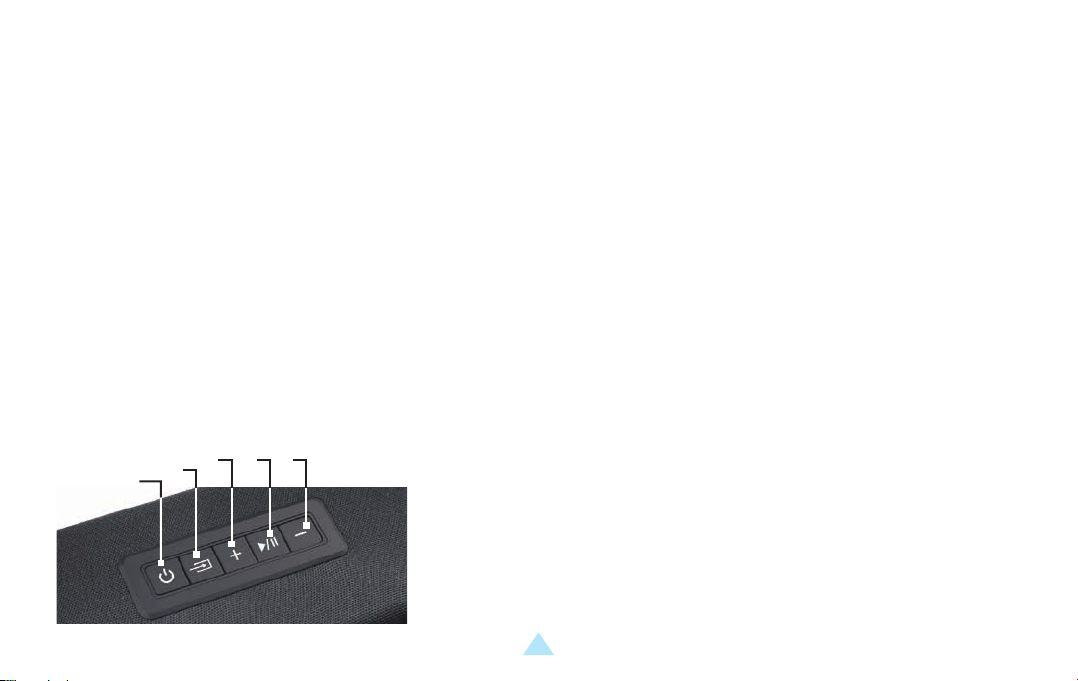
1. ON/OFF BUTTON
2. SOURCE SELECTION / RESET BUTTON: PRESS TO CHANGE SOURCE,
HOLD TO RESET TREBLE AND BASS TO FACTORY SETTINGS
3. VOLUME +
4. PLAY / PAUSE
5. VOLUME -
1. 2. 3. 4. 5.
USER MANUAL

2
LS2000 / LS3000 – USER MANUAL – ENGLISH
4.
3.
5.
1.
2.
1. USB-A PORT
2. POWER PORT
3. DIGITAL COAXIAL PORT
4. AUX / STEREO RCA PORTS
5. DIGITAL OPTICAL AUDIO / TOSLINK IN
Indicator
Light
RED: STANDBY
WHITE: OPTICAL
GREEN: COAXIAL
BLUE: BLUETOOTH
PURPLE: USB
LIGHT BLUE: STEREO RCA
2. REMOTE CONTROL
1 2
3
4 5
6
7 8
9
10 11
12 13
14
15 16
1. POWER BUTTON
2. MUTE / UNMUTE
3. VOLUME +
4. PREVIOUS
5. NEXT
6. VOLUME -
7. OPTICAL
8. COAXIAL
9. BLUETOOTH
( Press and hold to
desconnect BT )
10. USB
11. RCA
12. DSP SETTING: MOVIE
13. DSP SETTING: DIALOG
14. DSP SETTING: MUSIC
15. TREBLE + / -
16. BASS + / -
3. PACKAGE CONTENT
Legamaster Soundbar LS2000
Soundbar
19v power adapter
Remote Control
2x AAA batteries
Digital Optical Cable
RCA / 3.5mm cable
3.5mm / RCA adapter
Wall-mounting kit
Wall-mounting template
Legamaster Subwoofer LS3000 (sold seperatly)
Subwoofer
19v power adapter
USER MANUAL

3
LS2000 / LS3000 – USER MANUAL – ENGLISH
4. OPERATING THE SOUNDBAR
Plug the AC power cord of the 19v adapter into a suitable AC power-outlet, and connect the other end to the power-port of the soundbar.
POWER SUPPLY
Connect a source to the soundbar using a suitable cable. Connect the cable to the RCA, AUX, Optical or USB port of the soundbar, or use
the 3.5mm/RCA adapter to connect the cable.
SOURCE
Use the source-selection button on the soundbar, or the source-buttons on the remote control to select the proper source. The indicator-light
on the front of the soundbar will change color to show the different sources selected (see above for color-explanation).
SOURCE SELECTION
Use the volume up and down buttons on soundbar or remote to adjust the volume.
Using the DSP buttons (MOVIE, MUSIC, DIALOG) on the remote, pre-set setting can be chosen that
adjust the sound settings (bass / treble) for specific scenario’s.
With the BASS- and BASS+ buttons on the remote, the bass output can be regulated to your liking.
With the TREBLE- and TREBLE+ buttons on the remote, treble can be set to your liking.
SOUND AND VOLUME SETTINGS
Using the source selection button, or the BT button on the remote, switch to Bluetooth mode. The indicator will light up blue (when a device is
already paired) or will blink blue when in pairing mode.
Pairing a new device is only possible when no other devices are connected.
On a Bluetooth-enabled device, open the Bluetooth-settings. Make sure Bluetooth is enabled. Connect your device to by selecting LS2000
from the list of devices.
To disconnect your device, hold the BT button for a few seconds.
CONNECTING A BLUETOOTH DEVICE
USER MANUAL

4
LS2000 / LS3000 – USER MANUAL – ENGLISH
NOTE:
Once paired, a device will auto-connect to the soundbar when in range and when the soundbar is not paired to another device.
The range of a Bluetooth-signal is limited. Please stay within 10 meters of the soundbar to guarantee a stable signal.
A device can be disconnected and prevented to auto-connect. Select LS2000 from the list of connected devices (sometimes called ‘my devices /
paired devices / etc.) and select ‘forget device’.
5. CONNECTING THE LS3000 SUBWOOFER TO THE SOUNDBAR
The Legamaster LS2000 can be upgraded by connecting the Legamaster LS3000 subwoofer to the audio-system. (LS3000 sold seperately).
To connect the LS3000 Subwoofer to the soundbar, first plug in the power adapter in a suitable power-outlet, and connect the other end to
the subwoofer.
Press the ‘connect’ button on the back of the subwoofer. Please make sure no other soundbars than the soundbar that is intended to connect
to the subwoofer are located close-by and are switched on, as the subwoofer may connect to the wrong soundbar unit.
After pressing the ‘connect’ button, the subwoofer will connect to the Legamaster LS2000 Sounbar.
6. PRECAUTIONS AND SAFETY INSTRUCTIONS
If smoke or a peculiar smell comes from the product, remove the power plug from the socket immediately.
Failure to do so may result in fire or electric shock.
Failure to do so may result in fire or electric shock.
If liquid is spilled or objects are dropped inside the product, remove the power plug from the socket
immediately.
If the powercord is damaged or becomes hot, turn off the product. Make sure the plug has cooled down and
remove the plug from the socket.
USER MANUAL

5
LS2000 / LS3000 – USER MANUAL – ENGLISH
7. INSTALLATION
Don’t install in a high temperature or high humidity environment.
Don’t install near any heat sources such as radiators, hot-air outlets, stoves or other devices that produce heat.
If the product is still used in this condition, it may cause fire or an electric shock.
In all of the cases like above: contact your dealer for inspection / replacement.
To turn off the product completely, remove the plug from the socket.
This may cause fire or electric shock.
Don’t overload sockets or cables beyond electrical capacity.
Don’t use extension leads as this may cause fire or electric shock.
Don’t insert the power plug into any socket other than 100-240V AC
This may cause fire or electric shock.
Don’t use a damaged power plug or worn socket
Don’t insert the wrong plug as it may cause fire or electric shock
Make sure the product is mounted or placed properly. Dropping or falling may cause damage to the product and/or to it‘s environment.
Information in this document is subject to change without notice.
2019 Legamaster International B.V. All rights reserved.
Reproduction in any manner whatsoever without the written permission of Legamaster International is strictly forbidden.
USER MANUAL
1
LS2000 / LS3000 – BENUTZERHANDBUCH – DEUTSCH
1. GERÄT
Sehr geehrter Kunde,
wir danken Ihnen für den Kauf dieses Legamaster-Produkts.
Bevor Sie das Produkt in Betrieb nehmen, lesen Sie bitte die folgenden Anweisungen durch.
Hinweise zum Recycling
Im Sinne einer möglichst geringen Umweltbelastung muss die Entsorgung dieses Produkts gemäß den gesetzlichen Bestimmungen Ihres
Landes erfolgen. Zur Entsorgung des Produkts wenden Sie sich bitte an einen Distributor oder eine Niederlassung in Ihrem Land.
Hinweise zur Garantie
Legamaster garantiert die kostenlose Reparatur oder den kostenlosen Austausch defekter LS2000 und LS3000 Produkte und/oder Teile durch
einen autorisierten Servicepartner oder Händler während der Garantiezeit von 2 Jahren.
Die Garantie tritt am Tag des Kaufs in Kraft, wie auf der Rechnung angegeben.
Wenn Sie einen Garantieanspruch geltend machen möchten oder andere Serviceprobleme haben, wenden Sie sich bitte direkt an Ihren
Händler oder Legamaster. Für Kontaktinformationen besuchen Sie bitte die Legamaster-Website.
1. EIN / AUS-SCHALTER
2. QUELLENAUSWAHL/RESET-KNOPF: DRÜCKEN SIE DIESE TASTE, UM
DIE QUELLE ZU WECHSELN, HALTEN SIE SIE GEDRÜCKT, UM DIE HÖHEN
UND TIEFEN AUF DIE WERKSEINSTELLUNGEN ZURÜCKZUSETZEN.
3. VOLUME +
4. PLAY / PAUSE
5. VOLUME -
1. 2. 3. 4. 5.
BENUTZERHANDBUCH

BENUTZERHANDBUCH
2
LS2000 / LS3000 – BENUTZERHANDBUCH – DEUTSCH
4.
3.
5.
1.
2.
1. USB-A PORT
2. POWER PORT
3. DIGITAL COAXIAL PORT
4. AUX / STEREO RCA PORTS
5. DIGITAL OPTICAL AUDIO / TOSLINK IN
Indicator
Light
ROT: STANDBY
WEISS: OPTICAL
GRÜN: COAXIAL
BLAU: BLUETOOTH
VIOLETT: USB
HELLBLAU: STEREO RCA
2. FERNSTEUERUNG
1 2
3
4 5
6
7 8
9
10 11
12 13
14
15 16
1. EIN / AUS-SCHALTER
2. MUTE / UNMUTE
3. VOLUME +
4. VORHERIGE
5. NÄCHSTE
6. VOLUME -
7. OPTICAL
8. COAXIAL
9. BLUETOOTH
( Drücken und halten , um
die V erbindung zu trennen BT )
10. USB
11. RCA
12. DSP SETTING: MOVIE
13. DSP SETTING: DIALOG
14. DSP SETTING: MUSIC
15. TREBLE + / -
16. BASS + / -
3. PAKETINHALT
Legamaster Soundbar LS2000
Soundbar
19v Netzteil
Fernsteuerung
2x AAA Batterien
Optisches Kabel
RCA / 3,5mm Kabel
3,5mm / RCA Adapter
Wandmontage-Set
Wall-mounting template
Legamaster Subwoofer LS3000
(Separat erhältlich)
Subwoofer
19v Netzteil

BENUTZERHANDBUCH
3
LS2000 / LS3000 – BENUTZERHANDBUCH – DEUTSCH
4. BEDIENUNG DER SOUNDBAR
Stecken Sie das Netzkabel des 19V-Adapters in eine
geeignete Steckdose und verbinden Sie das andere Ende
mit dem Stromanschluss der Soundbar.
STROMVERSORGUNG
Schließen Sie eine Quelle mit einem geeigneten Kabel an die Soundbar an.
Schließen Sie das Kabel an den RCA-, AUX-, optischen oder USB-Anschluss der
Soundbar an, oder verwenden Sie den 3,5-mm-RCA-Adapter, um das Kabel
anzuschließen.
QUELLE
Verwenden Sie die Quellenauswahltaste auf der Soundbar oder die Quellentasten auf der Fernbedienung, um die richtige Quelle auszuwählen.
Die Kontrollleuchte auf der Vorderseite der Soundbar wechselt die Farbe, um die verschiedenen ausgewählten Quellen anzuzeigen
(siehe oben für die Farberklärung).
QUELLENAUSWAHL
Verwenden Sie die Auf- und Ab-Taste auf der Soundbar oder der Fernbedienung, um die Lautstärke einzustellen.
Mit den DSP-Tasten (MOVIE, MUSIC, DIALOG) auf der Fernbedienung können voreingestellte Einstellungen gewählt werden,
die die Klangeinstellungen (bass / treble) für bestimmte Szenarien anpassen.
Mit den Tasten BASS- und BASS+ auf der Fernbedienung kann der Bass-Ausgang nach Belieben eingestellt werden.
Mit den TREBLE- und TREBLE+-Tasten auf der Fernbedienung können Sie die Höhen nach Ihren Wünschen einstellen.
TON- UND LAUTSTÄRKEEINSTELLUNGEN
Das Koppeln eines neuen Gerätes ist nur möglich, wenn keine anderen Geräte angeschlossen sind.
Wechseln Sie mit der Quellenwahltaste oder der BT-Taste auf der Fernbedienung in den Bluetooth-Modus. Die Anzeige leuchtet blau
(wenn ein Gerät bereits gekoppelt ist) oder blinkt blau, wenn sich das Gerät im Kopplungsmodus befindet.
Öffnen Sie auf einem Bluetooth-fähigen Gerät die Bluetooth-Einstellungen. Vergewissern Sie sich, dass Bluetooth aktiviert ist.
Verbinden Sie Ihr Gerät mit dem LS2000, indem Sie es aus der Liste der Geräte auswählen.
Um die Verbindung zum Gerät zu trennen, halten Sie die BT-Taste einige Sekunden lang gedrückt.
ANSCHLUSS EINES BLUETOOTH-GERÄTES
HINWEIS:
Este manual sirve para los siguientes modelos
1
Tabla de contenidos
Idiomas:


