
Lamax Electronics DRIVE C7 Manual de usuario

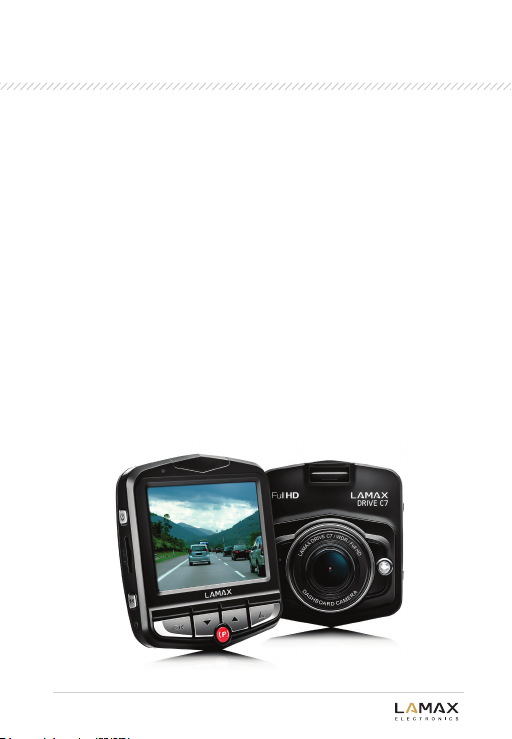
LAMAX DRIVE C7
Dashboard Camera
User manual

1.
16.
17.
10.
11.
13.
14.
12.
4.
3.
5. 6. 7. 9. 15.
2.
8.
Product Structure
1. LED
2. Power Button (ON / OFF)
3. Micro SDHC Card Slot
4. Menu
5. OK
6. Down
7. Park (P) / Time-lapse (T)
8. Up
9. SOS / Mode
10. USB Interface
11. AV Interface
12. HDMI / GPS Interface
13. Display
14. Lens
15. LED Flash
16. Microphone
17. Reset
LAMAX DRIVE C7
Dashboard Camera

Setup instructions
Installing the camera:
1. Run the power cable around
the windscreen so as not to obstruct
the driver's line of sight. Place
the device in front of the rear-view
mirror to optimise its field of view.
2. Do not install the camera where
it might distract the driver or impede
the driver's view.
3. In some vehicles the power may be on even when the engine has been
4. As the device may have been in storage for a while, when using it for
the first time, the internal battery may be running low. If the device
has no power, manually plug in the car charger after the car starts, turn
on the camera, and charge the battery.
1. Choose a Micro SDHC card of Class 6 or higher and preferably
of 8 GB or more for optimum recording space. We recommend using
branded Micro SDHC cards Class 10 and above.
2. Please format the Micro SDHC card using the device when
using the card for the first time.
Micro SDHC Card
Capacity cards Length of recording Full HD
32 GB
16 GB
8 GB
4 GB
480 minutes
240 minutes
120 minutes
60 minutes
LAMAX DRIVE C7
Dashboard Camera

Software settings:
1. Language:
Press the "Menu“ button to enter the main menu. Choose Select language
and press the "OK“ button to select. Press the "Up“ and "Down“ buttons
to choose the language you want, and press "OK“ to confirm.
2. Time and Time zone settings:
When using the device for the first time, go to the system menu
and select “Clock settings” to set the current date and time. Time zone
setting: This device includes a GPS time function. After the GPS device
has successfully located its position, the date and time of the device
is updated automatically. To select the correct time zone go
to “Time Zone Selection” and select the corresponding time zone
(GPS module must be connected).
3. Enter the system menu to adjust other individual settings.
LAMAX DRIVE C7
Dashboard Camera
Video Resolution
Record time
Micro SDHC card
Battery level
Mode
Scenes
White balance
Exposure
GPS info

Main functions and basic operation:
Turning the device on and off:
Normal driving mode: Connect the vehicle power supply. The device
automatically turns on and starts recording when the car is started. When
the engine is turned off the device automatically turns off.
Manual mode:
Press the "Power“ button to manually turn the device on or off.
Parking mode:
Parking mode has two functions named as "P Mode" and "T Mode".
P Mode (impact sensor):
Tap the "P“ button to turn this function on and off. When this function is on,
the device will automatically start up and record if a collision is detected.
It will automatically shut down again after 20 s. This mode will use the
internal battery. Users can add an external power source.
T Mode (time-lapse):
Press and hold the "P“ button to turn the time-lapse function on and off.
When this function is on, the camera can continuously record 1 photo per
second. This can be then played back at 30 photos per second.
The advantages of this mode are as follows:
A. Available recording time can be increased 30-fold. For example, if the
normal recording time of an 8 GB Micro SDHC card is 1 hour, then this
mode can increase it up to 30 hours and a 32 GB memory card can cover at
least one week.
B. Users can view all videos at 30 times the speed, without missing any
unexpected or unusual events over the recording period.
This mode is mainly used for real time monitoring when parked. An external
power source is needed as the device must be on at all times in this mode.
Users should select an external power source to suit their individual needs.
LAMAX DRIVE C7
Dashboard Camera

Video Recording:
After startup, video recording will automatically begin, and can be stopped
or restarted by pressing "OK“.
Motion detection recording:
When this function is on, the device can detect motion and begin recording.
The recording stops when no further motion is detected and restarts again
if motion is detected again. This function makes recording more effective
and utilises the disk space more efficiently.
Loop recording:
When the Micro SDHC card is full, the camera automatically records over
the oldest unprotected files.
Accident file protection:
This device is equipped with a gravity sensor and when an impact is
detected the video captured is locked against being overwritten. The
protected file is stored under the alternative name of SOS_XXXX.avi.
Manual protection:
As well as the auto-protection feature, it is also possible to manually protect
files on the device. Whilst recording, at any time the user can press the SOS
button to lock the current video. Pressing this again unlocks the current
video.
Auto display off:
After 3 minutes, the display switches off automatically. Pressing any key
turns it back on again. This function can be turned on or off in the system
menu.
Note: The sensitivity of the gravity sensor can be set in the system menu.
Photo Mode:
When not recording video, change to Photo mode by pressing the "Mode“
button and take a photo by pressing the OK button. Use the digital zoom by
pressing the "Up“ and "Down“ buttons. Enter the main menu and select Image
mode to set the image resolution, AWB sensitivity, special effects and other
settings.
LAMAX DRIVE C7
Dashboard Camera

Playback Mode:
Under Playback mode, it is possible to do the following by pressing the
Menu button: adjust the volume, delete files, lock and unlock files.
Playback mode includes AVI playback and Image playback. Press "Mode"
to switch between these modes.
GPS Function (GPS module is optional via HDMI):
The device supports an external GPS module which can record the route
of the journey. GPS is displayed in red on the screen when it is searching
for a signal and green when it has located its position. The current
longitude, latitude and number of satellites is then displayed on the screen.
When playing a video, the complete driving route and current position
are displayed simultaneously.
Note: The device does not support A-GPS. The GPS will not locate
the position successfully in an underground car park or indoors.
Shortcut Keys:
Manually lock (or unlock) the current video by pressing the “SOS“ button
under Photo mode. Turn off the screen by pressing the “Down“ button.
LAMAX DRIVE C7
Dashboard Camera
Product Features
•Simple and elegant design
•Motion detection records accidents when you are away from your car.
If your car is hit when parked, the camera will automatically switch
on and record the incident.
• Time-lapse camera. After the car engine is turned off, the camera can take
photos every second to monitor the surrounding area, guaranteeing
the safety of your car when left alone (an external power source is needed
when used for an extended time).
•Highly sensitive image sensor can capture a clear crisp image
even under low-light conditions.
•Loop recording automatically overwrites previously recorded
material and replaces it with new content.
•Automatically begins recording when the car is started.
•Using the on-board G-sensor and 3D accelerometer, collisions
are automatically recorded and the data locked and protected
against being overwritten.
LAMAX DRIVE C7
Dashboard Camera

Technical specifications:
Note: The design and specifications of this device are subject
to change without prior notice.
Pack contents
1. LAMAX DRIVE C7; 2. Power cable; 3. Bracket; 4. USB cable; 5. User manual
LAMAX DRIVE C7
Dashboard Camera
Display dimensions
Lens angle of view 140ohorizontally, 85overtically,
150odiagonally
Video recording FHD 30 fps, HD 60 fps,
HD 30 fps, VGA 30 fps
Video Mode AVI
SD card slot Micro SDHC
Microphone / Loudspeaker
Built-in
Frequency 50 Hz / 60 Hz
TV output NTSC / PAL
USB Interface USB 2.0
External Power Source 5.5 V 1A
Battery Built-in Li-polymer battery
System requirements Windows 7 / Windows 8

Precautions and notices:
•For your own safety, do not use the camera’s controls while driving.
•A window mount is needed when using the recorder in a car. Make sure that
you place the recorder in an appropriate place, so as not to obstruct the
driver’s view or deployment of airbags.
•Make sure that no object is blocking the camera lens and no reflective
material is placed near the lens. Please keep the lens clean.
•If the car’s windshield is tinted or coated, it may impact the recording quality.
Safety precautions:
•Use only the charger supplied with your device. Use of another type of
charger may result in malfunction and/or danger.
•Do not use the charger in high moister environment. Never touch the
charger when your hands or feet are wet.
•Allow adequate ventilation around the charger when using it to operate
the device or to charge the battery. Do not cover the charger with paper
or other objects that will reduce cooling. Do not use the charger while
it is inside a carrying case.
•Connect the charger to a proper power source. The voltage requirements
are found on the product case and/or on the packaging.
•Do not use the charger if it is visibly damaged. In case of damage, do not
repair the equipment yourself!
•In case of device overheating, immediately disconnect the power source.
Caring for your device:
•Taking good care of your device will ensure trouble-free operation and
reduce the risk of damage.
•Keep your device away from excessive moisture and extreme temperatu
res and avoid exposing your device to direct sunlight or strong ultraviolet
light for extended periods of time.
•Do not drop your device or subject it to severe shock.
•Do not subject your device to sudden and severe temperature changes.
This could cause moisture condensation inside the unit, which could
damage your device. In the event of moisture condensation, allow the
device to dry out completely before use.
•The screen surface can easily be scratched. Avoid touching it with
sharp objects.
LAMAX DRIVE C7
Dashboard Camera
Otros manuales para DRIVE C7
1
Tabla de contenidos
Idiomas:
Otros manuales de Cámara de salpicadero de Lamax Electronics

Lamax Electronics
Lamax Electronics T6 Manual de usuario

Lamax Electronics
Lamax Electronics S9 DUAL Manual de usuario

Lamax Electronics
Lamax Electronics Drive S5 Navi Plus Manual de usuario

Lamax Electronics
Lamax Electronics N4 Manual de usuario

Lamax Electronics
Lamax Electronics DRIVE C7 Manual de usuario

Lamax Electronics
Lamax Electronics LAMAX C9 Manual de usuario

Lamax Electronics
Lamax Electronics S7 Dual Manual de usuario


