Lakeland 53449 Manual de usuario

INSTRUCTION BOOKLET
Model: 53449
STEAM GENERATOR IRON

2
LAKELAND STEAM GENERATOR IRON
Thank you for choosing the Lakeland Steam Generator Iron.
Please take a little time to read this booklet before getting started and keep it in a safe
place for future reference.
A high pressure Steam Generator Iron, with a constant temperature and high pressure of
steam, making ironing effortless and quicker. There are two temperature heat settings,
with the options to dry iron, continuous and vertical steam and the option of a quick
steam burst. The steam pressure generates steam quickly to remove creases, giving
a perfectly pressed nish. It has a non-stick soleplate, with tiny holes to help steam
penetrate the fabric. The water tank is removable for easy lling and has a water rell
indicator.
Here at Lakeland, our award-winning family-owned business still offers the same
excellent quality, value for money and exceptional customer service as when we founded
the company back in the 1960s.
Our products are hand-picked and thoroughly tested so you can be sure that everything
you purchase will be a pleasure to use for many years to come.

3
CONTENTS
Product features................................................................................................................................4
Control panel ......................................................................................................................................5
Safety precautions ........................................................................................................................6-7
Using your Steam Generator Iron for the rst time...............................................................8-11
Instructions for use...................................................................................................................12-14
Hints and tips .................................................................................................................................. 15
Frequently asked questions ......................................................................................................... 16
Care and cleaning........................................................................................................................... 17
Technical information.................................................................................................................... 18
Electrical connections ................................................................................................................... 18
Recycling your electricals ............................................................................................................. 19

4
PRODUCT FEATURES
1. Soleplate
2. Temperature dial
3. Steam trigger
4. Heating indicator light
5. Water lling hole
6. Water tank handle
7. Water tank lock
8. Water tank
9. Unit base
10. Cord clip
11. Cord and plug
12. Control panel
13. Thermal insulation stand
14. Iron
15. Steam supply hose
1
3 24
14
12
11
8
5
6
7
10
9
13
15

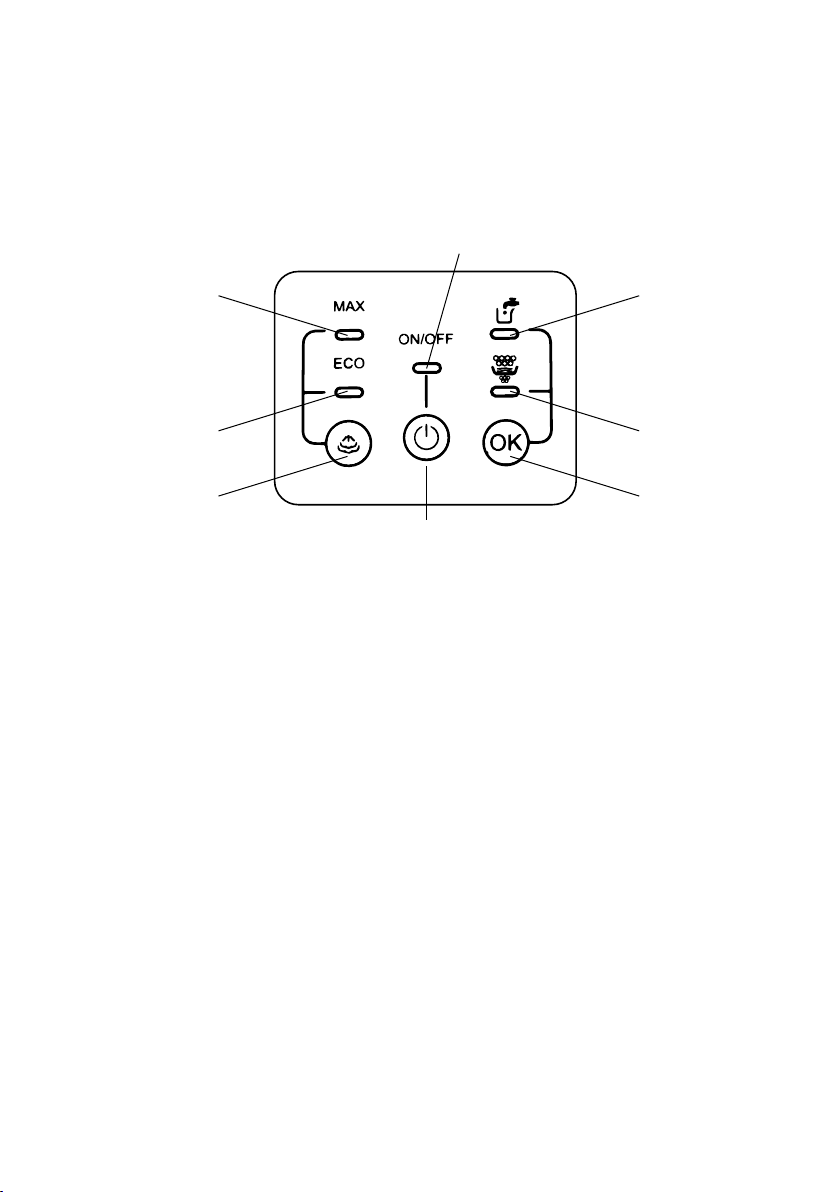
5
Power indicator
ON/OFF button
MAX steam
rate indicator
Water rell
indicator
ECO steam
rate indicator
Descaling
indicator
Steam toggle
button
OK reset
button
CONTROL PANEL

6
SAFETY PRECAUTIONS
Carefully read all the instructions before using the appliance and keep in a safe place
for future reference. Always follow these safety cautions when using the appliance to
avoid personal injury or damage to the appliance. This appliance should be used only as
described in this instruction book.
• This appliance can be used by children aged from 8 years and
above and persons with reduced physical, sensory or mental
capabilities or lack of experience and knowledge if they have
been given supervision or instruction concerning use of the
appliance in a safe way and understand the hazards involved.
Children shall not play with the appliance. Cleaning and user
maintenance shall not be done by children unless they are older
than 8 and supervised.
• Make sure your electricity supply matches the voltage shown on the appliance.
• Ensure all packaging materials and any promotional labels or stickers are removed
from the appliance before the rst use.
• Always inspect the appliance before use for noticeable signs of damage. Do not use if
damaged or has been dropped. In the event of damage, or if the appliance develops a
fault contact the Lakeland Customer Services team on 015394 88100 or
• Do not use this appliance if the lead is damaged. Contact the Customer Services
• Always use the appliance on a dry, level, heat resistant surface. Do not allow the
power cord to touch hot surfaces or the soleplate. Allow the iron to cool completely
before storing it in an upright position.
• Unplug from the mains when not in use and before cleaning. To disconnect, turn the
socket to ‘OFF’ and remove the plug from the mains socket.
• Do not use any accessories or attachments with this appliance other than those
recommended by Lakeland.
• To protect against re, electric shock or personal injury, do not immerse cord, plug or
lid in water or other liquids.
• Do not leave the lead hanging over the edge of an ironing board, kitchen table or
worktop, where it may be pulled by children, or tripped over. Avoid contact between
the lead and hot surfaces.
• For indoor use only and not in bathrooms.
• For domestic use only.
• This appliance should be used for ironing fabric as described within the instructions
for use that accompany it.

7
• Always ensure that your hands are dry before removing the plug from the mains
socket. Never pull the plug out of the mains socket by its lead.
• To avoid injury or possible re, do not cover the appliance when in use.
• Not recommended to be used with a plug-in timer switch.
• An earthed extension cable may be used with care. The electrical rating of the cable
should be at least as great as the appliance. Do not allow the cable to hang over the
edge of the worktop or touch any hot surfaces.
• WARNING: A cut off plug inserted into a 13 amp socket is a serious safety
(shock) hazard. Ensure the cut off plug is disposed of safely.
• CAUTION: The plastic bags used to wrap this appliance or the packaging may
be dangerous. To avoid risk of suffocation, keep these bags out of reach of
babies and children. These bags are not toys.
• DO NOT leave the iron unattended when in use.
• Unplug the iron before lling or emptying the water tank, before cleaning and
maintenance and immediately after use.
• Only use water in the water tank. DO NOT add perfume, vinegar, chemically de-scaled
water or any other substances into the water tank.
WARNING – HOT SURFACES
• Do not touch the surfaces marked with this symbol , they will be very hot during
and just after use.
• Hot surfaces can burn and hot steam can scald, possible injury could occur.
• Allow the appliance to cool completely before touching, handling, moving or storing.

8
USING YOUR STEAM GENERATOR IRON
FOR THE FIRST TIME
• Unpack the iron, remove all the packaging materials, check that nothing is on the
soleplate.
• Unwind the power cord and steam supply hose, place the Steam Generator Iron base
unit on a dry, at level surface.
• Place the iron in the correct position on the thermal insulation stand.
• Fill the water tank with tap water, as described below in ‘Filling the Water Tank’.
• Plug in and switch on at the socket.
• Press the ON/OFF button on the control panel and it will illuminate red and there will
be an audible beep, the appliance is powered on. If you wish to turn off the appliance
press and hold the ON/OFF button for 2 seconds and the iron will power off.
• Turn the temperature dial up on the iron to the MAX temperature setting, when the
iron is up to temperature and the ‘eco’ light on the control panel has stopped ashing
green and is permanently on. The heating indicator light will illuminate on the iron
itself, to show that there is power to it. When the iron has reached temperature the
heating indictor light will go out.
• The soleplate has reached temperature.
• When you switch on the iron for the rst time you may notice a slight burning smell,
this is normal for a new appliance and will stop after a few uses.
• Some residue may remain inside the iron from manufacturing, so iron an old cotton
cloth or tea towel for rst use, DO NOT use the iron on your laundry. Press the steam
trigger to run water through the iron.
• When you activate the steam function, you may hear a pumping sound, this is normal,
water is being pumped into the steam generator.
• During the heating process from out of the soleplate, there may be some steam
coming out automatically, this phenomenon will continue for about 3 seconds and is
normal.
• There will be little condensation water in the steam supply hose after rst use, after
the second use, the condensation water will be sprayed out together with the steam
at the beginning of steam being released. This phenomenon will continue for several
seconds and is normal.

9
FILLING THE WATER TANK
• For best results, always make sure there is plenty of
water in the tank when ironing, but do not ll the tank
beyond the ‘MAX’ level.
• Only use water in the water tank. DO NOT add perfume,
vinegar, chemically descaled water or any other
substances into the water tank.
• Always make sure the iron is switched off and
unplugged from the socket.
• Holding the water tank handle, lift the water tank lock
upwards to pull out the water tank, removing from the
base unit.
• Fill water tank with tap water through the lling
aperture, until the ‘MAX’ mark is reached.
• Never ll the water tank level beyond the ‘MAX’ mark.
• After lling replace the water tank into the base unit.
WATER REFILL INDICATOR
• If the water in the water tank is lower than the ‘MIN’ level mark, the water rell
indicator will illuminate red and there will be two audible beeps.
• The appliance will stop working, you need to add water into the tank.
• Remove the water tank and rell it with water through the lling aperture, make sure
that the water level is between the ‘MIN’ and ‘MAX’ level mark.
• Replace the water tank into the base unit, the water rell indicator will turn off and the
appliance will continue to work normally.
CORRECT PLACEMENT OF STEAM GENERATOR IRON ON THE BASE UNIT
When the iron is put on the thermal insulation stand, it must be placed on it correctly.
Incorrect position Correct position

10
INCREASING AND DECREASING THE HEAT SETTINGS
• Turn the temperature dial to set ironing temperature
based on the garment which needs to be ironed.
• The Steam Generator Iron has two heat settings:
1) MAX setting with a temperature range from 175°C to
225°C
2) Intelligent temperature setting with a temperature range
from 115°C to 175°C
• To increase the heat setting, turn the temperature
dial clockwise till the desired setting lines up with the
heating indicator light.
• To decrease the heat setting, turn the temperature dial
anti-clockwise till the desired setting lines up with the
heating indicator light.
HEATING INDICATOR LIGHT
• When the iron is heating up, the temperature indicator will illuminate blue.
• Once the iron has reached the selected temperature, it will go out.
• The heating indicator light will be cycled on and off as the iron maintains the selected
temperature during heating.
MAX setting
(175°C<T<225°C)
Intelligent
temperature
setting
(115°C<T<175°C)
Tabla de contenidos
Otros manuales de Hierro de Lakeland