
Lab599 Discovery TX-500 Manual de usuario

HF/50MHz Transceiver TX-500
USER MANUAL
v03.2021

2
Searching for Keywords
Search for keywords such as "Interface" and "menu” to nd a topic. If you are using
Adobe Acrobat Reader to read this document, press Ctrl+F on Windows
or Command+F on Mac to begin a search.
Navigating to a Topic
View a complete list of topics in the table of contents. Click on a topic to navigate
to that section. To return to the table of contents click on the page number.
Printing this Document
This document supports high resolution printing.
LEGEND
W Warning A Important INote
Using this Manual
This content is subject to change.
Download the latest version from
https://lab599.com/downloads/
If you have any questions about this document,
please contact Lab599 by sending a message to [email protected].
Copyright © 2020 Lab555 All Rights Reserved.

3
Table of Contents
Introduction ........................................................................................................................... 5
Controls end user interface ............................................................................................ 6
Device body and controls .............................................................................................. 6
User Interface ................................................................................................................. 8
Protections........................................................................................................................... 10
Basic Operations ............................................................................................................... 12
Getting Started ............................................................................................................. 12
Using the Menu ............................................................................................................ 12
Band Selection ............................................................................................................. 12
Mode Selection............................................................................................................. 13
VFOs A and B................................................................................................................ 13
RIT ................................................................................................................................. 14
XIT ................................................................................................................................ 14
VFO lock/unlock ........................................................................................................... 14
Transmit Settings......................................................................................................... 14
Receive Settings........................................................................................................... 16
Advanced Operating........................................................................................................ 18
Frequency Memories.................................................................................................... 18
DIG MODES (Audio Data Modes)................................................................................. 18
Split and XIT ................................................................................................................. 18
Receive Audio Equalization (RX EQ)............................................................................ 19
Transmit Audio Equalization (TX EQ).......................................................................... 19
Cross-Mode Operation ............................................................................................... 19
External power amplier control ................................................................................. 20
CW keyer memory ........................................................................................................ 20
Voice message memory .............................................................................................. 21
Accessories.......................................................................................................................... 22
Firmware Upgrades.......................................................................................................... 24
Remote Control.................................................................................................................. 25
Menu Functions ................................................................................................................. 26
00. Valcoder.................................................................................................................. 26
01. IF DSP ..................................................................................................................... 26

Table of Contents
4
02. CW Pitch ................................................................................................................. 26
03. CW Speed................................................................................................................ 26
04. CW Weight .............................................................................................................. 26
05. CW Key.................................................................................................................... 26
06. AGC ......................................................................................................................... 27
07. RF ............................................................................................................................ 27
08. Power...................................................................................................................... 27
09. GAIN........................................................................................................................ 27
10. NR Level.................................................................................................................. 27
11. NB Level.................................................................................................................. 27
12. SQL.......................................................................................................................... 27
13. VOX L ...................................................................................................................... 27
14. VOX ......................................................................................................................... 27
15. AM/FM .................................................................................................................... 28
16. CMR Level............................................................................................................... 28
17. Save Band VFO....................................................................................................... 29
18. EQL.......................................................................................................................... 29
19. RPAN ....................................................................................................................... 29
20. TPAN ....................................................................................................................... 29
21. TIME........................................................................................................................ 29
22. Corr TIME................................................................................................................ 29
23. TX Metr ................................................................................................................... 29
24. Type Tone ............................................................................................................... 29
25. VOX ......................................................................................................................... 30
26. Beep Key................................................................................................................. 30
27. Backlight................................................................................................................. 30
28. Contrast .................................................................................................................. 30
Maintenance........................................................................................................................ 31
Specifications...................................................................................................................... 33
FCC information ................................................................................................................ 35

5
Introduction
On behalf of our development team, we want to thank you for choosing the TX-500 Discovery.
The TX-500 is an ultra compact all-mode transceiver ideal for travelling. Its compact size
and weight mean that you can take the instrument to remarkable places, where radio work
will give you an unforgettable experience.
The strong casing, protection against splashes and dust ensure the use of TX-500 in extreme
conditions and guarantee its reliability. A sharp monochrome display will allow you to clearly
see the information in either bright sunshine or low light, thanks to a multi-mode backlight.
The transceiver parameters and functions will also make it possible to successfully use the
unit at a home station or as a mobile version. Record-low current consumption in reception
mode (up to 110 mA) will extend the battery life, providing for longer stay on the air without
recharging.
Because the TX-500 is a software-dened radio (SDR), you can expand its capabilities using
computer applications and adding new features with free rmware updates. The TX-500
Discovery has an integrated high-performance spectrum analyzer, allowing you to see
signals before you hear them.
It’s high time to go off into the deep blue yonder, taking the TX-500 with you.
6
Controls end User Interface
DEVICE BODY AND CONTROLS
Front view
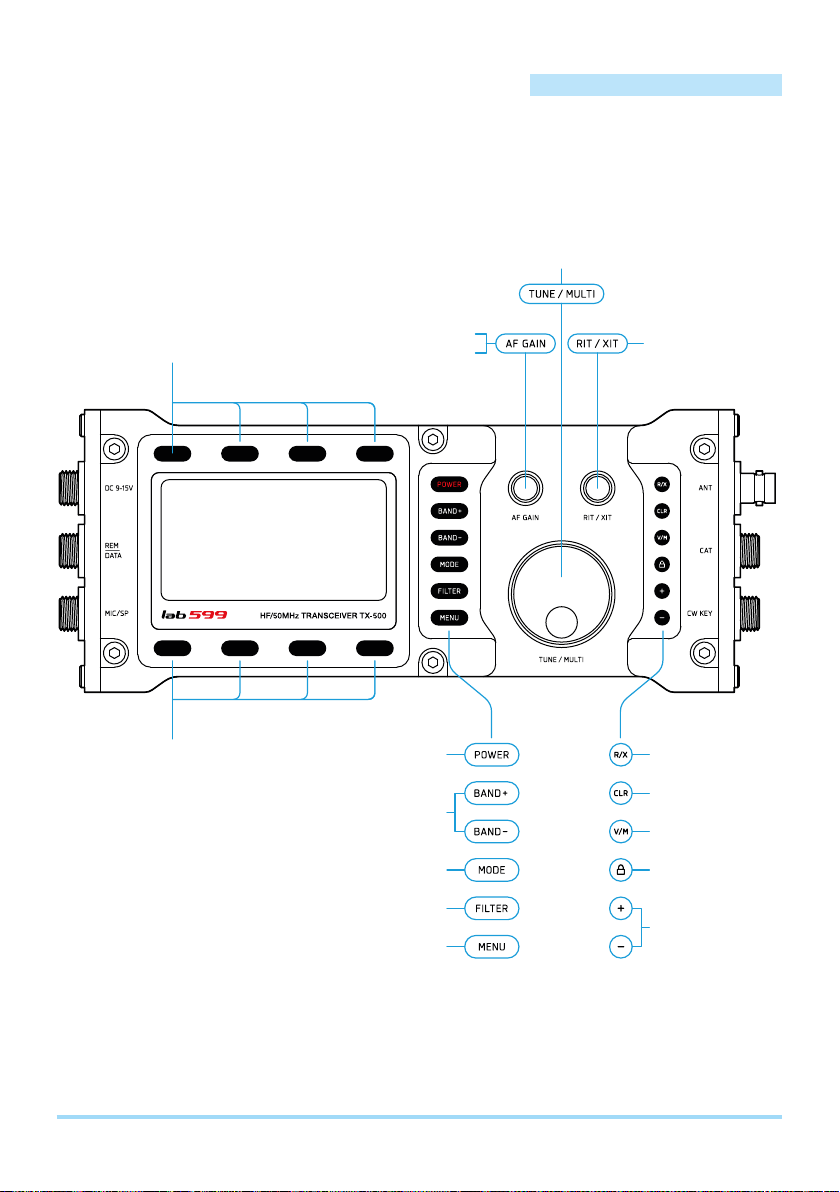
Top function keys
RIT/XIT On / Off
Clear RIT / XIT
VFO / Memory
Lock / Unlock VFO
Step VFO
Power On/Off
Band Up / Down
Basic mode
Passband filter
Menu mode
Receiver gain control (RX mode)
Monitor volume (TX mode)
Tune VFO A, B / Menu Settings
RX / TX offset
Bottom function keys

Controls end User Interface
7
Left side
DC 9-15V
Power supply
1 – GND
2 – DC IN (9-15V/3A max)
1 – SPEAKER – *
2 – MIC IN
3 – PTT IN
4 – SPEAKER +
5 – MIC IN (V+) **
6 – GND
1 – PTT IN
2 – PTT OUT
3 – AUDIO DATA OUT
4 – Q 5 – I
6 – AUDIO DATA IN
7 – GND
25
61
2
4
5
6
3
4 3
2
1
7
1
MIC/SP
Microphone / Speaker
REM
DATA
* Connect a speaker or headphones with the appropriate pins 1 & 4, SPEAKER (-) and SPEAKER (+).
Do not connect a speaker to ground, pin 6.
** For connecting an external electret microphone that requires additional power supply.
Right side
1
4
5
3
2
CW KEY ANTCAT
4
3
1
2
1 – GND
2 – RX
3 – +3.3V IN ***
4 – TX
1 – GND
2 – “•”
5 – “–”3 – NC
4 – NC Antenna (50 Ohm)
*** When connecting with a third-party USB adapter, make sure that an input voltage of 3.3V (10mA) is supplied to the pin.

Controls end User Interface
9
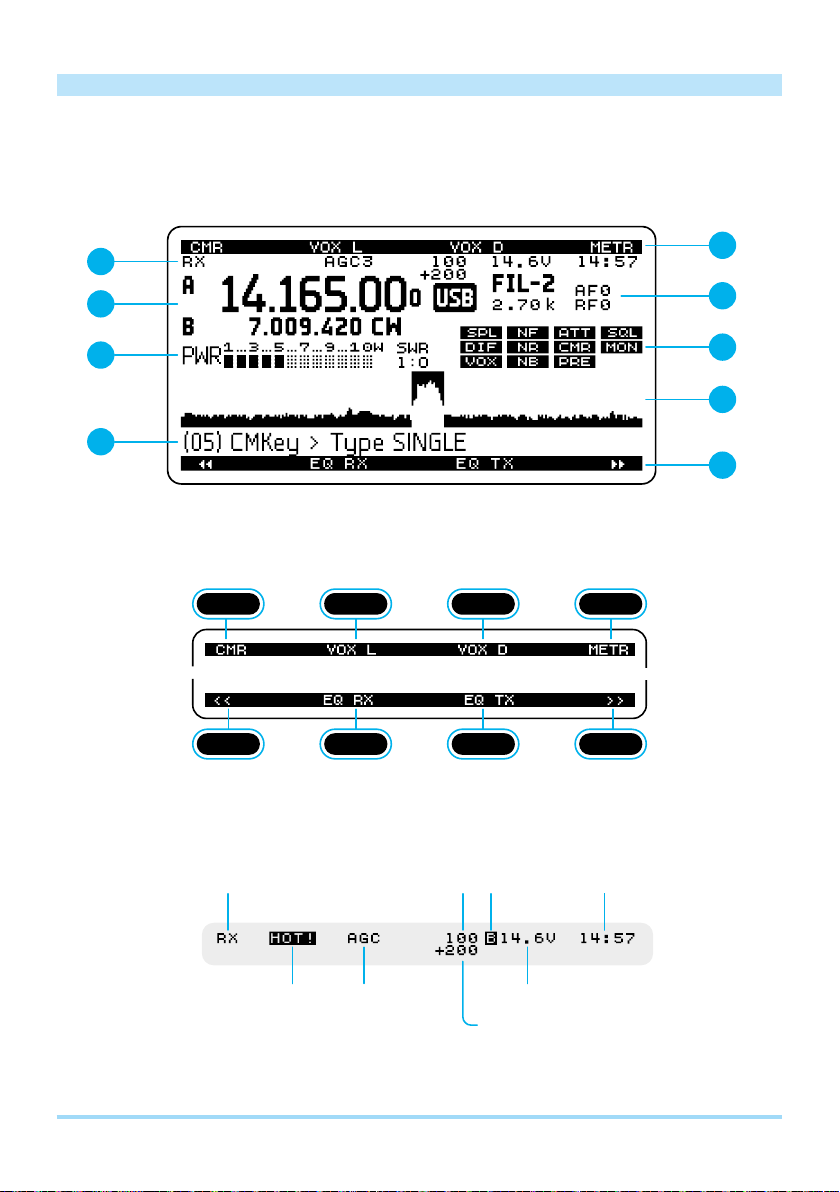
3— VFO A / B
VFO A
Basic VFO
VFO B
4— Info block 1
Basic modes or alternative modes:
Filter band width Receiver gain (0-100)
Monitor (0-100)
Radio frequency gain
Volume (-50+5)
ABCDEFG
5— Graph bar
Power output (PWR),
SWR, MIC, ALC
Transmit mode:
Power output (NUM),
SWR (NUM)
Receive mode:
S-meter
6— Info block 2
A
C
B
D
F
G
E
L
I
J
K
– Noise reduction ON
– Noise blanking ON
– Notch filter ON
– Attenuator ON
– Monitor ON
– VOX ON
– Speech compression ON
– Preamp ON
– Squelch ON
– Split mode effect ON
– Virtual intermediate frequency ON
7— Pan-adapter
Receiving or transmission channel
8— Menu
Menu Up Menu Down
– Function buttons

10
Protections
OVERVOLTAGE PROTECTION
When exceeding 15.0 volts, the transceiver won’t allow switching to TX mode, (the voltage
indicator on the display will become inverse) a signicant excess (more than 16 volts) it can
cause the protective fuse to burn out, as well as the failure of the transceiver! Use a power
source or battery with a voltage of 9 to 15 volts and a current of at least 3 Amps.
AATTENTION! Exceeding the supply voltage above 15 volts can damage
the transceiver!
REVERSE POLARITY PROTECTION
If you connected a minus voltage source or battery instead of a plus, the transceiver will not
turn on. You must connect the external power supply correctly, please, see the pinout of the
power connector in the section “Controls end user interface”.
OVERHEAT PROTECTION
The transceiver has an internal protection against the overheating of the output stage of the
transmitter. If the TX continuous mode is too long, the output stage as well as the transceiver
body can be heated up. If the limit value is exceeded (about 60 degrees Celsius), the trans-
ceiver won’t allow switching to TX mode. After the temperature drops, the TX prohibition
mode will turn off automatically.
AATTENTION! During long-term TX mode (digital modes) do not block the air
access to the rear cover of the transceiver, or reduce the power.
TIP: Unfold both rear legs to increase the air flow convection.
Otros manuales para Discovery TX-500
2
Este manual sirve para los siguientes modelos
1
Tabla de contenidos
Otros manuales de Transceptor de Lab599


