
KT&C VDS302 Manual de usuario

Resolution 960 Series
750+ HTVL Varifocal
3-Axis Dual Voltage IP68 Vandal Dome Camera
Operation Instructions
Model No. VDS302
Please read this manual rst for correct installation and operation.
This manual should be retained for future reference.
The information in this manual was current when published.
The manufacturer reserves the right to revise and improve its products.
All specications are therefore subject to change without notice.
M201-VDS302-001

CONTENTS
1. CAUTIONS
2. PRECAUTIONS
3. FEATURES
4. PRODUCT OVERVIEW
5. EQUIPMENT AND ACCESSORIES
6. OVERVIEW AND FUNCTION
7. INSTALLATION
8. CONNECTION
9. DIMENSIONS
10. SPECIFICATION
11. OSD MENU STRUCTURE
2
These servicing instructions are for use by qualied service personnel only.
To reduce the risk of electric shock do not perform any servicing other than
that contained in the operating instructions unless you are qualied to do so.
Use Class 2 Power Supply Only
CAUTION

1. CAUTIONS
3
This device complies with Part 15 of the FCC Rules.
Operation is subject to the following two conditions:
1. This device may not cause harmful interference.
2. This device must accept any interference received, including
interference that may cause undesired operation.
Note
This equipment has been tested and found to comply with the limits for a
Class A digital device, pursuant to part 15 of the FCC Rules. These limits are
designed to provide reasonable protection against harmful interference when the
equipment is operated in a commercial environment. This equipment generates,
uses, and can radiate radio frequency energy and, if not installed and used
in accordance with the instruction manual, may cause harmful interference to
radio communications. Operation of this equipment in a residential area is likely
to cause harmful interference in which case the user will be required to correct
the interference at his own expense.
WARNING
This is a class A product. In a domestic environment this product may cause
radio interference in which case the user may be required to take adequate
measures.
Caution
Any changes or modifications in construction of this device which are not
expressly approved by the party responsible for compliance could void the
user’s authority to operate the equipment.
1. A regulated DC12V or AC24V power supply with a minimum of 500mA / 10VA is
recommended for use with this product for the best picture and the most stable operation.
An unregulated power supply can cause damage to the product.
If an unregulated power supply is used, product warranty will be void.
2. It is recommended that cables and monitors with a 75ohm video impedance level are
used with this product.
If your monitor supports high impedance mode, then please adjust accordingly.
3. Do not disassemble the camera to gain access to the internal components.
Refer servicing to your dealer.
4. Pointing the camera directly towards the sun, or any similarly bright or reective light,
may cause smear and possible damage to the sensor.
5. Removing the Serial Number Label will void the warranty.
6. The camera’s power supply must be plugged into a properly grounded wall socket.

1. CAUTIONS
4
WEEE
(Waste Electrical & Electronic Equipment)
This marking shown on the product or its literature, indicates that it should
not be disposed with other household wastes at the end of its working life. To
prevent possible harm to the environment or human health from uncontrolled
waste disposal, please separate this from other types of wastes and recycle it
responsibly to promote the sustainable reuse of material resources. Household
users should contact either the retailer where they purchased this product, or
their local government ofce, for details of where and how they can take item
for environmentally safe recycling.
Business users should contact their supplier and check the terms and
conditions of the purchase contract.
This product should not be mixed with other commercial wastes for disposal.
CAUTION
RISK OF ELECTRIC SHOCK DO NOT OPEN
CAUTION: TO REDUCE THE RISK OF ELECTRIC SHOCK, DO NOT
REMOVE COVER (OR BACK). NO USER SERVICEABLE
PARTS INSIDE. REFER SERVICING TO QUALIFIED
SERVICE PERSONNEL
This symbol is intended to alert the user to the presence
of un-insulated “dangerous voltage” within the product’s
enclosure that may be of sufcient magnitude to constitute a
risk of electric shock.
This symbol is intended to alert the user to the presence of
important operating and maintenance (servicing) instructions
in the literature accompanying the appliance.

2. PRECAUTIONS
1. Do not install the camera near electric or magnetic elds.
Install the camera away from TV/radio transmitters, magnets, electric motors,
transformers and audio speakers since the electromagnetic elds generated from these
devices may distort the video image or otherwise interfere with camera operation.
2. Never disassemble the camera beyond the recommendations in this manual nor
introduce materials other than those recommended herein. Improper disassembly or
introduction of corrosive materials may result in equipment failure or other damage.
3. Try to avoid facing the camera toward the sun.
In some circumstances, direct sunlight may cause permanent damage to the sensor and/
or internal circuits, as well as creating unbalanced illumination beyond the capability of
the camera to compensate.
4. Keep the power cord away from water and other liquids and never touch the
power cord with wet hands. Touching a wet power cord with your hands or touching
the power cord with wet hands may result in electric shock.
5. Never install the camera in areas exposed to oil, gas or solvents.
Oil, gas or solvents may result in equipment failure, electric shock or, in extreme cases,
re.
6. Cleaning
For cameras with interchangeable lenses, do not touch the surface of the sensor directly
with the hands. Use lens tissue or a cotton tipped applicator and ethanol to clean the
sensor and the camera lens. Use a damp soft cloth to remove any dirt from the camera
body. Please do not use complex solvents, corrosive or abrasive agents for cleaning of
any part of the camera.
7. Do not operate the camera beyond the specied temperature, humidity or power
source ratings. This camera is suitable for indoor operation only. Use the camera at
temperatures within -40°C~60°C (-40°F~140°F) and humidity between 20% and 80%.
This device is not rated as submersible. The input power source is 12VDC / 24VAC
regulated.
8. Mounting
Use care in selecting a solid mounting surface which will support the weight of the camera
plus any wind, snow, ice or other loading, and securely attach the camera to the mounting
surface using screws and anchors which will properly support the camera. If necessary
(e.g. when mounting to drop ceilings) use a safety wire to provide additional support for
the camera.
5

3. FEATURES
• Superlative resolution of over 750 horizontal TV lines for amazing image quality.
• 960H CCD for sensor sensitivity of .001 lux in low light without DSS boost.
• Full motion color or digital day/night during low ambient light without ghosting.
• Simple and easy to use OSD setup menu.
- Adaptive Tone Curve Reproduction (ATR)/Electronic Wide Dynamic Range to
properly expose images during unbalanced light contrast in the scene.
- Anti Color Roll white balance option resists uorescent light interference
- Optional Back Light Compensation (BLC) and Highlight Compensation. (HLC)
- Adjustable 2D-Noise Reduction to increase picture clarity and improve utilization
of DVR disk storage.
- Privacy image masking for 4 congurable zones.
• 2.8~11mm Aspheric Varifocal DC iris lens to capture the desired eld of view.
• Dual voltage (12VDC/24VAC) with Anti Color Roll.
• IP68 waterproof.
• Extreme Operating temperature down to -40 degrees.
• Service Video output for convenient installation,
and ease of service.
• 3-Axis gimbal for convenient wall or ceiling mounting.
• Optional wall mount arm. (KA-WM100)
6

4. PRODUCT OVERVIEW
Take advantage of the new Resolution 960 Series technology with the 960H cameras
that deliver 750+ HTVL and more. To achieve the amazing resolution of this advanced
imaging technology, the KPC-VDS302 uses a 960H CCD sensor on these Resolution 960
cameras to produce over 750 horizontal TV lines of resolution. Combined with a sensor
native low light sensitivity of 0.001 lux, this camera truly delivers everything you want
in an outdoor analog camera: crystal clear images, Electronic Wide Dynamic Range to
maintain the clarity of those color images in the most challenging of bright or unbalanced
scene lighting conditions, plus excellent low light performance and wide temperature
range operation as low as -40°F up to 140°F with low current draw. The KPC-VDS302
offers exible positioning for wall or ceiling mounting in an IP68 waterproof, vandal
resistant housing; 2.8~11mm varifocal DC Iris lens; dual voltage (12VDC/24VAC) with
Anti Color Roll and many DSP functions (DNR to save DVR HDD space, digital WDR,
BLC, HLC, anti-color roll for stability under uorescent lighting). For an alternate surface
mounting conguration, add a wall mount arm (KA-WM100).
5. EQUIPMENT AND ACCESSORIES
DOME
CAMERA
This User Guide
Template
Screws(4ea) / Plastic anchors(4ea)
/ Wrench / Screws(1ea)
Service Video Output Test Cable /
Wrench / Screws(4ea) / Pigtail Jack
7
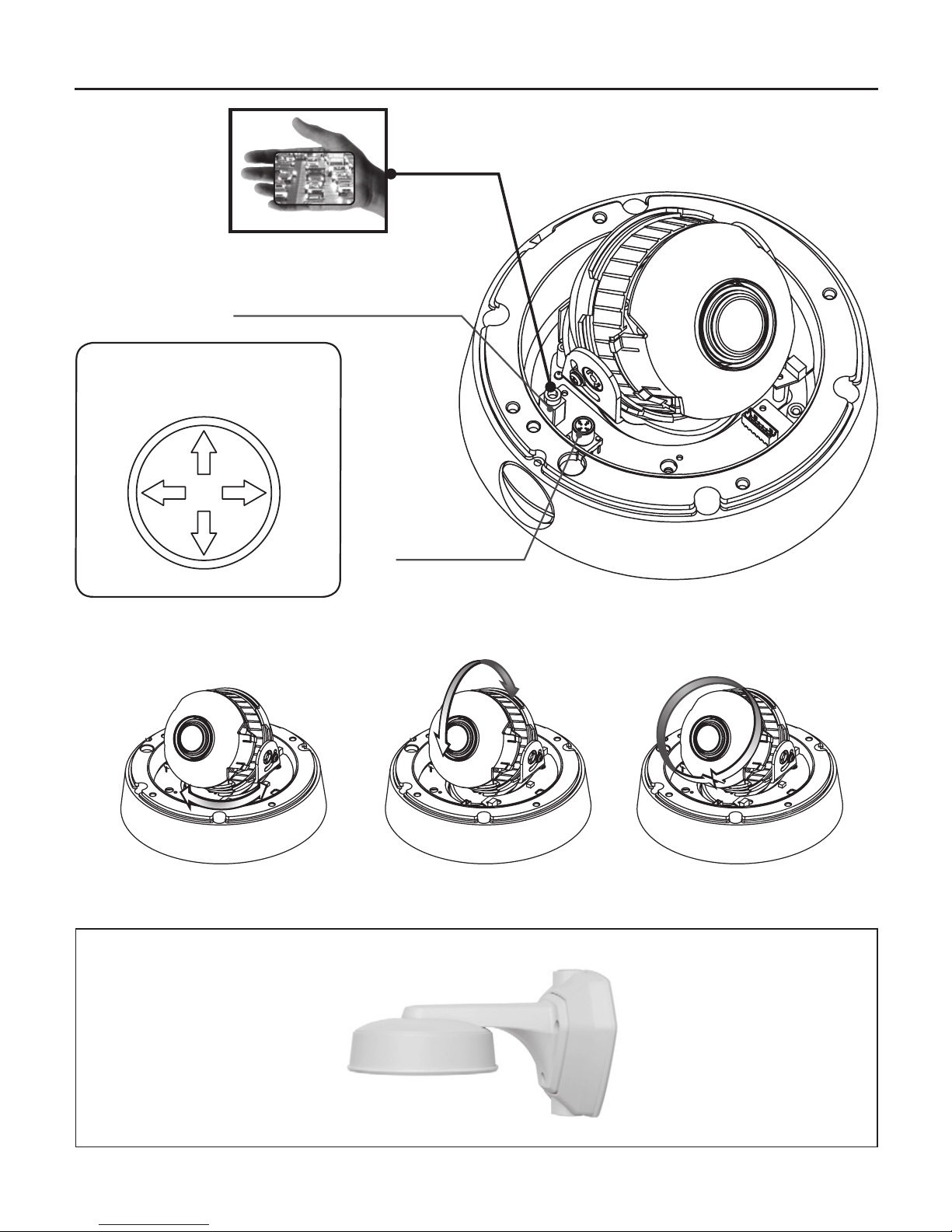
6. OVERVIEW AND FUNCTION
8
• CONTROL FUNCTION
(OSD JOYSTICK)
LEFT
UP
RIGHT
DOWN
Service Video Connector
OSD Joystick
Pan Rotation Tilt Rotation Axial Rotation
• 3-Axis gimbal.
• Optional wall mount arm.
(KA-WM100)

7. INSTALLATION
9
Separate Circuit Cover and adjust
LENS ZOOM / FOCUS KNOB.
After setting the lens, assemble
the Circuit Cover.
Cover Screws(4ea)
are captive and will normally be
retained in cover. They are shown here
for illustration purpose.
Screws(4ea)
Plastic Anchors(4ea)
Circuit Cover
Template
Lens Zoom Knob
Lens Focus Knob
Tilting angle
70˚

When you install the camera, please glue up the end of cable to
keep it stable in order to protect the camera from the humidity problems.
8. CONNECTION
• DC 12V / AC24V
10
DC 12V / AC 24V
POWER SUPPLY
PIGTAIL JACK
VIDEO IN
Tabla de contenidos
Otros manuales de Cámara IP de KT&C

KT&C
KT&C KNC-HDi47 Manual de usuario

KT&C
KT&C ACE-M321 Manual de usuario

KT&C
KT&C Bullet KEZ-BR3IR Guía del usuario

KT&C
KT&C EZhd KEZ-c1BR28V12IR Guía del usuario

KT&C
KT&C KPT-SPDN120HD Manual de usuario

KT&C
KT&C KPC-WDR7000NU Manual de usuario

KT&C
KT&C KPC-LND45 Manual de usuario

KT&C
KT&C KEZ-c1TR28V12XIR Guía del usuario


