
KPU entone Manual de usuario

“Totally Local, Simply Brilliant”
Entone Set Top Box User’s Guide

!
!
INTRODUCTION)
!
-.<2&'.!7&!
%&''()*)&+!
=#>(;!
!
"#$! %&! '())%**+,! *(! -.%/0%/0! 1(2! &*3*+4(54*6+43.*! *+'6/(7(01! 3/,!
+8'+9*%(/37! :372+;! ! <%*6! "#$! =())>%&%(/! ?#@>! 1(2! 0+*! ABBC! ,%0%*37!
D237%*1! 9.(0.3))%/0E! 3/! %/*+.3'*%:+! 9.(0.3)! 02%,+E! =F4D237%*1! )2&%'!
'63//+7&E!(/4&'.++/!=377+.!?FE!93.+/*37!'(/*.(7&!3/,!)(.+G!
!
#7+3&+!.+:%+H!*6+!%/5(.)3*%(/!(/!*6+!/+8*!930+!H%*6!(2.!*+'6/%'%3/;!!@6%&!
%/5(.)3*%(/! H%77! %/&2.+! *63*! 1(2! 63:+! -++/! 9.(:%,+,! *6+! )3*+.%37&! 3/,!
%/&*.2'*%(/!*(!&*3.*!+/I(1%/0!1(2.!/+H!&+.:%'+;!
!
"#$!%&''()*)&+!%:*7&'.0!?:@@&07!
JBK4LLM4NOKO!
!
A)<<)+B!5+6!C22&:+7!=+D&0'57)&+)
P(/,31!Q!R.%,31S! !!JSBB!3)!Q!TSBB!9)!
U3*2.,31S! ! ABSBB!3)!Q!OSBB!9)!
!
>.28+)25<!?:@@&07!
TAA!(.!JBK4LLN4LAAA!V8*!A!(.!+)3%7S!6+79,+&WXW92/+*;/+*!
P(/,31!Q!R.%,31S! !!MSBB!3)!Q!JSBB!9)!
U3*2.,31!4!U2/,31S! AASBB!3)!Q!JSBB!9)!
!
EDD)2.!4&257)&+!
LOAK!@(/03&&!Y:+;!Z@6+!#73[3\!
P(/,31!Q!R.%,31S! !!JSBB!3)!Q!TSBB!9)!
U3*2.,31S! ! ABSBB!3)!Q!OSBB!9)!
!
-.F*)7.!
GGGH3@:+.7H+.7!
!
!
!
!
!
!
!
!

!
!
Welcome)
!
Your!TVs!are!programmed!as!follows:!
!
!
TV!
!
!
Location!
!
!
Channel/Input!
TV!
Programming!
Code!
TV!1!
!
!
!
TV!2!
!
!
!
TV!3!
!
!
!
TV!4!
!
!
!
!
Modem:!
Model!
Location!
Wired/Wireless!
!
!
!
!
Set!Top!Boxes:!
!
!
TV!
!
!
Model!
!
!
SD/HD!
!
!
PVR!
TV!1!
!
!
!
TV!2!
!
!
!
TV!3!
!
!
!
TV!4!
!
!
!
!
Your!PINs!are!currently!set!to:!
Purchasing!PIN!
!
!
Installation!Checklist:!
□Installation!Summary!Sheet!
□TV!Locations!and!Setup!
□Personal!Identification!Numbers!(PIN)!
□Remote!Control!Quick!Reference!Guide!
□Turning!System!On/Off!
□Common!Remote!Functions!
•Guide!
•Menu!
•Music!
•VOD!
□Caller!ID!(if!applicable)!
□Channel!Lineup!
□DSL!Authentication/!Speed!Test:!_______________!
□HD!Setup!
•Aspect!Ratio!and!Resolution!
•Stream!Enablement!
□Customer!Support!
□Help!
!

!
!
Table)of)Contents)
!
Introduction!
! Equipment ................................................................ !1‐2!
! The!Remote .............................................................. !3‐4!
! Getting!Started ......................................................... !5‐6!
!
Personal!Settings!
! Parental!Controls ...................................................... !7‐8!
! PIN!Settings............................................................... !8!
!
System!Features!
! Menu ........................................................................ !9!
! Interactive!Program!Guide!(IPG)............................... !10‐11!
! Favorites ................................................................... !12!
! Auto!Tune!&!Reminders ........................................... !12!
! Music ........................................................................ !13!
! Video‐On‐Demand!(VOD) ......................................... !13‐14!
! Pay‐Per‐View!(PPV)................................................... !14!
! Caller!ID .................................................................... !15‐16!
! Closed!Captioning ..................................................... !16!
! HDTV:!Aspect!Ratio!&!Resolution ............................. !16‐17!
!
Appendix!A:!PVR!Recording ................................. 18‐26!
Appendix!B:!Troubleshooting............................... 27‐29!
!
!
!
!
!
!
!
!
!
!
!
!
!
!
!
!
!

Page!1!
!
Introduction)
!
!
!
Front!of!Entone!Amulet!
!
Part!Name!
Description!
1. Standby!Switch!
Power!up!or!put!Amulet!in!standby!mode.!
2. Standby/On!Indicator!
Amber! in! standby! mode! and! starting! Green!
when!started.!
3. Front!Panel!Display!
Start‐up!messages!
Clock!after!starting!
4. IR!receiver!
Remote!control!IR!receiver!
5. Arrow!keys!
UP! arrow! for! setting! HDMI! and! Component!
resolution.!!!
6. OK!button!
Trigger!remote!registration!mode.!!!
7. Reset!Pin!Hole!
Restart!Amulet.!
!
!
Cables!!
1. Ethernet!
2. Coaxial!Cable!
3. Telephone!Cord!
4. Left!and!Right!Audio!and!Component!Video!
5. Power!Cord!

Page!2!
!
!
Equipment)
!
!
!
!
Back!of!Entone!Amulet!
!
Part!Name!
Description!
1. Digital!Audio!
S/PDIF!digital!coaxial!RCA!audio!output!
2. S‐Video!
S‐Video!output!
3. Audio!Left/Right!
Composite!audio!output!
4. Video!
Composite!video!output!
5. Y!Pb!Pr!
Component!video!output!
6. Optical!Audio!
S/PDIF!digital!optical!audio!TOSLINK!output!
7. HDMI!
HDMI!output!
8. Ethernet!
RJ45!plug!for!connecting!to!ADSL!modem!or!
network!access!equipment!
9. RF!TV!
Type‐F! connector! for! RF! TV! output! (factory!
set!to!channel!10)!
10. Coax!out!
Type‐F! connector! for! HomePNA! coaxial!
output!(optional!feature)!
11. To!Line!
RJ11! plug! for! connecting! HomePNA! phone!
wire!output!(optional!feature)!
12. DC!input!
DC!power!jack!
!
!
!
!
!
!
!
!
!
!
!
!
!
!
!
!
!

Page!3!
!
!
!
!
Equipment)
!
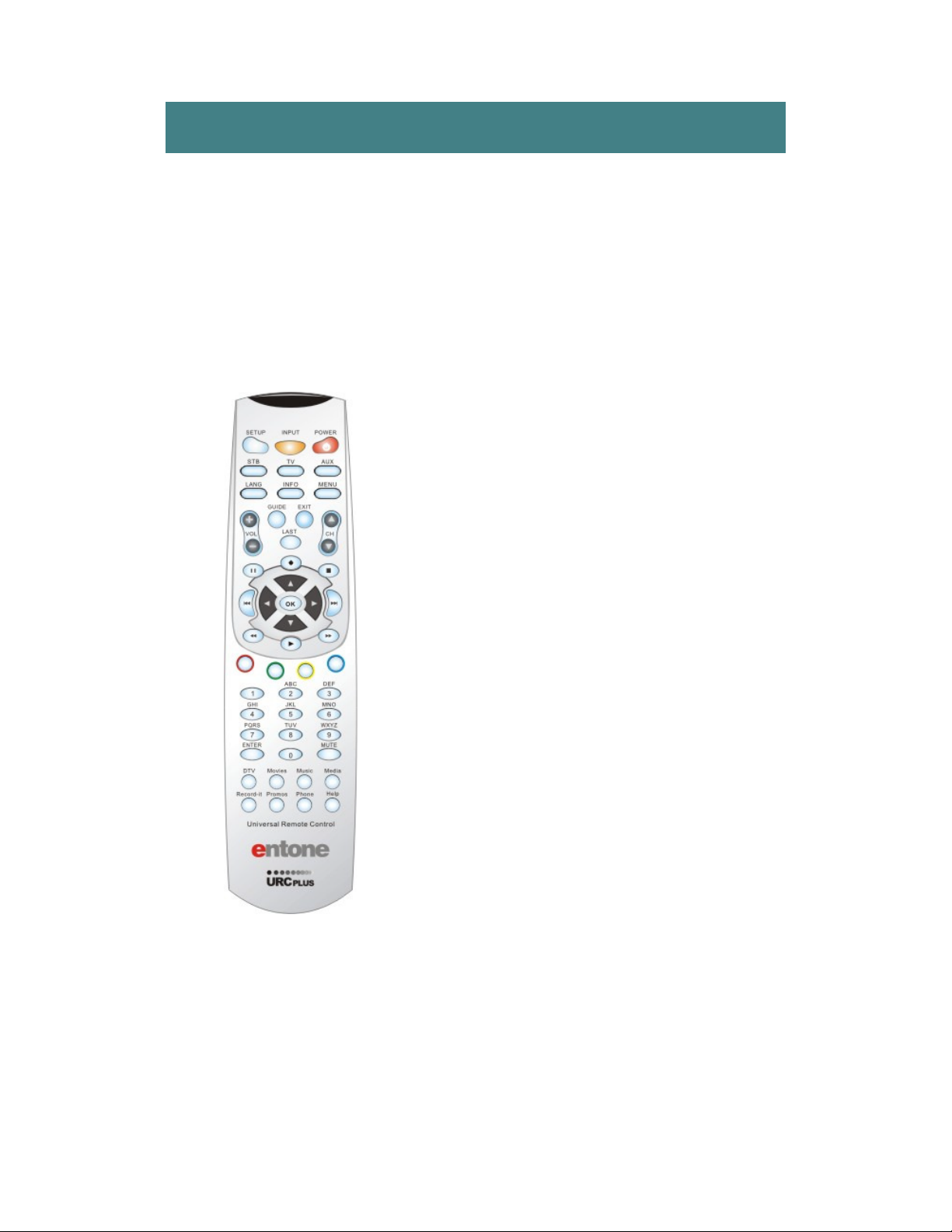
Remote!
!
Remote!Buttons!
Description!
1. SETUP!
Special!Key!reserved!for!remote!programming!functions!
2. INPUT!
Changes!the!current!A/V!input!of!the!selected!device.!!
INPUT!+!MENU!triggers!STB!User!Menu.!
3. INFO!
Displays!on‐screen!information!about!the!current!
television!program.!
4. LANG!
Reserved!for!future!use.!
5. GUIDE!
Displays!the!on‐screen!television!guide!which!provides!
information!about!current!and!future!television!
programming.!
6. VCR/DVD!Controls!
Buttons!used!for!VCR/DVD!play/stop/ffwd/rwd/pause.!!
These!buttons!can!be!also!be!used!for!VCR‐like!controls!
with!VOD!services.!
7. OK!
Executes!the!currently!selected!menu!option.!
8. ENTER!
Confirms!the!channel!number!entered.!
9. MOVIES!
Displays!the!VOD!menu.!
10. DTV!
Returns!user!to!live!programming.!
11. RECORD‐IT!
Displays!the!PVR!Menu.!
12. RESERVED!USE!KEY!
Reserved!for!future!use.!
13. POWER!
Turns!the!currently!selected!service!on!or!off.!
14. DEVICE!KEYS!
Selects!the!device!that!you!would!like!to!control.!!
(STB/TV/AUX)!
15. MENU!
Displays!the!on‐screen!menu.!
16. EXIT!
Exits!the!current!menu!option.!
17. CH!
Changes!the!channel!up/down.!!Page!up/down!in!the!
Guide.!
18. LAST!
Changes!channel!to!the!most!recently!viewed!channel.!
19. VOL!
Raises!or!lowers!volume!of!the!currently!selected!device.!
20. NAVIGATION!KEYS!
Navigates!right,!left,!up,!down!in!the!on‐screen!guide.!
21. SPECIAL! FUNCTION!
KEYS!
Access!to!special!menu!items!and!views.!
22. NUMBERED!
BUTTONS!
Allows!direct!access!to!specific!channels!and!menu!items.!
23. MUTE!
Turns!off!the!volume!of!the!currently!selected!device.!
24. MEDIA!
Not!used.!
25. MUSIC!
Displays!available!music!channels.!
26. PHONE!
Displays!the!Caller!ID!menu.!
27. HELP!
Displays!the!on‐screen!help!menu.!

Page!4!
!
!
The)Remote)
!
!
1!
!
2!
!
3!
!
4!
!
5!
!
6!
!
7!
!
8!
!
9!
!
10!
!
11!
!
12!
!
13!
!
14!
!
15!
!
16!
!
17!
!
18!
!
!
19!
!
!
20!
!
!
21!
&
!
22!
&
!
23!
&
!
24!
&
!
25!
&
!
26!
&
!
27!
&
!
Page!5!
!
!
!
Getting)Started)
!
Turning!on!the!System!
!
The! universal! remote! provided! allows! you! to! navigate! through! the! Digital! TV!
functions!and!also!control!the!volume!and!power!on!your!television.!
!
entone!URC!Plus!–!B!Series!
!
! !
!
!
!
!
!
!
!
!
!
!
!
!
!
!
!
!
!
To!turn!the!system!ON:!
!
1. Press! TV,! then! PWR! on! the! remote! to!
turn!on!the!television.!
!
2. Press! the! STB! button! then! PWR! to!
initiate! control! of! KPU! Commvision!
functions.!
!
To!turn!the!system!OFF:!
!
1. Press!the!STB!button!then!PWR!to!turn!
off!the!Set!Top!Box.!
!
2. Press!TV,!then!PWR!to!turn!off!the!TV.!
!
!
URC!Plus!Troubleshooting:!
!
When!turning!on!the!system,!if!a!screen!
appears! prompting! you! to! press! PWR,!
verify! that! you! are! in! STB! mode! by!
pressing!the!STB!button.!!Then!point!the!
remote! away! from! the! TV! and! press!
PWR!again,!to!activate!the!Set!Top!Box.!
!
!
!
!
!
!
27!
!
27!
!
27!
!
27!
!
27!
!
27!
!
27!
!
27!
!

Page!6!
!
!
!
!
!
Getting)Started)
!
Remote!Control!
!
Use! the! remote! arrow! keys! to! navigate! interactive,! on‐screen!
menus.! ! When! the! curser! moves,! a! highlight! appears! around!
selected!items.!!Feature!buttons!on!the!remote!(DTV,!Music,!etc.)!
jump! directly! to! a! particular! service.! ! See! page! 3! for! a! complete!
description.!
!
Navigating!with!the!Remote!
!
1. Use!the!remote!arrow!keys!to!move!the!cursor.!!The!selected!
item!will!be!highlighted!in!white.!
!
2. Press!the!OK!button!on!the!remote.!!An!action!occurs!and!the!
screen!changes.!
!
Remote!Codes!
!
The!remote! is!capable! of!controlling! additional! home!electronics!
such! as! your! TV,! DVD! or! Stereo.! ! Refer! to! the! included! Remote!
Programming! instructions! for! additional! information! on! how! to!
program!the!remote.!!Programming!instructions!are!also!available!
at!www.entone.com/assets/File/Reference_Guides/Amulet_User_Guide_v1_6_1.pdf!
!
Personal!Identification!Number!
!
A!4‐digit!personal!identification!number!(PIN)!is!issued!at!the!time!
of!installation!(See!Welcome!page).!
!
Your!PIN! is!used! to!rent! movies!and! set!parental! controls!for! TV!
programs! and! movie! ratings.! ! When! required,! an! on‐screen!
message! prompts! you! to! enter! the! PIN! using! the! remote.! ! As! a!
security!measure,!asterisks!appear!as!the!numbers!are!entered.!!If!
the!wrong!PIN!is!entered,!a!message!prompts!re‐entry.!
!
Note:! You! can! change! or! inactivate! the! PIN.! ! See! page! 8! for!
details.!
!
!
!
Otros manuales para entone
1
Tabla de contenidos


