
Kinghome GDN20AZ-A3EBA2A Manual de usuario

Thank you for choosing our product.
Please read this Owner’s Manual carefully before operation and
retain it for future reference.
If you have lost the Owner's Manual, please contact the local agent
the electronic version.
Owner's Manual
Original Instructions
Dehumidifier
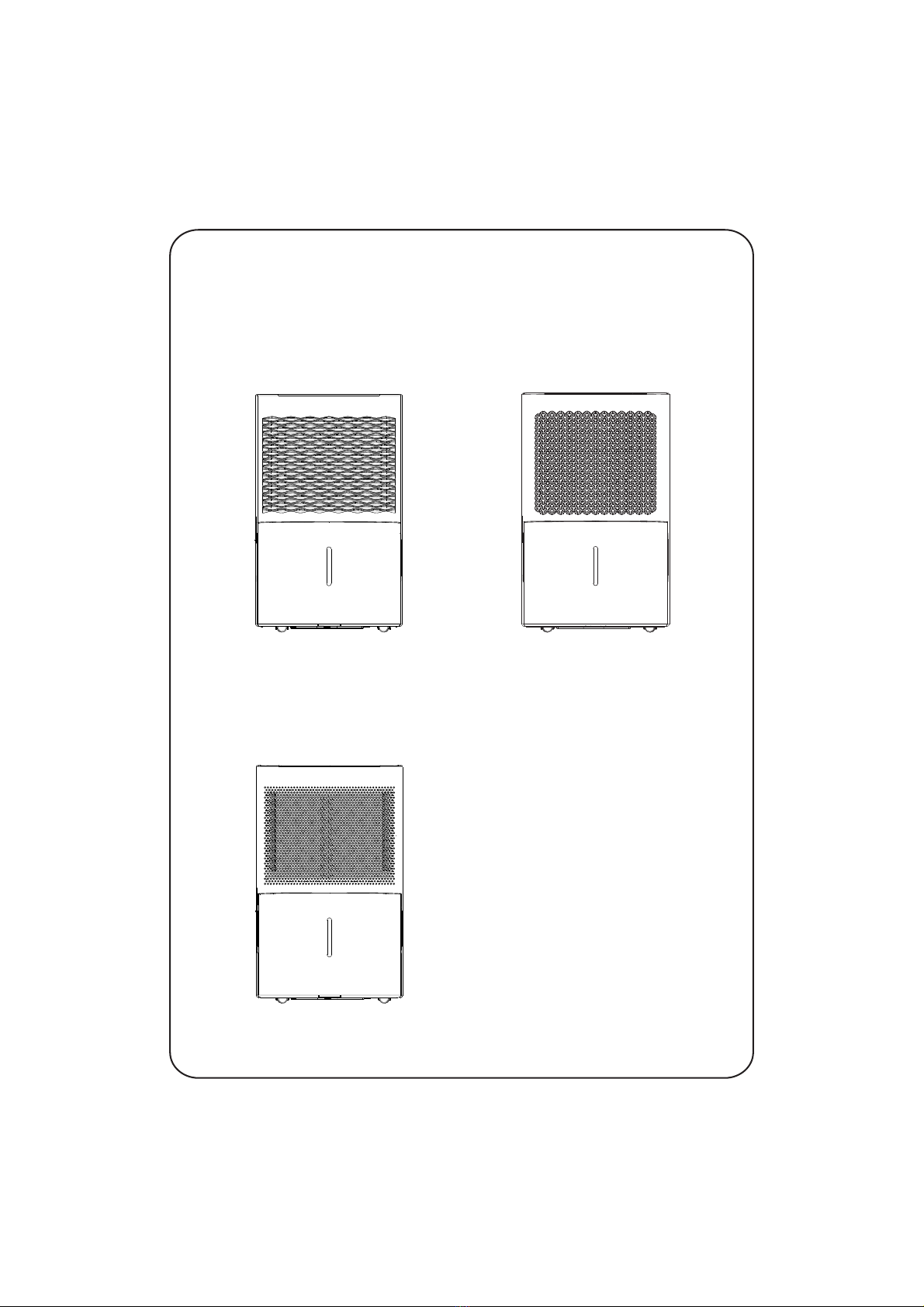
Actual product may be different from above graphics, please refer to actual product.
GDN20AZ-A3EBA4A
GDN30BB-A3EBA4A
GDN35BB-A3EBA4A
GDN50BA-A3EBA4A
GDN45BA-A3EBA4A
GDN20AZ-A3EBA3A
GDN30BB-A3EBA3A
GDN35BB-A3EBA3AGDN35BB-A3EBA2A
GDN50BA-A3EBA3AGDN50BA-A3EBA2D
GDN45BA-A3EBA3A
GDN20AZ-A3EBA2A
GDN30BB-A3EBA2B
GDN45BA-A3EBA2A
NOTICE:
Graphics in this manual are only for reference. Please refer to actual
products for specific details.
This appliance is not intended for use by persons (including children) with reduced physical, sensory
or mental capabilities, or lack of experience and knowledge, unless they have been given supervision
or instruction concerning use of the appliance by a person responsible for their safety.
Children should be supervised to ensure that they do not play with the appliance.
Malfunction Codes................................................................................15
Electric Schematic Diagram..................................................................17
Troubleshooting....................................................................................13
Malfunction
Maintenance
Clean and Maintenance........................................................................10
Operation Instructions
Operation Method...................................................................................5
Drainage Option......................................................................................8
Operation Notices
Operation Area........................................................................................1
Safety Precautions..................................................................................2
Parts Name.............................................................................................3
Check Before Operation.........................................................................4
Content

Explanation of Symbols
1.Damage the product due to improper use or misuse of the product;
2.Alter, change, maintain or use the product with other equipment without abiding
by the instruction manual of manufacturer;
After verification, defects are due to improper operation during transportation of
product;
4.
Operate, repair, maintain the unit without abiding by instruction manual or related
regulations;
5.
After verification, the problem or dispute is caused by the quality specification or
performance of parts and components that produced by other manufacturers;
6.
The damage is caused by natural calamities, bad using environment or force
majeure.
7.
After verification, the defect of product is directly caused by corrosive gas;3.
Exception Clauses
Manufacturer will bear no responsibilities when personal injury or
property loss is caused by the following reasons.
Indicates a hazardous situation that, if not avoided, will
result in death or serious injury.
Indicates a hazardous situation that, if not avoided, could
result in death or serious injury.
Indicates a hazardous situation that, if not avoided, may
result in minor or moderate injury.
Indicates important but not hazard-related information,
used to indicate risk of property damage.
Indicates a hazard that would be assigned a signal word
WARNING or CAUTION.
DANGER
WARNING
CAUTION
NOTICE
If it needs to install, move or maintain , please contact dealeror
local service center to conduct it at first. must be installed,
moved or maintained by appointed unit. Otherwise, it may cause serious
damage or personal injury or death.
1
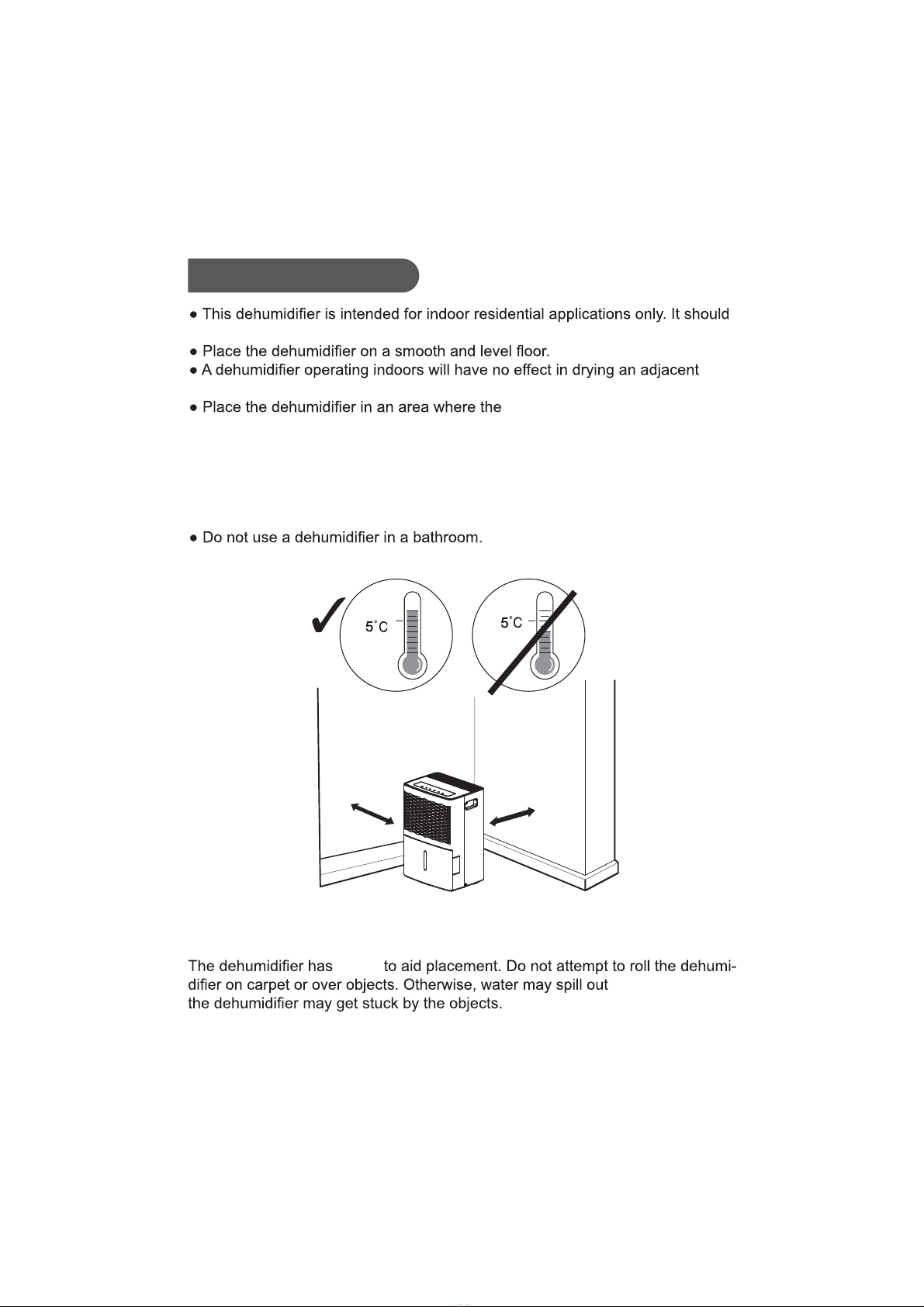
Operation Area
Note:
from the bucket or
NOTICE:
castors
Correct
Above
(41°F)
Wrong
Below
(41°F)
not be used for commercial or industrial applications.
temperature will not below 5°C(41°F)
Avoid direct sunlight.
.tesolcasahcus,aeradesolcne
or above 32°C(90°F). The suggested range of relative humidity is between 30%
and 90%.
Allow at least
18inches
of air space on all sides of the unit.
Close all doors, windows and other outside openings of the room to improve
the working effect.
Please keep the air inlet/outlet clean and not blocked.
at least 18inches
at least 18inches

Before operation, please check the power cord if it complies with the require-
Safety Precautions
Warning
This appliance can be used by children aged from 8 years and above and pe-
rsons with reduced physical, sensory or mental capabilities or lack of experie-
nce and knowledge if they have been given supervision or instruction concer-
ning use of the appliance in a safe way and understand the hazards involved.
Children and disabled people are not allowed to use the dehumidifier without
supervision.
Children shall not play with the appliance.
Cleaning and user maintenance shall not be made by children without
supervision.
ment indicated on the nameplate.
Before cleaning, please turn it off and unplug the dehumidifier.
tondnadetcennocllews'tierusekamdnadrocrewopdednuorgesuesaelP
Make sure the power cord is not pressed by any hard object.
Do not remove the power plug or move unit by pulling the power cord.
Do not use any heating application near the dehumidifier.
Do not remove the power plug in wet hands.
damaged.
Keep children from playing or climbing on the dehumidifier.
Do not place the dehumidifier under dripping objects.
Memory function is included in this dehumidifier. When nobody is taking care
of the unit, please turn it off and remove the power plug o
r disconnect power.
Do not repair or disassemble the unit by yourself.
tarewoptcennocsidesaelp,)llemsdenrub.g.e(srucconoitidnoclamronbafI
once and then contact local dealer.
sihtfodirtegottnawuoyfI.erehwyrevefodesopsidebtonnacreifidimuheD
dehumidifier, please check with l ecivresnoitamrofnirolasopsidgnildnahlaco
center about what to do.
Instructions for cord-connected room air conditioners shall i
nclude manufacture’s
recommendations regarding the nafoesufI.)sdrocnoisnetxe(stesdrocfoesu
.sihtetatsllahssnoitcurtsnieht,dednemmocertonsidrocnoisnetxe
afoesuehttsaeltayficepsllahsdrocnoisnetxenarofsnoitadnemmoceR
tnemhcattaepyt-gnidnuorgrotcudnocgnidnuorgtnempiuqenahtiwtesdroc
plug, and grounding-type connector(load fitting) ;and the amp city and voltage
rating of the cord set.
The appliance shall be installed in accordance with national
wiring regulations.
If the SUPPLY CORD is damaged, it must be replaced by the man
ufacturer, its
service agent or similarly qualified person in order to avoid a hazard.
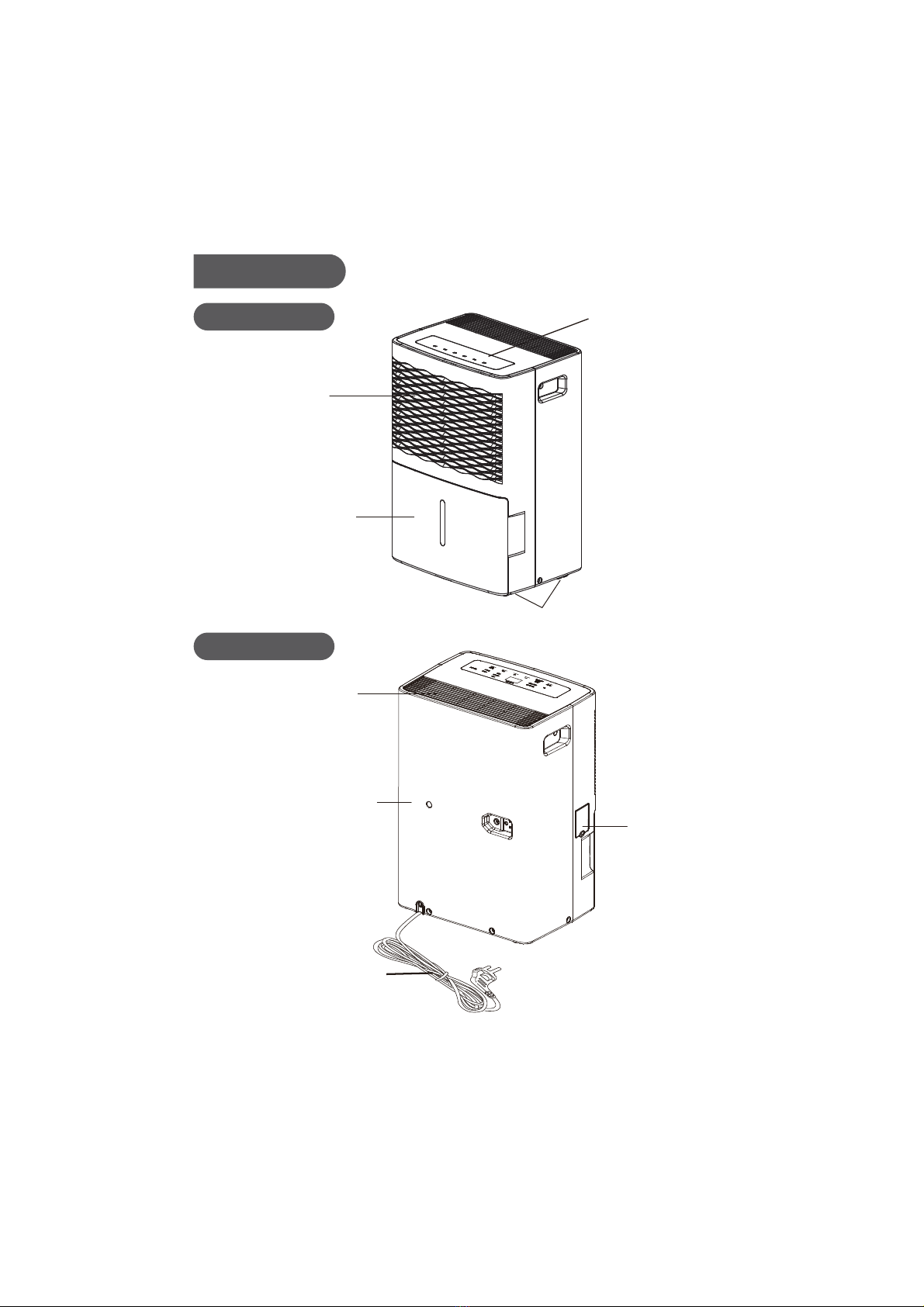
Rear Case
Power Plug
Cover Plate
(continuous
drainage)
3
Back Side
Air Outlet
Air-in Grille
Castors
Control
Bucket
Panel
Water
Parts Name
Front Side
Note:Actual product may be different from above graphics, please refer to actual product.
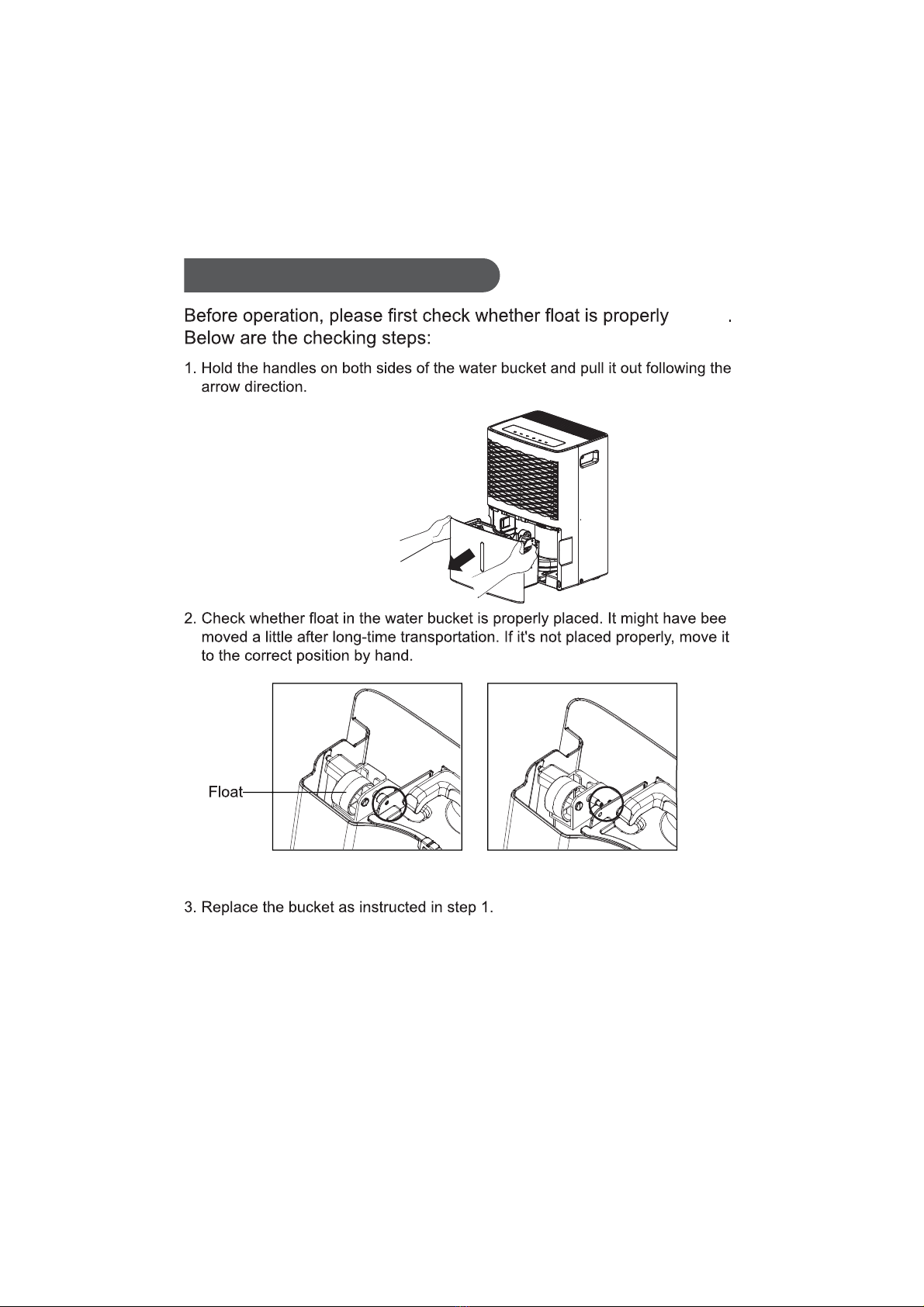
Check Before Operation
placed
n
Correct Position Wrong Position
4
Note:Actual product may be different from above graphics, please refer to actual product.
5
NOTICE:
2FILTER
After 250 hours of operation, the Filter indicator light will glow to remind
you to clean the filter. Remove the filter and clean it.
Press to rest to turn off the Filter light.See the Clean and Maintenance.
1
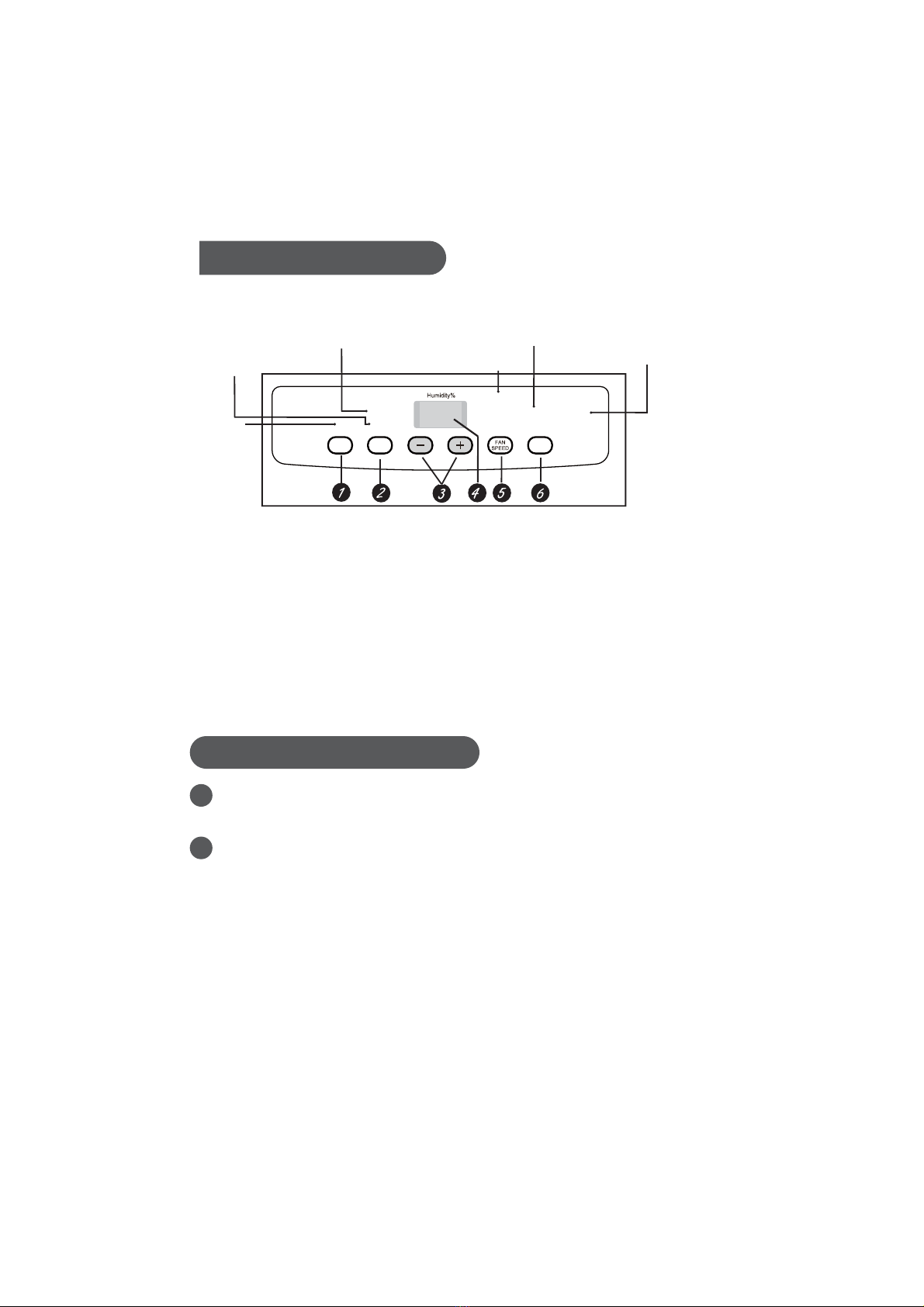
Basic Functions of the Buttons
POWER
Press to turn the dehumidifier on and off.
Water bucket must be correctly installed for the dehumidifier to operate.
Do not remove the bucket while unit is in operation.
If you want to use drain hose to drain water away, please install the hose
according to section "Drainage option".
Each time pressing the effective button on the control panel will give out a
"beep" sound.
When power is connected, power indicator on the control panel will be on and
dehumidifier gives out a “beep” sound simultaneously.
Operation Method
Full light indicates
bucket needs to be emptied
or is not in place in the unit
4 hour or 2 hour
Full
delay on/off indicator
lights
Nonstop operation
on indicator light High, Medium
and Low fan
indicator lights
Filter
indicator light
Low
Medium
High
Nonstop
FILTER
Filter
4
hour
TIMER
Power On
indicator light
2
hour
On
P
POWER
*Actual product may be different from above graphics, please refer to actual product.

6
3-/+
The humidity level can be set within a range of 80% RH (Relative Humidity)
to.35% RH (Relative Humidity) in 5% reduce or at continuous operation.To
set the unit for continuous operation, press the - pad until the screen reads
NS.
6TIMER
While the dehumidifier is in operation, press this pad to set it to automatically
turn off in 2 hours or 4 hours. While the dehumidifier is off, press this pad to
set it to automatically turn on in 2 hours or 4 hours.
4
NOTE: If Nonstop is selected, the dehumidifier will operate continuously at its
maximum dehumidification settings if attached to a hose to drain or until the
bucket is full.For drier air, press the - pad and set to a lower percent value (%).
For damper air, press the + pad and set to a higher percent value (%).
When you first use the dehumidifier, set the humidity control to 45% or 50%.
Allow at least 24 hours for the dehumidifier to achieve the humidity level. If you
still have damper air than desired, set the humidity level to a lower setting or
select Continuous for maximum dehumidification.
Display
Shows the set % humidity level while setting, then shows the actual (± 5%
accuracy) room % humidity level.
5 FAN SPEED
Controls the fan speed.
Press to select either High, Medium or Low fan speed.
Set the fan control to High for maximum moisture removal. When the humidity
has been reduced and quiet operation is preferred, set the fan control to Medium
or Low.
Este manual sirve para los siguientes modelos
14
Tabla de contenidos
Otros manuales de Deshumidificador de Kinghome


