
KCM GM338 Manual de usuario

Dual-band GSM/GPRS handset
GM338 User Guide
Rev A1.1
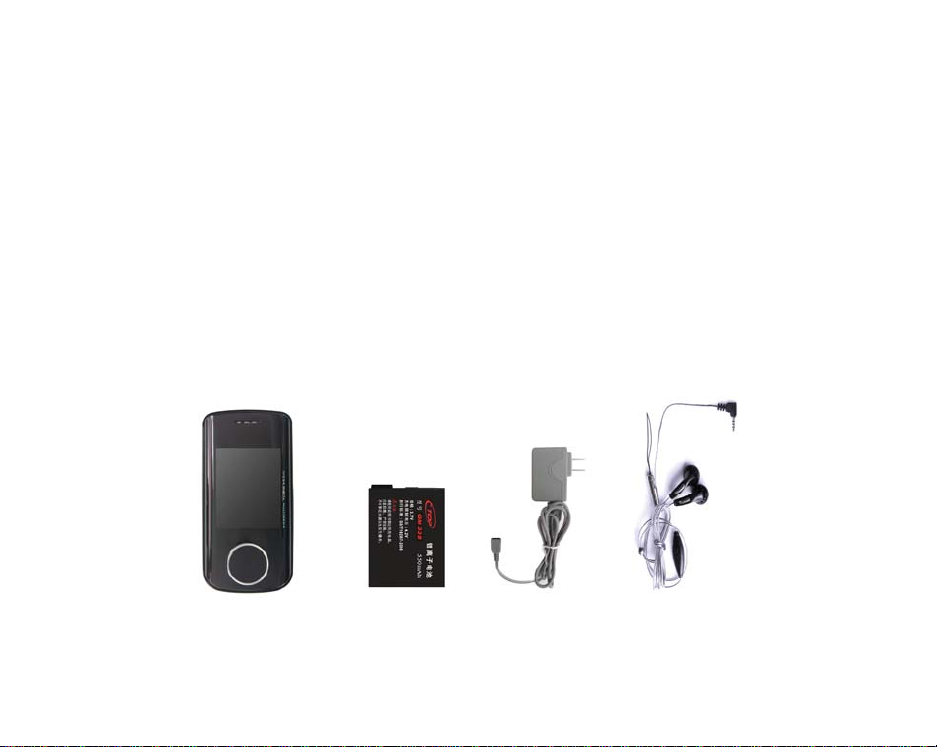
UNPACKING
Thank you for purchasing GM338. Check whether your phone comes equipped with all the nec
essary components, as shown in the figure below. If the product is defective or there is a comp
onent missing, immediately contact the office where you bought our phone.
9Phone
9Li-ion Battery
9USB type Travel Charger & USB Cable
9Earphone
9User Guide
9Quick Reference Card

CONTENTS
0…SAFETY INFORMATION
0…BEFORE YOU START
0…PHONE ICONS
0…DESCRIPTION OF KEYS
0…BACKLIGHT
0…BATTERY
0…NETWORK LINKING
0…INSERT & REMOVE THE T-
FLASH CARD
0…THE IDLE PROFILE
0…CALL FUNCTIONS
0…DISPLAY SCREEN
0…KEY OPERATION
0…SILENT MODE
0…CALL LOG
0…CALL MENU
0…FUNCTION MENU
0…PHONEBOOK
0…Quick Search
0…Search Entry
0…Add New Entry
0…Copy All
0…Delete
0…Caller Group
0…Extra Number
0…Settings
0…Caller Picture
0…Caller Ring Tone
0…Caller Video
0…MESSAGE
0…SMS
0…MMS
0…Chat Application
0…Voice Mail
0…Broadcast Message
0…CALL HISTORY
0…Missed Calls
0…Dialed Calls
0…Received Calls
0…Delete Call Log

0…Call Time
0…Call cost
0…SMS Counter
0…GPRS Counter
0…SETTINGS
0…Phone Setup
0…Call Setup
0…Network Setup
0…Security Setup
0…Sound Effect
0…Restore Factory Settings
0…S/W Version
0…MULTIMEDIA
0…Camera
0…ImageViewer
0…Video Recorder
0…Video Player
0…Audio Player
0…Sound Recorder
0…Melody compose
0…FILE MANAGER
0…FUN & GAME
0…Games
0…Theme
0…Image Editor
0…Game Setting
0…USER PROFILE
0…ORGANIZER
0…Calendar
0…To Do List
0…Alarm
0…World Clock
0…Hourly Alarm
0…SERVICES
0…SIM Tool Kit
0…WAP
0…Data Account
0…EXTRA FUNCTIONS
0…Calculator
0…Unit Converter
0…Currency Converter
0…Health
0…Stopwatch

0…SHORTCUTS
0…TEXT INPUT MODE
0…SPANISH/ENGLISH IUPUT MODE
0…Multitap ES/ABC Input Mode
0…Multitap es/abc Input Mode
0…Smart ES/ABC Input Mode
0…Smart es/abc Input Mode
0…Numeric Mode
0…SYMBOLS
0…MP3 AND MP4 INSTRUCTION
0…TROUBLESHOOTING
0…GLOSSARY
0…LIMITED WARRANTY
STATEMENT

SAFETY INFORMATION
PERSONAL USE
Operation of any radio equipment including mobile phones may interfere with the function of in
adequately shielded medical devices such as hearing aids and pacemakers. You must consult t
he manufacturer of these devices or your physician before use.
In oil depots and chemical factories where explosive gas or other products are stored, the user
should pay close attention to the restriction on the use of mobile phone. Even if your phone is i
n the idle mode, it will still transmit radio frequency signals. Therefore, you must switch off wh
en requested to do so.
Do not move the antenna close to or touch any exposed part of the body when making a call.
Otherwise, it will cause minor burn to your body.
Note traffic safety. When you are driving, please do no use your mobile phone. Stop on the sid
e of the road when you do need to use it. Avoid making calls with your cellular phone in storm
y weather.
Safety Information related with children:
9Be cautious of children swallowing the small parts such as the SIM card
9Prevent children from playing with your cell phone as toys. For example, behaviors l
ike throwing, biting the phone, or immersing it into water should be avoided.
9Do not let children less than 14 years old hang the phone around the neck.

MOBILE PHONE USE
Please use only the accessories or parts offered by the manufacturer or those authorized by th
e manufacturer. Use of unauthorized accessories might influence the performance of the phone.
What’s worse, your phone might get damaged and harm will be caused to your body. It might
even violate the national regulations on the telecommunication terminal products.
Do not use chemical products like cleaning solvents or detergents to clean your phone. It is rec
ommended that you use slightly damp and static electricity proof cloth instead of cloth that is d
ry and easy to catch static electricity. Before cleaning, you should switch off your phone.
Your mobile phone produces magnetic fields. Do not place it next to magnetic storage media s
uch as computer diskettes. Operating your mobile phone close to other electrical equipment su
ch as televisions, phones, radios and personal computers may cause interference and therefore
influence the performance of your phone.
Do not expose your mobile phone to strong sunlight, direct heat or any liquids in case of any d
amage.
Harsh handling behaviors such as throwing; beating which might damage the internal integrate
d circuit of the phone should be avoided.
Please do not link it to other unnecessary equipments.

Note! Non-professionals must not try to dissemble the phone.
Phone Precautions!
9Use your phone battery only for its intended purpose, and never use any battery
charger which is damaged or worn out.
9When you unplug your phone from its charger, grasp and pull the plug, not the
power cord.
9Do not use harsh chemicals, cleaning solvents, or strong detergents to clean your
phone. Wipe it with a soft cloth slightly dampened in a mild soap-and-water
solution.
9Do not attempt to open the casing on your phone or its battery.
9Always keep SIM card out of children’s reach.
BATTERY USE
Do not short-circuit the battery terminals. This is dangerous and will damage the battery, produ
ce heat and may cause a fire.
Never dispose of batteries in a fire as it can cause explosion. Return waste batteries to your su
pplier or an approved recycling center. Do Not dispose along with household wastes.
Warning! If the battery case is broken, avoid contact with the contents. Wash contaminated s
kin with lots of water and seek medical attention.
Battery Precautions!

9Avoid dropping the cell phone. Dropping it, especially on a hard surface, can potenti
ally cause damage to the phone and battery. If you suspect damage to the phone o
r battery, take it to a service center for inspection.
9Never use any charger or battery that is damaged in any way.
9Use the battery only for its intended purpose.
9If you use the phone near the network’s base station, it uses less power; talk and st
andby time are greatly affected by the signal strength on the cellular network and t
he parameters set by the network operator.
9Battery charging time depends on the remaining battery charge and the type of bat
tery and charger used. The battery can be charged and discharged hundreds of tim
es, but it will gradually wear out. When the operation time (talk time and standby ti
me) is noticeably shorter than normal, consider purchasing a new battery.
9If left unused, a fully charged battery will fully discharge itself over time.
9Extreme temperatures will affect the charging capacity of your battery : it may requ
ire cooling or warming first.
9Do not leave the battery in hot or cold places, such as in a car in summer or winter
conditions, as it will reduce the capacity and life of the battery. Always try to keep t
he battery at room temperature. A phone with a hot or cold battery may temporaril
y not work, even when the battery is fully charged. Batteries are particularly affecte
d by temperatures below 32°F.
9Do not place the phone in areas that may get very hot, such as on or near a cookin
g surface, cooking appliance, iron, or radiator.
9Prevent your phone or battery from getting wet. Even though they will dry and app
ear to operate normally, the circuitry could slowly corrode and pose a safety hazard.
9Avoid a battery out of the phone in coming contact with metal objects, such as coin
s, keys or jewelry.

ON THE ROAD
Before making or receiving calls acquaint yourself thoroughly with the applicable local laws and
guidelines regarding the use of mobile radio telephones and always abide by these laws.
Air bags, anti-lock brakes, cruise control and fuel injection systems are normally immune to rad
io transmissions but if you come across problems, please consult you vehicle dealer.
Turn off your mobile phone when refueling or where there are signs restricting the use of two-
way radio equipment. Do not store or carry flammable or explosive materials in the same comp
artment as your mobile phone because internal sparks could cause ignition.
Safety comes first, and is the ultimate responsibility of the driver. Please:
9Give full attention to driving – driving safely is your first responsibility.
9Use a Hands-free Kit, if available.
9If you have a Hands-free Kit make sure to pre-program numbers when possible, an
d keep calls brief and to a minimum.
9If you don’t have a handsfree kit, pull off the road and park your vehicle before ma
king or answering a call in driving conditions so require.
ON AN AIRCRAFT
Switch off your mobile phone before boarding an aircraft. Use of mobile phone is strictly forbid
den on an aircraft because of the potential interference with the telecommunication system. If
Tabla de contenidos
Otros manuales de Auricular de KCM


