
Kathrein CAP 210 Instrucciones de funcionamiento

CAP 210 und 310/Dreheinheit
Kurzbedienungsanleitung
936.2704/A/1204/1.2d/ZWT
Sicherheitshinweise der ausführlichen
Betriebsanleitung UFD 170 beachten!
Freie Sicht zum Satelliten wahren!
Fahrzeug muss bei Satelliten-Suche ruhig stehen (Personen-Bewegungen
im Fahrzeug vermeiden)!
Vor Fahrtantritt ist grundsätzlich zu kontrollieren, ob sich die Antenne in
der Parkposition befindet!
•
•
•
Satelliten-Suche
Wichtige Hinweise
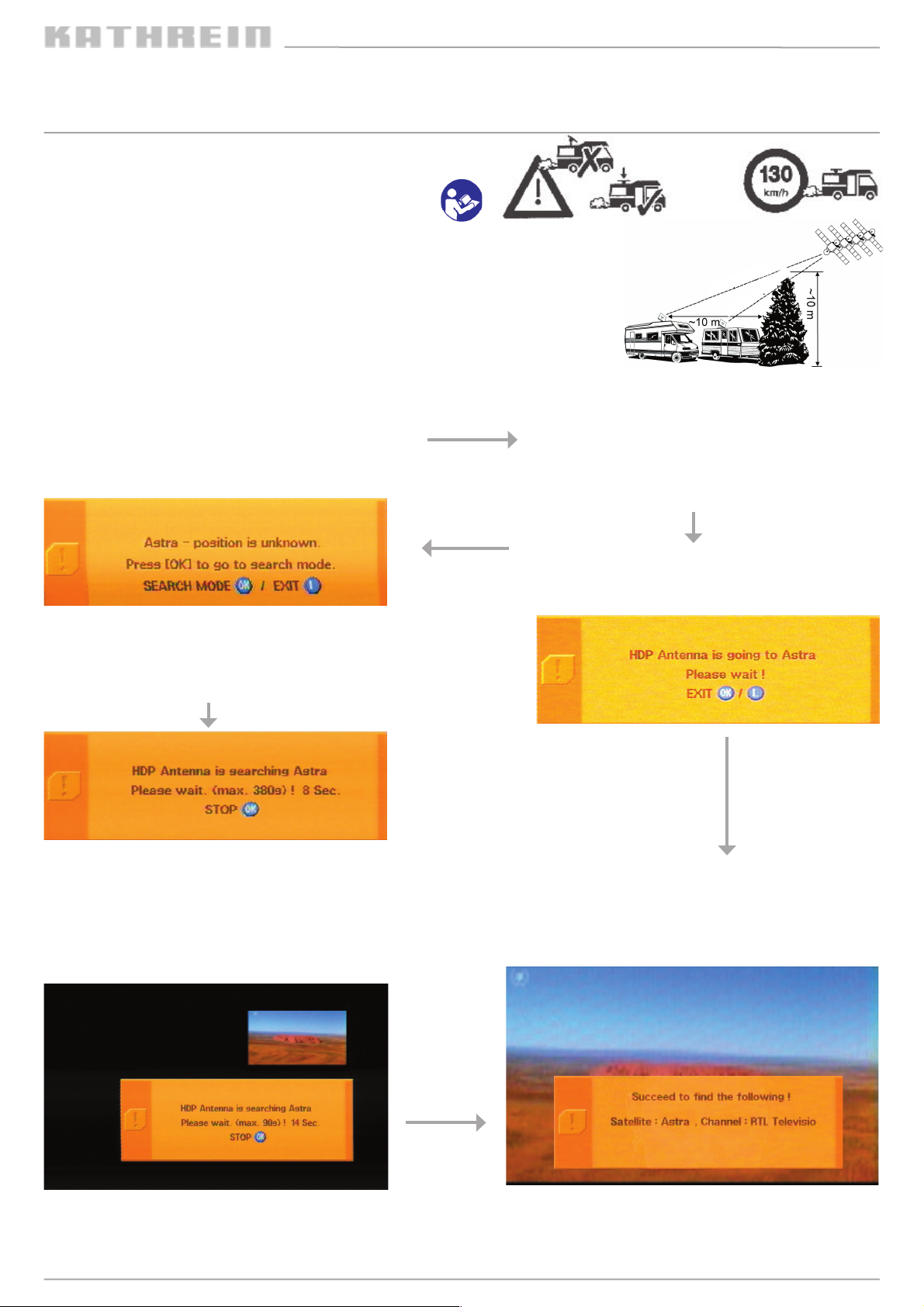
1. Schalten Sie zuerst den UFD 170 mit der -Taste der Fernbedienung ein (Netzschalter muss auf „ein“ sein).
2. Am Bildschirm erscheint für ca. 10 Sekunden:
„Willkommen“ „UFD 170“
4. Nach der Initialisierung wird die letzte Satelli-
ten-Position angefahren, es erscheint folgen-
des Bild (beispielhaft):
7. Im Anschluss erscheint folgende Einblendung
und nach wenigen Sekunden das gewünschte
TV-Programm im Vollbild:
5. Ist kein Satelliten-Signal vorhanden, erscheint
die oben stehende Einblendung. Drücken Sie
die OK-Taste, um den Suchmodus zu starten
(der Satelliten-Name kann je nach Programm-
Platz variieren, z. B. HOTBIRD).
6. Wird das Satelliten-Signal jetzt gefunden,
erscheint vorerst nur ein kleiner Bildausschnitt
rechts oben. Brechen Sie die Suche auf kei-
nen Fall ab, da der UFD 170 jetzt noch einen
Feinabgleich zur Optimierung des Signal-
Empfangs macht (siehe Bild)!
kein Signal
vorhanden!
Signal
vorhanden!
3. Anschließend erscheint für ca. 20 Sekunden:
„Bitte warten!“ „HDP wird initalisiert“
Hinweis:
Mit Hilfe der F-Taste Ihrer Fernbedienung können Sie beinahe zu jedem Zeitpunkt einen Satelliten-Suchlauf aufrufen (Ausnahmen:
Sie befinden sich in einem Menü oder es ist bereits ein anderes OSD eingeblendet). Die Suche wird auch nicht ausgelöst, wenn Sie
bereits ein TV-Signal haben. Nach Betätigen der F-Taste wird zunächst die aktuelle Satelliten-Position angefahren; ist kein Signal
vorhanden, erscheint das unter Punkt 5 gezeigte OSD. Fahren Sie dann wie unter Punkt 5 beschrieben fort.
•

CAP 210 und 310/Dreheinheit
Kurzbedienungsanleitung
936.2704/A/1204/2.2d/ZWT - Technische Änderungen vorbehalten!
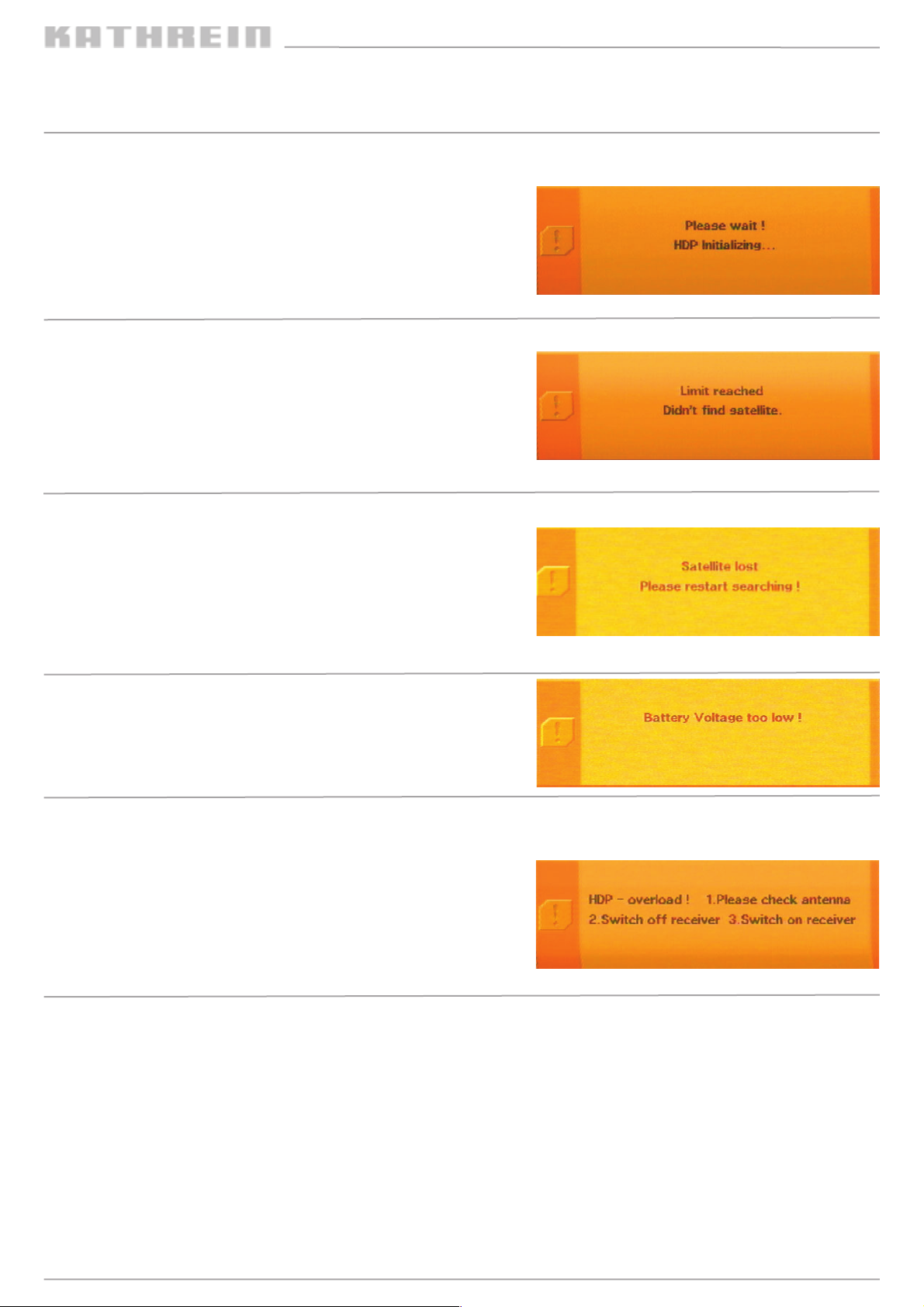
Mögliche Fehlermeldungen und deren Ursache
1. Initalisierungs-OSD wird nicht mehr ausgeblendet (auch nicht
nach 20 Sekunden)
Überprüfen Sie die Verbindung zwischen Receiver und Steuer-
einheit
UFD 170 mit Fernbedienung aus- und wieder einschalten
2. Satellit konnte nicht gefunden werden
Versuchen Sie die erneute Suche mit einem anderen Programm
des gleichen Satelliten
Mit der OK-Taste verlassen Sie diese OSD-Einblendung und
können ein neues Programm wählen. Bei Bedarf benützen Sie
die F-Taste
3. Satelliten-Signal wurde verloren (z. B. durch ungünstige Emp-
fangsverhältnisse)
Wiederholen Sie die Suche mit dem selben oder mit einem
anderen Programm des gleichen Satelliten
Mit der OK-Taste verlassen Sie diese OSD-Einblendung und
können ein neues Programm wählen. Bei Bedarf benützen Sie
die F-Taste
•
•
•
•
4. Versorgungs-Spannung ist zu niedrig
Ihre Dreheinheit ist zwar noch einsetzbar, durch eine zu geringe
Versorgungs-Spannung kann jedoch eine Überlast ausgelöst
werden
5. Überlast ist aufgetreten
Wenn Sie diese Anzeige erhalten, überprüfen Sie die Bord-
spannung (evtl. zu niedrig), die Verbindung zur Dreheinheit,
die Dreheinheit auf Vereisung bzw. ob die Dreheinheit vielleicht
durch ein Hindernis behindert wurde
Schalten Sie den UFD 170 aus und dann wieder ein (dieser Vor-
gang muss bei Bedarf mehrfach wiederholt werden). Siehe auch
Punkt 11 Anwendungshinweis BAS 60, Funktionsstörungen
•
•
•
Power-off/Stand-by/Parkposition
Ausschalten des UFD 170 mit dem Netzschalter (Power-off)
Der UFD 170 ist vom Netz getrennt und die Dreheinheit bleibt auf ihrer Satelliten-Position bis zum nächsten Einschalten
stehen (nur erforderlich bei Arbeiten am Stromkreis (z. B. Batterie-Wechsel) oder sehr langer Nichtbenutzung).
Stand-by
Durch einmaliges Drücken der Stand-by-Taste geht der UFD 170 in Stand-by, die Dreheinheit verhält sich wie
bei „Power-Off“ (s.o.).
Parkposition
Durch zweimaliges Drücken der Stand-by-Taste fährt die Dreheinheit selbstständig in die Parkposition, der UFD 170 geht
ganz normal in Stand-by. Nach dem Wiedereinschalten fährt die Dreheinheit automatisch in ihre letzte Satelliten-Position.
Weitere Möglichkeiten, die Dreheinheit in Parkposition zu bringen, finden Sie in der ausführlichen Betriebsanleitung.
•
•

CAP 210 and 310/Antenna turntable
Brief Operating Instruction
936.2704/A/1204/1.2e/ZWT
Observe the safety precautions in the
UFD 170 Detailed Operating Instructions!
Maintain a clear view to the satellite!
The vehicle must be still when satellite searching (avoid physical move-
ments inside the vehicle)!
Prior to entering the vehicle, check whether the antenna is in the park
position!
•
•
•
Satellite searching
Important Information
1. First switch on the UFD 170 using the key on the remote control (power switch must be set to „on“).
2. The following message will appear on screen
for approx. 10 seconds:
„Welcomes you“ „UFD 170“
4. Once the system has initialised, the last satel-
lite position will be located and the following
screen will appear (example only):
7. The following message appears and after just
a few seconds, you will see the selected TV
programme full-size on the screen:
5. If no satellite signal is available, the above
message will appear. Press OK to start the
search mode (the satellite name can vary
depending on the programme location, e.g.
HOTBIRD).
6. If the satellite signal is now found, a small
picture will appear in the top right of the screen.
Do not interrupt the search. The UFD 170 is
still making a fine adjustment to optimise
the signal reception (see screen)!
No signal
available!
Signal
available!
3. The following message will appear for approx.
20 seconds:
„Please wait!“ „HDP initializing“
Note:
You can use the Fkey on your remote control to start a satellite search at practically any time (exceptions: you are in a menu or
another OSD is already shown). Neither will the search start if you already have a TV signal. Press the Fkey and the current satellite
position will be located; if no signal is available, the OSD shown under No. 5 will appear. Proceed as described under No. 5.
•

4. Supply voltage too low
Your antenna turntable can still be used, although it may trigger
an overload due to the low supply voltage
CAP 210 and 310/Antenna turntable
Brief Operating Instruction
936.2704/A/1204/2.2e/ZWT - Technical changes reserved!
Possible error messages and their causes
1. OSD initialisation message has not faded (even after 20 se-
conds)
Check the connection between the receiver and the control unit
Switch UFD 170 on and off using remote control
2. Satellite not found
Try a new search with an alternative programme from the same
satellite
Press OK to exit this OSD and select a new programme. Use
the F key if required
3. Satellite signal is lost (e.g. due to poor reception)
Repeat the search with the same or an alternative programme
from the same satellite
PressOKto exit this OSD and select a new programme. Use
theFbutton if required
•
•
•
•
5. Overload
If you see this message, check the vehicle power supply (pos-
sibly too low), the connection to the antenna turntable, the
antenna turntable for ice and/or whether it has been obstructed
by an obstacle
Switch the UFD 170 off and then on again (this procedure may
have to be repeated several times). See also No. 11 Application
Information BAS 60, Malfunction
•
•
•
Power-off/Stand-by/Park position
Switch off the UFD 170 at the power switch (Power-off)
The UFD 170 is isolated from the power supply and the antenna turntable remains located in the same satellite position
until next switched on (necessary only when working on the electrical circuit (e.g. changing battery) or prolonged periods
of non-use).
Stand-by
If the stand-by button is pressed once, the UFD 170 switches to stand-by mode. The antenna turntable responds as when
„Power-Off“ (see above).
Park position
If the stand-by button is pressed twice, the antenna turntable automatically moves to the park position. The UFD 170 swit-
ches to stand-by mode. When next switched on, the antenna turntable automatically moves to its last satellite position. Al-
ternative methods of moving the antenna turntable into park position are described in the Detailed Operating Instructions.
•
•
CAP 210 et 310/Unité rotative
Mode d‘emploi
936.2704/A/1204/1.2f/ZWT
Respecter les consignes de sécurité décrites
dans le manuel d‘utilisation complet de l‘UFD 170 !
Garder le champ libre en direction du satellite !
Le véhicule doit être immobilisé lors de la recherche du satellite (éviter les
mouvements de passagers dans le véhicule) !
Avant d‘entamer le trajet, il convient de contrôler systématiquement si
l‘antenne est en position fixe !
•
•
•
Recherche du satellite
Remarques importantes
1. Activer tout d‘abord le récepteur UFD 170 à l‘aide de la touche de la télécommande (interrupteur d‘alimentation
sur „Marche“).
2. Le message ci-dessous s‘affiche pendant
env. 10 secondes :
„Welcomes you“ „UFD 170“
4. Après l‘initialisation, le dispositif se place sur la
dernière position du satellite, l‘image suivante
apparaît (à titre d‘exemple) :
7. Ensuite, l‘affichage suivant apparaît à l‘écran
suivi, quelques secondes plus tard, du pro-
gramme TV en plein écran:.
5. Si aucun signal du satellite n‘est détecté, le
message ci-dessus s‘affiche à l‘écran. Ap-
puyer sur la touche OK pour activer le mode
derecherche (le nom du satellite peut varier en
fonction de l‘emplacement du programme, par
ex. HOTBIRD).
6. Si, à présent, le signal est détecté, une petite
section d‘image apparaît tout d‘abord dans
l‘angle supérieur droit de l‘écran. N‘arrêter la
recherche en aucun cas, car le récepteur
UFD 170 procède à présent à un ajustage
fin en vue d‘optimiser la réception du signal
(voir Image) !
aucun
signal
disponible !
Signal
disponible !
3. Ensuite, le message suivant s‘affiche pendant
env. 20 secondes :
„Please wait“ „HDP initializing“
Conseil :
La touche Fde la télécommande permet de lancer à tout moment une recherche de satellite (sauf si vous vous trouvez dans un menu
ou si un autre message du système d‘exploitation est déjà affiché). De même, la recherche n‘est pas lancée lorsqu‘un signal TV est
déjà intercepté. Après avoir activé la touche F, le dispositif se place sur la position actuelle du satellite ; si aucun signal n‘est disponib-
le, le message apparaissant à l‘écran représenté au point 5 s‘affiche. Poursuivre la procédure telle que décrite au point 5.
•
Tout est fixé?
Réception
Pas de réception
4. Tension d‘alimentation trop faible
Votre unité rotative reste utilisable, mais une tension
d‘alimentation trop faible peut induire une surcharge
CAP 210 et 310/Unité rotative
Mode d‘emploi
936.2704/A/1204/2.2f/ZWT - Sous réserve de modifications techniques !
Messages d‘erreur potentiels et causes
1. Le message d‘initialisation reste affiché (même après 20
secondes)
Vérifier la connexion entre le récepteur et l‘unité de commande
Désactiver puis réactiver l‘UFD 170 à l‘aide de la télécommande
2. Impossible de détecter le satellite
Tenter une nouvelle recherche avec un autre programme du
même satellite
Appuyer sur la touche OK pour supprimer le message affiché
et sélectionner un nouveau programme. Utiliser la touche F,si
nécessaire
3. Le signal du satellite a été perdu (par ex. en raison de mauvai-
ses conditions de réception)
Renouveler la recherche avec le même ou un autre programme
du même satellite
Appuyer sur la touche OK pour supprimer le message affiché
et sélectionner un nouveau programme. Utiliser la touche F,si
nécessaire
•
•
•
•
5. Détection de surcharge
Si ce message s‘affiche, vérifier la tension embarquée (éventu-
ellement trop faible) et la connexion vers l‘unité rotative ; cont-
rôler la présence de givre sur l‘unité rotative ou vérifier si cette
dernière est gênée par un obstacle quelconque
Désactiver le récepteur UFD 170 puis le réactiver (au besoin,
renouveler cette opération plusieurs fois). Voir également point
11 Conseil d‘utilisation BAS 60, Dysfonctionnements
•
•
•
Arrêt/Veille/Position fixe
Désactivation de l‘UFD 170 avec l‘interrupteur d‘alimentation (Arrêt)
L‘UFD 170 est coupé du secteur et l‘unité rotative reste sur la position de satellite qu‘elle occupe jusqu‘à la prochaine
activation (uniquement requis lors d‘opérations sur circuit électrique - par ex. remplacement de la batterie, ou après une
inutilisation prolongée).
Veille
Appuyer une seule fois sur la touche Veille pour activer le mode Veille de l‘UFD 170, l‘unité rotative se comporte comme
pour la désactivation „Arrêt“ (voir ci-dessus).
Position fixe
Appuyer deux fois sur la touche Veille pour placer automatiquement l‘unité rotative en position fixe, l‘UFD 170 passe tout
simplement en mode Veille. Après le réactivation, l‘unité rotative regagne automatiquement la dernière position qu‘elle
a occupée. D‘autres méthodes de positionnement de l‘unité rotative en position fixe sont disponibles dans le manuel
d‘utilisation complet.
•
•

3. Il seguente messaggio viene, quindi,
visualizzato per circa 20 secondi:
„Please wait“ „HDP initializing“
Unità di rotazione/CAP 210 e 310
Brevi istruzioni per l‘uso
936.2704/A/1204/1.2it/ZWT
Rispettare le avvertenze di sicurezza contenute
nelle istruzioni per l‘uso complete dell‘UFD 170!
Accertarsi che non vi siano ostacoli in direzione
del satellite!
Durante la ricerca del satellite, il veicolo deve essere fermo (evitare movi-
menti di persone all‘interno del veicolo)!
Prima di mettersi in marcia, controllare che l‘antenna sia in posizione di
parcheggio!
•
•
•
Ricerca del satellite
Avvertenze importanti
1. Accendere prima l‘apparecchio UFD 170 utilizzando il tasto - del telecomando (l‘interruttore di rete deve essere
posizionato su „ON“).
2. Il seguente messaggio appare sullo schermo per
circa 10 secondi:
„Welcomes you“ „UFD 170“
4. Una volta eseguita l‘inizializzazione, viene avvi-
ata l‘ultima posizione del satellite; viene visua-
lizzata la seguente schermata (ad esempio):
7. Alla fine, appare la seguente immagine e, dopo
pochi secondi, viene visualizzato il programma
televisivo desiderato a schermo intero:
5. Se il segnale del satellite non è disponibile,
appare l‘immagine sopra indicata. Premere il
tasto OK per avviare la modalità di ricerca (il
nome del satellite può variare a seconda della
posizione nel programma, ad es. HOTBIRD).
6. Se il segnale del satellite viene trovato in
questo momento, inizialmente appare soltanto
un‘immagine piccola in alto a destra sullo scher-
mo. Non interrompere in nessun caso la
ricerca, perché l‘UFD 170 sta eseguendo un
allineamento di precisione per ottimizzare la
ricezione del segnale (v. figura)!
Non è pre-
sente alcun
segnale!
Il segnale
è presente!
Avvertenza:
Utilizzando il tasto Fdel telecomando, è possbile richiamare la funzione di ricerca del satellite quasi in ogni momento (eccezioni: ci
si trova all‘interno di un menu o è già visualizzato un altro messaggio sullo schermo). La ricerca non viene avviata anche quando è
già presente un segnale televisivo. Dopo aver premuto il tasto F, inizialmente viene avviata l‘attuale posizione del satellite; se non è
presente alcun segnale, viene visualizzato il messaggio indicato al punto 5. Procedere, quindi, come descritto al punto 5.
•
Tutto fisso?
Ricezione
senza ricezione

4. La tensione di alimentazione è troppo bassa
L‘unità di rotazione può ancora essere installata, ma una tensio-
ne di alimentazione troppo bassa può causare un sovraccarico
Unità di rotazione/CAP 210 e 310
Brevi istruzioni per l‘uso
936.2704/A/1204/2.2it/ZWT- Si riserva il diritto di apportare modifiche tecniche!
Possibili messaggi di errori e relative cause
1. Il messaggio di inizializzazione sullo schermo non viene più
spento (nemmeno dopo 20 secondi)
Controllare il collegamento tra il ricevitore e l‘unità di comando
Spegnere e riaccendere l‘UFD 170 utilizzando il telecomando.
2. Non è stato possibile trovare il satellite
Provare ad eseguire una nuova ricerca con un altro programma
dello stesso satellite
Premendo il tasto OK, si esce da questo messaggio sullo scher-
mo ed è possibile selezionare un nuovo programma. In caso di
necessità, utilizzare il tasto F
3. Si è perso il segnale del satellite (ad es. a causa di condizioni
di ricezione sfavorevoli)
Ripetere la ricerca utilizzando lo stesso programma o un pro-
gramma diverso dello stesso satellite
Premendo il tasto OK, si esce da questo messaggio sullo scher
mo ed è possibile selezionare un nuovo programma. In caso di
necessità, utilizzare il tasto F
•
•
•
•
5. Si è verificato un sovraccarico
Se viene visualizzato questo messaggio, controllare la tensio-
ne di bordo (è possibile che sia troppo bassa), il collegamento
all‘unità di rotazione, che l‘unità di rotazione non sia gelata o che
il corretto funzionamento di quest‘ultima non sia stato impedito
da un ostacolo
Spegnere l‘UFD 170 e poi riaccenderlo (in caso di necessità,
ripetere più volte questo procedimento). V. anche il punto 11
Avvertenza di utilizzo BAS 60, disturbi di funzionamento
•
•
•
Alimentazione disinserita/Stand-by/Posizione di parcheggio
Spegnere l‘UFD 170 con l‘interruttore di rete (alimentazione disinserita)
L‘UFD è staccato dalla rete e l‘unità di rotazione rimane in quella posizione del satellite fino alla successiva accensione
(è necessario solo in caso di lavori al circuito elettrico (ad es. sostituzione della batteria) oppure dopo un lungo periodo di
inutilizzo).
Stand-by
Premendo una volta il tasto stand-by, l‘UFD 170 entra in modalità stand-by; l‘unità di rotazione si comporta come
nella situazione di „alimentazione disinserita“ (v. sopra).
Posizione di parcheggio
Premendo due volte il tasto stand-by, l‘unità di rotazione si porta automaticamente nella posizione di parcheggio e l‘UFD
170 si porta normalmente in stand-by. Quando si riaccende l‘apparecchio, l‘unità di rotazione si riporta automaticamen-
te nell‘ultima posizione del satellite. Le altre possibilità di portare l‘unità di rotazione nella posizione di parcheggio sono
descritte nelle istruzioni per l‘uso complete.
•
•

3. A continuación aparecerá en pantalla el sigui-
ente mensaje durante aprox. 20:
„Please wait“ „HDP initializing“
CAP 210 y 310/Unidad giratoria
Guía rápida del usuario
936.2704/A/1204/1.2sp/ZWT
¡Tenga en cuenta las indicaciones de seguridad
de las Instrucciones de funcionamiento del
receptor UFD 170!
¡Asegure una orientación sin obstáculos hacia el satélite!
El vehículo debe estar detenido durante la búsqueda del satélite (evite que se
muevan los ocupantes del vehículo).
¡Antes de emprender la marcha, asegúrese de que la antena se encuentra en
posición de estacionamiento!
•
•
•
Búsqueda del satélite
Indicaciones importantes
1. En primer lugar encienda el receptor UFD 170 mediante el botón -del mando a distancia (el interruptor de alimen-
tación eléctrica debe estar en la posición „On“).
2. En la pantalla aparecerá el siguiente mensaje durante
aprox. 10:
„Welcomes you“ „UFD 170“
4. Tras la inicialización, la antena se orienta hacia
la última posición del satélite y aparece la
siguiente imagen (a modo de ejemplo):
7. Una vez establecida la conexión aparecerá la
siguiente imagen y tras algunos segundos se
visualizará el programa de televisión en toda la
pantalla:
5. Si no se detecta ninguna señal del satélite, se
mostrará el mensaje de arriba. Pulse el botón OK
para activar el modo de búsqueda (el nombre del
satélite puede variar dependiendo número del
programa, p. ej. HOTBIRD).
6. Si ahora se detecta la señal del satélite, aparecerá
tras unos momentos una pequeña imagen en la
esquina superior derecha. ¡Bajo ningún concep-
to interrumpa la búsqueda. El receptor UFD 170
aún debe realizar un ajuste fino para optimizar
la recepción de la señal (véase la imagen)!
¡no hay
señal!
¡Señal
existente!
Nota:
Con ayuda del botón Fdel mando a distancia podrá realizar en cualquier momento un nueva búsqueda de un satélite (excepciones: si
tiene abierto un menú o se encuentra en un menú OSD programable en pantalla). Además, no se iniciará la búsqueda si ya existe una
señal de TV. Tras pulsar el botón Fla antena se orientará hacia la posición actual del satélite y, en el caso de que no exista una señal,
se mostrará el menú OSD indicado en el punto 5. Proceda entonces tal como se describe en el punto 5.
•
¿Todo fijo?
Receptión
No receptión

4. La tensión de alimentación es demasiado baja
La unidad giratoria aún está operativa pero puede producirse
una sobrecarga debido a una tensión de alimentación insufi-
ciente
CAP 210 y 310/Unidad giratoria
Guía rápida del usuario
936.2704/A/1204/2.2sp/ZWT
Mensajes de error y posibles causas
1. No desaparece el menú de configuración OSD de la pantalla
(incluso después de transcurrir 20 segundos)
Compruebe la conexión entre el receptor y la unidad de control
Apague y vuelva a encender el receptor UFD 170 mediante el
mando a distancia
2. No ha sido posible encontrar un satélite
Vuelva a realizar una búsqueda con otro programa del mismo
satélite
Salga del menú OSD pulsando el botón OKy elija un nuevo
programa. Si fuese necesario, utilice el botón F
3. Se ha perdido la señal del satélite (p.ej. por interferencias en
la recepción)
Repita la búsqueda con el mismo u otro programa del satélite
Salga del menú OSD pulsando el botón OKy elija un nuevo
programa. Si fuese necesario, utilice el botón F
•
•
•
•
5. Se ha producido una sobrecarga
Si aparece este mensaje, comprueba la tensión de a bordo
(posiblemente la corriente del vehículo sea insuficiente), la co-
nexión hacia la unidad giratoria o que la unidad giratoria no esté
atascada por la presencia de hielo u otros obstáculos
Apague y vuelva a encender el receptor UFD 170 (si fuese ne-
cesario, repita este procedimiento varias veces). Véase también
el punto 11 Indicaciones de uso de la antena BAS 60, interrupci-
ones del funcionamiento
•
•
•
Descon./modo Stand-by/Posición „estacionamiento“
Desconexión del receptor UFD 170 mediante el interruptor de alimentación (Power-off)
El receptor UFD 170 está desconectado de la red eléctrica y la unidad giratoria permanece orientada hacia la posición
del satélite elegido hasta que se vuelva a conectar (sólo necesario en caso de realizar trabajos en el circuito eléctrico
(p.ej. para cambiar la batería) o si no va a ser utilizado durante un tiempo prolongado).
Modo Stand-by
Pulsando una vez el botón Stand-by, el receptor UFD 170 pasará el modo Stand-by y la unidad giratoria se comporta
como en el caso de „Power-Off“ (véase arriba).
Posición „estacionamiento“
Pulsando dos veces el botón Stand-by, la unidad giratoria pasará automáticamente a la posición de estacionamiento y el
receptor UFD 170 permanece en el modo Stand-by normal. Tras volver a encender la unidad, la unidad giratoria vuelve a
orientarse automáticamente hacia la última posición del satélite. Consulte las instrucciones de funcionamiento detalladas
para obtener información sobre otras variantes para posicionar la unidad giratoria al modo de estacionamiento.
•
•
Otros manuales para CAP 210
2
Este manual sirve para los siguientes modelos
1
Tabla de contenidos
Idiomas:


