
KaiCong SIP1201 Manual de usuario

KaiCong-Nothing important than safety!
Anything else ,please contanct me.
IP Camera
(KaiCong IP camera SIP1201)
KaiCong Ares
SIP1201
U
Us
se
er
r
m
ma
an
nu
ua
al
l
2013-03-18 V1.0

KaiCong-Nothing important than safety!
Anything else ,please contanct me.
Index
Product Instruction-------------------------------------------------1
Equipment connection diagram --------------------------------2
Search IP Camera----------------------------------------------------3
LAN monitoring, control installation, monitoring screen
introduction ----------------------------------------------------------4
Device System Settings --------------------------------------------5
Remote Setup --------------------------------------------------------6
CMS Watch ------------------------------------------------------------7
SeeSeeSee--------------------------------------------------------------8

KaiCong-Nothing important than safety!
Anything else ,please contanct me.
Ⅰ、Product Description
If the user manual can’t help you to solve the problem, please call our technology center
for solutions. We will update the content for the new functions without notice.
1、Installation Environment
Keep away from the places for high-temperature, heat source and direct sunlight;
Keep away from water and when it gets wet, cut off the power immediately.
Avoid using at damp environment; the reference range for operation humidity is below
85%RH.
Avoid using in overheating and too cold environment, the reference range for
operation temperature is -10℃~ +50℃.
Please install it horizontally or wall mounting, avoid strenuous vibration place
and not put other equipments on the item.
2、Transport and Handling
The package is well-designed to ensure the security during the delivery, so please
do not change the package at random.
1,Do not move the ip cameras from overheated to super cool condition frequently,
otherwise it will frost and shorten the service life.
2,Do not move the item when it is on, otherwise the main board might be damaged.
Notice:
1. Please check the power supply before operating the camera.
2. Be careful do not bang the camera and avoid strong impacts or shocks.
3. Do not directly touch the optical components for the image sensor, if necessary,
please clear with a clean and moistened cloth with alcohol and wipe the dirt gently;
when not using the camera, please place the dust cover on to the item to protect
Notice
Statement

KaiCong-Nothing important than safety!
Anything else ,please contanct me.
the image sensor.
4. Do not aim the camera directly into the sun or at other intense light sources that
could affect the image quality (it is not a problem for the ip camera), also shorten
the service life for the image sensor.
5. The laser may burn down the image sensor, when using the laser gear,do not expose
the surface of image sensor in the laser.
6. If the equipment is not working properly, please contact the store or the service
center, do not disassemble or modify the equipment in any way. ( Problems caused
by unauthorized modification or repair should be at your own risk.)
Product introduction
Product summary
Thank you for choosing our company’s M series IP camera, which has several models,
including indoor HD PTZ camera, indoor HD cube camera, outdoor HD waterproof camera
etc. It is very suitable for houses, shops, office building and so on.
Main features for M series:
Support simultaneously 3 kinds of H.264 video stream and 1 way MJPEG video
stream, suitable for Local, Internet and Cross-platform view;
Support resolution for 1280*720/640*360/320*180;
Support 4 ways view in a video stream;
Support two-way intercom function, G.711 and G.726 audio encoding;
Support 802.11b/g/n protocol, build-in WiFi module to perform wireless
monitoring function;
Support max. 32G SD/TF card for storing the alarm video and pictures, timing
snapshot and recording;
Built-in web server, use one port to send all the data, it’s easy to do
network setting;
Support ONVIF and RTSP protocol, easy to integrate it to NVR or large client
software;
Support WPS/QSS function;
Support POE function for some cameras, user optional;
Support multi-languages web interface, support 1/4/9 split screen to
perform several view at same time;
Manufacturer attaches a label of DDNS at the bottom of each IP Camera. When
IP Camera is connected to the internet, this URL can be used to visit the
device;
Provide free client software, support Multi-view, Long time recording,
video replay, etc;
Provide free software viewed by mobile phone.

KaiCong-Nothing important than safety!
Anything else ,please contanct me.
Ⅱ、Equipment Diagram
Ⅲ、Equipment connection diagram
Ⅳ、Search IP Camera
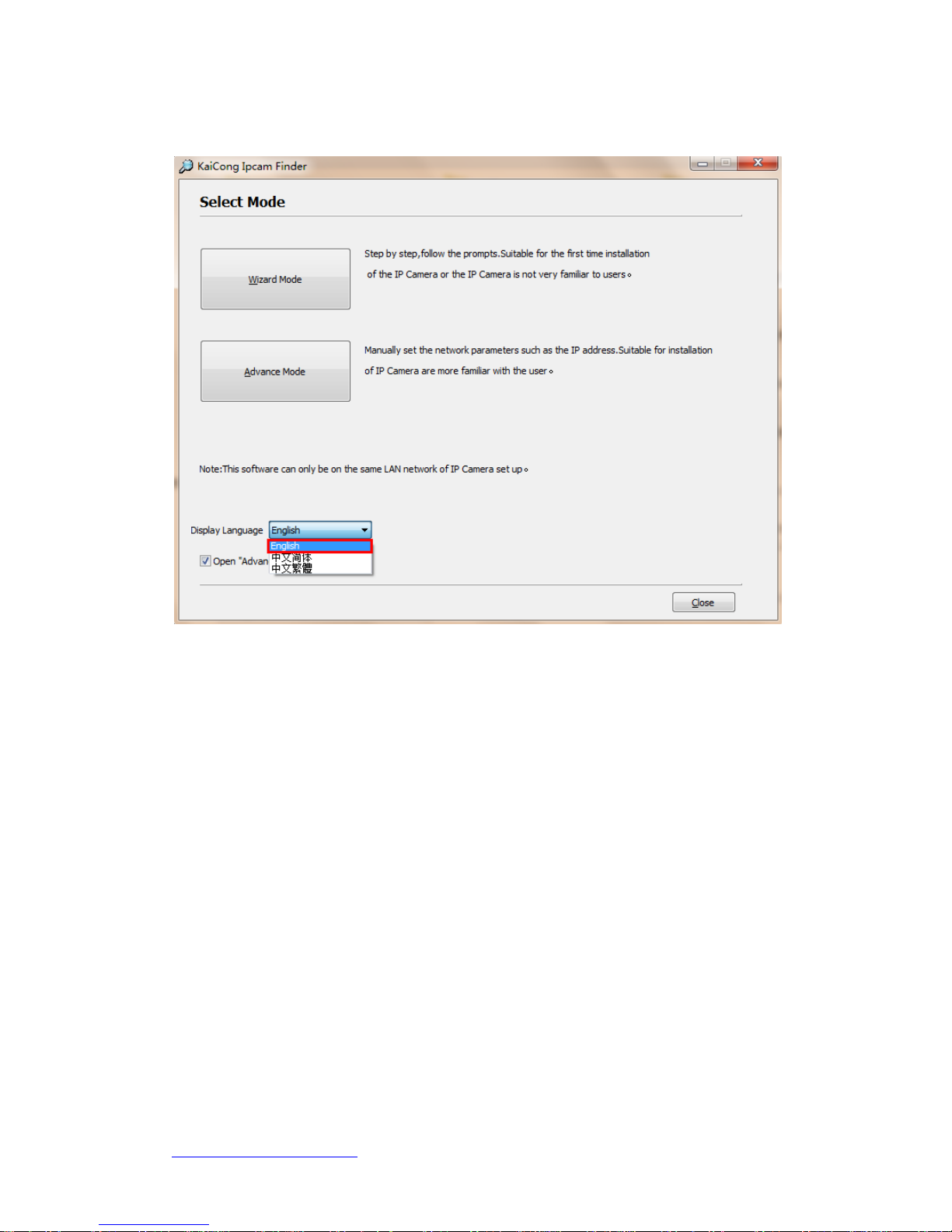
1、Download Software address
http://kaicong.net/download/KaiCongIPCameraFinder.zip
KaiCong-Nothing important than safety!
Anything else ,please contanct me.
2、Operate Software
Choose "English" and Click "Advance Mode ",search IP Camera.

KaiCong-Nothing important than safety!
Anything else ,please contanct me.

KaiCong-Nothing important than safety!
Anything else ,please contanct me.
Software interface
Area A: Shows all the network parameters of the current computer, the most important
is the LAN gateway address (IP address), in this case 192.168.1.1, the IP of the
network cameras, gateway, DNS must be based on the current LAN gateway to set.
Area B: Display all KaiCong network cameras accessed in LAN, this instruction
includes a total of 21 sets network cameras.
Area C: Select any network camera in area B, you can query and set the network camera
parameters.
Notice:
If the search tools has not searched ip camera in the current LAN, network cameras,
please make sure whether the ip camera is connected to the power, LAN, and computers
in a local area network. If the computer installed antivirus software, please
temporarily shut down antivirus software.

KaiCong-Nothing important than safety!
Anything else ,please contanct me.
Set IP Camera -----Chooseoneanddonetworkparametersetting
Name: Camera Name:
port: Default port "80",please modify as a "non-80" port. The camera’s port is 9605.
IP: Camera IP must and router in a gateway .The camera’s IP address is 192.168.1.229.
Sub Mask: Default 255.255.255.0.
Gateway: Gateway address is the router IP-----192.168.1.1
Primary DNS: Fill in router IP.
The end,click the "apply",the cameras begins to restart ,remain energized.

KaiCong-Nothing important than safety!
Anything else ,please contanct me.
Click "Open", fill in the camera’s user name and password(default admin
&123456),login camera.
Tabla de contenidos
Otros manuales de Cámara IP de KaiCong


