JVC KD-G152 Manual de usuario

ENGLISHDEUTSCH
РУCCKИЙ
CD RECEIVER
CD-RECEIVER
РЕСИВЕР С ПРОИГРЫВАТЕЛЕМ КОМПАКТ-ДИСКОВ
KD-S1501/KD-G152/KD-G151
For canceling the display demonstration, see page 7.
Zum Abbrechen der Displaydemonstration siehe Seite 7.
Информацию об отмене демонстрации функций дисплея см. на стр. 7.
For installation and connections, refer to the separate manual.
Für den Einbau und die Anschlüsse siehe das eigenständige Handbuch.
Указания по установке и выполнению соединений приводятся в отдельной инструкции.
INSTRUCTIONS
BEDIENUNGSANLEITUNG
ИНСТРУКЦИИ ПО ЭКСПЛУАТАЦИИ
GET0287-006A
[EY]
Cover_KD-S1501[EY]006A_f.indd 2Cover_KD-S1501[EY]006A_f.indd 2 10/29/04 12:30:22 PM10/29/04 12:30:22 PM

2
ENGLISH
Thank you for purchasing a JVC product.
Please read all instructions carefully before operation, to ensure your complete understanding and to
obtain the best possible performance from the unit.
IMPORTANT FOR LASER PRODUCTS
1. CLASS 1 LASER PRODUCT
2. CAUTION: Do not open the top cover. There are no user serviceable parts inside the unit; leave
all servicing to qualified service personnel.
3. CAUTION: Visible and invisible laser radiation when open and interlock failed or defeated.
Avoid direct exposure to beam.
4. REPRODUCTION OF LABEL: CAUTION LABEL, PLACED OUTSIDE THE UNIT.
Warning:
If you need to operate the receiver while
driving, be sure to look ahead carefully or
you may be involved in a traffic accident.
How to reset your unit
• This will reset the microcomputer. Your
preset adjustments will also be erased.
• If a disc is loaded, it will eject. Be careful
not to drop the disc.
How to forcibly eject a disc
If a disc cannot be recognized by the
receiver or cannot be ejected, ejects the disc
as follows.
• If this does not work, try to reset your
receiver.
• Be careful not to drop the disc when it
ejects.
For security reasons, a numbered ID card is provided with this receiver, and the same ID number is
imprinted on the receiver’s chassis. Keep the card in a safe place, as it will help the authorities to
identify your receiver if stolen.
EN02-05_KD-S1501[EY]006A_f.indd 2EN02-05_KD-S1501[EY]006A_f.indd 2 10/29/04 2:29:59 PM10/29/04 2:29:59 PM

3
ENGLISH
How to reset your unit ........................... 2
How to forcibly eject a disc................... 2
How to read this manual........................ 4
How to use the MODE button ............... 4
Control panel — KD-S1501/
KD-G152/KD-G151 ................... 5
Parts identification................................. 5
Getting started....................... 6
Basic operations.................................. 6
Canceling the display demonstrations ... 7
Setting the clock .................................... 7
Radio operations ................... 8
Listening to the radio........................... 8
Storing stations in memory.................... 9
Listening to a preset station................... 9
FM RDS operations.................10
Searching for your favorite FM RDS
programme
....................................... 10
Storing your favorite programmes......... 11
Using the standby receptions................. 11
Tracking the same programme
—Network-Tracking Reception ........ 12
Disc operations ...................... 13
Playing a disc ..................................... 13
Selecting the playback modes................ 14
Sound adjustments ................ 15
Selecting preset sound modes
(C-EQ: custom equalizer) .................. 15
Adjusting the sound............................... 16
General settings — PSM .........17
Basic procedure ..................................... 17
Detaching the control
panel .................................. 19
Maintenance .......................... 20
More about this receiver ........ 21
Troubleshooting ..................... 22
Specifications ......................... 23
*For safety....
• Do not raise the volume level too much, as
this will block outside sounds, making driving
dangerous.
• Stop the car before performing any
complicated operations.
Contents
*Temperature inside the car....
If you have parked the car for a long time in
hot or cold weather, wait until the temperature
in the car becomes normal before operating the
unit.
EN02-05_KD-S1501[EX_EU]f.indd 3EN02-05_KD-S1501[EX_EU]f.indd 3 10/27/04 3:22:06 PM10/27/04 3:22:06 PM

4
ENGLISH
How to read this manual
The following methods are used to made the
explanations simple and easy-to-understand:
• Some related tips and notes are explained in
“More about this receiver” (see page 21).
• Button operations are mainly explained with
the illustrations as follows:
Press briefly.
Press repeatedly.
Press either one.
Press and hold until
your desired response
begins.
Press and hold both
buttons at the same
time.
How to use the MODE button
If you press MODE, the receiver goes into
functions mode, then the number buttons work
as different function buttons.
Ex.: When number button 2 works as
MO (monaural) button.
Time countdown indicator
To use these buttons for original functions
again after pressing MODE, wait for
5 seconds without pressing any of these buttons
until the functions mode is cleared.
• Pressing MODE again also clears the
functions mode.
EN02-05_KD-S1501[EX_EU]f.indd 4EN02-05_KD-S1501[EX_EU]f.indd 4 10/27/04 3:22:06 PM10/27/04 3:22:06 PM

5
ENGLISH
Control panel — KD-S1501/KD-G152/KD-G151
Display window
1+/– buttons
2DISP (display) button
3Loading slot
4Display window
5MODE button
60(eject) button
7¢/4buttons
8(standby/on/attenuator) button
9SEL (select) button
pEQ (equalizer) button
qMO (monaural) button
wSSM (Strong-station Sequential Memory)
button
eCD button
rFM/AM button
tRPT (repeat) button
yRND (random) button
uT/P (traffic programme/programme type)
button
i(control panel release) button
oNumber buttons
Display window
;Tuner reception indicators
MO (monaural), ST (stereo)
aRDS indicators
TP, PTY, AF, REG
sCD indicator
dRND (disc random) indicator
fRPT (repeat) indicator
gLOUD (loudness) indicator
hEQ (equalizer) indicator
jSound mode (C-EQ: custom equalizer)
indicators
ROCK, CLASSIC, POPS, HIP HOP, JAZZ,
USER
• also works as the time countdown
indicator.
kMain display
lSource display
Volume level indicator
Parts identification
EN02-05_KD-S1501[EX_EU]f.indd 5EN02-05_KD-S1501[EX_EU]f.indd 5 10/27/04 3:22:07 PM10/27/04 3:22:07 PM

6
ENGLISH
Getting started
Basic operations
~
Ÿ
You cannot select “CD” as the playback
source if there is no disc in the loading
slot.
!
Volume level appears.
Volume level indicator
⁄Adjust the sound as you want.
(See pages 15 and 16.)
To drop the volume in a moment (ATT)
To restore the sound, press it
again.
To turn off the power
Caution on volume setting:
Discs produce very little noise compared
with other sources. Lower the volume
before playing a disc to avoid damaging
the speakers by the sudden increase of the
output level.
EN06-11_KD-S1501[EX_EU]f.indd 6EN06-11_KD-S1501[EX_EU]f.indd 6 10/27/04 3:22:49 PM10/27/04 3:22:49 PM

7
ENGLISH
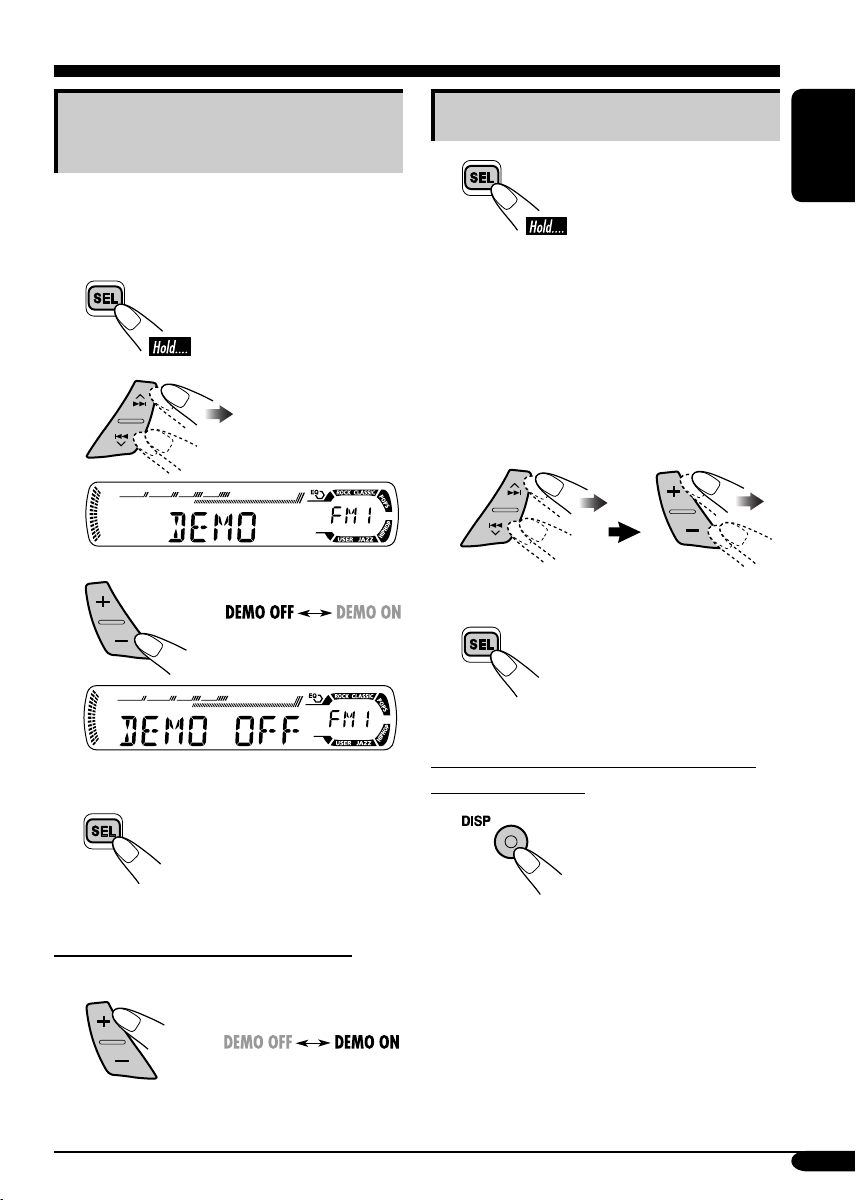
Canceling the display
demonstrations
If no operations are done for about 20 seconds,
display demonstration starts.
[Initial: DEMO ON]—see page 17.
1
2
3
4Finish the procedure.
To activate the display demonstration
In step 3above...
Setting the clock
1
2Set the hour, minute, and clock
system.
1Select “CLOCK H” (hour), then
adjust the hour.
2Select “CLOCK M” (minute),
then adjust the minute.
3Select “24H/12H,” then select
“24H” (hour) or “12H” (hour).
3Finish the procedure.
To check the current clock time when the
power is turned off
EN06-11_KD-S1501[EX_EU]f.indd 7EN06-11_KD-S1501[EX_EU]f.indd 7 10/27/04 3:22:50 PM10/27/04 3:22:50 PM

8
ENGLISH
Radio operations
Listening to the radio
~
Lights up when receiving an FM stereo
broadcast with sufficient signal strength.
Selected band appears.
ŸStart searching for a station.
When a station is received, searching
stops.
To stop searching, press the same
button again.
To tune in to a station manually
In step Ÿabove...
1
2Select the desired station frequencies.
When an FM stereo broadcast is hard to
receive
1
2
Lights up when monaural mode is activated.
Reception improves, but stereo effect will
be lost.
To restore the stereo effect, repeat the same
procedure. “MONO OFF” appears and the MO
indicator goes off.
EN06-11_KD-S1501[EX_EU]f.indd 8EN06-11_KD-S1501[EX_EU]f.indd 8 10/27/04 3:22:51 PM10/27/04 3:22:51 PM

9
ENGLISH
2
3
Preset number flashes for a while.
Listening to a preset station
1
2Select the preset station (1 – 6) you
want.
To check the current clock time while
listening to an FM (non-RDS) or AM station
• For FM RDS stations, see page 12.
Storing stations in memory
You can preset six stations for each band.
FM station automatic presetting—
SSM (Strong-station Sequential
Memory)
1Select the FM band (FM1 – FM3)
you want to store into.
2
3
“SSM” flashes, then disappears when
automatic presetting is over.
Local FM stations with the strongest signals are
searched and stored automatically in the FM
band.
Manual presetting
Ex.: Storing FM station of 92.5 MHz into the
preset number 4 of the FM1 band.
1
EN06-11_KD-S1501[EX_EU]f.indd 9EN06-11_KD-S1501[EX_EU]f.indd 9 10/27/04 3:22:51 PM10/27/04 3:22:51 PM

10
ENGLISH
FM RDS operations
Searching for your favorite FM RDS programme
You can tune in to a station broadcasting your
favorite programme by searching for a PTY code.
~
The last selected PTY code appears.
ŸSelect one of your favorite
programme type.
or
Select one of the twenty-nine PTY
codes.
Ex.: When “ROCK M” is selected
!Start searching for your favorite
programme.
If there is a station broadcasting a
programme of the same PTY code as
you have selected, that station is tuned
in.
PTY codes
NEWS, AFFAIRS, INFO, SPORT,
EDUCATE, DRAMA, CULTURE,
SCIENCE, VARIED, POP M (music),
ROCK M (music), EASY M (music),
LIGHT M (music), CLASSICS, OTHER
M (music), WEATHER, FINANCE,
CHILDREN, SOCIAL, RELIGION,
PHONE IN, TRAVEL, LEISURE, JAZZ,
COUNTRY, NATION M (music), OLDIES,
FOLK M (music), DOCUMENT
EN06-11_KD-S1501[EX_EU]f.indd 10EN06-11_KD-S1501[EX_EU]f.indd 10 10/29/04 11:49:32 AM10/29/04 11:49:32 AM
Este manual sirve para los siguientes modelos
2
Tabla de contenidos
Idiomas:
Otros manuales de Receptor de coche de JVC

JVC
JVC KD-AR7000 Manual de usuario

JVC
JVC KD-DB101EX Manual de usuario

JVC
JVC KD-R400J Manual de usuario

JVC
JVC KD-A305/KD-R300 Manual de usuario

JVC
JVC KD-R681 Manual de usuario

JVC
JVC KD-A725J Manual de usuario

JVC
JVC KD-AR870J Manual de usuario

JVC
JVC KD-R526 Guía

JVC
JVC KD-S30 Manual de usuario

JVC
JVC KW-R520 Manual de usuario