JVC KD-AR390 Manual de usuario

ENGLISHESPAÑOLFRANÇAIS
CD RECEIVER KD-AR390/KD-G340
RECEPTOR CON CD KD-AR390/KD-G340
RÉCEPTEUR CD KD-AR390/KD-G340
For canceling the display demonstration, see page 4.
Para cancelar la demostración en pantalla, consulte la página 4.
Pour annuler la démonstration des affichages, référez-vous à la page 4.
For installation and connections, refer to the separate manual.
Para la instalación y las cone iones, refiérase al manual separado.
Pour l’installation et les raccordements, se référer au manuel séparé.
INSTRUCTIONS
MANUAL DE INSTRUCCIONES
MANUEL D’INSTRUCTIONS
GET0487-001A
[J]
For customer Use:
Enter below the Model
No. and Serial No. which
are located on the top or
bottom of the cabinet. Retain
this information for future
reference.
Model No.
Serial No.
Cover_KD-AR390[J]f.indd 1Cover_KD-AR390[J]f.indd 1 9/24/07 4:37:41 PM9/24/07 4:37:41 PM

ENGLISH
2
Thank you for purchasing a JVC product.
Please read all instructions carefully before operation, to ensure your complete understanding and to obtain the best
possible performance from the unit.
INFORMATION (For U.S.A.)
This equipment has been tested and found to comply with the limits for a Class B digital de ice, pursuant to Part
15 of the FCC Rules. These limits are designed to pro ide reasonable protection against harmful interference in
a residential installation. This equipment generates, uses, and can radiate radio frequency energy and, if not
installed and used in accordance with the instructions, may cause harmful interference to radio communications.
Howe er, there is no guarantee that interference will not occur in a particular installation. If this equipment does
cause harmful interference to radio or tele ision reception, which can be determined by turning the equipment
off and on, the user is encouraged to try to correct the interference by one or more of the following measures:
– Reorient or relocate the recei ing antenna.
– Increase the separation between the equipment and recei er.
– Connect the equipment into an outlet on a circuit different from that to which the recei er is connected.
– Consult the dealer or an experienced radio/TV technician for help.
Caution:
Changes or modifications not appro ed by JVC could oid the user’s authority to operate the equipment.
IMPORTANT FOR LASER PRODUCTS
1. CLASS 1 LASER PRODUCT
2. CAUTION: Do not open the top co er. There are no user ser iceable parts inside the unit; lea e all ser icing to
qualified ser ice personnel.
3. CAUTION: (For U.S.A.) Visible and/or in isible class II laser radiation when open. Do not stare into beam.
(For Canada) Visible and/or in isible class 1M laser radiation when open. Do not iew directly with
optical instruments.
4. REPRODUCTION OF LABEL: CAUTION LABEL, PLACED OUTSIDE THE UNIT.
[European Union only]
Warning:
If you need to operate the unit while dri ing, be sure to
look around carefully or you may be in ol ed in a traffic
accident.
For saf ty...
• Do not raise the olume le el too much, as this will
block outside sounds, making dri ing dangerous.
• Stop the car before performing any complicated
operations.
T mp ratur insid th car...
If you ha e parked the car for a long time in hot or cold
weather, wait until the temperature in the car becomes
normal before operating the unit.
EN02-07_KD-AR390[J]f.indd 2EN02-07_KD-AR390[J]f.indd 2 9/24/07 4:37:12 PM9/24/07 4:37:12 PM

ENGLISH
3
How to r s t your unit
• Your preset adjustments will also be erased (except the
registered Bluetooth device, see page 10).
How to forcibly j ct a disc
• Be careful not to drop the disc when it ejects.
• f this does not work, reset your unit.
How to us th M MODE button
If you press M MODE, the unit goes into functions mode,
then the number buttons and 5/∞ buttons will work
as different function buttons.
Ex.: When number button 2 works as MO (monaural)
button.
To us th s buttons for th ir original functions,
press M MODE again.
• Waiting for about 5 seconds without pressing any of
these buttons will automatically cancels the functions
mode.
Caution on volum s tting:
Discs produce ery little noise compared with other
sources. Lower the olume before playing a disc to
a oid damaging the speakers by the sudden increase of
the output le el.
CONTENTS
INTRODUCTIONS
Preparation .................................................. 4
OPERATIONS
Basic operations ........................................... 5
• Using the control panel ............................... 5
• Using the remote controller (RM-RK50) ...... 6
Listening to the radio ................................... 8
Disc operations ............................................. 9
EXTERNAL DEVICES
Using the Bluetooth
® de ices ....................... 10
• Using the Bluetooth cellular phone ............ 12
• Using the Bluetooth audio player ............... 13
Listening to the HD Radio ™ Broadcast ......... 14
Listening to the CD changer ......................... 15
Listening to the satellite radio ..................... 16
Listening to the iPod .................................... 18
Listening to the other external
components .............................................. 19
SETTINGS
Selecting a preset sound mode .................... 20
General settings — PSM .............................. 22
Bluetooth settings ....................................... 24
Title assignment .......................................... 25
REFERENCES
More about this unit .................................... 25
Troubleshooting ........................................... 29
Maintenance ................................................ 33
Specifications ............................................... 34
The control panel illustrations used for
explanation in this manual is of KD-AR390.
EN02-07_KD-AR390[J]f.indd 3EN02-07_KD-AR390[J]f.indd 3 9/24/07 4:37:14 PM9/24/07 4:37:14 PM

ENGLISH
4INTRODUCTIONS
Preparation
Cancel the display demonstration and set the clock
• See also page 22.
1Turn on the power.
2Enter the PSM settings.
3Cancel the display demonstrations
Select “DEMO,” then “DEMO OFF.”
Set the clock
Select “CLOCK HOUR,” then ad ust the hour.
Select “CLOCK MIN” (minute), then ad ust the minute.
4Finish the procedure.
When the power is turned off: Check the current clock time
When the power is turned on: Change the display information of the current source
FM/AM Station name *1 = Frequency = Clock = (back to the beginning)
CD/CD CH Audio CD/CD Text: Disc title/performer *2 = Track title *2 = Current track number with the
elapsed playing time = Current track number with the clock time = (back to
the beginning)
MP3/WMA: Album name/performer (folder name) *3 = Track title (file name) *3 = Current
track number with the elapsed playing time = Current track number with the
clock time = (back to the beginning)
IPOD Folder name = Track name = Current track number with the elapsed playing time = Current
track number with the clock time = (back to the beginning)
HD RADIO Call Sign *4 = Frequency = Title/artist/album name of the current segment *5 = Clock = (back
to the beginning)
SIRIUS/
XM
Category name = Channel name = Artist name = Composer name *6 = Song/program name/
title = Clock = (back to the beginning)
*1 If no title is assigned to a station, “NO NAME” appears. To assign a title to a station, see page 25.
*2 If the current disc is an audio C , “NO NAME” appears.
*3 If an MP3/WMA file does not have Tag information or “TAG ISPLAY” is set to “TAG OFF” (see page 23), folder name
and file name appear.
*4 “
**** -FM” or “ **** ” appears when no Call Sign is received.
*5 “NO TEXT” appears when no text is received.
*6 Only for SIRIUS Satellite radio.
EN02-07_KD-AR390[J]f.indd 4EN02-07_KD-AR390[J]f.indd 4 10/18/07 8:54:04 AM10/18/07 8:54:04 AM

ENGLISH
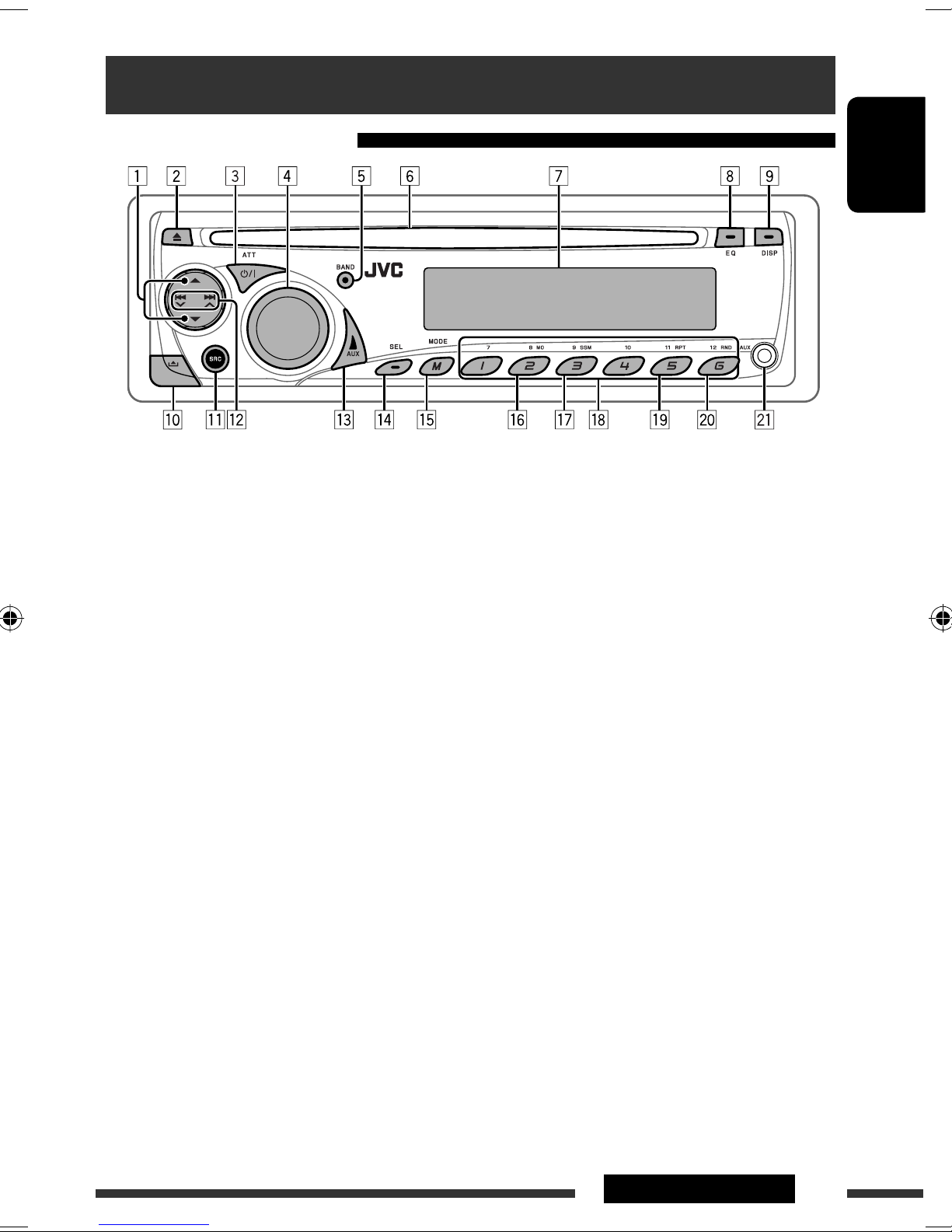
5OPERATIONS
Basic operations
Using the control panel
• BT-PHONE/BT-AUDIO: Select setting item/
Registered device.
e Select “AUX IN” directly if an external com onent is
connected to the AUX (auxiliary) in ut jack.
r • Adjust the sound mode.
• Enter the PSM settings [Hold].
t Enter functions mode.
y Activate monaural mode while in functions mode.
u Preset stations automatically into the number
buttons while in functions mode.
i • FM/AM/HD RADIO/SIRIUS/ M: Select reset
station/channel.
• CD/CD-CH: Select folder/track/disc (for CD
changer).
• BT-PHONE: Select reset hone number.
o Select re eat lay while in functions mode.
; Select random lay while in functions mode.
a AUX (auxiliary) in ut jack
*1 When the HD Radio tuner box is connected, the
built-in tuner of this unit will be disable. To listen
to the HD Radio broadcast, refer to “Listening to the
radio” on page . For more features, see page 14.
*2 You cannot select these sources if they are not ready
or not connected.
1 • FM/AM: Select reset station.
• HD RADIO: Select channel.
• SIRIUS/ M: Select category.
• CD/CD-CH: Select folder.
• IPOD: Enter the main menu/Pause layback/
Confirm selection.
• BT-PHONE/BT-AUDIO: Enter/cancel Bluetooth
menu.
2 Eject disc.
3 • Turn on the ower.
• Turn off the ower [Hold].
• Attenuate the sound (if the ower is on).
4 Volume control [Turn].
5 Select the bands.
6 Loading slot
7 Dis lay window
8 Select the sound mode.
9 Change the dis lay information.
p Detach the anel.
q Select the source.
FM/AM *1 = SIRIUS *2/ M *2 = CD *2 =
CD-CH *2/IPOD *2 (or E T IN) = BT-PHONE *2
= BT-AUDIO *2 = AU IN = (back to the
beginning)
w • FM/AM/HD RADIO/SIRIUS/ M: Search for
station/channel.
• CD/CD-CH: Select track.
• IPOD: Select track.
EN02-07_KD-AR390[J]f.indd 5EN02-07_KD-AR390[J]f.indd 5 10/8/07 6:54:35 PM10/8/07 6:54:35 PM

ENGLISH
6
B for using th r mot controll r:
• Aim the remote controller directly at the remote
sensor on the unit.
• DO NOT expose the remote sensor to bright light
(direct sunlight or artificial lighting).
KD-AR390 is equipped with the steering wheel
remote control function.
• See the Installation/Connection Manual (separate
olume) for connection.
Installing th lithium coin batt ry (CR2025)
For USA-California Only:
This product contains a CR Coin Cell Lithium Battery
which contains Perchlorate Material—special
handling may apply.
See www.dtsc.ca.go /hazardouswaste/perchlorate
Display window
1 Status of Bluetooth de ice
(De ice number, [1 – 5]; signal strength, [0 – 3]*;
battery reminder, [0 – 3]*)
* As the number increases, the signal/battery power
becomes stronger.
2 Tr (track) indicator
3 Source display / Track number / Folder number /
Time countdown indicator
4 Bluetooth indicator
5 Playback source indicators—CH (CD changer), DISC
6 Sound mode (iEQ: intelligent equalizer) indicators
—CLASSIC, HIP HOP, JAZZ, ROCK, POPS, USER
7 Playback mode / item indicators— RND (random),
(disc), (folder), RPT (repeat)
8 Tuner reception indicators—ST (stereo),
MO (monaural)
9 HOLD indicator
p HD (HD Radio) indicator
q LOUD (loudness) indicator
w EQ (equalizer) indicator
e Disc information indicators—
TAG (Tag information), (folder), (track/file)
r Main display
Using th r mot controll r (RM-RK50)
Remote sensor
EN02-07_KD-AR390[J]f.indd 6EN02-07_KD-AR390[J]f.indd 6 9/24/07 4:37:16 PM9/24/07 4:37:16 PM

ENGLISH
7OPERATIONS
1 • Turns the power on if pressed briefly or
attenuates the sound when the power is on.
• Turns the power off if pressed and held.
2 • Changes the FM/AM bands with 5 U.
• Changes the preset stations with D ∞.
• Changes the folder of the MP3/WMA.
• While playing an MP3 disc on an
MP3-compatible CD changer:
– Changes the disc if pressed briefly.
– Changes the folder if pressed and held.
• While listening to the satellite (SIRIUS or XM)
radio:
– Changes the categories.
• While listening to an Apple iPod:
– Pauses or resumes playback with D ∞.
– Enters the main menu with 5 U.
(Now 5 U/D ∞/2 R/F 3 work as the menu
selecting buttons.)*
3 Adjusts the olume le el.
4 Selects the sound mode (iEQ: intelligent equalizer).
5 Selects the source.
6 For Bluetooth cellular phone:
– Answers calls if pressed briefly.
– Rejects calls if pressed and held.
7 • Searches for stations if pressed briefly.
• Fast-forwards or re erses the track if pressed and
held.
• Changes the tracks if pressed briefly.
• While listening to the satellite radio:
– Changes the channels if pressed briefly.
– Changes the channels rapidly if pressed and
held.
• While listening to an iPod (in menu selecting
mode):
– Selects an item if pressed briefly. (Then, press
D ∞ to confirm the selection.)
– Skips 10 items at a time if pressed and held.
• Re erse skip/forward skip for Bluetooth audio.
* 5 U : Returns to the previous menu.
D ∞ : Confirms the selection.
Warning (to pr v nt accid nts and damag ):
• Do not install any battery other than CR2025 or its
equi alent.
• Do not lea e the remote controller in a place (such
as dashboards) exposed to direct sunlight for a long
time.
• Store the battery in a place where children cannot
reach.
• Do not recharge, short, disassemble, heat the battery,
or dispose of it in a fire.
• Do not lea e the battery with other metallic
materials.
• Do not poke the battery with tweezers or similar
tools.
• Wrap the battery with tape and insulate when
throwing away or sa ing it.
EN02-07_KD-AR390[J]f.indd 7EN02-07_KD-AR390[J]f.indd 7 9/24/07 4:37:16 PM9/24/07 4:37:16 PM

ENGLISH
8
Manual presetting
Ex.: Storing FM station of 92.50MHz into preset number
4 of the FM1 ban .
1
2
3
To listen to a preset station
or
Listening to the radio
1Select “FM/AM.”
2Select the bands.
3Search for a station to listen—Auto Search.
Manual Search: Hol either one of the buttons until “M” flashes on the isplay, then press
it repeate ly.
• When receiving an FM stereo broa cast with sufficient signal strength, “ST” lights up
on the isplay.
When an FM stereo broadcast is
hard to receive
Reception improves, but stereo effect will be lost.
• “MO” lights up on the isplay.
To restore the stereo effect, repeat the same
proce ure. “MONO OFF” appears an the MO in icator
goes off.
FM station auto atic presetting
— SSM (Strong-station Sequential
Me ory)
You can preset up to six stations for each ban .
1 While listening to a station...
2
Local FM stations with the strongest signals are
searche an store automatically in the selecte FM
ban .
• If an HD Ra io tuner box is connecte , you can also
search an store the AM station automatically.
Preset number flashes for a while.
EN08-13_KD-AR390[J]f.indd 8EN08-13_KD-AR390[J]f.indd 8 9/24/07 4:37:23 PM9/24/07 4:37:23 PM

ENGLISH
9OPERATIONS
To stop play and eject the disc
• Press SRC to listen to another
playback source.
Prohibiting disc ejection
To cancel the prohibition, repeat the same
proce ure.
Disc operations
Pressing (or hol ing) the following buttons allows you
to...
[Press] Select track
[Hol ] Reverse/fast-forwar
track
MP3: Select fol er
(Number buttons) *1
Locate particular fol er *2
(for MP3/WMA isc) or track
irectly
*1 Press to select number 1 to 6; hold to select number 7
to 12.
*2 It is required that folders be assigned with 2-digit
numbers at the beginning of their folder names—01
02 03 and so on.
All tracks will be playe repeate ly until you change the
source or eject the isc.
After pressing M MODE, press the following buttons to...
Skip 10 tracks
MP3/WMA: Within the same fol er
TRACK RPT:
Repeat current track
FOLDER RPT:
MP3: Repeat current fol er
FOLDER RND:
MP3: Ran omly play all tracks of
current fol er, then tracks of next
fol ers
ALL RND:
Ran omly play all tracks
• To cancel repeat play or ran om play, select
“RPT OFF” or “RND OFF.”
EN08-13_KD-AR390[J]f.indd 9EN08-13_KD-AR390[J]f.indd 9 9/24/07 4:37:25 PM9/24/07 4:37:25 PM

ENGLISH
10
Registering using “OPEN”
Preparation: Operate the device to turn on its Bluetooth
function.
1 Select “BT-PHONE” or “BT-AUDIO.”
2 Select “NEW DEVI E.”
3 Select “OPEN.”
4 Enter a PIN (Personal Identification Number)
code to the unit.
• You can enter any number you like (1-di it to
16-di it number). [Initial: 0000]
* Some devices have their own PIN code. Enter the
specified PIN code to the unit.
1 Move to the next (or previous) number
position.
2 Select a number or blank space.
3 Repeat steps 1 and 2 until you finish
enterin a PIN code.
4 Confirm the entry.
“OPEN..” flashes on the display.
For Bluetooth operations, it is required to connect
the Bluetooth Adapter (KS-BTA200) (separately
purchased) to the CD chan er jack on the rear of this
unit.
• Refer also to the instructions supplied with the
Bluetooth adapter and the Bluetooth device.
• Refer to the list (included in the box) to check
the countries where you may use the Bluetooth ®
function.
To use a Bluetooth device throu h the unit
(“BT-PHONE” and “BT-AUDIO”) for the first time,
you need to establish Bluetooth wireless connection
between the unit and the device.
• Once the connection is established, it is re istered in
the unit even if you reset your unit. Up to five devices
can be re istered in total.
• Only one device can be connected at a time for each
source (“BT-PHONE” and “BT-AUDIO”).
Registering a Bluetooth device
Registration (Pairing) methods
Use either of the followin items in the Bluetooth menu
to re ister and establish the connection with a device.
• Select “BT-PHONE” or “BT-AUDIO” as the source to
operate the Bluetooth menu.
OPEN Make the unit ready to establish a new
Bluetooth connection.
Connection is established by operatin the
Bluetooth device.
SEAR H Make the unit ready to establish a new
Bluetooth connection.
Connection is established by operatin
the unit.
Using the Bluetooth ® devices
EN08-13_KD-AR390[J]f.indd 10EN08-13_KD-AR390[J]f.indd 10 10/10/07 11:44:25 AM10/10/07 11:44:25 AM
Otros manuales para KD-AR390
5
Este manual sirve para los siguientes modelos
1
Tabla de contenidos
Otros manuales de Receptor de coche de JVC

JVC
JVC KS-F315 Manual de usuario

JVC
JVC KD-AR470 - Radio / CD Manual de usuario

JVC
JVC KS-FX384 Guía

JVC
JVC KD-G722 Manual de usuario

JVC
JVC KD-LHX505 Manual de usuario

JVC
JVC KD-SX947R Manual de usuario

JVC
JVC KS-F383R Manual de usuario

JVC
JVC KD-AVX40 - DVD Player With LCD monitor Manual de usuario

JVC
JVC KS-FX850R Manual de usuario

JVC
JVC KD-G240 - MP3 FRONT AUX Manual