Jinyoung SX1900 Manual de usuario

TFT LCD Monitor : SX1900 1/8
Issued Date :
Oct 26, 2003
To: Jinyoung Contech Co., Ltd.
#501, 222-12 MARIOTOWER, GURO3-DONG, GURO-KU, SEOUL, KOREA
TEL : 82-2-890-6400 FAX : 82-2-890-6406
HOME PAGE : http://www.jyct.com/ Page :
8pages
19
”
TFT LCD MONITOR with Sharpening Style USER
’
S MANUAL
SX1900
- With Touch Screen (Optional)
1. Introduction
With an LCD Panel Monitor using a TFT Color LCD, you can use SX1900 a substitution of general PC
Monitor because it can receive the R.G.B input of PC VGA Signal. SX1900 has OSD Function in order to
display the best quality of the screen according to VGA Cards’ features. Besides, Touch Screen is available
by customer’s request, it can be usable simultaneously with PS/2 Mouse.
Safety Precautions
The safety recommendations outlined in this section are to be read, understood and followed before
operating the product. Keep this information in a safe place for future reference. Failure to comply with any of
the following safety procedures could result in serious hazard.
A. Do not operate product for any purposes other than its intended use.
B. This product is intended for indoor use only.
C.Do not operate product if power cord is damaged in any way.
D.Do not insert object into openings.
E. Do not immerse product in water or permit liquids to spill inside.
F. Turn off power when attended or not in use unplug product before moving it or when it is not
in use for an extended period of time.
Note : These specifications are subject to change for up-date without notification

TFT LCD Monitor : SX1900 2/8
2. Specification
2.1 LCD Monitor Specifications
-Screen Size : 19.0” TFT Color LCD
-Active Area (H x V) : 376.32 ×301.056 mm
-Supporting Resolutions : Full display by zooming out on VGA/SVGA/XGA/SXGA
-Driver Element : a-SI TFT active matrix
-Pixel Arrangement : RGB vertical stripe
-Display Mode : Normally Black
-Surface treatment : Haze 44%, Hard – Coating (3H)
-Resolution : 1280 x 1024 dots
-Aspect Ratio : 5:4
-Max .Colors : 16,7M(true 8-bit) color
-Pixel Pitch (H x V) : 0.294 x 0.294 mm
-Luminance(cd/m2) : Typ. 250
-Contrast Ratio : Typ. 1,000 : 1
-Backlight Lifetime : Typ.35,000Hrs
-ViewingAngle : Horizontal ; Typ. 89°/89°, Vertical ; Typ. 89°/89°
-Response Time(ms) : Typ. 15(R)/10(F)
-Screen Adjustment : OSD (On Screen Display) include Auto Adjustment compliant
-Mount Type : Panel Mount & Wall Mount & Stand Type & VESA Standard ARM Mount
-Supporting Analog R.G.B signal (Analog VGA) input
-Chassis Material : Front -Aluminum, Rear – Steel
-RGB Input : 0.7Vpp±10%, 75 Ohms
-Input Rating : AC 100-240V @ 1.4-0.7A, 50/60Hz or DC 12V @ 4.3A
-Ampere requirement :AC 100V @ 1.4A, AC 200V @ 0.7A, DC 12V @ 4.3A
-Power requirement : 51.6W
-Power Consumption : Max. 51.6W
-Power Saving Mode : Less than 3W
-Storage Temperature : -20 ~ 60°C
-Operating Temperature : 0 ~ 50℃
-Dimensions(W x H x D) : Power Type ; 438 x 363 x 69.5 mm,
-Weight : Net ; 7.4 kg, Gross ; 9.9kg
-Refresh Rate : Max. 1280 x 1024 @ 75Hz (60Hz for optimal display)
-Main Frequency : Max. 157.5MHz
-Frequency : Hor. 31.5~80 KHz, Ver. 56~75Hz
-Compatibility of Vertical Frequency

TFT LCD Monitor : SX1900 3/8
PC MODE Vertical Frequency (Hz)
640 x 480 60 / 72 / 75
800 x 600 56 / 60 / 72 / 75
1024 x 768 60 / 70 / 75
1280 x 1024 60 / 75
DOS 640 x 350 70
DOS 640 x 400 70
IBM
DOS 720 x 400 70
2.2 Touch Screen Specifications
-Touch Screen Type : Analog Resistive 4-Wire Type
-Touch Screen Controller Interface : Serial (RS-232)
-Touch Screen Drivers : MS-DOS, Windows 3.1/95/98/ME/NT/2000/XP/2003
-Drift compensation for fluctuations in the temperature and humidity
-Antiglare scratch resistant finish
-Gloved or Ungloved finger or Stylus activation
-Chemically strengthened glass backing panel
-Optically bonded buffer layer
-Transmittance : Typ. >80%
-Durability : Point Activation Typ. 1,000,000
Gouge Hardness 3H

TFT LCD Monitor : SX1900 4/8
3. OSD Functions
3.1 OSD function
Selected Menu Button :
SelectedSELButton: SelectedSubitem:
3.1.1 Brightness & Contrast
Brightness Item
Adjust Panel Brightness Level.
Contrast Item
Adjust Panel Contrast Level.
3.1.2 Color Control
Color Adjust Item
Adjust Color Level automatically. If the image adjusted is
good, select "ok" or not, select "cancel" and adjust it again.
Super RGB Item
Setting up s-RGB mode.
Automatic adjustment for Color Level.
User can adjust warmness as
users please.
Color Temperature Item
4200K
Adjust the warmness of the image displayed.
The higher temperature the coolest image looks like.

TFT LCD Monitor : SX1900 5/8
5000K
6500K
7500K
9300K
The lower temperature the warmest image looks like.
3.1.3 Image Control
Image Auto Adjust Item
Auto adjustment H,V Position of image and Clock &
Phase. If the result adjusted is good, select "ok" or not,
select "cancel" and adjust it again
H-Total Adjust Item
Adjust increase/decrease image of horizontal size
Phase Adjust Item
Adjust data sampling position of image.
H-Position Adjust Item
Move the image horizontally.
V-Position Adjust Item
Move the image horizontally.
3.1.4 OSD utility
OSD Display Time Adjust Item
Adjust OSD display time.
OSD H-Position Adjust Item
Move the OSD menu horizontally.
OSD Adjust Item
OSD V-Position Adjust Item
Move the OSD menu vertically.
User Value Initial Item
Reset user’s value
Image Sharpness
Adjust Item
Adjust sharpness of the image.
DOS Mode Select Item
Adjust Dos screen resolution to 640 x 400 or 720 x 400
Menu Exit Item OSD Exit

TFT LCD Monitor : SX1900 6/8
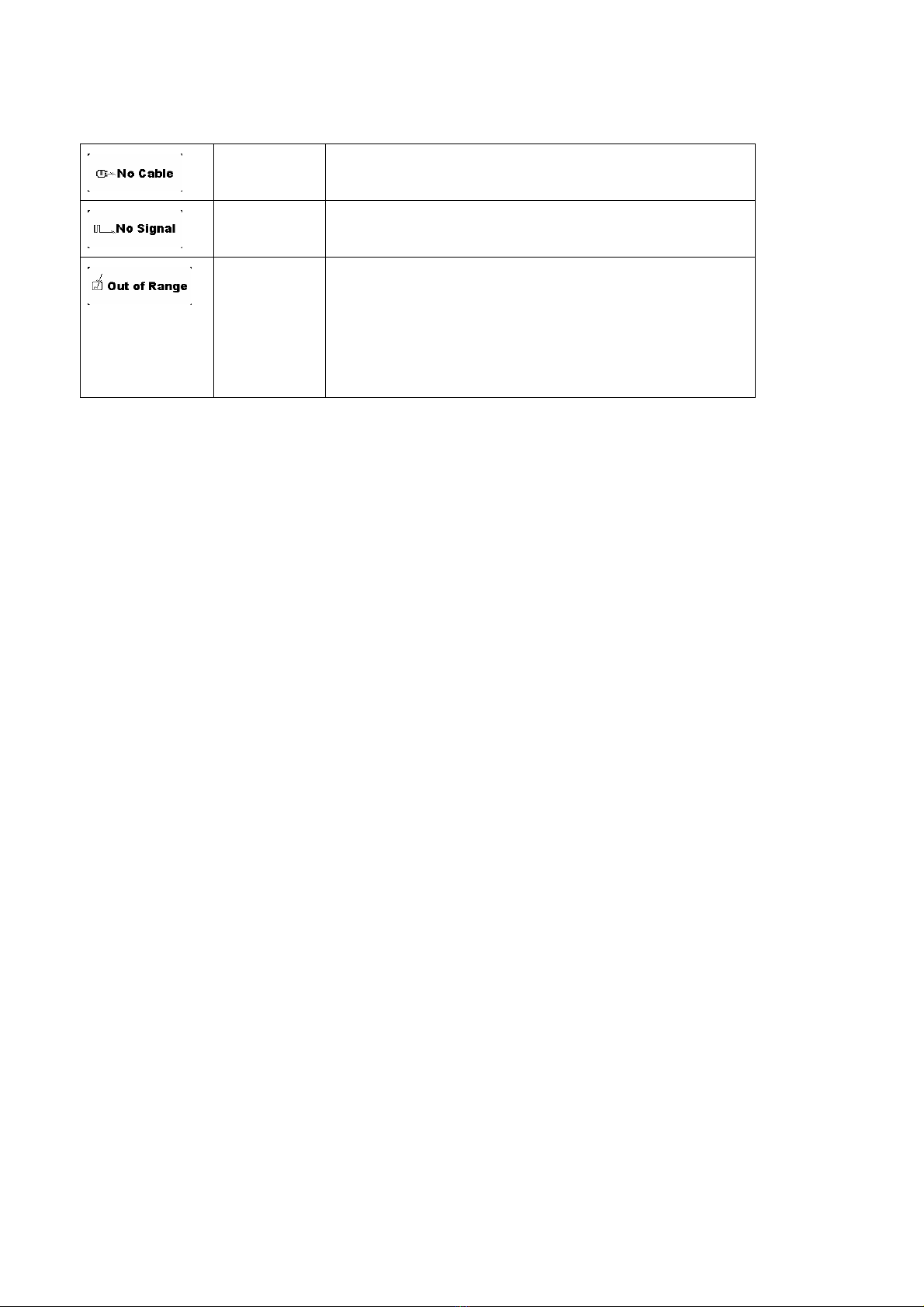
3.1.5 Warning Message
No Cable In case of not connected PC VGA Cable with A/D Controller, the
message “No Cable ” is displayed.
No signal If there is no PC VGA Signal(R,G,B H-SYNC, V-SYNC), the
message “No Signal ” is displayed.
Out of Range Result of using LCD do not identify with resolution of VGA Card in
PC
In order to remove the phenomenon, The VGA mode in PC should
be adjusted into the mode (resolution) that can be supported by
LCD.

TFT LCD Monitor : SX1900 7/8
4. Connectors
※Touch is optional.
5. Dimensions
Monitor Dimensions
VESA Standard ARM Mount.

TFT LCD Monitor : SX1900 8/8
Appendix
1. Packing List
yLCD Monitor
yLCD Monitor Manual
yAC Power Cord
yVGA Cable
ySupporters, 8PCS
yTouch Cable (Optional)
yTouch Screen Install CD (Optional)
yTouch Screen User’s Manual (Optional)
Tabla de contenidos