
jbc SFR Manual de usuario

SFR
Solder Feeder for Robot
INSTRUCTION MANUAL

Packing List
The following items are included:
Allen Key 1,5 mm ......... 1 unit
Ref. 0741610
Reel Support ................. 1 unit
Ref. 0024561
Solder Feeder ............. 1 unit Communications
Cable 3 m........................ 1 unit
Ref. 0024563
Allen Key 2,5 mm ......... 1 unit
R ef. 0 012574
Screws
DIN 912 M4x65.......... 2 units
Ref. 0024552
Screws
DIN 912 M4x20........ 2 units
Ref. 0921890
Allen Key 3 mm ......... 1 unit
Ref. 0013609
Screws
DIN 7991 M4x10........ 1 unit
Ref. 0490180
This manual corresponds to the following reference:
SFR-B
2

Spanner 10 mm............. 1 unit
Ref. 0 017631
Features and Connections
Communications and Power
Connector LED Indicator:
· Blue: device powered
· Green: device working
· Red blinking: error, no solder wire
or device is blocked
Assembling
Holes
The SFR Solder Feeder for Robot works together with one of the different GSFR Guide Kits, available for various
solder wire diameters, with or without solder wire perforation. GSFR Guide Kits are sold separately.
Drag Mechanism
Lid with
Push Tabs
Manual ............................ 1 unit
Ref. 0024557
Insulator ......................... 1 unit
Ref. 0024588
www.jbctools.com
3

1 3
5
2 4
Transmitted data - Grey cable
Optional:
Pedal activation by
relay or digital output
Ground - Blue cable
Brown cable
Black cable
Received data - White cable
DB9
Connector
5
4
9
8
7
6
3
2
1
Connection
- The SFR unit can be connected to a PLC by a five-pin Communications Cable (Ref. 0020261).
- Connect the cables to the corresponding pins to match your PLC connection. To comunicate with
a computer use a DB9 female connector.
- Download the Communication Protocol at www.jbctools.com
Communications Cable
Ref. 0020261
For detailed information about pin distribution see following table:
Front view
SFR Communications Connector
Pin Distribution
Pin Color Description
1 Brown Power supply input:
24Vdc (±5%). 1.5 A current required
2 White Serial input: RS232 RX
3 Blue Common reference:
GND for RS232 and witch
4 Black Switch input: 0V or 24V to start feeding.
Leave it open to stop
5 Grey Serial output: RS232 TX
V+ 24 Vdc
V- 1.5 A
4

SFR-B
GSFR
SFR-B
GSFR
SFR-B
GSFR
Assembly: GSFR* Wheels to SFR
1. Insert the Intermediate Nozzle until its collar
rests against the housing and tighten the
screw.
2. Assemble the Guide Wheel and tighten
the screw. Attention: Always use the correct
wheel set for each wire thickness.
3. Assemble the Blade first, then mount the
Blade Clamp onto the same axis and tighten
the screw. Caution: handle the blade carefully
to avoid injury.
4. Insert the Inlet Nozzle into the hole and
tighten the screw.
1
GSFR* with Solder Wire Perforation GSFR* without Solder Wire Perforation
4
1
22
33
4
Blade
Blade Clamp
Inlet
Nozzle
Guide
wheel
Traction
Wheel
Support
Wheel
Inter.
Nozzle
Inter.
Nozzle
*Not included, sold separately.
For this operation, disconnect the device, and take off the cover by pressing the tabs. Use the allen
key and the spanner, provided with the SFR, to assemble the components shown below.
1. Insert the Intermediate Nozzle until its collar
rests against the housing and tighten the
screw
2. Assemble the Support Wheel and tighten
the screw. Attention: Always use the correct
wheel set for each wire thickness.
3. Assemble the Traction Wheel onto the axis
and tighten the screw.
4. Insert the Inlet Nozzle into the hole and
tighten the screw.
Inlet
Nozzle
www.jbctools.com
5

SFR-B
GSFR
SFR-B
GSFR
SFR-B
GSFR
4
2
1
3
5
*Not included, sold separately
Solder Feeder
Ref. SFR-B
GSFR Guide Tube*
Automatic
Soldering Iron*
Ref. TRA-B
Reel Support
Ref. 0024561
Screws
Ref. 0024552
GSFR Bushing*
GSFR
Outlet Nozzle*
The guide position
can be adjusted in
angle, height and
length
Screw
Ref. 0490180
Assembly: GSFR Tube to SFR* and TRA*
1. Assemble the SFR to the TRA with the screws.
2. Assemble the GSFR Guide Tube to the TRA and tighten the screw.
3. Assemble the Outlet Nozzle onto the Dispensing Tube.
4. Assemble the GSFR Bushing into the SFR hole and tighten the screw.
5. Finally attach the Reel Support to the SFR with its screw.
6

SFR-B
GSFR
SFR-B
GSFR
SFR-B
GSFR
Assembly: Reel support positions
The Reel Support can be installed both vertically and horizontally to match your preferences.
Unscrew the bolt using a 3mm allen key and set the Reel Support as desired.
Tighteen the bolt to fix the Reel Support in its position.
Loosen the bolt
completely before
repositioning the
support.
Reel Support
vertically assembled
Reel Support
horizontally assembled
www.jbctools.com
7

SFR-B
GSFR
Assembly: SFR independent from TRA*
Screws
Ref. 0014954
Solder Feeder
Ref. SFR-B
Insulator
Ref. 0 021713
Screws
Ref. 0921890
If mounting SFR independently from TRA, the Electrical Insulator is required.
Assemble the Insulator to your device with the screws (ref. 092890), and then the SFR to the Isolator
with its screws (ref. 0014954).
The Electrical Insulator must be assembled to ensure a that the SFR work properly.
*Not included, sold separately
Do not use the SFR without insulator if it is mounted without the TRA.
8
SFR-B
GSFR
SFR-B
GSFR
Solder Wire Wheels
Inlet
Nozzle
Guide
Tube
Intermediate
Nozzle
Intermediate
Nozzle
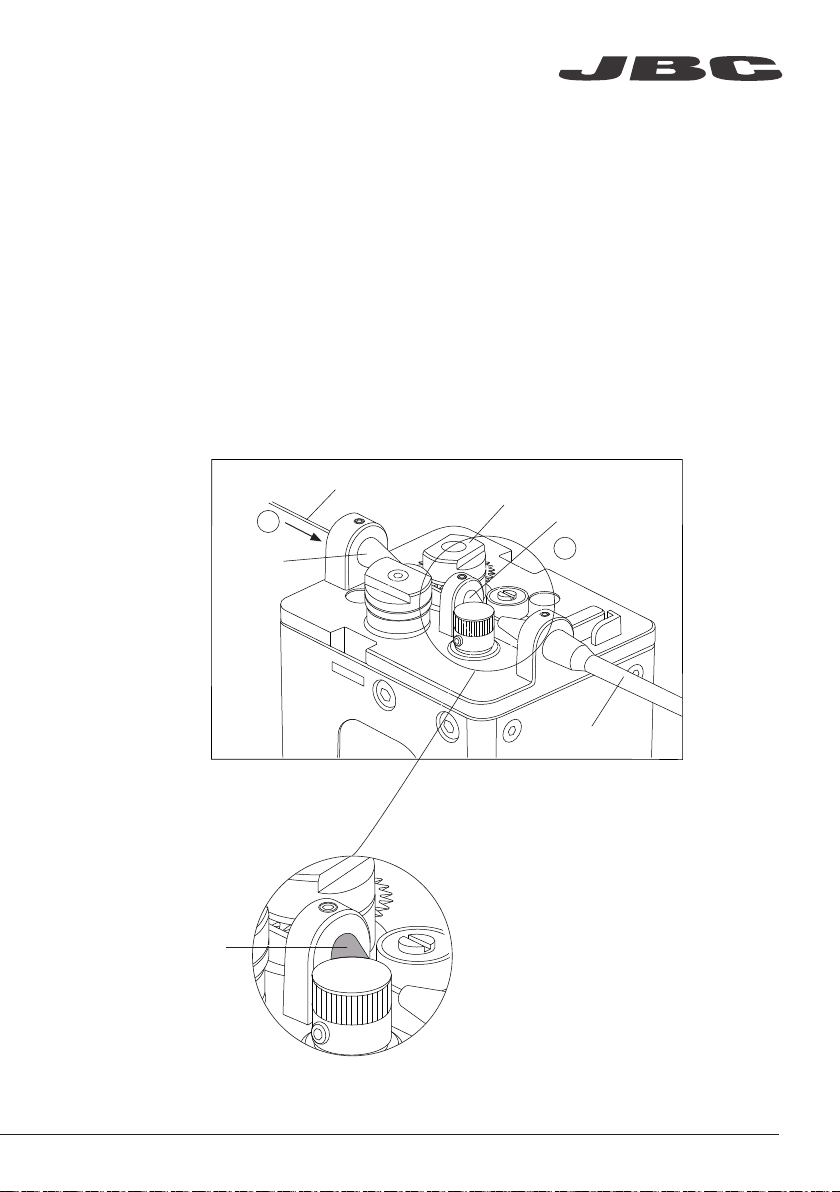
Solder Wire Loading
The GSFR must be assembled previously.
1. Feed the Solder Wire into the Inlet Nozzle until it reaches the wheels.
2. Make sure the wire passes through the Intermediate Nozzle and enters into the Guide Tube.
Important: Set the wire thickness parameter before starting to dispense wire. To set W-THI Code
see the Communication Protocol for SFR unit at www.jbctools.com/jbcsoftware.html.
Wire feeding is controlled by an external controller (Robot/PLC/Computer). See the Communication
Protocol for SFR unit at www.jbctools.com/jbcsoftware.html
1
2
www.jbctools.com
9

Dimensions (Vertical Reel Suport)
Solder Wire Reel dimensions: max. lenght 80mm (3.2 in), max. diameter 80mm (3.2 in), max. weight 1 kg (2.2 lb).
mm
(in)
10
Este manual sirve para los siguientes modelos
1
Tabla de contenidos
Manuales populares de Alimentador de alambre de otras marcas


Lincoln Electric
Lincoln Electric LN-25X Manual de usuario

Matrix
Matrix OmniFlow 330 Hoja de especificaciones

EWM
EWM drive 4X IC D EX Manual de usuario

Lincoln Electric
Lincoln Electric 12442 Manual de usuario

Aim
Aim AIVE Guía de instalación

Lincoln Electric
Lincoln Electric Power Feed 10 Robotic K1780-2 Manual de usuario

Miller
Miller XR-AlumaFeed Suitcase Manual de usuario

Lincoln Electric
Lincoln Electric Activ8X Manual de usuario

Abicor Binzel
Abicor Binzel iROB Feed HA Manual de usuario

EWM
EWM drive 4X IC D EX Manual de usuario

Lincoln Electric
Lincoln Electric LF-72 Manual de usuario

Hakko Electronics
Hakko Electronics 373 Manual de usuario