
jbc WSB Manual de usuario

INSTRUCTION MANUAL
WSB
High-Temperature
Wire Stripper Station

Index
Packing List ....................................................................................................................................... 3
Features and Connections .............................................................................................................. 4
Changing Cartridges ........................................................................................................................ 5
Stripping a Wire ................................................................................................................................ 6
Adjustable Strip Gauge ................................................................................................................... 6
Control Process ................................................................................................................................ 7
Operation ........................................................................................................................................... 8
Material Mode ................................................................................................................................... 9
Cartridge Range ............................................................................................................................. 10
Sealing Plug Replacement ............................................................................................................ 11
Accessories ................................................................................................................................ 12-13
Maintenance .................................................................................................................................... 14
Safety ................................................................................................................................................ 15
Specifications .................................................................................................................................. 16
Page
2

WS440 Sealing Plug .... 2 units
Ref. OB3000 (includes 10x)
Manual ............................... 1 unit
Ref. 0027209
Control Unit ...................... 1 unit Stand .................................. 1 unit
Ref. WSBT-SA
High-Temperature Wire
Stripper Tweezers ........ 1 unit
Ref. WS440-A
Power Cord ...................... 1 unit
Ref. 0024092 (100V)
0023715 (120V)
0023714 (230V)
Stand cable ...................... 1 unit
Ref. 0024227
Cartridge Holder ............. 1 unit
Ref. SCH-A
Packing List
The following items are included:
This manual corresponds to the following references:
WSB-9A (100V )
WSB-1A (120V )
WSB-2A (230V)
Metal Brush....................... 1 unit
Ref. 0022793
Cartidges Extractor
Pliers .................................. 1 unit
Ref. PLR195
Screw Driver .................... 1 unit
R ef . 0 0 23 511
www.jbctools.com
3

Features and Connections
Power Socket
Control Unit
Stand
Ref. WSBT-A
Stand cable
Ref. 0024227
Equipotential connector
USB Connector
Main Switch
Fuse
High-Temperature Wire
Strippers Tweezers
Ref. WS440-A
W440 Cartridges
(not included)
4
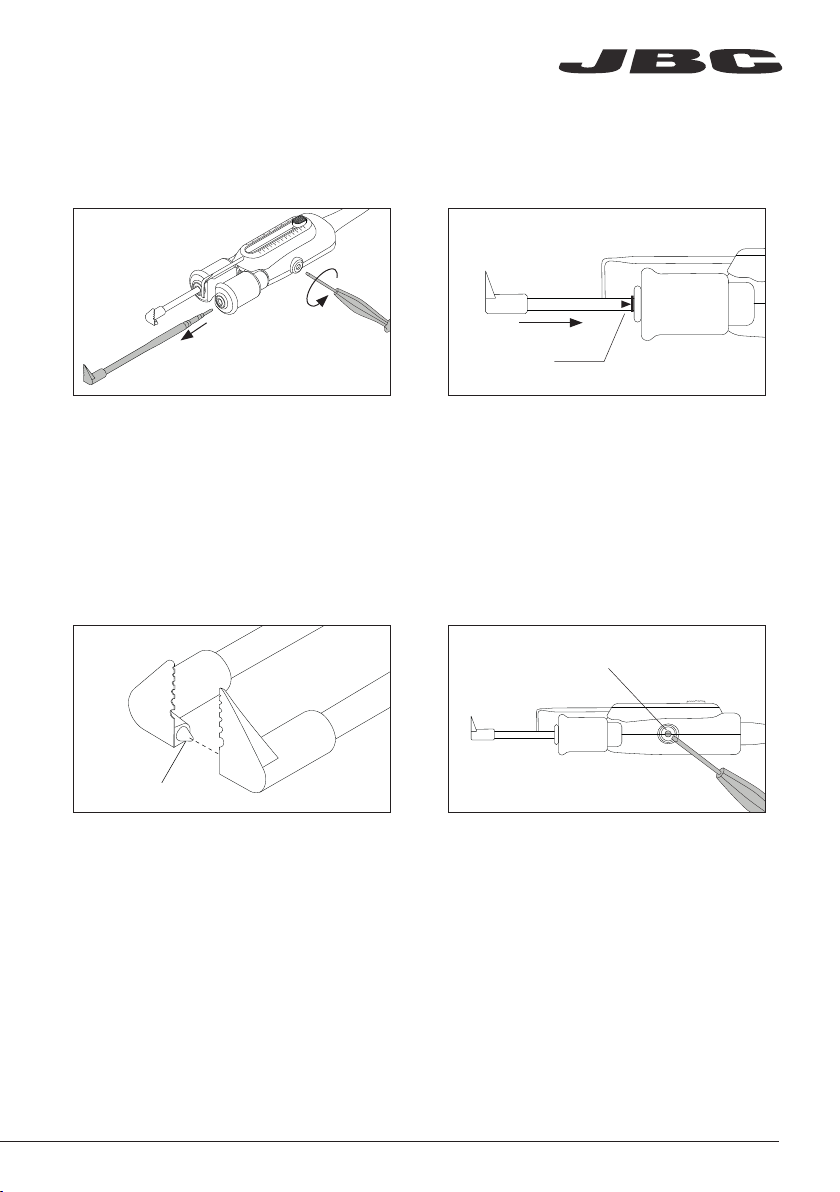
Mark
Align the cartridges in working position using
a flat pliers (JBC Ref. PLR-195).
The conical cartridge aligner helps centering
both cartridges and ensure a good
functionality.
Fix the cartridges in its working position. by
tightening the screw.
Important: It is essential to tighten the screws
for the tool to function.
Cartridge Electric
Connection Screw
3. Positioning 4. Fixing
Insert the cartridge until the reference mark.
Take the mark as reference and check that both
tips match.
Important: It is esential to insert the cartridge
till the mark for a good connection.
Loosen the screws and remove the cartridges.
Changing Cartridges
1. Removing 2. Inserting
Cartridge aligner
www.jbctools.com
5

Strip Gauge Knob Strip Gauge
Adjustable Strip Gauge
Adjust the strip gauge according to your stripping requirements.
Place the wire touching the strip gauge.
3. Remove Wire
Pull the wire stripper toward to stripp off
the wire end.
2. Close Cartridges
Choose cartridges according to the wire
diameter. Pinch the wire with the blades. The
pinched area will be melted by heat.
Stripping a Wire
1. Align Wire
6

Power 75%
Power 75%
Kapton
®
PI
90%
Power 59%
Power 59%
Custom 68%
Power 75%
Power 75%
Kapton
®
PI
90%
1. Material Mode
Control Process
Choose between the different materials
by pressing the buttons and to
choose between all different material
options.
To work on a customized mode, press
and then the buttons and to
select the power level.
2. Custom Mode
WSS offers two different working modes. Switch the power on choose between Material Mode
and Custom Mode by pressing the button.
Selected Material
Work Screen
Next Material
Power Level
Previous Material
Instant Power
Work Mode
Strip Gauge Knob Strip Gauge
Adjustable Strip Gauge
Adjust the strip gauge according to your stripping requirements.
Place the wire touching the strip gauge.
3. Remove Wire
Pull the wire stripper toward to stripp off
the wire end.
2. Close Cartridges
Choose cartridges according to the wire
diameter. Pinch the wire with the blades. The
pinched area will be melted by heat.
Stripping a Wire
1. Align Wire
www.jbctools.com
7

Power 75%
Power 75%
Kapton
®
PI
90%
Power 35%
Power 35%
Kapton
®
Sleep
90%
PI
Power 0%
Power 0%
Kapton
Hibernation
90%
PI
®
WSST
WSST/
WSSB
WSBT
WSST
WSST/
WSSB
WSBT
WSST
WSST/
WSSB
WSBT
Station troubleshooting available on the product page at www.jbctools.com
Troubleshooting
1. Work 2. Sleep 3. Hibernation
When the wire stripper is lifted
from the stand, the cartridges
will heat up according to the
selected configuration.
When the wire stripper is in the
stand, the power falls after a
specified time.
After longer periods of
inactivity, the power is cut off
and the cartridges cool down
to room temperature.
Operation
Depending on where the tool is located, the soldering station switches between three different
statuses: Work, Sleep and Hibernation.
8

Material Mode
WSS incorporates predeterminated power levels and it also features a customized work mode. It
allows you to work on wire insulations made of thermoplastics and thermostable materials such
as Teflon1, Kapton2, silicone, rubber, etc.
Options included:
Insulation Material Symbol Power Level
Polyvinyl Chloride PVC 6%
Polyethylene PE 7%
Nylon ¹ PA 10%
Kynar ² PVDF 16%
Tefzel ¹ ETFE 17%
Teflon ¹
FEP 16%
PFA 21%
PTFE 40%
Ethylene Propylene
Rubber EPM/EPR 44%
Silicone Rubber SI 51%
Kapton ¹ PI 90%
ThermoplasticsThermostable
¹ Registred Trade Marks of DuPont
² Registred Trade Marks of Arkema
www.jbctools.com
9
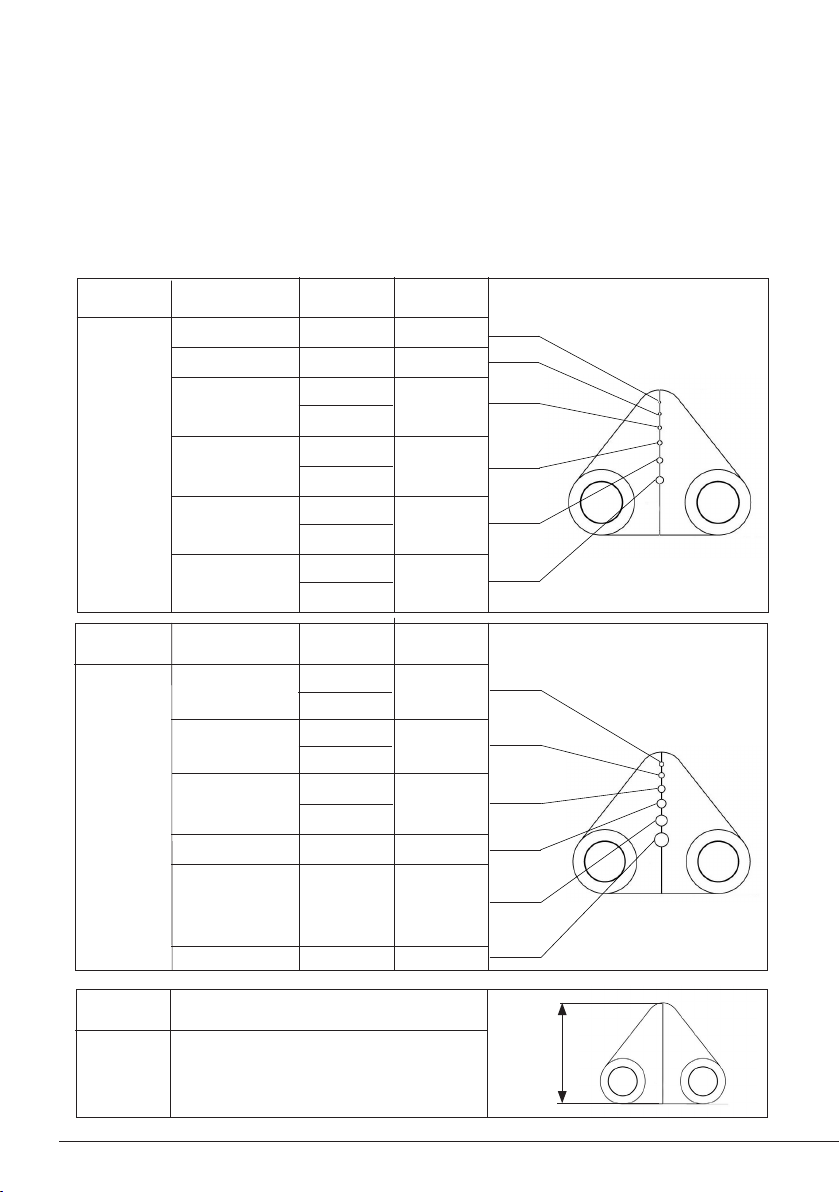
W440025
Cartridge
Ref.
Flat Blade
12,5 / 0.4921
Tip
mm / in
Cartridge
Ref.
W440023
Cartridge Range
WS440-A is compatible with W440 Blade Cartridge Range. Find the model that best suits your
soldering needs on www.jbctools.com.
22
24
26
28
AWG
Solid
34
30
Cartridge
Ref.
W440021
0,64 / 0,0252
0,51 / 0,0201
0,40 / 0,0157
0,32 / 0,0126
Tip Hole ø
mm / in
0,16 / 0,0063
0,25 / 0,0098
24 (7x32)
24 (19x36)
26 (10x36)
26 (19x38)
28 (19x40
27 (7x35)
30 (19x42)
30 (7x38)
AWG
Stranded
36 (7x44)
32 (19x44)
AWG
Solid
18
20
26
24
22
16
1,02 / 0,0402
Tip Hole ø
mm / in
0,81 / 0,0319
0,40 / 0,0157
0,51 / 0,0201
0,64 / 0,0252
1,29 / 0,0508
AWG
Stranded
20 (7x28)
20 (19x32)
20 (42x36)
22 (19x34)
27 (7x35)
28 (19x40)
26 (10x36)
26 (19x38)
24 (7x32)
24 (19x36)
18 (19x30)
10
Este manual sirve para los siguientes modelos
2
Tabla de contenidos
Otros manuales de Equipo de laboratorio de jbc

Manuales populares de Equipo de laboratorio de otras marcas


Agilent Technologies
Agilent Technologies 5800 ICP-OES Manual de usuario

Endress+Hauser
Endress+Hauser Cleanfit CPA875 Manual de usuario

NI
NI PXI-5422 Manual

Collomix
Collomix Aqix Manual de usuario

SPEX SamplePrep
SPEX SamplePrep 6875 Freezer/Mill Series Manual de usuario

Ocean Insight
Ocean Insight FLAME-NIR+ Manual de usuario


